


Insights on Surveys
Survey Insights provide an automated way to analyze and manage your survey data across your organization. By connecting your surveys, a central repository is created where QuestionPro AI generates summaries, descriptive insights, and relevant tags based on the context of your questions and responses.
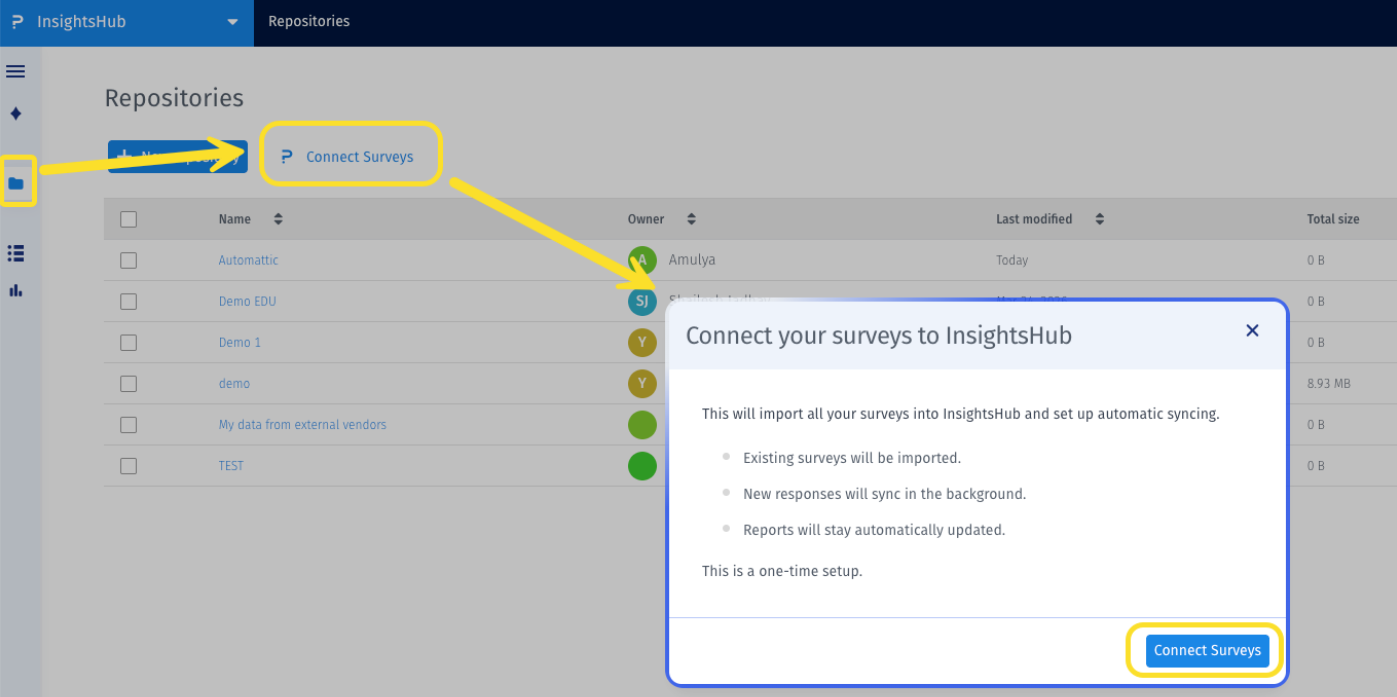
Click to download the videoTo begin using Survey Insights, you must perform a one-time sync task to import your data into the repository.
- Navigate to the Repositories page and select the Connect Surveys button, located next to the New Repository button.
- Once the sync is initiated, a repository named QuestionPro Surveys is created.
- Inside this repository, you will find your synced folders and the individual surveys contained within them.
When you open a survey report within the repository, the interface is divided into two primary sections:
- Left Side: Preview your survey questions and view corresponding data charts.
- Right Side: Access the Summary, Insights, and Tags tabs.
You can interact with your repository directly through the QuestionPro AI chat. If you ask a question and a matching survey exists in your repository, the AI will provide key insights.
These responses include trace details and references, showing you exactly which question from the survey was used to answer your query for better visibility and fact-checking.Access to survey insights is determined by your account role:
- Primary Account Users: Can view all surveys across the entire organization and utilize all AI features for those surveys.
- Non-Primary Users: Can only view and analyze surveys they have created personally.
The system automatically keeps your data up to date. A resync is triggered whenever:
- New responses are received.
- Questions are added or deleted.
- Survey details are modified.
Daily synchronization times for all Data Centers. All times are in PST.
| Data Center (DC) | Sync Time (PST) |
| United States (US) | 12:00 AM |
| Europe (EU) | 02:00 AM |
| United Arab Emirates (AE) | 04:00 AM |
| Australia (AU) | 06:00 AM |
| Canada (CA) | 08:00 AM |
| Kingdom of Saudi Arabia (KSA) | 10:00 AM |
Currently, the following limitations apply:
- Only surveys under a Research License are supported.
- Only questions supporting quantitative analysis are fetched.
- Combined analytics across multiple different surveys or responses are not yet supported.
