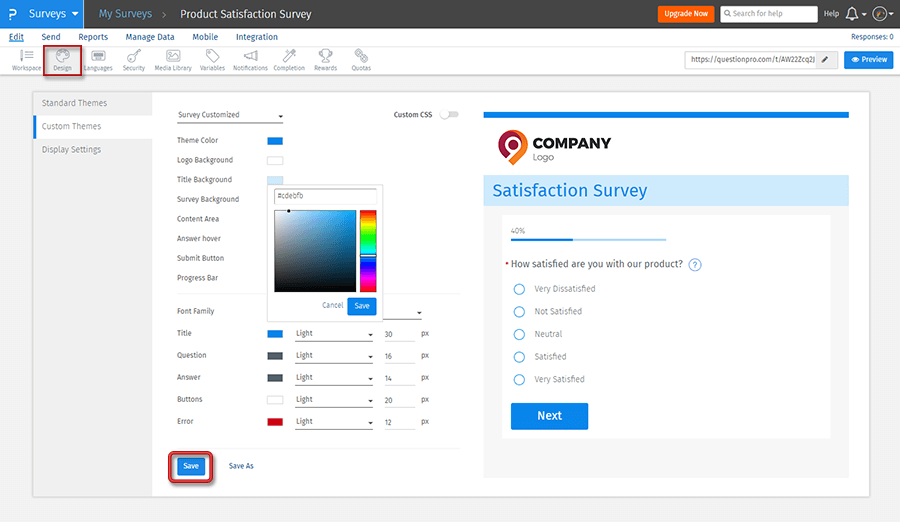
Using a survey design theme provides the ability for a brand to tailor-make the study to echo their brand colors. A custom theme settings also permits the use of adding custom logos, rel stylesheets, custom fonts, background image, etc.
Surveys that allow for a brand recall entice respondents to take the survey. It also helps with higher survey completion rates because they then know that their opinions matter and will be acted upon by the brand. The survey theming allows making use of custom layouts that make the survey reflect the brand values.
For example, when an airline wants to collect responses from fliers about their flying experience, it is better to create and use a customized theme and design on the survey rather than a dull-looking survey.
Use of custom survey design themes
The most significant use of survey theming or survey themes is the ability for a brand to create a research study look as close to the brand colors as possible. Using themes provide the ability to create striking custom layouts and leave a positive effect on the mind of the survey taker. You can create customized templates with standard themes and a custom design without the help of web designers.
In case you cannot achieve the desired look of the survey with the ready-made features, you can also use your custom styling sheet. A customized CSS lets researchers have the freedom to design the survey as they want.
Examples of survey design themes
Consider an apparel chain running surveys for customers. Rather than using off-the-shelf reviews, custom themes propel the survey to look and feel better. Good-looking and recognizable surveys help with higher response rates when the brand solicits feedback from customers. It could be either at the point of experience or even after the transaction concludes.
With some customization of the survey design, the entire survey can be made to reflect the voice of a brand. This can include changing layout, background color, logo, progress bar color, font type and size, button colors, etc.

Advantages of using design themes in a survey
There are many benefits of using themed survey designs for researchers and brands alike. The most significant advantage of using custom survey themes and survey design themes are:
Higher brand recall: Using custom themes with a theme builder in a survey allows for the brand colors to be echoed in the study. These themes ensure that the respondents that see or receive the survey recognize the colors and style that they are familiar with and associate with the brand.
Good-looking surveys: Survey theming propels the look and feel of a survey from dull, boring surveys to an attractive custom design. Using custom fonts, backgrounds, layouts, colors for questions and answers, etc. makes the survey look a lot better.
Reduced drop-out rate: When the survey taker recognizes custom colors and associates with the brand, there is a higher chance of starting and completing the survey.
Higher trust: Creating a custom theme increase the trust of respondents on the survey. There are less chances that a respondent might doubt the credibility of the survey. Branded survey with a company logo will get quality responses in high numbers.
How to set up survey themes and survey design themes?
View our detailed help file on survey theme and survey design theme compelling and impactful studies for your brand.

 Survey Software
Easy to use and accessible for everyone. Design, send and analyze online surveys.
Survey Software
Easy to use and accessible for everyone. Design, send and analyze online surveys.
 Research Suite
A suite of enterprise-grade research tools for market research professionals.
Research Suite
A suite of enterprise-grade research tools for market research professionals.
 Customer Experience
Experiences change the world. Deliver the best with our CX management software.
Customer Experience
Experiences change the world. Deliver the best with our CX management software.
 Employee Experience
Create the best employee experience and act on real-time data from end to end.
Employee Experience
Create the best employee experience and act on real-time data from end to end.