

- Add widgets
- Survey Comparison
- Heatmap
- Confidentiality Settings
- eNPS in Workforce Analytics Portal
- Notes Widget
- Text Analysis Widget
- Response rate
- Text Report
- Trend analysis widget
- Show/hide Markers and Building blocks
- Question Filter
- Single Question Widget
- Heatmap default
- Sentiment analysis
- Scorecard
- Driver analysis
- Scorecard: All options view
- Heatmap Column Types
- Multiple Tabs in a Dashboard
- Tab Exports
- AI Summary and Recommendations
- 360 feedback introductory text
- 360 feedback display configurations
- 360 feedback display labels
- Multi Level Priority Logic
- 360 Surveys- Priority Model
- 360 feedback - skip logic
- 360 feedback - show hide question logic
- 360 Survey Settings
- 360 feedback configuration
- Customize the validation text
- 360 Survey design
- 360-Reorder section
- 360 Section Type - Single Select Section
- 360 Delete Sections
- 360 Add Sections
- 360 section type - Free responses text section
- 360 Section Type - Presentations text section
- 360 Section-Edit Configurations
- 360 Survey- Languages
- Matrix section

Relationship Weightage in 360 Review Reports
In 360-degree feedback assessments, different rater groups offer varying perspectives based on their professional proximity to the subject. The Relationship Weightage feature allows administrators to assign custom percentage weights to specific evaluator relationships (e.g., Self, Manager, Peers, Direct Reports, External). This ensures that the final calculated scores accurately mirror organizational hierarchies and strategic priorities rather than relying on simple arithmetic averages.
Watch this quick walkthrough to understand how it works:
Click to download video
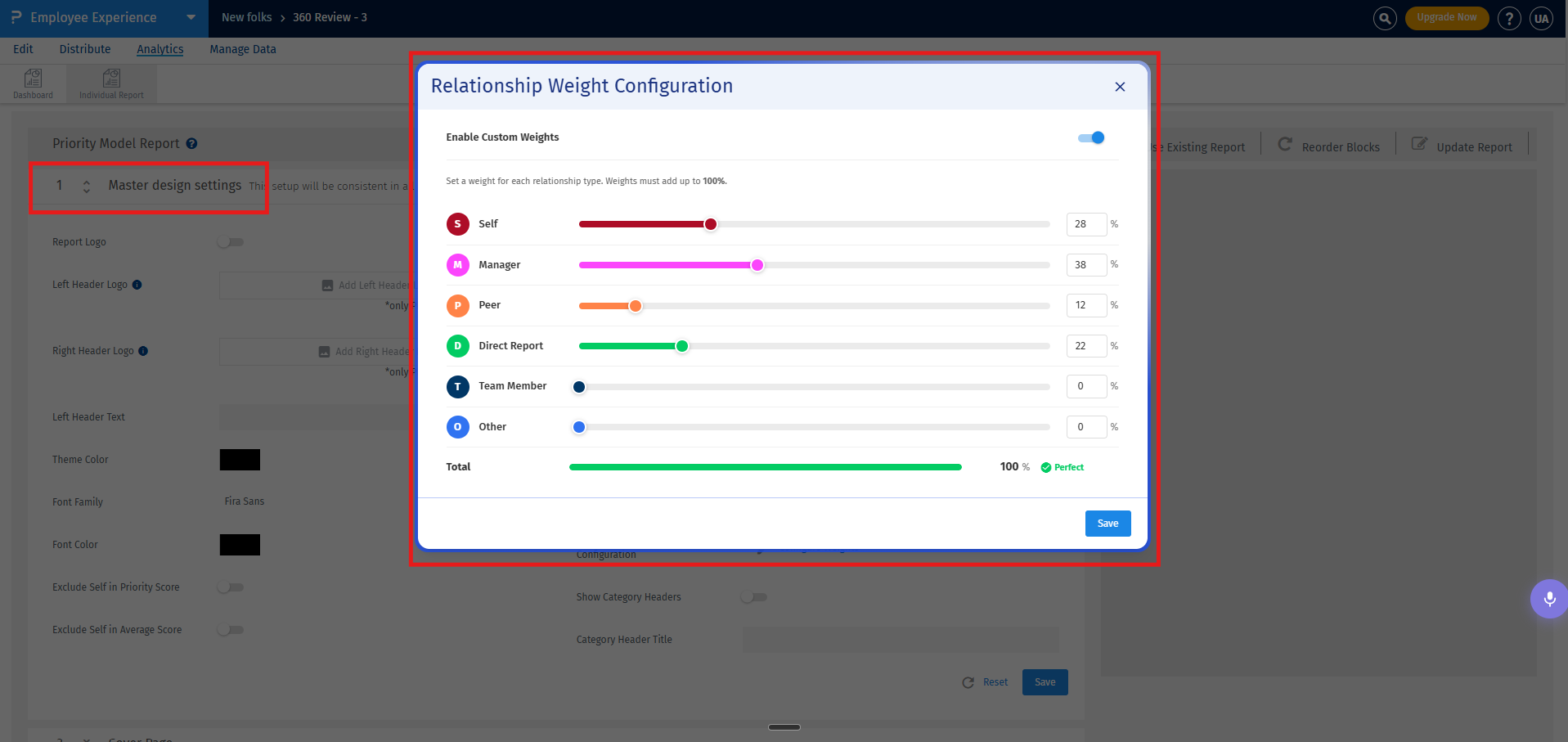
Global weights apply uniformly across all reporting blocks where a mean score calculation occurs. To configure relationship weights globally, follow these steps:
- Navigate to the master design block of your 360 report template.
- Locate the Relationship Weight Configuration option.
- Toggle the switch to apply weights globally to all blocks.
- Adjust the sliders or enter the percentage fields for each active evaluator relationship group:
- Self
- Manager
- Direct Reports
- Peers
- External or more.
- Click Save to commit your global weight configurations.
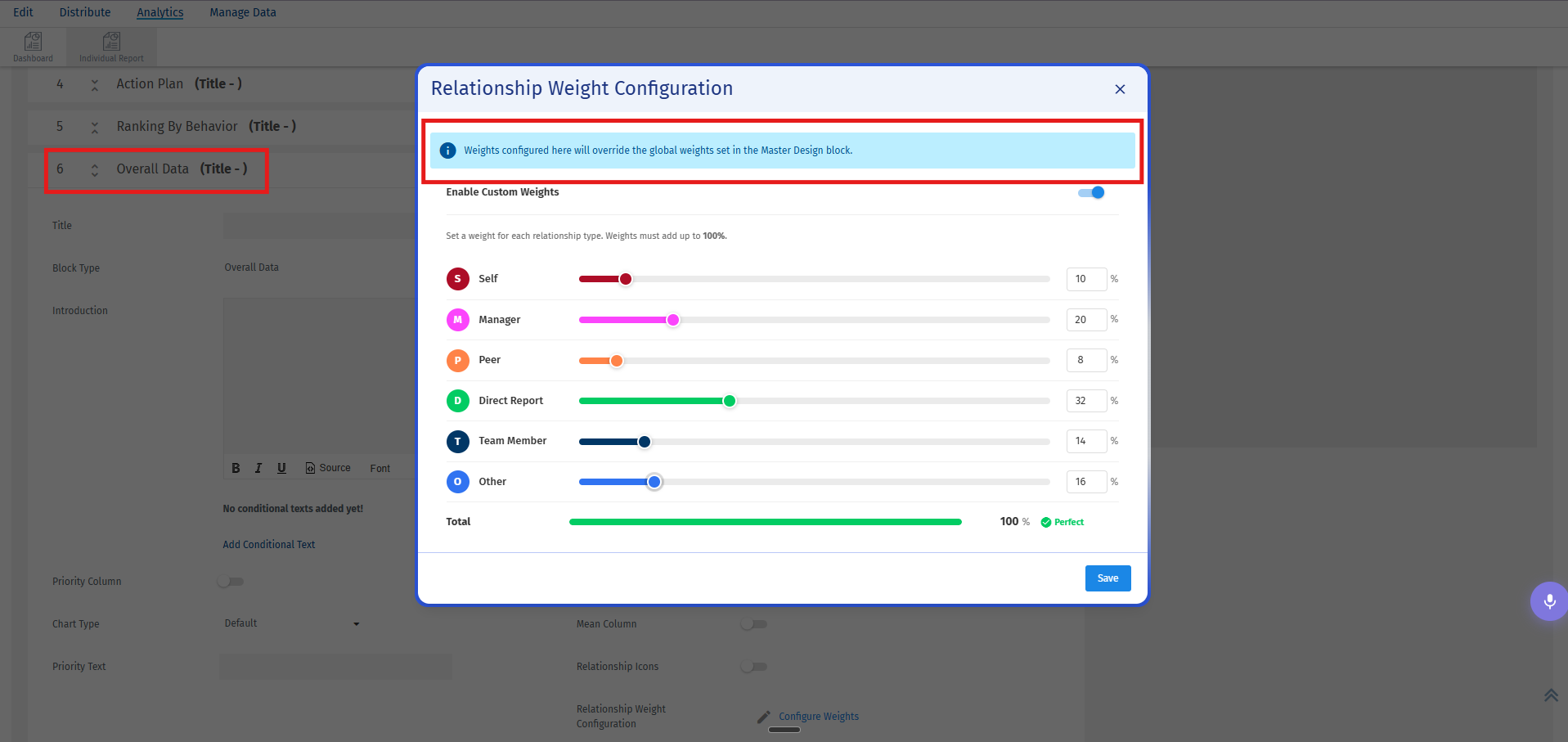
Organizations sometimes require specific sections of a performance profile to be evaluated differently from the overall report framework. You can override global weights on individual reporting blocks by managing their localized weight behaviors:
- Open the Report Builder workspace and navigate to the specific data block you wish to modify (for example, the Overall Data block).
- Locate the weight configuration settings situated in the parameters of the target block.
- Switch the toggle to active. This isolates the block configuration from the global template hierarchy.
- Manually input the custom percentage weights or using the sliders required for this specific reporting section. Just like global parameters, the custom localized total must equal exactly 100%.
- Save the individual block properties. The customized calculations apply exclusively to this block, leaving the global scoring configurations intact for the rest of the report layout.
The calculation engine incorporates automated structural fallbacks to handle variable evaluator behavior seamlessly:
- Disabled Relationships: If a relationship classification is deactivated entirely via the **Display Config** panel, its assigned weight is dynamically redistributed proportionally among the remaining active rater groups.
- Zero Responses: If a subject receives no evaluations from a specific rater group (e.g., an individual has no direct reports assigned), that group is excluded automatically from the calculation denominator to prevent mathematical dilution or score skewing.
