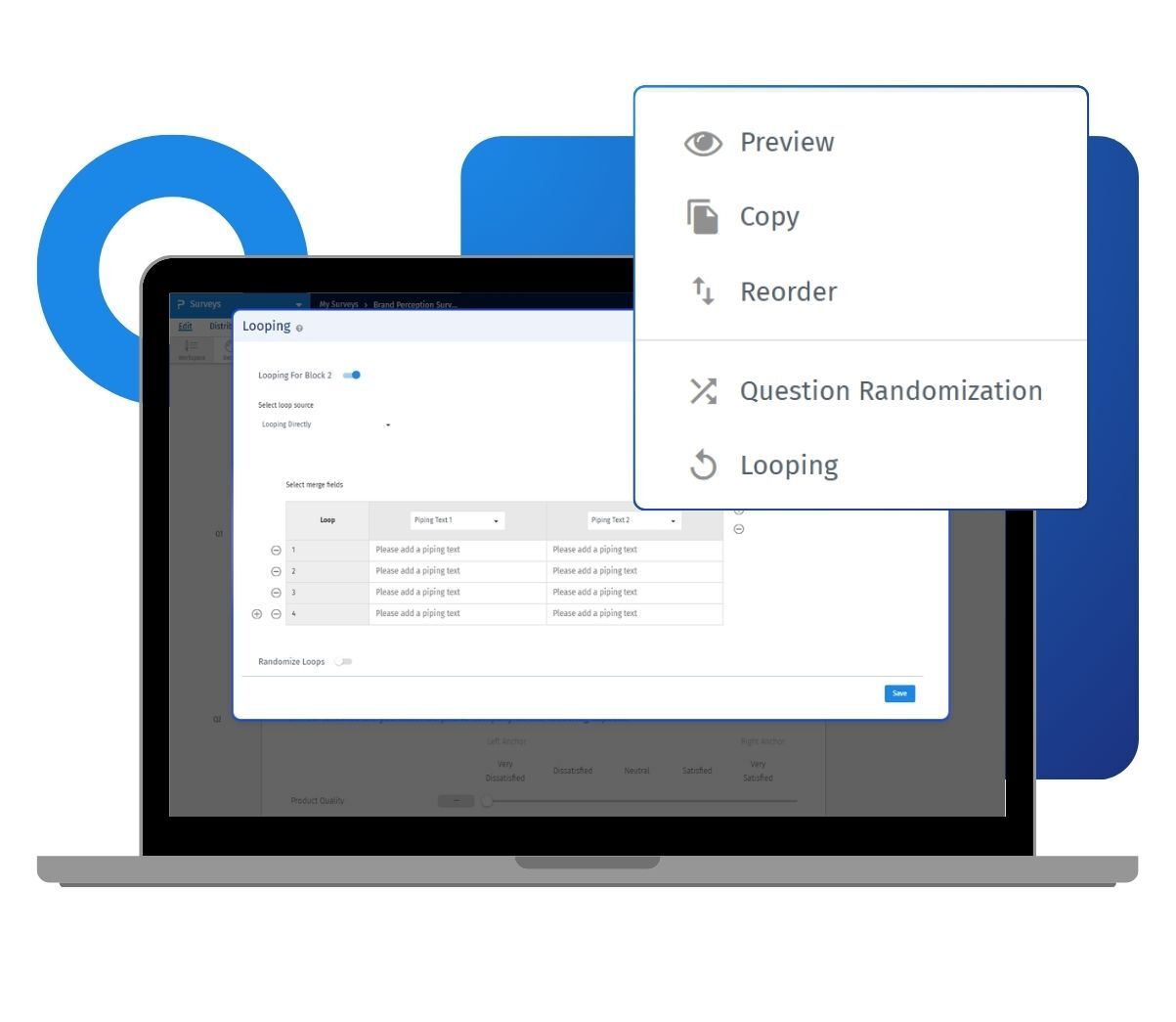
You can set block looping to run a fixed number of times, or tie it to an earlier question. When it is tied to a question, the block loops once for each choice that respondent picked or saw. Every loop can pull in piping text, so the questions inside the block automatically reference the correct product or brand.
Example of block looping in your surveys
Consider a consumer packaged goods company in the US that wants feedback on four new snack flavors. Instead of building four separate question blocks, the research team builds one block covering taste, packaging, and purchase intent. They set block looping to repeat that block once for each flavor a respondent tried. Piping text swaps in the flavor name on every loop, so respondents always know which product they are rating. The team ends up with clean, comparable data across all four flavors without writing a single duplicate question.
The uses of block looping
The uses of block looping are:
Concept and product testing: Repeat the same evaluation block for each product, flavor, or concept shown to a respondent. This gives you comparable ratings across the whole list.
Monadic style comparisons: Loop a block based on a prior multiple-choice question. Each respondent only sees the block for items they actually used or saw.
Brand and ad tracking: Ask the same set of brand health questions once per brand in your list. You never duplicate the block for every competitor you track.
Longitudinal or repeated check-ins: Set block looping to run a fixed number of times. This collects the same feedback across multiple sessions or touchpoints in a single survey.
Multilingual piping: Add translated piping text for each iteration. Respondents in different markets see the loop content in their own language.
Faster survey builds: Build a question block once and let block looping repeat it. You skip the manual copying of blocks and editing of labels for every item.
The advantages of block looping
The uses of block looping are:
Cleaner survey structure: One block handles what would otherwise take several duplicate blocks. Your survey stays easier to review and edit.
Consistent question wording: Every loop uses the same underlying questions. This keeps your data comparable across products, brands, or sessions.
Flexible loop sources: Choose a fixed loop count, or tie the loop to a question's selected, unselected, displayed, or all choices. The logic matches your research design.
Built-in piping: Piping text updates automatically on every pass. Respondents always see the right product or brand name without extra logic.
Works with your existing logic: Block looping runs alongside skip logic, branching, and scoring, a QuestionPro logic engine built for advanced survey design. You do not have to redesign your survey logic to add a loop.
Testable before launch: Preview the survey with the anonymous link. Confirm each loop and its piping text before you send it to real respondents.
How to use block looping in QuestionPro
To use block looping in your research studies, read our help file on how to set up block looping.

 Survey Software
Easy to use and accessible for everyone. Design, send and analyze online surveys.
Survey Software
Easy to use and accessible for everyone. Design, send and analyze online surveys.
 Research Suite
A suite of enterprise-grade research tools for market research professionals.
Research Suite
A suite of enterprise-grade research tools for market research professionals.
 Customer Experience
Experiences change the world. Deliver the best with our CX management software.
Customer Experience
Experiences change the world. Deliver the best with our CX management software.
 Employee Experience
Create the best employee experience and act on real-time data from end to end.
Employee Experience
Create the best employee experience and act on real-time data from end to end.