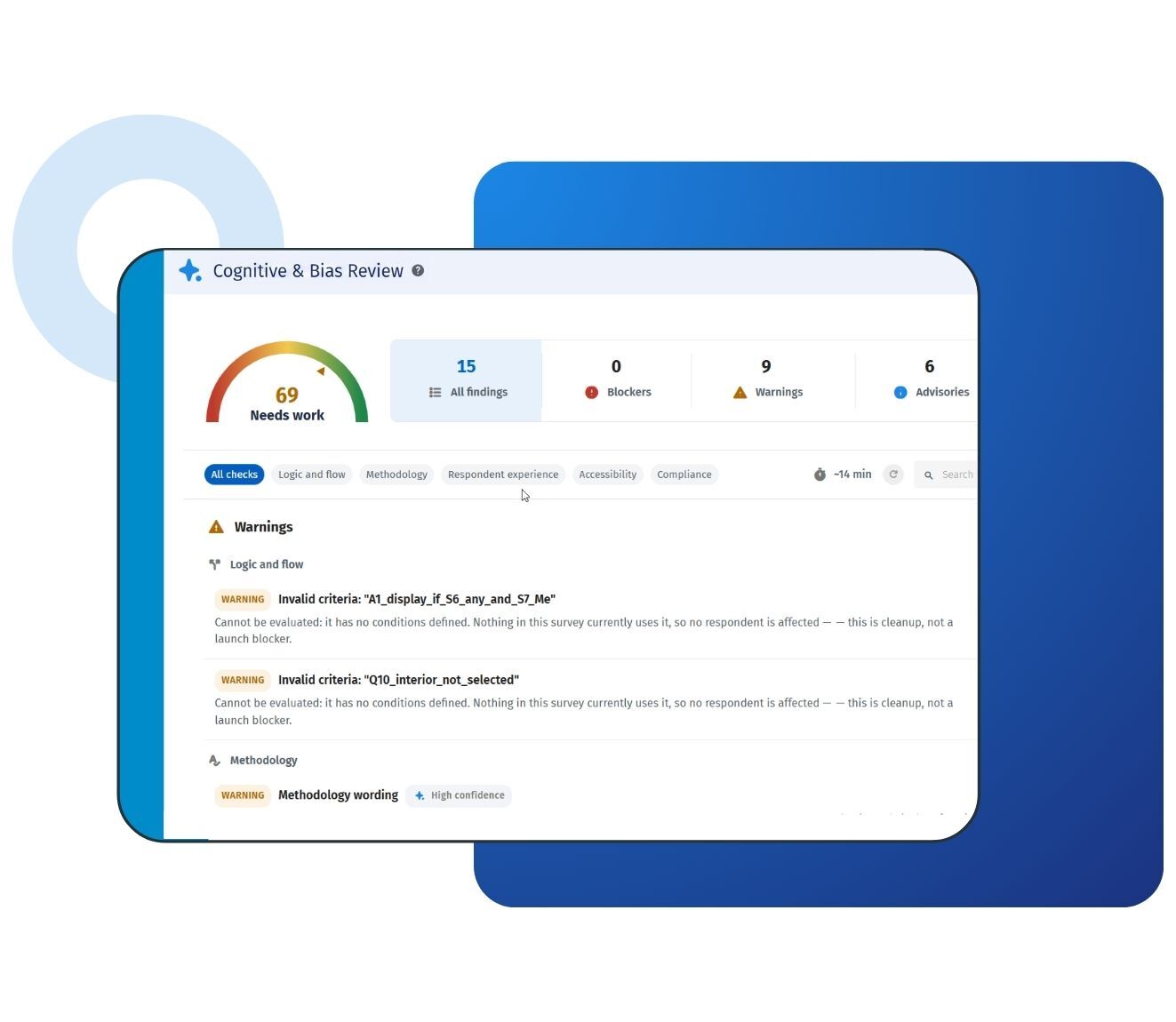
Think of it as the second pair of eyes an experienced researcher would give your survey, available on every survey you build. You open it from the survey builder, and each finding explains what it caught and why it matters. Many issues have a one-click correction. Wording problems come with a suggested rewrite you preview before applying. Two AI reviews, powered by QuestionPro AI, add suggestions on question wording and overall survey coherence.
How cognitive & bias review looks at bias and respondent effort
The name describes two things that quietly shape survey data. Bias is anything in the survey that nudges answers in one direction. Cognitive effort is how much thinking a survey asks of the person answering it. Cognitive & bias review looks at both:
Bias-prone patterns: Unbalanced scales, missing neutral options, scale lengths that change partway through a battery, and double-barreled questions that force one answer to two opinions.
Respondent effort: Survey length, open-text burden, vague terms, and overly complex phrasing all make answers harder to give and easier to rush.
Everything around them: Logic, accessibility, and compliance checks make sure respondents can reach, read, and trust every question.
No tool removes bias completely, and this one doesn't claim to. It flags the survey design patterns that invite bias, so you can fix them before anyone answers.
What cognitive & bias review checks before you publish
Every review runs five rule-based checks across the whole survey:
Logic: Dangling branches that point nowhere, questions no respondent can reach, and loops that send people back through the same pages. Handy when your survey logic has been edited after questions moved.
Accessibility: WCAG-related issues, such as a question with empty text or a matrix too large to answer comfortably.
Respondent experience: Survey length and too many open-text boxes, two common causes of survey fatigue and drop-off.
Methodology: Unbalanced scales, missing validation, missing neutral options, and scale lengths that change partway through a battery of questions.
Compliance: A missing consent or privacy disclosure when the survey collects personal information.
Two AI reviews run alongside these checks. One reads each question for wording problems, such as double-barreled questions, vague terms, and overly complex phrasing. The other reads the survey as a whole. It flags questions that drift off theme, or a survey title that promises something no question measures. These AI suggestions are advisory, so they never move your score.
How the cognitive & bias review readiness score works
Every survey starts at 100. Each finding lowers the score based on how serious it is:
Blocker: The survey is broken for respondents; for example, a branch that leads to a dead end.
Warning: The survey runs, but data quality will suffer.
Advisory: A suggestion that is safe to launch without acting on.
The score then lands in one of four bands:
Ready (90 to 100): Clear to publish.
Good (75 to 89): A few things are worth tightening.
Needs work (50 to 74): Fix the main issues before launch.
Not ready (0 to 49): The survey needs real attention first.
One blocker keeps the score below the quality threshold, so a serious problem can't hide inside an otherwise clean survey. A survey with no questions scores 0. Dismissing a finding clears it from your worklist, but only a real fix raises the score. That keeps the number honest for everyone who relies on it.
Example of cognitive & bias review in your surveys
Consider a regional healthcare network operating across the US. Its patient experience team has a dozen people building surveys, and only two of them are trained researchers. Before a new discharge survey goes out, the author runs Cognitive & bias review. It flags a page that asks for a phone number without a privacy disclosure. It also catches a branch that skips the care section for emergency room visitors. Both are fixed from the review panel, the score climbs into the ready band, and the survey ships on schedule.
Consider a national retail chain in the US running a quarterly employee pulse survey. Regional HR managers adapt the master survey for their own stores. Cognitive & bias review catches a five-point scale that one manager trimmed to four points, which breaks consistency across the battery. It also flags a question asking whether training was "useful and well-timed." The suggested fix splits it into two clear questions, and the regional results stay comparable.
Consider a US university research center surveying students about campus services. The draft scale offers four positive options and only one negative option, and a 20-row matrix closes the survey. Cognitive & bias review flags the lopsided scale and the oversized matrix. The team rebalances the options and breaks the matrix into shorter groups, so the satisfaction results reflect how students actually feel.
Consider a mid-size market research agency based in the US that sends surveys to several clients every week. Project managers use the readiness score as the internal sign-off before any survey goes to a client for approval. Senior researchers spend their review time on the brief and the analysis plan instead of hunting for dead-end branches.
The uses of cognitive & bias review
The uses of cognitive & bias review are:
Pre-launch quality control: Review the whole survey in one click before any respondent sees it.
Reducing bias-prone wording and scales: Spot lopsided scales, missing neutral options, and double-barreled questions before they skew your results.
Consistent review across distributed teams: Every author, in every department, gets the same standard of review, whether or not a researcher is available.
Supporting accessibility work: WCAG-related checks run on every review, so common barriers surface early.
Checking privacy disclosures: Catch surveys that collect personal information without consent or privacy language.
Approving surveys for launch: Give authors, reviewers, and approvers one shared signal for when a survey is ready.
Coaching new survey authors: Each finding explains why it matters, so newer authors pick up survey design best practices while they build.
The advantages of cognitive & bias review
The advantages of cognitive & bias review are:
Problems surface before respondents find them: You avoid re-fielding, discarding responses, and explaining shaky numbers to stakeholders.
You stay in control of every change: One-click fixes show the exact before and after. AI rewrites apply only after you confirm them, and collected responses are never touched.
A score that can't be gamed: A single blocker caps the score, and dismissing a finding doesn't raise it. Only real fixes move the number.
Expert review on every survey: Methodology checks and AI wording review cover the bias and wording issues a senior researcher would look for, on surveys that never reach one.
Safe for shared work: If a colleague edits the survey after you open a preview, the fix is blocked instead of applied to out-of-date content.
Built into the QuestionPro platform: It runs inside the same survey builder your teams already use, with QuestionPro AI behind the wording and coherence reviews.
Who cognitive & bias review is for
Cognitive & bias review is built for anyone who works with surveys, whether you design them every day or only build one now and then.
Research operations teams: Give every author across the organization one shared standard, so each survey leaves the building in the same good shape.
CX programs: Check feedback surveys across locations and touchpoints before they go live, and keep the experience consistent for every customer.
HR and employee experience teams: Launch engagement and pulse surveys with neutral wording and clear privacy language, even when the timeline is short.
Agencies: Add a fast second review to client surveys, so what you deliver is ready the first time.
Academic research groups: Strengthen the instruments you build for a thesis, a class or a study, with clear guidance on each fix.
Data quality, accessibility and privacy owners: Hold every survey to the same standard without reviewing each one by hand.
Anyone building their first survey: Get a clear score and plain-language fixes, and launch with confidence from day one.
How to use cognitive & bias review in QuestionPro
To use cognitive & bias review in your research studies, read our help file on how to set up cognitive & bias review.

 Survey Software
Easy to use and accessible for everyone. Design, send and analyze online surveys.
Survey Software
Easy to use and accessible for everyone. Design, send and analyze online surveys.
 Research Suite
A suite of enterprise-grade research tools for market research professionals.
Research Suite
A suite of enterprise-grade research tools for market research professionals.
 Customer Experience
Experiences change the world. Deliver the best with our CX management software.
Customer Experience
Experiences change the world. Deliver the best with our CX management software.
 Employee Experience
Create the best employee experience and act on real-time data from end to end.
Employee Experience
Create the best employee experience and act on real-time data from end to end.