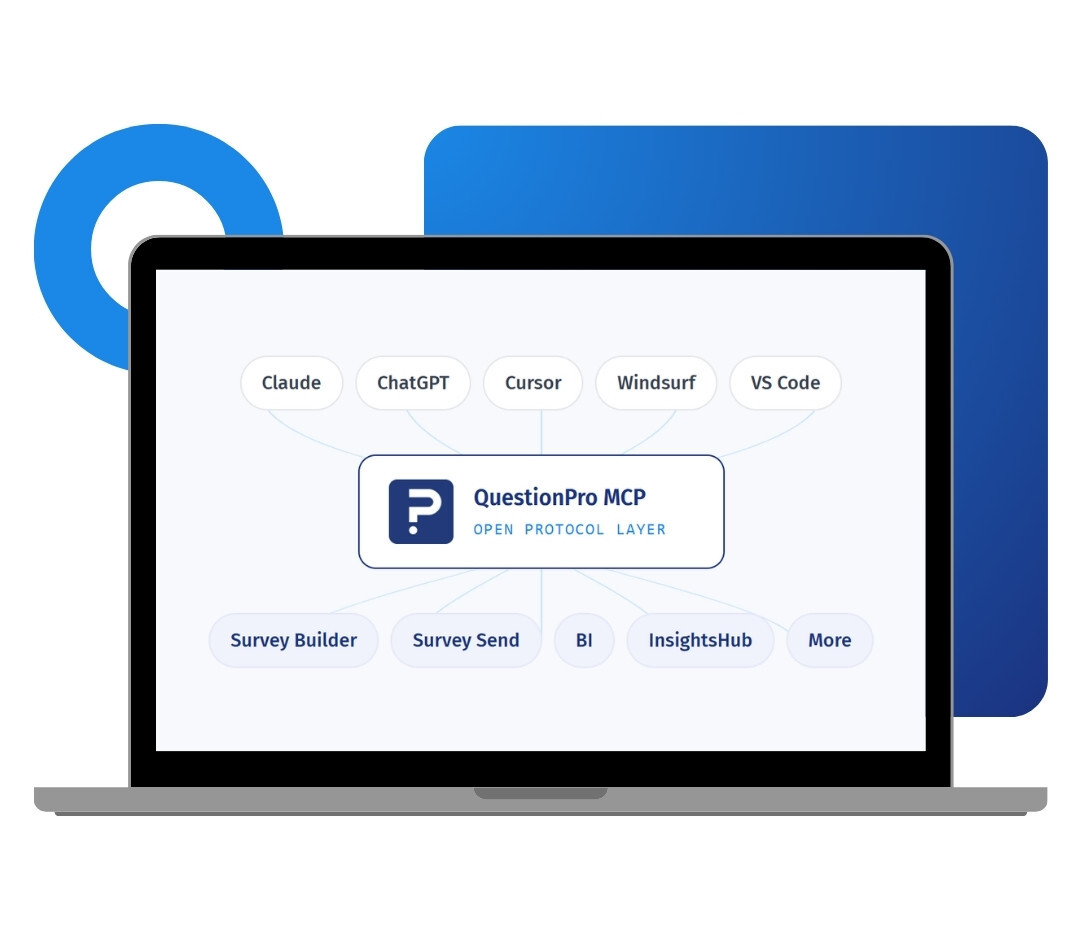
When you connect QuestionPro MCP, your AI assistant gains scoped access to your account through a secure OAuth sign-in. You describe what you need in plain English, and the agent carries out the workflow, from building a survey to reading a dashboard. This is a direct connection, not a chatbot layered on top of the interface.
For twenty years, people used QuestionPro by opening a browser and clicking through screens. Going headless changes who operates the product, not what the product is. Your assistant drives the same platform, against the same data, under the same permissions, in the same workspace your team already uses. Nothing is copied out, nothing is duplicated, and no export sits in someone's downloads folder going stale.
The real gain shows up when a task spans more than one step. Because each part of the platform is exposed as its own server, an assistant can chain them together and complete a whole workflow from a single request. Ask it to build an engagement survey with branching logic, send it to a segment, and summarize the responses, and it moves across Survey Builder, Survey Send, and Survey Result without you switching context once.
Access runs on the same infrastructure that serves 5.3 million users across more than 100 countries. Assistants connect through OAuth 2.1, so there are no static API keys to create, share, or rotate, and you can disconnect any assistant at any time.
Example of QuestionPro MCP in your research
Consider a global consumer goods brand headquartered in the US. Its insights team works inside an AI assistant all day and does not want to stop to open another dashboard. With QuestionPro MCP connected, an analyst types a brief for a five question concept test, and the survey is built in their QuestionPro account within seconds. Later, they ask the same assistant for the NPS trend from last quarter, and the answer comes back in the chat with the segment breakdown already applied. The research gets done where the team already works.
Types of QuestionPro MCP
QuestionPro MCP is not a single connector. Every part of the platform is exposed as its own server, so you can connect to the root endpoint at mcp.questionpro.com and reach all of them at once, or point your assistant at one server when you want a focused integration. The current set is published on the QuestionPro headless page , where the servers are grouped by category.
The types of QuestionPro MCP servers are:
Survey Builder: Create and configure surveys, questions, and logic from a plain-language brief, including branching and blocks.
Survey Send: Distribute surveys, build recipient lists, and queue email campaigns for your approval before anything goes out.
Survey Result: Pull response data and results directly into the conversation, with no export step in between.
BI: Build and query dashboards, widgets, data sources, and filters, so a reporting request becomes a question rather than a build task.
CX: Work across CX workspaces, segments, workflows, and transactions to see how experience programs are performing.
Closed Loop: Manage CX feedback tickets and cases so issues raised by customers get picked up and closed out faster.
Customer360: Run churn analysis and customer health scoring to spot accounts that need attention before they lapse.
Intercept: Set up website intercept projects and targeting rules to capture feedback at the moment of the experience.
Journey Management: Reach journey maps, boards, and workspaces so journey work sits alongside the data that informs it.
EX: Handle Employee Experience folders, members, and surveys for engagement and lifecycle programs.
Communities: Manage research communities and panel members, and distribute studies to the people you have already recruited.
Audience: Launch specialized sample projects and target a specific audience when you need respondents you do not already have.
InsightsHub: Search repositories, files, and AI insights to surface what your organization already learned before commissioning new work.
UX Qual: Reach UX and qualitative research tools for studies that need depth rather than scale.
LivePolls: Create polls, run sessions, and manage templates and teams for live audience research.
Synthetic Data: Generate synthetic data to pressure-test a design or model a scenario before fielding a real study.
Integrations: Configure survey webhooks, triggers, and data mappings so results flow into the systems your team already runs on.
Organization: Review organization users, teams, and usage analytics to see how the platform is being used across the business.
Admin: Handle user, invoice, ticket, and subscription administration without leaving the assistant.
New servers are added as more of the platform is exposed, so the list above reflects what is available today. Check the headless page for the current set and live status.
The Uses of QuestionPro MCP
The uses of QuestionPro MCP are:
Build surveys from a brief: Describe the study in plain language and your AI assistant creates the full survey, including question types and logic, in your account.
Pull results without exporting: Ask for response data, NPS trends, or cross-tabs and get the answer back in your chat, not a file you have to open.
Run CX and closed-loop work: Query CX workspaces, segments, and feedback tickets so your team can act on customer signals faster.
Reach your research repository: Connect to InsightsHub repositories and past studies to surface prior findings without hunting through folders.
Distribute to communities and audiences: Launch studies to research communities or a targeted audience sample straight from the conversation.
Chain a full workflow: Combine servers so one request can design, send, analyze, and summarize a study end to end.
The Advantages of QuestionPro MCP
The advantages of QuestionPro MCP are:
No dashboard required: Your team runs research from the AI tool they already use, so there is no login step between a question and an answer.
Secure, scoped access: The connection uses OAuth 2.1, so no API keys change hands. You approve exactly which servers and actions an assistant can touch, down to a single survey or dashboard.
Enterprise-grade controls carry over: Every connection is bound to a real user, sessions are revocable from Settings and Connected apps, and each consent and tool call is logged. This runs on the infrastructure behind 5.3 million users in more than 100 countries.
Full platform coverage: Nineteen servers span surveys, BI, CX, Employee Experience, Communities, Audience, InsightsHub, and more, so agents can work across the whole research workflow.
Fast to connect: Setup takes a few minutes and needs no technical skill. Paste a URL, sign in, and approve.
Built for where research is headed: A headless platform is infrastructure an AI agent can use directly, not a tool a person has to operate by hand.
How to Set Up QuestionPro MCP
To connect QuestionPro MCP to your AI assistant, read our help file on how to set up the MCP connectors.

 Survey Software
Easy to use and accessible for everyone. Design, send and analyze online surveys.
Survey Software
Easy to use and accessible for everyone. Design, send and analyze online surveys.
 Research Suite
A suite of enterprise-grade research tools for market research professionals.
Research Suite
A suite of enterprise-grade research tools for market research professionals.
 Customer Experience
Experiences change the world. Deliver the best with our CX management software.
Customer Experience
Experiences change the world. Deliver the best with our CX management software.
 Employee Experience
Create the best employee experience and act on real-time data from end to end.
Employee Experience
Create the best employee experience and act on real-time data from end to end.