• Skip to main content
  • Skip to primary sidebar
  • Skip to footer
QuestionPro

QuestionPro

questionpro logo
  • Products
    survey software iconSurvey softwareEasy to use and accessible for everyone. Design, send and analyze online surveys.research edition iconResearch SuiteA suite of enterprise-grade research tools for market research professionals.CX iconCustomer ExperienceExperiences change the world. Deliver the best with our CX management software.WF iconEmployee ExperienceCreate the best employee experience and act on real-time data from end to end.
  • Solutions
    IndustriesGamingAutomotiveSports and eventsEducationGovernment
    Travel & HospitalityFinancial ServicesHealthcareCannabisTechnology
    Use CaseAskWhyCommunitiesAudienceContactless surveysMobile
    LivePollsMember ExperienceGDPRPositive People Science360 Feedback Surveys
  • Resources
    BlogeBooksSurvey TemplatesCase StudiesTrainingHelp center
  • Features
  • Pricing
Language
  • English
  • Español (Spanish)
  • Português (Portuguese (Brazil))
  • Nederlands (Dutch)
  • العربية (Arabic)
  • Français (French)
  • Italiano (Italian)
  • 日本語 (Japanese)
  • Türkçe (Turkish)
  • Svenska (Swedish)
  • Hebrew IL (Hebrew)
  • ไทย (Thai)
  • Deutsch (German)
  • Portuguese de Portugal (Portuguese (Portugal))
  • Español / España (Spanish / Spain)
Call Us
+1 800 531 0228 +1 (647) 956-1242 +55 9448 6154 +49 030 9173 9255 +44 01344 921310 +81-3-6869-1954 +61 (02) 6190 6592 +971 529 852 540
Log In Log In
SIGN UP FREE

Home Surveys Mobile

Mobile: Layout Difference

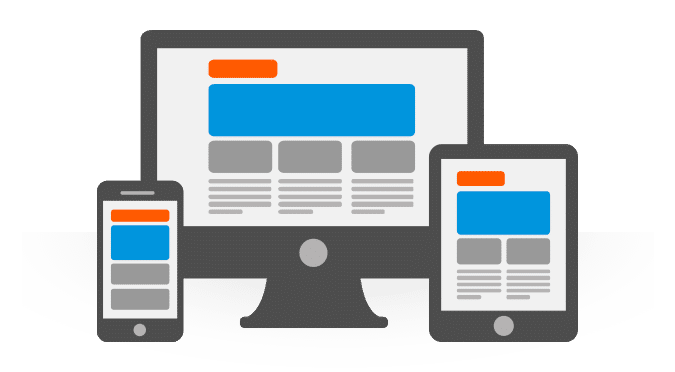
This blog is an insight to why desktop and mobile should not be considered a single development project. Any project that considers both desktop and mobile should be tailored according to both. We will be looking at some of the reasons why one size doesn’t fit all and why it should not be taken for granted that it does.

Let’s kick off with screen size, the most obvious of all differences. The average size of a phone screen is one fifth to one tenth the size of monitors (Unless someone has made a 20+ inch phone that I don’t know about). This means that more information must be displayed in less space, at the same time elements that are not the point of attention for the page must less noticeable . An example of this is sites that change the display accordingly. On a large screen they have buttons at the top or left of the page but on a smaller screen it becomes hidden in a slide out menu.

The second on the list is touch input. Touch inputs aren’t as accurate as the good old mouse, to handle this elements should be easily tapable. So instead of putting the word “Back” on a page it makes more sense to have an arrow icon in it’s place. Swapping text to icons as much as possible helps to provide information in limited space along with making it easier to use on a touch device. (Added bonus: if you have sites or apps in multiple languages you don’t need to translate an icon)

Third (this one is not too obvious) is load. By load I mean the system requirements required to run the app or page. I’m a gamer so I have a nice desktop, at the same time I use a Nexus 4 and an HTC sensation as my phone. I very rarely have loading problems on the desktop but on the days I take the HTC out to the same sites I see the phone slow to a crawl. When going for mobile pages keep them as simple as possible, don’t try and run every javascript, ajax and the like on a mobile version, keep it as lite as possible. For apps: unless a mobile version of a game is being made try to keep the requirements really low by considering the worst device you can think of as the target.

That being said, do make a mobile website. With the growth of mobile very few visitors are coming from a desktop. Most are probably coming in from a portable device.


SHARE THIS ARTICLE:

About the author
Zohayr Rege

View all posts by Zohayr Rege

Primary Sidebar

Gain insights with 80+ features for free

Create, Send and Analyze Your Online Survey in under 5 mins!

Create a Free Account

RELATED ARTICLES

HubSpot - QuestionPro Integration

Target Weighting: What it is, Importance & How to Use it?

Dec 25,2023

HubSpot - QuestionPro Integration

SOPS Surveys: Impact + Best Practices on Patient Satisfaction

Jul 03,2023

HubSpot - QuestionPro Integration

Product Testing with Synthetic Data: How It Works & Applications

Aug 07,2025

BROWSE BY CATEGORY

Footer

MORE LIKE THIS

Collaboration & Competition – BOTH in the same tool – LivePoll Teams

Jan 23, 2026

transactional-nps-surveys

How to use transactional NPS surveys to improve CX

Jan 23, 2026

transactional-survey

When to use a transactional survey, importance and best practices

Jan 21, 2026

ai-prompting-tcxt-What Prompted Me to Say This?

What Prompted Me to Say This? – Tuesday CX Thoughts

Jan 20, 2026

Other categories

questionpro-logo-nw
Help center Live Chat SIGN UP FREE
  • Sample questions
  • Sample reports
  • Survey logic
  • Branding
  • Integrations
  • Professional services
  • Security
  • Survey Software
  • Customer Experience
  • Workforce
  • Communities
  • Audience
  • Polls Explore the QuestionPro Poll Software - The World's leading Online Poll Maker & Creator. Create online polls, distribute them using email and multiple other options and start analyzing poll results.
  • Research Edition
  • LivePolls
  • InsightsHub
  • Blog
  • Articles
  • eBooks
  • Survey Templates
  • Case Studies
  • Training
  • Webinars
  • All Plans
  • Nonprofit
  • Academic
  • Qualtrics Alternative Explore the list of features that QuestionPro has compared to Qualtrics and learn how you can get more, for less.
  • SurveyMonkey Alternative
  • VisionCritical Alternative
  • Medallia Alternative
  • Likert Scale Complete Likert Scale Questions, Examples and Surveys for 5, 7 and 9 point scales. Learn everything about Likert Scale with corresponding example for each question and survey demonstrations.
  • Conjoint Analysis
  • Net Promoter Score (NPS) Learn everything about Net Promoter Score (NPS) and the Net Promoter Question. Get a clear view on the universal Net Promoter Score Formula, how to undertake Net Promoter Score Calculation followed by a simple Net Promoter Score Example.
  • Offline Surveys
  • Customer Satisfaction Surveys
  • Employee Survey Software Employee survey software & tool to create, send and analyze employee surveys. Get real-time analysis for employee satisfaction, engagement, work culture and map your employee experience from onboarding to exit!
  • Market Research Survey Software Real-time, automated and advanced market research survey software & tool to create surveys, collect data and analyze results for actionable market insights.
  • GDPR & EU Compliance
  • Employee Experience
  • Customer Journey
  • Synthetic Data
  • About us
  • Executive Team
  • In the news
  • Testimonials
  • Advisory Board
  • Careers
  • Brand
  • Media Kit
  • Contact Us

QuestionPro in your language

  • English
  • Español (Spanish)
  • Português (Portuguese (Brazil))
  • Nederlands (Dutch)
  • العربية (Arabic)
  • Français (French)
  • Italiano (Italian)
  • 日本語 (Japanese)
  • Türkçe (Turkish)
  • Svenska (Swedish)
  • Hebrew IL (Hebrew)
  • ไทย (Thai)
  • Deutsch (German)
  • Portuguese de Portugal (Portuguese (Portugal))
  • Español / España (Spanish / Spain)

Awards & certificates

  • survey-leader-asia-leader-2023
  • survey-leader-asiapacific-leader-2023
  • survey-leader-enterprise-leader-2023
  • survey-leader-europe-leader-2023
  • survey-leader-latinamerica-leader-2023
  • survey-leader-leader-2023
  • survey-leader-middleeast-leader-2023
  • survey-leader-mid-market-leader-2023
  • survey-leader-small-business-leader-2023
  • survey-leader-unitedkingdom-leader-2023
  • survey-momentumleader-leader-2023
  • bbb-acredited
The Experience Journal

Find innovative ideas about Experience Management from the experts

  • © 2022 QuestionPro Survey Software | +1 (800) 531 0228
  • Sitemap
  • Privacy Statement
  • Terms of Use