SIGN UP FREE

Run course evaluations inside Canvas

Set up evaluations in QuestionPro, deliver them through Canvas, and bring all your response data, dashboards, and instructor reports back into one place. No separate login for students. No scattered data for your team.

Book a Demo

How QuestionPro turns Canvas into your evaluation system

Choose a Canvas course

Pick the course where the evaluation should live. Works for courses where you are the instructor.

Pick or link a survey

Select a survey from your QuestionPro account or paste a direct survey link. The evaluation content stays in QuestionPro.

Build the Canvas assignment

Set the title, delivery method, instructions, and publish settings all inside the familiar Canvas assignment builder.

Control who receives it

Send to the full course roster or limit to specific sections. Flexible enough for large courses with multiple groups.

Add credit and a deadline

Offer complete/incomplete participation credit, set point values, and add due dates so students know what's expected.

Preview before you publish

Check exactly what students will see before the assignment goes live. Review which surveys are already linked to each course.

Students find the evaluation where they already do their coursework

Because the evaluation lives inside Canvas as an assignment, students don't need a separate link, a reminder email, or a new login. It's in the same place they check deadlines and submit work.

  • Place evaluations inside any course you teach in Canvas
  • Pull in any QuestionPro survey existing or new
  • Preview the student experience before you publish
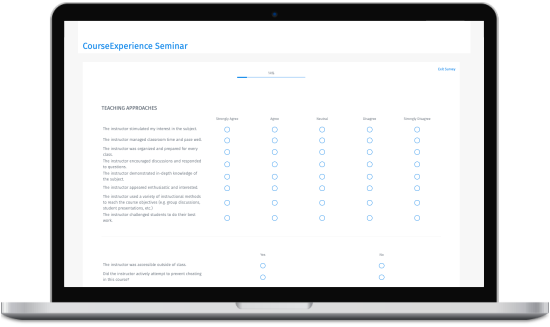
QuestionPro Course Experience evaluation framework

Decide how students take it and whether it's worth credit

Set the evaluation to open inside the Canvas page, in a new tab, or where your institution has per-student LTI enabled as a personalized assignment. Pair it with participation credit and a due date to improve completion rates without chasing students down.

  • Embedded, new-tab, or per-student delivery options
  • Restrict to specific sections within a large course
  • Attach participation credit or points to encourage completion
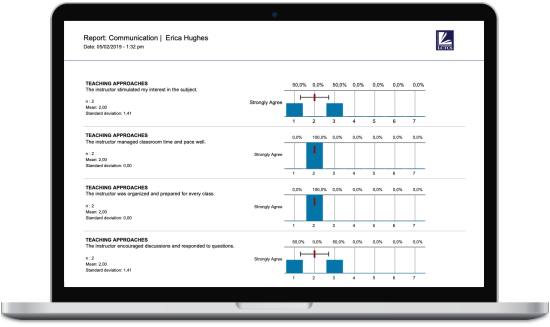
Course evaluation analytics and reports

Launch when you're ready and keep everything organized as evaluations scale

Preview the full student experience before a single notification goes out. Once you're confident, publish in one click. As your team builds more evaluations across more courses, the survey-to-course mapping stays visible so nothing gets lost.

  • Preview the complete student view before publishing
  • Publish instantly or hold until your planned launch date
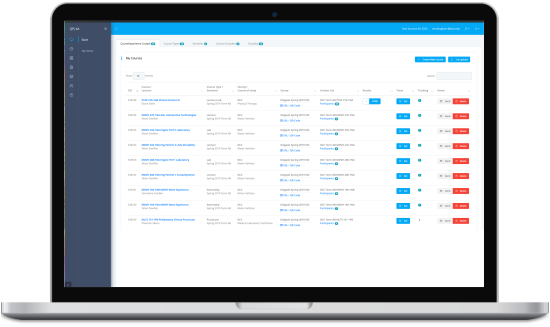
  • Track which QuestionPro surveys are linked across all your courses
Course evaluation report across devices

FAQ

Does QuestionPro integrate with Canvas LMS?

Yes. QuestionPro integrates with Canvas through LTI, letting instructors add course evaluations as Canvas assignments. Students complete the QuestionPro survey directly inside Canvas, and all response data, reporting, and dashboards stay inside QuestionPro.

Do I need admin access?

You need admin access the first time to complete the Canvas setup. Once the integration is configured, you can create and manage evaluations on your own.

How do I add a course evaluation to Canvas using QuestionPro?

You choose a Canvas course you teach, select or link a QuestionPro survey, configure the assignment title and delivery method, optionally add participation credit and a due date, preview the student view, and publish. The setup takes a few minutes for each course evaluation.

Can students complete QuestionPro evaluations inside Canvas without a separate login?

Yes. When a course evaluation is added as a Canvas assignment using the QuestionPro LTI integration, students access it through their existing Canvas course. No separate account or login is required.

Where do course evaluation responses from Canvas go?

All responses collect in QuestionPro. Your team accesses reporting, dashboards, and exports from within the QuestionPro platform separated from Canvas. Instructors do not see individual student responses unless access has been explicitly configured.

Can I send course evaluations to specific sections in Canvas, not the whole course?

Yes. When setting up the evaluation assignment, you can restrict it to specific sections within a course, rather than sending it to all enrolled students.