Hook / Story
Imagine you’re conducting a nationwide brand tracking study.
You successfully collect 1,000 responses and hit every quota target you’ve planned. Fifty percent of respondents are male, fifty percent are female. Age quotas are perfectly balanced. Regional representation looks great too.
But when you begin analyzing the data, you discover something unexpected.
Most of your younger respondents are concentrated in one region. Older respondents are heavily represented in another. Some important demographic combinations are barely represented at all.
On paper, your sample looks balanced. In reality, it doesn’t fully reflect the audience you’re trying to understand.
This is where traditional quota sampling falls short—and where Nested Quota makes a difference.
Customer Pain Point
Many researchers rely on individual quotas to manage respondent distribution. While this approach helps balance broad demographics, it often overlooks the intersections between them.
For example:
- Age quotas may be met, but not evenly distributed across genders.
- Regional quotas may be achieved, but certain age groups may dominate specific regions.
- Smaller demographic segments may become underrepresented despite meeting overall targets.
As research becomes more sophisticated, understanding these demographic intersections becomes increasingly important.
Without multi-dimensional quota control, researchers risk:
- Sampling bias
- Inconsistent audience representation
- Limited subgroup analysis
- Reduced confidence in insights
- Time-consuming manual quota adjustments
The result? A sample that looks balanced but doesn’t accurately reflect the population being studied.
Behind the Scenes (Why We Built This)
Customers told us they needed more control over how respondents were distributed across multiple demographic variables.
Audience Balancing helped researchers align samples with population distributions, but many studies required an additional layer of precision.
Researchers wanted the ability to control not only age, gender, region, or ethnicity independently—but also the combinations of those demographics.
For example:
- Females aged 18–34 in the West region
- Males aged 35–54 in the South region
- Respondents aged 55+ across specific ethnic groups
Managing these combinations manually was complex and prone to error.
Nested Quota was built to solve this challenge by giving researchers a simple way to define and manage quotas across multiple demographic dimensions simultaneously.
Introducing Nested Quota
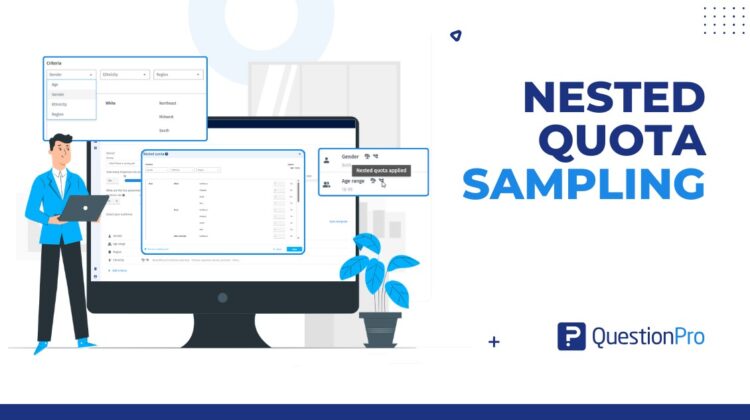
Nested Quota is an advanced audience management feature that enables researchers to apply quotas across up to three demographic criteria at the same time.
Instead of controlling respondent distribution using a single qualification, Nested Quota allows users to manage demographic intersections and ensure balanced representation across targeted sub-populations.
Researchers can create quotas using:
- Age
- Gender
- Region
- Ethnicity
By combining these criteria, teams can build more representative samples and gain deeper confidence in their findings.
How It Works
Setting up Nested Quota is straightforward.
Step 1: Configure Audience Balancing
Before Nested Quota can be activated:
- Audience Balancing must be applied.
- At least two balanced qualifications must be configured.
- The project must target a minimum of 100 completed responses.
Step 2: Open Nested Quota
Once prerequisites are met, the Nested Quota option becomes available.
Step 3: Select Your Criteria
Choose up to three demographic criteria such as:
- Age + Gender
- Gender + Region
- Age + Gender + Region
- Age + Gender + Ethnicity
Step 4: Define Quotas
Specify the desired respondent distribution for each demographic combination.
Step 5: Launch Your Study
The platform manages respondent collection according to your configured quota structure, helping maintain balanced representation throughout fieldwork.
Real Use Case
A global consumer electronics company is preparing to launch a new product and wants feedback from a nationally representative audience.
The research team needs responses from:
- Younger and older consumers
- Male and female participants
- Multiple geographic regions
Using traditional quotas, the team can balance age, gender, and region separately.
However, they also want to ensure that younger consumers are represented across all regions—not concentrated in a single area.
Using Nested Quota, they create quotas based on:
- Age
- Gender
- Region
The platform automatically manages respondent recruitment across these demographic combinations.
The result is a more representative sample, stronger subgroup analysis, and greater confidence in product launch decisions.
What’s Next
As research questions become more complex, audience management needs to evolve beyond basic quota controls.
Nested Quota helps researchers capture the real-world diversity of their target population by managing demographic intersections, not just individual characteristics.
Combined with Audience Balancing, Nested Quota provides a powerful framework for building high-quality, representative samples while reducing manual quota management.
Because better audience control leads to better insights—and better business decisions.