Hook / Story
If you’ve ever launched multiple research projects targeting similar audiences, you’ve probably experienced this.
You open a new project, start adding qualification criteria, select age groups, choose employment status, define household characteristics, apply additional targeting logic—and then realize you’ve done this exact same setup dozens of times before.
The audience is nearly identical to the one used last week.
And the week before.
And the month before.
Yet every new project requires rebuilding the audience from scratch.
For researchers managing recurring studies, the process becomes repetitive, time-consuming, and prone to mistakes.
That’s exactly why we built Audience Templates.
Customer Pain Point
Audience targeting is one of the most important parts of research design.
But for many research teams, it’s also one of the most repetitive.
Whether you’re running brand trackers, customer experience programs, employee surveys, or consumer studies, the same audience definitions often get recreated over and over again.
This leads to several challenges:
- Valuable time spent rebuilding audiences
- Inconsistent qualification criteria across projects
- Increased risk of setup errors
- Difficulty maintaining standardized audience definitions
- Slower project launches
As organizations scale their research operations, these inefficiencies quickly add up.
Researchers needed a faster and more consistent way to build audiences.
Behind the Scenes (Why We Built This)
We noticed a common pattern among Audience users.
Many customers repeatedly targeted the same groups:
- Homeowners
- Parents
- Gamers
- Full-time employees
- Nationally representative audiences
Yet every new project required manually recreating these audience definitions.
Customers wanted a way to save their most frequently used qualification logic and apply it instantly to future projects.
At the same time, new users needed a faster way to get started without building audience criteria from scratch.
Audience Templates was designed to solve both challenges.
Introducing Audience Templates
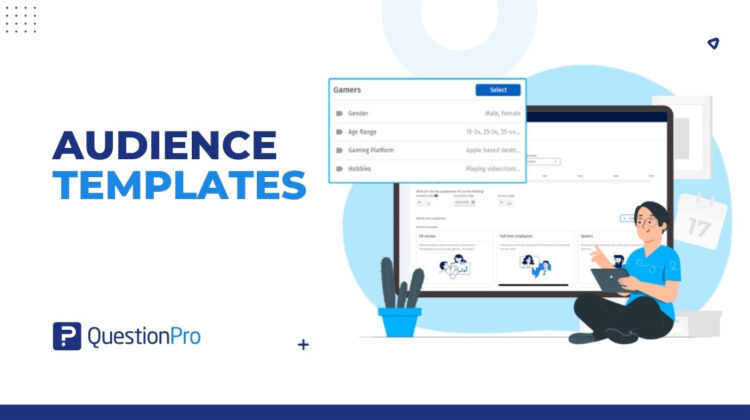
Audience Templates allows researchers to save, reuse, and manage audience qualification criteria across projects.
Instead of manually rebuilding audiences every time, users can apply a predefined template with a single click.
The feature includes two types of templates:
Default Templates
Pre-built templates designed around common research audiences, including:
- Census
- Homeowners
- Gamers
- Full-Time Employees
- Parents
- Children Through Parents
My Templates
Custom templates created and managed by researchers.
Users can:
- Save frequently used audience definitions
- Reuse them across projects
- Edit and update them over time
- Rename or delete them when needed
The result is faster project creation and more consistent audience targeting.
How It Works
Using Audience Templates is simple.
Apply a Default Template
When creating a project:
- Browse the available templates.
- Preview the included qualification criteria.
- Click Select.
- The audience qualifications automatically populate.
Researchers can still customize the audience after applying the template.
Create Your Own Template
Once you’ve configured an audience:
- Click Save Template.
- Enter a template name.
- Save it.
The template is now available under My Templates and can be reused in future studies.
Manage Templates
Templates can be:
- Edited
- Renamed
- Deleted
- Updated
- Saved as new versions
Most importantly, changes to a template do not affect projects that previously used it.
Real Use Case
A consumer insights team runs monthly customer satisfaction surveys targeting homeowners aged 25–65.
Previously, researchers manually recreated the same audience qualifications every month.
Not only did this consume valuable setup time, but small inconsistencies occasionally appeared between projects.
With Audience Templates, the team creates a custom template once and saves it.
Now, every month, they simply select the template and launch their study.
The audience setup takes seconds instead of minutes, and every survey uses the same targeting logic.
The result is faster execution, greater consistency, and more confidence in trend analysis over time.
What’s Next
Research teams shouldn’t have to rebuild the same audience definitions repeatedly.
Audience Templates transform audience qualification criteria into reusable assets that can be applied across projects with a single click.
Whether you’re running recurring trackers, customer studies, employee research, or specialized consumer surveys, Audience Templates helps your team launch projects faster while maintaining consistency and quality.
Because the best audience definition is the one you only have to build once.