• Skip to main content
  • Skip to primary sidebar
  • Skip to footer
QuestionPro

QuestionPro

questionpro logo
  • Products
    survey software iconSurvey softwareEasy to use and accessible for everyone. Design, send and analyze online surveys.research edition iconResearch SuiteA suite of enterprise-grade research tools for market research professionals.CX iconCustomer ExperienceExperiences change the world. Deliver the best with our CX management software.WF iconEmployee ExperienceCreate the best employee experience and act on real-time data from end to end.
  • Solutions
    IndustriesGamingAutomotiveSports and eventsEducationGovernment
    Travel & HospitalityFinancial ServicesHealthcareCannabisTechnology
    Use CaseAskWhyCommunitiesAudienceContactless surveysMobile
    LivePollsMember ExperienceGDPRPositive People Science360 Feedback Surveys
  • Resources
    BlogeBooksSurvey TemplatesCase StudiesTrainingHelp center
  • Features
  • Pricing
Language
  • English
  • Español (Spanish)
  • Português (Portuguese (Brazil))
  • Nederlands (Dutch)
  • العربية (Arabic)
  • Français (French)
  • Italiano (Italian)
  • 日本語 (Japanese)
  • Türkçe (Turkish)
  • Svenska (Swedish)
  • Hebrew IL (Hebrew)
  • ไทย (Thai)
  • Deutsch (German)
  • Portuguese de Portugal (Portuguese (Portugal))
  • Español / España (Spanish / Spain)
Call Us
+1 800 531 0228 +1 (647) 956-1242 +55 9448 6154 +49 030 9173 9255 +44 01344 921310 +81-3-6869-1954 +61 (02) 6190 6592 +971 529 852 540
Log In Log In
SIGN UP FREE

Home Audience

Create Once, Reuse Everywhere: Introducing Audience Templates Top

audience-templates

Hook / Story

If you’ve ever launched multiple research projects targeting similar audiences, you’ve probably experienced this.

You open a new project, start adding qualification criteria, select age groups, choose employment status, define household characteristics, apply additional targeting logic—and then realize you’ve done this exact same setup dozens of times before.

The audience is nearly identical to the one used last week.

And the week before.

And the month before.

Yet every new project requires rebuilding the audience from scratch.

For researchers managing recurring studies, the process becomes repetitive, time-consuming, and prone to mistakes.

That’s exactly why we built Audience Templates.

Customer Pain Point

Audience targeting is one of the most important parts of research design.

But for many research teams, it’s also one of the most repetitive.

Whether you’re running brand trackers, customer experience programs, employee surveys, or consumer studies, the same audience definitions often get recreated over and over again.

This leads to several challenges:

  • Valuable time spent rebuilding audiences
  • Inconsistent qualification criteria across projects
  • Increased risk of setup errors
  • Difficulty maintaining standardized audience definitions
  • Slower project launches

As organizations scale their research operations, these inefficiencies quickly add up.

Researchers needed a faster and more consistent way to build audiences.

Behind the Scenes (Why We Built This)

We noticed a common pattern among Audience users.

Many customers repeatedly targeted the same groups:

  • Homeowners
  • Parents
  • Gamers
  • Full-time employees
  • Nationally representative audiences

Yet every new project required manually recreating these audience definitions.

Customers wanted a way to save their most frequently used qualification logic and apply it instantly to future projects.

At the same time, new users needed a faster way to get started without building audience criteria from scratch.

Audience Templates was designed to solve both challenges.

Introducing Audience Templates

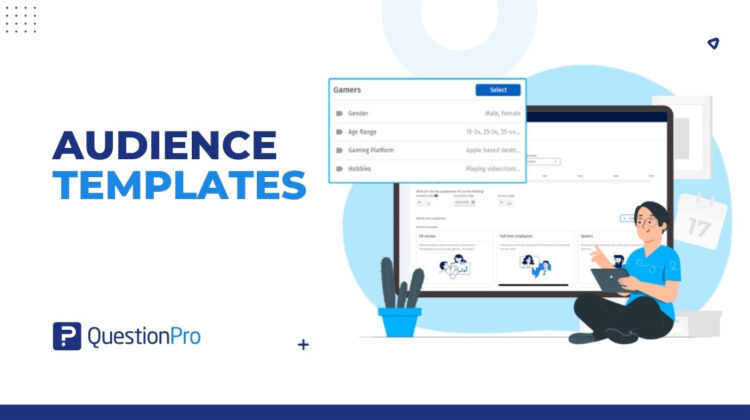
Audience Templates allows researchers to save, reuse, and manage audience qualification criteria across projects.

Instead of manually rebuilding audiences every time, users can apply a predefined template with a single click.

The feature includes two types of templates:

Default Templates

Pre-built templates designed around common research audiences, including:

  • Census
  • Homeowners
  • Gamers
  • Full-Time Employees
  • Parents
  • Children Through Parents

My Templates

Custom templates created and managed by researchers.

Users can:

  • Save frequently used audience definitions
  • Reuse them across projects
  • Edit and update them over time
  • Rename or delete them when needed

The result is faster project creation and more consistent audience targeting.

How It Works

Using Audience Templates is simple.

Apply a Default Template

When creating a project:

  1. Browse the available templates.
  2. Preview the included qualification criteria.
  3. Click Select.
  4. The audience qualifications automatically populate.

Researchers can still customize the audience after applying the template.

Create Your Own Template

Once you’ve configured an audience:

  1. Click Save Template.
  2. Enter a template name.
  3. Save it.

The template is now available under My Templates and can be reused in future studies.

Manage Templates

Templates can be:

  • Edited
  • Renamed
  • Deleted
  • Updated
  • Saved as new versions

Most importantly, changes to a template do not affect projects that previously used it.

Real Use Case

A consumer insights team runs monthly customer satisfaction surveys targeting homeowners aged 25–65.

Previously, researchers manually recreated the same audience qualifications every month.

Not only did this consume valuable setup time, but small inconsistencies occasionally appeared between projects.

With Audience Templates, the team creates a custom template once and saves it.

Now, every month, they simply select the template and launch their study.

The audience setup takes seconds instead of minutes, and every survey uses the same targeting logic.

The result is faster execution, greater consistency, and more confidence in trend analysis over time.

What’s Next

Research teams shouldn’t have to rebuild the same audience definitions repeatedly.

Audience Templates transform audience qualification criteria into reusable assets that can be applied across projects with a single click.

Whether you’re running recurring trackers, customer studies, employee research, or specialized consumer surveys, Audience Templates helps your team launch projects faster while maintaining consistency and quality.

Because the best audience definition is the one you only have to build once.
Create memorable experiences based on real-time data, insights and advanced analysis. Request Demo

SHARE THIS ARTICLE:

About the author
Raj Purohit
PDM Audience & Synthetic data
View all posts by Raj Purohit

Primary Sidebar

Unlock the Power of Research with QuestionPro Audience

Gain insights from more than 22 million high-quality respondents around the globe

Get a Free Quote Now!

RELATED ARTICLES

HubSpot - QuestionPro Integration

10 Customer Satisfaction Factors That Affect the Most

Oct 10,2023

HubSpot - QuestionPro Integration

Customer Satisfaction Research: What it is + How to do it?

Aug 16,2023

HubSpot - QuestionPro Integration

Online Survey Tools in India: How to Choose the Right Platform for Your Market Research Agency

Apr 14,2026

BROWSE BY CATEGORY

Footer

MORE LIKE THIS

QuestionPro Brings Three AI Research Platforms to the ATSIP PsychTech Conference at the University of Limerick

Jun 25, 2026

audience-templates

Create Once, Reuse Everywhere: Introducing Audience Templates Top

Jun 25, 2026

The AI-Native Freshman: What the 2026 Intake Expects from University, and How to Find Out

Jun 24, 2026

Research Methods and Reproducibility: How Survey Platforms Support Rigorous Academic Work

Jun 24, 2026

Other categories

questionpro-logo-nw
Help center Live Chat SIGN UP FREE
  • Sample questions
  • Sample reports
  • Survey logic
  • Branding
  • Integrations
  • Professional services
  • Security
  • Survey Software
  • Customer Experience
  • Workforce
  • Communities
  • Audience
  • Polls Explore the QuestionPro Poll Software - The World's leading Online Poll Maker & Creator. Create online polls, distribute them using email and multiple other options and start analyzing poll results.
  • Research Edition
  • LivePolls
  • InsightsHub
  • Blog
  • Articles
  • eBooks
  • Survey Templates
  • Case Studies
  • Training
  • Webinars
  • All Plans
  • Nonprofit
  • Academic
  • Qualtrics Alternative Explore the list of features that QuestionPro has compared to Qualtrics and learn how you can get more, for less.
  • SurveyMonkey Alternative
  • VisionCritical Alternative
  • Medallia Alternative
  • Likert Scale Complete Likert Scale Questions, Examples and Surveys for 5, 7 and 9 point scales. Learn everything about Likert Scale with corresponding example for each question and survey demonstrations.
  • Conjoint Analysis
  • Net Promoter Score (NPS) Learn everything about Net Promoter Score (NPS) and the Net Promoter Question. Get a clear view on the universal Net Promoter Score Formula, how to undertake Net Promoter Score Calculation followed by a simple Net Promoter Score Example.
  • Offline Surveys
  • Customer Satisfaction Surveys
  • Employee Survey Software Employee survey software & tool to create, send and analyze employee surveys. Get real-time analysis for employee satisfaction, engagement, work culture and map your employee experience from onboarding to exit!
  • Market Research Survey Software Real-time, automated and advanced market research survey software & tool to create surveys, collect data and analyze results for actionable market insights.
  • GDPR & EU Compliance
  • Employee Experience
  • Customer Journey
  • Synthetic Data
  • About us
  • Executive Team
  • In the news
  • Testimonials
  • Advisory Board
  • Careers
  • Brand
  • Media Kit
  • Contact Us

QuestionPro in your language

  • English
  • Español (Spanish)
  • Português (Portuguese (Brazil))
  • Nederlands (Dutch)
  • العربية (Arabic)
  • Français (French)
  • Italiano (Italian)
  • 日本語 (Japanese)
  • Türkçe (Turkish)
  • Svenska (Swedish)
  • Hebrew IL (Hebrew)
  • ไทย (Thai)
  • Deutsch (German)
  • Portuguese de Portugal (Portuguese (Portugal))
  • Español / España (Spanish / Spain)

Awards & certificates

  • survey-leader-asia-leader-2023
  • survey-leader-asiapacific-leader-2023
  • survey-leader-enterprise-leader-2023
  • survey-leader-europe-leader-2023
  • survey-leader-latinamerica-leader-2023
  • survey-leader-leader-2023
  • survey-leader-middleeast-leader-2023
  • survey-leader-mid-market-leader-2023
  • survey-leader-small-business-leader-2023
  • survey-leader-unitedkingdom-leader-2023
  • survey-momentumleader-leader-2023
  • bbb-acredited
The Experience Journal

Find innovative ideas about Experience Management from the experts

  • © 2022 QuestionPro Survey Software | +1 (800) 531 0228
  • Sitemap
  • Privacy Statement
  • Terms of Use