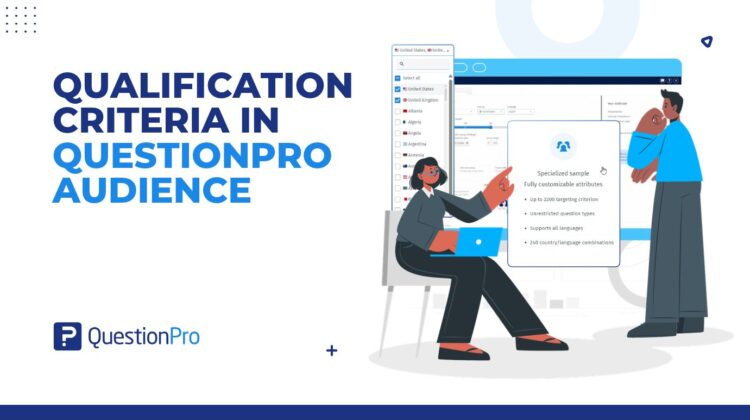
More markets, sharper screens, and a feasibility check, all before your survey gets its first response. That is the practical payoff of the extended qualification criteria in QuestionPro Audience.
The study that stalls at the country dropdown
Here’s a confession most people who scope international research will recognize. The question that kills the most studies isn’t “what should we ask?” It’s “can we even field there?”
You know the moment. The brief lands with six markets on it. The audience is specific: parents who shop online for groceries, or IT decision makers at mid-sized companies. You open your sample tool, scroll the country list, and find three of the six. The rest of the afternoon goes to emailing another vendor and splitting the budget. Then you wonder how two datasets become one story.
That’s the limitation QuestionPro Audience has eliminated. The extended qualification library now covers 160 countries, up from 8 and then 58. It carries more than 1,100 qualification criteria and more than 82,000 answer options. All of it sits in the same Specialized Sample flow you already use, so there’s nothing new to learn.
Learn More: How Specialized Sample targeting works in QuestionPro Audience
What is the extended qualification library in QuestionPro Audience?
It’s the catalog of countries, criteria, and answer options you pick from. You use it to tell Audience who should take your survey. If you’re new to buying sample, think of it as a filter on a very large, verified panel. You choose the market. Then you choose the traits people need to have before they ever see your first question.
A criterion is one thing you can filter on, like age, job title, or whether someone owns a car. An answer option is a value inside it, like “Director” under job title. The criteria sit in 8 segments. They run from demographics and B2B to travel, automotive, electronics, food and beverages, home and family, and health.
One detail matters more than the size. When you pick a country, Audience only shows the criteria that work there. Depending on the market, that might mean states, provinces, or regions. You aren’t offered a screen that can’t be filled there.
Our product team covered the full list of segments and countries in the announcement post on Audience targeting coverage. This post is about what the bigger catalog changes mean for your next study.
Targeting or screener questions: which should do the work?
Every researcher has written a survey that opens with eight screener questions. It works. It also makes the survey longer, and the people who screen out still have to start it.
With a bigger qualification library, you can filter more before anyone enters the survey. A simple way to decide:
- Use targeting for stable facts about a person: country, region, age range, industry, job title, or home ownership.
- Keep screener questions for things only your study cares about. Has someone seen your ad, or used your app last month?
Targeting does the sorting. Your survey does the asking. That split keeps the questionnaire shorter and gives you a clearer view of who you’re actually paying to reach.
Five studies that just got easier
A concept test in a market you couldn’t reach before
A food and beverage brand in the US wants to test a new flavor in Morocco and Vietnam before a regional rollout. With a shorter country list, a gap like that meant moving the study elsewhere. Now the researcher picks the country, adds grocery purchasing and beverage criteria, and reads the estimate before committing budget.
A B2B study that needs the right job titles
A software company in Europe wants 200 finance leaders in Germany and the Netherlands. There’s no need for a job title screener. The team filters on job title, department, and organization revenue from the B2B segment. The survey starts at the first real question.
A health study with a specific respondent
A healthcare research team needs adults with specific eyewear and exercise habits. Both traits live in the health segment. The team adds them as criteria and keeps the survey to questions only that audience can answer.
A first study from someone who has never bought a sample
A graduate student or a new marketing hire needs 300 responses from young adults in Brazil. They don’t know the jargon yet, and they don’t need to. Pick Brazil, pick an age range, and add an answer option or two. The estimate tells them whether the plan works.
A scoping call that ends with an answer
An agency account lead gets asked, “Can you do Kenya, Peru and Poland?” All three are on the 160-country list. The researcher then confirms the real targeting and feasibility inside a project. The list starts the conversation, and the project screen gives the final answer.
Feasibility is the honest part
More criteria means fewer matching people. That’s arithmetic, not a bug.
As you add criteria, Audience updates the estimate in the right panel. That includes feasibility, cost per interview, and total project cost. If the number drops too far, you have two easy moves. Remove a criterion, or select more answer options inside one.
If the audience still isn’t feasible, click the contact button. The Audience team reviews it and replies to your registered email with options. A country on the list is not a promise that every combination will return samples. The estimate is the source of truth, and it shows you that before you spend anything.
A few rules worth knowing before you launch
- Targeting locks at launch.
To change it, create a new project.
- Watch your end quota.
Each launch adds its responses to the survey’s end quota. Running a second project on the same survey? Reset the end quota to the total you need, so you don’t collect extra completes.
- One country per project here.
Running several countries under one parent project is a separate feature: multi-country launch. Each country still uses the same catalog.
- Targeting is not balancing.
If you need a demographic mix in the field, use survey quotas alongside your criteria.
None of these are new. They matter more now because you can do more in a single project.
Get started
If you already use QuestionPro Audience, open a new Specialized Sample project and check a market you’ve been sending elsewhere. The qualification library help file walks through adding criteria step by step.
New to QuestionPro? Create a free account and build your first survey. When you’re ready for respondents, the full catalog will be waiting. You set the audience, and you decide what the results mean.
Frequently asked questions
It’s the full set of countries, qualification criteria, and answer options you can target in a Specialized Sample project. It now covers 160 countries, more than 1,100 criteria in 8 segments, and more than 82,000 answer options. You pick a country, add criteria, and Audience shows whether that audience is feasible before you launch.
You can choose from 160 countries across every major region, from Albania to Zimbabwe. The full list is in the Specialized Sample help file. Each project still shows only what’s available for that study, and some country and criteria combinations won’t return a sample. Check the feasibility estimate in your project before you plan around a market.
Use criteria for stable traits such as age, region, industry, or job title, so people are filtered before they start your survey. Keep screener questions for things only your study cares about, like recent use of a product or recall of an ad. That mix keeps the survey shorter and the audience cleaner.
Each criterion narrows the group of people who qualify, so fewer people match. Audience updates the estimate every time you change targeting. If it drops too far, remove a criterion or select more answer options within one. If it’s still not feasible, use the contact button and the Audience team will email you options.
No. You pick a country, choose criteria from plain labels like age range or job title, and select the answer options that fit. The estimate tells you whether the plan works. You still decide who the right audience is and what the results mean. Audience handles the matching.
Not in a standard Specialized Sample project, which uses one country. To run two or more countries under one parent project, use multi-country launch, which is a separate feature. Each country inside it uses the same qualification library and shows the criteria that work in that market.
No. Targeting locks once a project launches. To use different criteria or a different country, create a new project. If both projects collect on the same survey, reset the survey’s end quota to the total you need, so you don’t collect extra completes.