From 8 countries to 160, with 1,100 qualification criteria in the same Specialized Sample flow.
A researcher has a survey ready and a market picked. The brief is clear. Then setup hits a wall: the country is not in the catalog, or the screen they need is not in the qualification list. The study waits, the survey gets extra filter questions, or the team looks outside the Audience.
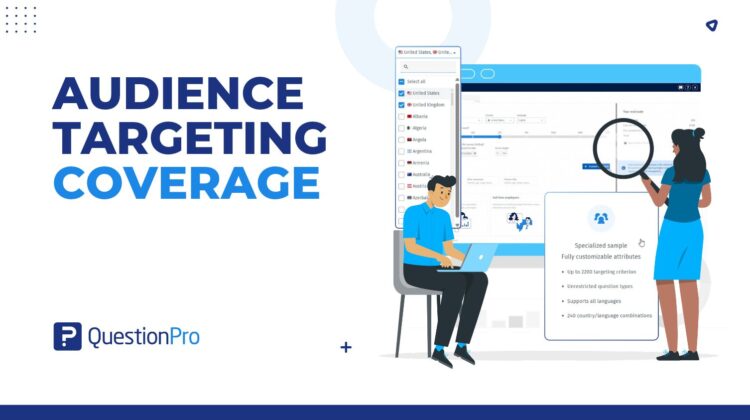
Audience targeting coverage is built for that moment. QuestionPro Audience now supports 160 countries, 1,100 qualification criteria, and 82,000 answer options — up from 8 countries and 10 criteria, then 58 countries and 50 criteria — so more of that work stays in Specialized Sample.
Why is it hard to field studies outside a short country list?
When only a handful of countries and qualifications are available, international work gets messy fast.
Researchers drop a market, or they collect a broader sample and hope the survey can screen people out. Extra survey questions slow completes, raise drop-off, and make incidence harder to predict.
Sales and research operations also lack a single, current list of supported countries. Scoping becomes a back-and-forth instead of a check against the catalog, then a feasibility run in the project.
The cost is delay, wider-than-needed samples, and studies that never leave the brief because the catalog did not cover the market or the screen.
Why did we expand Audience targeting coverage?
Customers kept asking for more countries and more ways to qualify respondents without leaving Audience.
The product decision was to grow the catalog inside the flow teams already use, not to invent a second setup path. Specialized Sample already asks for country, criteria, and an estimate. The catalog behind those fields needed to catch up.
That is why coverage moved in stages: 8 countries and 10 criteria, then 58 countries and 50 criteria, and now 160 countries, 1,100 criteria, and 82,000 data points. Country-specific lists matter too. States, provinces, regions, income, and education are not the same everywhere, so Audience only shows the criteria that work in the country you pick.
What is Audience targeting coverage today?
Audience targeting coverage is the current country and qualification catalog for Specialized Sample.
It includes:
- 160 countries you can select when you create a project.
- 1,100 qualification criteria, grouped into 8 segments in the Audience Qualification Library.
How are the 1,100 criteria categorized?
- Add criteria opens a segment first. These are the 8 segments and examples of what sits inside each one.
- Demographic — Annual Income, Sexual Orientation, Region, Age range, Gender, Education, Ethnicity, and more.
- B2B/Employment — Industry, Organization Revenue, Job Title, Employment Status, Department, and more.
- Airlines/Travel — Fly Purpose, Accommodation Type, and more.
- Automotive — Driver License, Automotive Brands, Motorcycle, Next Car Purchase, and more.
- Electronic/Computer — Electronics owned, Smartphone, Gaming Platform, Gaming Hours, and more.
- Food & Beverages — Grocery Stores, Grocery Purchasing, Fast Food, Beverage, and more.
- Home/Family/Hobbies — Home ownership, Pets, Hobbies, Sports, Parental Status, and more.
- Health & Ailment — Sufferer Ailments, Smoking, Eyewear, Exercise, and more.
- 82,000 data points, meaning answer options inside those criteria. For example, Gender includes options such as Male and Female.
This is platform coverage. The countries and criteria you can use on a given project are the ones shown when you set targeting. Always confirm feasibility before you launch. Some country and criteria combinations may not return samples.
How do you use the expanded country and criteria catalog?
Create or open a Specialized Sample project in Audience.
- Choose the country where you want people to answer.
- Audience shows only the criteria that work in that country.
- Click Add criteria, pick a topic, pick the criteria, pick answer options, and click Save.
- Watch the estimate. More criteria usually means fewer matching people. If the audience is too tight, remove a criterion or add more answer options.
- If the estimate is feasible, create the project and launch. If it is not, use Contact so the team can follow up on your registered email.
- This is the same path described in the Specialized Sample and Audience Qualification Library help files. After launch, targeting cannot be changed. Start a new project if you need a different country or screen, and correct the survey End quota if two projects would otherwise over-collect.
If you need several countries in one project, that is a Multi-country launch — a separate flow. Each country still uses this catalog and its own criteria.
What does a study look like when the market used to be out of reach?
A brand team wants to test a concept in a country that was not in the earlier 8- or 58-country catalogs. They open Specialized Sample, select the country from the 160-country list, and add a few qualifications from the library.
The estimate updates. If it is feasible, they launch in Audience. If it is not, they widen an answer option, drop a criterion, or use Contact. They do not treat the published country list as a guarantee that this exact combination will field.
No customer names, win rates, or cost savings are claimed here. The result to look for is operational: the country and screen were available to try in the product, and feasibility was visible before launch.
What should researchers do next with Audience targeting coverage?
Open Specialized Sample and check whether your next market is on the 160-country list. Apply the criteria you actually need, then read the estimate before you commit to the project.
Keep Multi-country launch for studies that need more than one country under one parent. Keep quotas and Audience balancing for mix in field. Use this coverage expansion for a larger catalog of countries and qualifications — with the project screen as the source of truth.