• Skip to main content
  • Skip to primary sidebar
  • Skip to footer
QuestionPro

QuestionPro

questionpro logo
  • Products
    survey software iconSurvey softwareEasy to use and accessible for everyone. Design, send and analyze online surveys.research edition iconResearch SuiteA suite of enterprise-grade research tools for market research professionals.CX iconCustomer ExperienceExperiences change the world. Deliver the best with our CX management software.WF iconEmployee ExperienceCreate the best employee experience and act on real-time data from end to end.
  • Solutions
    IndustriesGamingAutomotiveSports and eventsEducationGovernment
    Travel & HospitalityFinancial ServicesHealthcareCannabisTechnology
    Use CaseAskWhyCommunitiesAudienceContactless surveysMobile
    LivePollsMember ExperienceGDPRPositive People Science360 Feedback Surveys
  • Resources
    BlogeBooksSurvey TemplatesCase StudiesTrainingHelp center
  • Features
  • Pricing
Language
  • English
  • Español (Spanish)
  • Português (Portuguese (Brazil))
  • Nederlands (Dutch)
  • العربية (Arabic)
  • Français (French)
  • Italiano (Italian)
  • 日本語 (Japanese)
  • Türkçe (Turkish)
  • Svenska (Swedish)
  • Hebrew IL (Hebrew)
  • ไทย (Thai)
  • Deutsch (German)
  • Portuguese de Portugal (Portuguese (Portugal))
  • Español / España (Spanish / Spain)
Call Us
+1 800 531 0228 +1 (647) 956-1242 +55 9448 6154 +49 030 9173 9255 +44 01344 921310 +81-3-6869-1954 +61 (02) 6190 6592 +971 529 852 540
Log In Log In
SIGN UP FREE

Home CX

From One Ticket View to Every Team’s View: Introducing Column Manager

column-manager-for-the-ticket-list-view

Why support teams shouldn’t be forced to work from the same ticket layout

Every support team works differently.

A technical support engineer investigating escalations needs quick access to SLA deadlines, product details, and issue categories. A customer success manager may care more about survey responses, customer health, and account information. A quality assurance lead might prioritize ticket status and resolution trends.

Yet in many support platforms, everyone is expected to work from exactly the same ticket list.

The result isn’t just a less personalized experience. It creates unnecessary friction that slows agents down every single day.

That’s why we’ve introduced Column Manager for the Ticket List.

It gives every user the ability to configure their ticket workspace around the information they actually need.


The Problem with Fixed Ticket Lists

As customer support operations grow, so does the amount of information attached to every ticket.

Organizations introduce:

  • Priority levels
  • SLA deadlines
  • Product categories
  • Survey responses
  • Custom fields
  • Team-specific attributes

Every new field adds valuable context.

It also adds another column.

Eventually, the ticket list becomes crowded with information that only some users need.

Support agents spend more time scanning across columns to find relevant information.

Managers request different layouts for different teams.

Administrators receive repeated requests to add, remove, or reorder columns.

The ticket list becomes a compromise that works perfectly for no one.


One Workspace Doesn’t Fit Every Workflow

Different support teams solve different problems.

A billing support team doesn’t need the same ticket information as a product support team.

Customer success teams review different indicators than escalation specialists.

Even within the same department, individuals often prioritize different information depending on their responsibilities.

Instead of forcing every user into a single layout, Column Manager lets each person create a workspace that reflects how they actually work.

The underlying ticket data stays the same.

Only the presentation changes.


Meet Column Manager

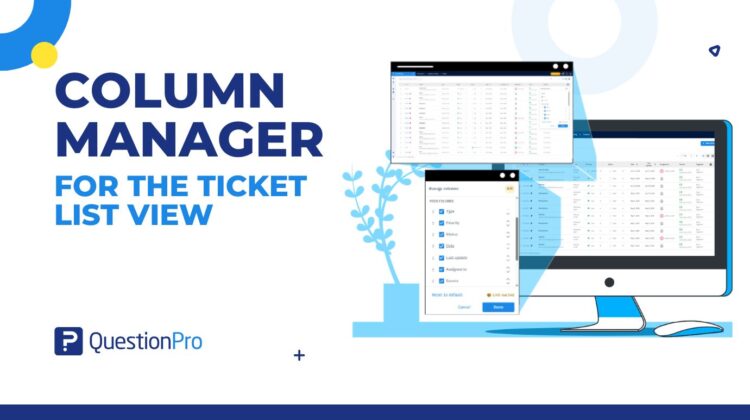
Column Manager allows users to personalize the Ticket List by selecting which columns are visible and arranging them in the order that best supports their workflow.

From a single configuration panel, users can:

  • Show or hide optional columns
  • Reorder columns using drag-and-drop
  • Search available system and custom fields
  • Configure their preferred ticket view
  • Save those preferences for future sessions

Essential identity columns such as Ticket ID and Contact remain permanently visible, ensuring every ticket can always be identified while still allowing extensive personalization.

The result is a cleaner, more focused workspace that adapts to the needs of each individual user.


Reduce Clutter Without Losing Information

One of the biggest challenges in mature support environments is balancing visibility with usability.

Adding more fields improves data capture.

Displaying every field all the time reduces usability.

Column Manager solves this by separating available information from visible information.

Support teams still capture all the information they need.

Users simply decide which pieces of that information deserve permanent space in their own ticket list.

This creates a workspace that’s easier to navigate while preserving the richness of the underlying data.


Built for Organizations That Continue to Grow

Support operations rarely stay static.

New workflows emerge.

New products introduce new ticket attributes.

Custom fields expand as businesses evolve.

Column Manager is designed to scale alongside those changes by supporting both system-defined fields and custom fields within the same configuration experience.

As ticket data grows, users can continue refining their workspace without waiting for platform changes or requesting custom configurations.


Less Administration, More Flexibility

Support administrators frequently receive requests that have little to do with business rules and everything to do with personal preference.

“Can we move this column?”

“Can we hide this field?”

“Can we see SLA time next to ticket status?”

While individually small, these requests add operational overhead and reduce agility.

Column Manager shifts those decisions directly to end users.

Instead of relying on administrators to tailor the interface for every team, users can personalize their own workspace whenever their needs change.

This reduces configuration requests while giving teams greater flexibility in how they manage their daily work.


Different Feedback Sources, Different Workspaces

Support teams often work across multiple feedback sources, each with its own operational priorities.

Column Manager maintains independent configurations for different feedback sources, allowing users to optimize each workspace separately rather than forcing a single layout across every ticket type.


A Better Ticket List Is a Better Workspace

Support teams don’t need more information.

They need the right information at the right time.

Column Manager transforms the ticket list from a static table into a personalized operational workspace that adapts to the way every individual works.

Instead of asking every team to fit the interface, the interface now fits the team.

And when agents spend less time navigating their workspace, they can spend more time delivering exceptional customer support.


SHARE THIS ARTICLE:

About the author
Anmol Sahetya
Product Manager
View all posts by Anmol Sahetya

Primary Sidebar

Take full control of your customer journey

Make immediate business actions with our CX management platform

Learn more

RELATED ARTICLES

HubSpot - QuestionPro Integration

The Cost of Neglecting Human Connection in Customer Support | Tuesday CX Thoughts

Apr 28,2025

HubSpot - QuestionPro Integration

Total Experience Management: Key Elements + Best Practices

Dec 12,2023

HubSpot - QuestionPro Integration

Hilton NPS & Hotel Guest loyalty in 2025

Jun 04,2025

BROWSE BY CATEGORY

Footer

MORE LIKE THIS

column-manager-for-the-ticket-list-view

From One Ticket View to Every Team’s View: Introducing Column Manager

Aug 9, 2026

recaptcha-for-captcha-question

Your survey has a bot problem, and it’s not the one you’re thinking of

Aug 7, 2026

scheduling-in-questionpro-ux

Scheduling: How QuestionPro UX Is Ending the Back-and-Forth Behind Every Research Session

Aug 6, 2026

tab-level-exports

Turn Your Dashboards into Executive Presentations with Tab-Level Exports

Aug 6, 2026

Other categories

questionpro-logo-nw
Help center Live Chat SIGN UP FREE
  • Sample questions
  • Sample reports
  • Survey logic
  • Branding
  • Integrations
  • Professional services
  • Security
  • Survey Software
  • Customer Experience
  • Workforce
  • Communities
  • Audience
  • Polls Explore the QuestionPro Poll Software - The World's leading Online Poll Maker & Creator. Create online polls, distribute them using email and multiple other options and start analyzing poll results.
  • Research Edition
  • LivePolls
  • InsightsHub
  • Blog
  • Articles
  • eBooks
  • Survey Templates
  • Case Studies
  • Training
  • Webinars
  • All Plans
  • Nonprofit
  • Academic
  • Qualtrics Alternative Explore the list of features that QuestionPro has compared to Qualtrics and learn how you can get more, for less.
  • SurveyMonkey Alternative
  • VisionCritical Alternative
  • Medallia Alternative
  • Likert Scale Complete Likert Scale Questions, Examples and Surveys for 5, 7 and 9 point scales. Learn everything about Likert Scale with corresponding example for each question and survey demonstrations.
  • Conjoint Analysis
  • Net Promoter Score (NPS) Learn everything about Net Promoter Score (NPS) and the Net Promoter Question. Get a clear view on the universal Net Promoter Score Formula, how to undertake Net Promoter Score Calculation followed by a simple Net Promoter Score Example.
  • Offline Surveys
  • Customer Satisfaction Surveys
  • Employee Survey Software Employee survey software & tool to create, send and analyze employee surveys. Get real-time analysis for employee satisfaction, engagement, work culture and map your employee experience from onboarding to exit!
  • Market Research Survey Software Real-time, automated and advanced market research survey software & tool to create surveys, collect data and analyze results for actionable market insights.
  • GDPR & EU Compliance
  • Employee Experience
  • Customer Journey
  • Synthetic Data
  • About us
  • Executive Team
  • In the news
  • Testimonials
  • Advisory Board
  • Careers
  • Brand
  • Media Kit
  • Contact Us

QuestionPro in your language

  • English
  • Español (Spanish)
  • Português (Portuguese (Brazil))
  • Nederlands (Dutch)
  • العربية (Arabic)
  • Français (French)
  • Italiano (Italian)
  • 日本語 (Japanese)
  • Türkçe (Turkish)
  • Svenska (Swedish)
  • Hebrew IL (Hebrew)
  • ไทย (Thai)
  • Deutsch (German)
  • Portuguese de Portugal (Portuguese (Portugal))
  • Español / España (Spanish / Spain)

Awards & certificates

  • survey-leader-asia-leader-2023
  • survey-leader-asiapacific-leader-2023
  • survey-leader-enterprise-leader-2023
  • survey-leader-europe-leader-2023
  • survey-leader-latinamerica-leader-2023
  • survey-leader-leader-2023
  • survey-leader-middleeast-leader-2023
  • survey-leader-mid-market-leader-2023
  • survey-leader-small-business-leader-2023
  • survey-leader-unitedkingdom-leader-2023
  • survey-momentumleader-leader-2023
  • bbb-acredited
The Experience Journal

Find innovative ideas about Experience Management from the experts

  • © 2022 QuestionPro Survey Software | +1 (800) 531 0228
  • Sitemap
  • Privacy Statement
  • Terms of Use