Your customer feedback widget may be small, but it is still part of your brand experience.
When customers see a feedback prompt on your website or app, they shouldn’t feel like they’ve suddenly entered a third-party survey experience. The colors, fonts, and overall look should feel like a natural extension of the digital experience they’re already having.
That’s where AI-powered CX Intercept design can make a difference.
Instead of manually translating brand guidelines into widget settings, QuestionPro AI can analyze your existing brand assets and automatically create a feedback widget that aligns with your visual identity.
Why Brand Consistency Matters in Customer Feedback
Organizations invest significant time and resources into defining their brand identity.
Brand guidelines often specify:
- Primary and secondary colors
- Typography and font styles
- Visual hierarchy
- Button styles
- Design principles
- Overall look and feel
But when it comes to customer feedback widgets, these guidelines don’t always get translated into the experience.
A feedback widget may use default colors or fonts that don’t match the website. Marketing teams may need to provide design specifications, while CX or product teams manually configure the widget.
The result can be unnecessary back-and-forth and an experience that feels disconnected from the brand.
A better approach is to make the feedback experience feel like a natural part of the product.
The Challenge of Designing CX Intercepts
A CX Intercept is designed to capture feedback at the right moment—while customers are interacting with your website or digital product.
But creating an on-brand Intercept traditionally requires several steps:
Brand guidelines >> Identify design elements >> Translate them into widget settings >> Configure >> Review >> Make adjustments
For organizations with multiple websites, products, or brands, this process can become even more time-consuming.
And not everyone configuring a CX program is a designer.
That’s where AI can simplify the process.
From Brand Guidelines to Widget Design with QuestionPro AI
Imagine you already have your brand guidelines.
They might exist as a PDF, presentation, document, image, or even on your website.
Instead of manually searching through those assets for the right colors and fonts, you can provide them to QuestionPro AI.
QuestionPro AI analyzes the available brand information and identifies relevant design elements such as:
- Brand colors
- Fonts and typography
- Font styles and weights
- Visual styling cues
It can then use these elements to create a theme for your CX Intercept.
The process becomes:
Upload or provide brand guidelines >> AI analyzes the brand >> AI creates the widget theme >> Preview >> Apply to your Intercept
What previously required manual design interpretation can become a much faster configuration process.
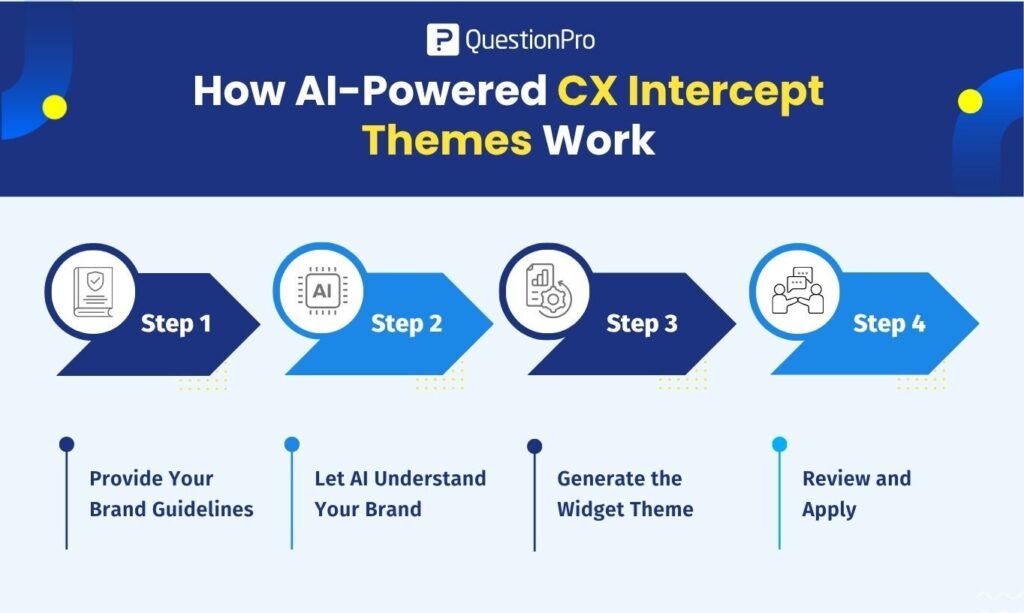
How AI-Powered CX Intercept Themes Work
With QuestionPros AI Themes, organizations can provide their brand guidelines in different formats, including a URL, PDF, DOC/DOCX, PPT/PPTX, or image.
QuestionPro AI analyzes the provided brand assets and uses the identified colors and fonts to create a theme for the CX Intercept widget.
This means teams don’t need to start with a blank widget and manually determine how to make it look like their brand.
Instead, the organization’s existing brand identity becomes the starting point.
Step 1: Provide Your Brand Guidelines
Start with the brand assets your organization already has.
This could be a brand guidelines document, presentation, image, or your website URL.
Step 2: Let AI Understand Your Brand
AI analyzes the provided content to identify relevant visual elements, including colors and typography.
Step 3: Generate the Widget Theme
The identified brand elements are translated into a theme for your CX Intercept.
Step 4: Review and Apply
Teams can review the generated design and apply it to their feedback widget.
The result is a feedback experience that is visually aligned with the rest of the digital journey.
Why This Matters for CX Teams
The value isn’t simply about making a widget look better.
It’s about removing friction from the process of creating a customer feedback experience.
1. Reduce Manual Design Work
CX teams don’t need to manually search through brand guidelines and recreate every design element in their widget.
2. Improve Brand Consistency
A feedback widget that uses your brand’s colors and typography can feel more integrated into your website or application.
3. Launch Faster
AI can shorten the gap between having brand guidelines and having a branded feedback experience ready to use.
4. Reduce Dependence on Design Resources
CX and product teams can get started without requiring a designer to manually translate brand guidelines into widget settings every time.
5. Scale Across Teams and Brands
Organizations managing multiple products, websites, or brands can use their existing brand assets to create more consistent feedback experiences.
A Feedback Widget Should Feel Like Part of the Experience
Consider two scenarios.
In the first, a customer is browsing a company’s website and sees a feedback widget with completely different colors and typography.
In the second, the widget uses the same visual language as the website.
The second experience feels more intentional.
This matters because feedback requests are themselves part of the customer journey. Customers are more likely to perceive the interaction as a natural part of the product rather than an external survey tool.
The goal isn’t to make the feedback widget stand out.
The goal is to make it belong.
AI Is Changing More Than Content Creation
When people think about AI in customer experience, they often think about chatbots, sentiment analysis, or automated insights.
But AI can also simplify the design and configuration side of CX.
Instead of asking teams to translate information manually, QuestionPro AI can interpret existing organizational assets and turn them into usable configurations.
Brand guidelines are a good example.
Companies have already done the work of defining their visual identity. AI can help bring that identity into additional customer touchpoints without requiring teams to recreate it from scratch.
What’s Next for AI-Powered CX Design?
AI-powered themes are just one step toward more intelligent CX configuration.
As AI becomes more capable, organizations could use it to:
- Automatically identify brand logos and visual assets
- Generate multiple widget theme variations
- Recommend accessible color combinations
- Check color contrast and readability
- Create themes directly from live websites
- Maintain consistent branding across multiple feedback experiences
- Align feedback experiences with broader brand guidelines
- Generate feedback widget copy that reflects the brand’s tone of voice
The broader opportunity is to move from manual configuration to intelligent CX design.
From Brand Guidelines to Customer Experience
Your brand guidelines shouldn’t live only in a PDF or presentation.
They define how customers experience your organization across digital touchpoints.
With AI, those guidelines can become actionable design inputs.
Instead of:
Brand Guidelines >> Manual Interpretation >> Manual Widget Configuration
the process can become:
Brand Guidelines >> AI >> Branded CX Intercept
That’s a simpler way to create feedback experiences that feel consistent, professional, and connected to your brand.
Make Your Feedback Widget Feel Like Your Brand
Your CX Intercept is part of the customer journey. It should look and feel like it belongs there.
With QuestionPro AI Themes, you can provide your brand guidelines through a URL or supported file format and let AI create a widget theme using the colors and fonts from your brand identity.
The result: less manual configuration, faster setup, and a more consistent customer feedback experience.
Because collecting feedback shouldn’t take customers out of your brand experience – it should be part of it.