Your Customers Experience One Journey. Why Are Your Journey Maps Disconnected?
Imagine a customer shopping with an online retailer.
They discover a product on the website, compare options on a mobile app, complete a purchase, track their delivery, contact customer support, and eventually join the brand’s loyalty program.
From the customer’s perspective, these interactions are all part of one continuous experience.
But inside the organization, things might look very different.
The marketing team owns the product discovery journey. The digital team manages the website and app experience. The operations team focuses on order fulfillment. Customer support manages service interactions, while the loyalty team works on retention.
Each team may have its own customer journey map, insights, metrics, and improvement initiatives.
The result? Multiple journey maps, multiple perspectives, and no easy way to see how everything connects.
This is one of the biggest challenges in customer journey management: understanding how individual customer journeys fit together to create the complete customer experience.
Customer journey mapping helps organizations visualize interactions, identify pain points, and understand customer needs. However, as journey mapping expands across departments, products, and channels, organizations also need a structured way to organize related journeys.
That’s where customer journey hierarchy becomes important.
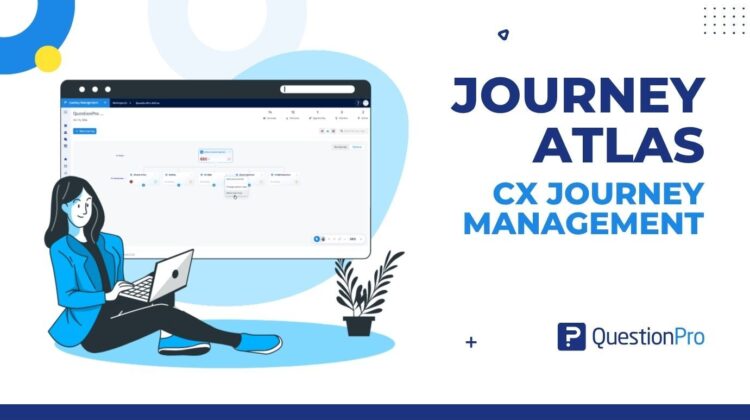
With QuestionPro Journey Atlas, organizations can bring related Journey Maps together through a hierarchy of Root Journeys, Child Journeys, and Grandchild Journeys, making it easier to organize journeys and navigate between different parts of the customer experience.
Let’s explore how this approach works and why it matters for modern customer experience management.
What Is Customer Journey Management?
Customer journey management is the practice of designing, understanding, measuring, and continuously improving the experiences customers have with an organization across different interactions and touchpoints.
Unlike traditional journey mapping, which often focuses on creating a visual representation of an experience, customer journey management takes a broader view.
It helps organizations understand not only what customers experience, but also where friction occurs, what drives dissatisfaction, and which improvements can have the greatest impact.
A customer journey management program typically involves:
- Mapping customer experiences: Documenting customer actions, expectations, emotions, and touchpoints.
- Identifying pain points: Understanding where customers encounter friction, delays, or unmet needs.
- Connecting customer insights: Bringing together feedback, research, and relevant experience metrics.
- Prioritizing improvements: Identifying opportunities to improve the customer experience.
- Tracking progress: Reviewing whether improvements deliver better customer and business outcomes.
For example, a bank might map the account opening journey, digital banking onboarding, transaction experience, and customer support journey.
Each map provides valuable insights. But to understand the complete banking experience, teams also need to understand how these journeys relate to one another.
This is why effective customer journey management requires more than creating individual journey maps. It requires a way to organize and connect them.
Learn more about QuestionPro Journey Management.
Why Do Organizations Need a Customer Journey Hierarchy?
As customer experience programs grow, so does the number of journeys organizations need to manage.
A retail company might have separate journeys for online shopping, in-store purchases, returns, loyalty programs, and customer support. A healthcare provider might manage patient registration, appointment scheduling, consultations, billing, and follow-up care.
Managing each journey individually can help teams understand specific experiences. However, it can become difficult to see the bigger picture when those maps are disconnected.
A customer journey hierarchy provides a structured way to organize related journeys at different levels of detail.
Instead of treating every journey as a separate entity, organizations can group journeys according to how they relate to a broader customer experience.
1. Connect the Bigger Picture With Individual Experiences
A high-level journey represents the broader customer experience, while smaller journeys describe specific parts of that experience.
For example, the end-to-end retail customer journey can include product discovery, purchase, post-purchase service, and customer retention.
A hierarchy makes these relationships easier to understand.
2. Organize Complex Customer Experiences
Some customer experiences involve dozens of touchpoints across multiple departments and channels.
A hierarchy helps break a complex experience into smaller, more manageable journeys without losing sight of the overall customer lifecycle.
When teams need to investigate a specific experience, they should be able to navigate to the relevant journey while understanding its relationship to the broader experience.
A structured hierarchy provides a framework for this navigation.
4. Support Cross-Functional Collaboration
Marketing, product, operations, and customer support may each manage different parts of the customer experience.
Organizing related journeys helps teams understand where their work fits into the wider customer journey.
The key idea: Customer journey hierarchy helps organizations move from a collection of individual maps toward a more structured view of the customer experience.
What Is Customer Journey Hierarchy?
A customer journey hierarchy organizes related journey maps into levels based on the scope and detail of the experience they represent.
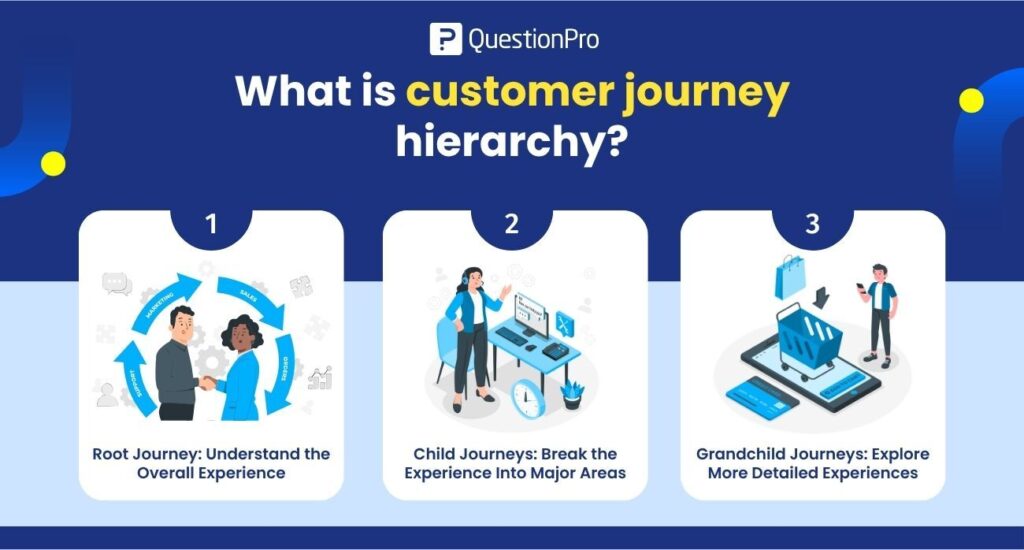
In QuestionPro Journey Atlas, this structure consists of three levels:
- Root Journey: The broader journey that provides the overall context.
- Child Journeys: Related journeys that represent specific parts of the Root Journey.
- Grandchild Journeys: More detailed journeys nested within Child Journeys.
Each level provides a different perspective on the customer experience.
Root Journey: Understand the Overall Experience
The Root Journey represents the broad customer experience you want to understand.
Examples include:
- End-to-End Retail Customer Journey
- Complete Banking Customer Journey
- Patient Healthcare Journey
- Enterprise Customer Lifecycle
- End-to-End SaaS Customer Journey
The Root Journey provides the overall context for the related journeys beneath it.
Child Journeys: Break the Experience Into Major Areas
Child Journeys represent distinct experiences within the broader journey.
For a retail organization, these might include:
- Product Discovery
- Purchase and Checkout
- Order Fulfillment
- Post-Purchase Support
- Customer Retention
Each Child Journey focuses on a specific part of the experience while remaining connected to the broader customer lifecycle.
Grandchild Journeys: Explore More Detailed Experiences
Grandchild Journeys provide another level of detail when a Child Journey contains distinct experiences that are useful to manage separately.
For example, the Purchase and Checkout journey might include:
- Cart Management
- Checkout
- Payment Processing
- Order Confirmation
This structure allows teams to organize journeys according to their needs and the complexity of their customer experiences.
Think of it this way: The Root Journey represents the overall experience, Child Journeys represent its major components, and Grandchild Journeys provide additional detail within those components.
How QuestionPro Journey Atlas Helps Connect Customer Journeys
QuestionPro Journey Atlas provides a centralized view of related Journey Maps, helping teams organize journeys through a hierarchy of Root, Child, and Grandchild Journeys.
Instead of navigating through unrelated journey maps without a clear structure, teams can use Journey Atlas to understand how journeys relate to one another and move between different parts of the customer experience.
The value lies in organizing the journey ecosystem, not simply creating more maps.
1. Bring Related Journey Maps Into a Centralized View
Journey Atlas helps users view related journeys within a structured hierarchy.
This is particularly useful for organizations that manage multiple customer journeys across different teams, channels, products, or services.
Teams can establish a clearer structure for related journeys and understand where individual experiences fit within the broader journey.
2. Establish a Clear Journey Hierarchy
With Root, Child, and Grandchild Journeys, organizations can represent customer experiences at different levels.
This helps teams distinguish between the overall customer lifecycle and the more specific experiences that make up that lifecycle.
The result is a more organized approach to managing complex journey maps.
Journey Atlas provides a way to navigate between different parts of a connected journey structure.
For example, a team reviewing the overall retail customer journey can use the hierarchy to locate a related checkout or post-purchase journey.
This helps users move from a broader view to a more focused experience when they need additional context.
4. Support Journey Management at Scale
As organizations expand their customer experience programs, their journey libraries can become increasingly complex.
A hierarchy provides a framework for organizing related journeys as the program grows.
Teams can structure journeys around customer lifecycle stages, products, services, or other meaningful experience groupings, depending on their journey management approach.
5. Connect Individual Journeys to the Broader Customer Experience
Individual journey maps are valuable because they reveal detailed customer interactions and pain points.
However, these details become more meaningful when teams can understand the wider experience in which they occur.
Journey Atlas helps establish this broader context by organizing related Journey Maps into a connected hierarchy.
Explore the Journey Atlas help documentation for more information.
Customer Journey Hierarchy in Action: A Retail Example
Let’s look at how a retailer could organize its customer journeys using Journey Atlas.
Imagine an omnichannel retailer that sells products through its website, mobile app, and physical stores.
The organization wants to understand the complete customer lifecycle, from initial discovery to repeat purchase.
Rather than treating every experience as an independent journey, the retailer can organize related journeys into a hierarchy.
Example Journey Hierarchy
Root Journey: End-to-End Retail Customer Experience
Child Journey 1: Product Discovery
- Website Search
- Product Comparison
- Product Recommendations
Child Journey 2: Purchase and Checkout
- Cart Management
- Checkout Experience
- Payment and Order Confirmation
Child Journey 3: Order Fulfillment
- Order Tracking
- Delivery Experience
- Delivery Issue Resolution
Child Journey 4: Post-Purchase Support
- Product Returns
- Refund Processing
- Customer Service
Child Journey 5: Customer Retention
- Loyalty Program Enrollment
- Rewards Redemption
- Repeat Purchase
What Does This Structure Help the Retailer Understand?
The Root Journey provides the overall context for the retail customer experience.
The Child Journeys organize major parts of the lifecycle, while the Grandchild Journeys provide additional detail where needed.
This hierarchy helps the organization:
- Understand how its individual journeys fit within the broader customer lifecycle.
- Organize related journey maps more consistently.
- Navigate to specific experiences without losing the broader context.
- Structure journey management across different teams and business functions.
For instance, if the digital team is reviewing the checkout experience, the hierarchy helps place that journey within the larger purchase journey and the end-to-end retail experience.
Important distinction: A journey hierarchy organizes related experiences. Determining whether checkout friction is driving customer abandonment, or whether delivery issues are reducing loyalty, requires relevant customer feedback, behavioral data, and experience metrics.
The hierarchy provides the structure; customer data and analysis help teams determine what needs to improve.
Journey Mapping vs. Customer Journey Management: What’s the Difference?
Journey mapping and journey management are closely related, but they serve different purposes.
| Journey Mapping | Customer Journey Management |
| Visualizes a customer experience | Supports the ongoing management and improvement of customer experiences |
| Focuses on stages, touchpoints, actions, and emotions | Connects journey design with insights, measurement, and improvement |
| Helps teams identify pain points within a journey | Helps teams prioritize and track experience improvements |
| Often focuses on an individual journey map | Can encompass multiple related journeys and the broader customer lifecycle |
| Produces a visual representation of an experience | Supports a continuous approach to understanding and improving experiences |
A customer journey map is an important building block of customer journey management.
As programs mature, organizations may also need capabilities for organizing multiple maps, connecting insights to relevant touchpoints, measuring experience performance, and tracking improvement initiatives.
QuestionPro Journey Management supports a broader approach to journey design and ongoing experience improvement, while Journey Atlas specifically addresses the organization and navigation of related Journey Maps.
Learn more about customer journey mapping software from QuestionPro.
Best Practices for Building an Effective Customer Journey Hierarchy
A hierarchy is only useful when it reflects meaningful relationships between customer experiences.
Here are five practices to consider when organizing journeys.
1. Start With a Clearly Defined Root Journey
Choose a Root Journey that represents a meaningful customer experience, such as the end-to-end customer lifecycle, a complete service experience, or a product lifecycle.
Avoid creating a Root Journey so broad that it becomes difficult to define its scope.
2. Group Child Journeys by Meaningful Relationships
Child Journeys should represent recognizable parts of the broader experience.
Depending on your organization, these might relate to lifecycle stages, customer goals, products, services, or major processes.
Choose a grouping that makes sense to the people who will use and maintain the journeys.
3. Use Grandchild Journeys When Additional Detail Is Valuable
Not every Child Journey needs Grandchild Journeys.
Introduce another level only when a specific experience is complex enough to benefit from further organization.
The goal is clarity, not hierarchy for its own sake.
4. Establish Consistent Naming Conventions
Use clear, descriptive names for Root, Child, and Grandchild Journeys.
For example, “End-to-End Retail Customer Journey,” “Purchase and Checkout,” and “Payment Processing” communicate their scope more clearly than generic names such as “Journey 1” or “Process A.”
Consistent naming helps teams understand the hierarchy and navigate it more easily.
5. Connect Journey Organization With Customer Insights
A well-organized hierarchy establishes context, but organizations still need evidence to understand customer needs and prioritize improvements.
Where available, connect journey management practices with customer feedback, research findings, experience metrics, and improvement initiatives.
This helps teams move beyond organizing journeys toward making informed customer experience decisions.
Who Can Benefit From Journey Atlas?
Journey Atlas can be valuable for teams that manage multiple related customer journey maps and need a structured way to organize them.
CX Managers
Organize journeys across the customer lifecycle and maintain a broader view of related experiences.
Journey Managers and Service Designers
Structure complex journeys into manageable levels and navigate between related maps.
Product Managers
Organize product-specific experiences within a broader customer lifecycle.
UX and Research Teams
Manage related experience maps and maintain context when investigating individual interactions.
Enterprise CX Teams
Establish a clearer structure for journey maps across products, channels, and business functions.
For organizations with a growing journey mapping program, Journey Atlas offers a way to organize related journeys rather than treating every map as a standalone artifact.
Frequently Asked Questions About Customer Journey Management and Journey Hierarchy
What is customer journey management?
Customer journey management is the practice of designing, understanding, measuring, and continuously improving customer experiences across interactions and touchpoints. It combines journey mapping with insights and improvement activities to help organizations deliver better experiences.
What is a customer journey hierarchy?
A customer journey hierarchy is a structured way to organize related journey maps at different levels. In Journey Atlas, these levels are Root Journeys, Child Journeys, and Grandchild Journeys, allowing teams to organize broader experiences and their more detailed components.
What is Journey Atlas in QuestionPro?
Journey Atlas is a capability within QuestionPro Journey Management that provides a centralized view of related Journey Maps. It helps users organize journeys into a hierarchy and navigate between different parts of the customer experience.
What is the difference between a Root Journey and a Child Journey?
A Root Journey represents the broader customer experience. A Child Journey represents a related, more specific experience within that broader journey. A Child Journey can have Grandchild Journeys when additional levels of organization are useful.
Why is journey hierarchy important?
Journey hierarchy helps organizations structure complex customer experiences, establish relationships between journey maps, and navigate between broader and more specific experiences. It is particularly useful when multiple teams manage different parts of the same customer lifecycle.
How does Journey Atlas help with complex customer experiences?
Journey Atlas provides a centralized view of related journeys and organizes them through Root, Child, and Grandchild Journeys. This gives teams a structured way to manage related maps and navigate across different parts of the customer experience.
Is customer journey mapping the same as customer journey management?
No. Customer journey mapping focuses on visualizing a particular customer experience. Customer journey management takes a broader approach by supporting the organization, measurement, and continuous improvement of customer experiences. Journey mapping is one component of journey management.
Conclusion: Build a More Connected Approach to Customer Journey Management
Customer experiences rarely happen in isolation.
A customer’s purchase may be influenced by product discovery, website usability, payment experiences, delivery performance, and post-purchase support. Each experience matters, but understanding the relationships between them is equally important.
As journey mapping programs grow, organizations need a structured way to organize related maps and navigate between different levels of the customer experience.
Customer journey hierarchy provides that structure.
With QuestionPro Journey Atlas, teams can organize related Journey Maps into Root, Child, and Grandchild Journeys, creating a centralized view of how individual journeys fit together.
For organizations looking to bring more structure to customer journey management, Journey Atlas offers a practical starting point for moving beyond fragmented journey maps toward a connected journey ecosystem.
Ready to organize your customer journeys?
Explore QuestionPro Journey Atlas and learn how to organize and navigate related Journey Maps.