

• Skip to main content
  • Skip to primary sidebar
  • Skip to footer
QuestionPro

QuestionPro

questionpro logo
  • Products
    survey software iconSurvey softwareEasy to use and accessible for everyone. Design, send and analyze online surveys.research edition iconResearch SuiteA suite of enterprise-grade research tools for market research professionals.CX iconCustomer ExperienceExperiences change the world. Deliver the best with our CX management software.WF iconEmployee ExperienceCreate the best employee experience and act on real-time data from end to end.
  • Solutions
    IndustriesGamingAutomotiveSports and eventsEducationGovernment
    Travel & HospitalityFinancial ServicesHealthcareCannabisTechnology
    Use CaseAskWhyCommunitiesAudienceContactless surveysMobile
    LivePollsMember ExperienceGDPRPositive People Science360 Feedback Surveys
  • Resources
    BlogeBooksSurvey TemplatesCase StudiesTrainingHelp center
  • Features
  • Pricing
Language
  • English
  • Español (Spanish)
  • Português (Portuguese (Brazil))
  • Nederlands (Dutch)
  • العربية (Arabic)
  • Français (French)
  • Italiano (Italian)
  • 日本語 (Japanese)
  • Türkçe (Turkish)
  • Svenska (Swedish)
  • Hebrew IL (Hebrew)
  • ไทย (Thai)
  • Deutsch (German)
  • Portuguese de Portugal (Portuguese (Portugal))
  • Español / España (Spanish / Spain)
Call Us
+1 800 531 0228 +1 (647) 956-1242 +55 9448 6154 +49 030 9173 9255 +44 01344 921310 +81-3-6869-1954 +61 (02) 6190 6592 +971 529 852 540
Log In Log In
SIGN UP FREE

Home Audience

AI Incidence Rate: Estimate Before You Launch

ai-incidence-rate

How IR by AI helps you plan Specialized Sample feasibility

Hook / Story

You are on the Specialized Sample setup screen. Country, responses, completion date, and survey length are done. Then the Incidence rate field is waiting, and the number you type will shape feasibility and cost.

You do not have last wave’s field IR for this screener. The audience is narrower than a general consumer study. So you type a familiar number, tell yourself it is close enough, and move on.

That is the moment IR by AI is built for. Not after launch. Not after a requote. At the point where a guessed incidence rate is about to become the plan.

Customer Pain Point

Survey incidence rate is one of the smallest fields in setup, and one of the easiest to get wrong.

Teams often enter an assumed IR because they need a number to complete feasibility. For a broad audience, a rough value may be close enough. For a niche or brand-specific target, it often is not.

The friction is practical:

  • The screener asks for a specific brand, condition, or behavior, while the panel can only target a broader group.
  • Qualifications may still be unfinished, so the typed IR is based on the survey in someone’s head rather than the criteria on the form.
  • A guessed IR can make cost and timeline look more comfortable than the study can support.

Live field IR is a different problem, handled later. The immediate problem is the planning number.

Behind the Scenes — Why We Built This

Research teams kept describing the same sequence: they knew the survey, they knew the audience they wanted, and they still had to invent an incidence rate to proceed.

Customer feedback pointed to a planning gap, not a fieldwork gap. QuestionPro already had IR Management for on-field incidence rate after launch. What was missing was a way to read the survey and the applied targeting before the project went live.

The product decision was to put that check next to the Incidence rate field, keep it optional, and leave the final number with the user. The platform can suggest an AI incidence rate. The researcher still chooses Apply AI estimated IR or Use my own IR.

Introducing the Feature

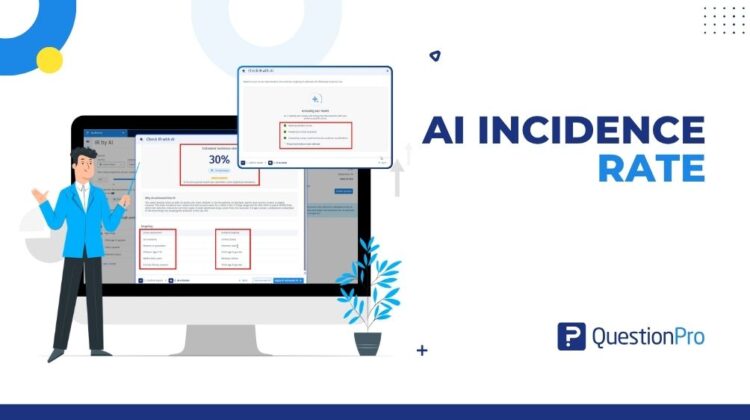
IR by AI is a QuestionPro Audience feature that predicts your survey incidence rate before you launch a Specialized Sample project.

Click Check with AI. Audience reads the selected survey and the audience criteria you have applied, then returns a suggested incidence rate with the reasoning behind it.

It is a planning tool. It does not replace IR Management, simulate quotas, redesign the survey, or add qualifications for you. It gives you a data-backed starting number, then lets you apply it or keep your own.

How It Works

IR by AI sits on the Specialized Sample create and edit form, next to Incidence rate.

1. Create or edit a Specialized Sample project and select the survey.

2. Set country, responses, completion date, and survey length as usual.

3. Add audience criteria if you already know them. You can also estimate without criteria.

4. Click Check with AI.

5. Confirm the survey in the Check IR with AI window.

6. For each country, confirm whether criteria have been added, or continue without criteria.

7. Review the suggested IR and the reasoning, then apply it or keep your own value.

The estimate looks at screener questions and qualifying answers, including terminate or skip logic; applied panel qualifications; and historical panel profiling data when it is available. If you continue without criteria, the estimate is based on the survey requirements only.

On multi-country projects, you confirm criteria per country and still receive one shared incidence rate. The Incidence rate field accepts 10% to 99%. The field stays editable after you apply an estimate.

Real Use Case

A research team is preparing a Specialized Sample project for people who own one specific product brand. The survey already terminates respondents who do not own that brand. The panel targeting that can actually be applied is broader than the screener.

Without IR by AI, the team would type a familiar incidence rate and discover the mismatch in field. With Check with AI, they can compare the survey requirement with available qualifications, review the reasoning, and decide whether to apply the suggested IR, keep their own number, or adjust targeting before launch.

This is a planning scenario, not a promised field result. Actual on-field IR can still change after launch.

What’s Next

IR by AI is the planning side of incidence rate in QuestionPro Audience. IR Management remains the live-field side.

The current release keeps the researcher in control: the AI suggests, you decide. The product direction described in the PRD is to close more of the gap between screeners and qualifications over time, including later help with qualification selection. Those later items are not a substitute for the workflow available today.

If you already have a number you trust, keep entering it manually. If you want a starting point based on the survey you actually attached, Check with AI is there for that.
Create memorable experiences based on real-time data, insights and advanced analysis. Request Demo

SHARE THIS ARTICLE:

About the author
Raj Purohit
PDM Audience & Synthetic data
View all posts by Raj Purohit

Primary Sidebar

Unlock the Power of Research with QuestionPro Audience

Gain insights from more than 22 million high-quality respondents around the globe

Get a Free Quote Now!

RELATED ARTICLES

HubSpot - QuestionPro Integration

Top 10 Employee Engagement Survey Tools

May 07,2024

HubSpot - QuestionPro Integration

Exploring Top 12 Net Promoter Score Tools To Boost Loyalty

Dec 04,2023

HubSpot - QuestionPro Integration

Using Live Polls Inside Presentations: A Guide for Interactive Sessions

Sep 11,2026

BROWSE BY CATEGORY

Footer

MORE LIKE THIS

ai-incidence-rate

AI Incidence Rate: Estimate Before You Launch

Sep 13, 2026

Student Belonging Surveys: Measuring Campus Connection

Sep 11, 2026

Word Clouds in Live Presentations: Turning Opinions Into Visual Insights

Sep 11, 2026

Community Impact Surveys: Proving Nonprofit Outcomes

Sep 11, 2026

Other categories

questionpro-logo-nw
Help center Live Chat SIGN UP FREE
  • Sample questions
  • Sample reports
  • Survey logic
  • Branding
  • Integrations
  • Professional services
  • Security
  • Survey Software
  • Customer Experience
  • Workforce
  • Communities
  • Audience
  • Polls Explore the QuestionPro Poll Software - The World's leading Online Poll Maker & Creator. Create online polls, distribute them using email and multiple other options and start analyzing poll results.
  • Research Edition
  • LivePolls
  • InsightsHub
  • Blog
  • Articles
  • eBooks
  • Survey Templates
  • Case Studies
  • Training
  • Webinars
  • All Plans
  • Nonprofit
  • Academic
  • Qualtrics Alternative Explore the list of features that QuestionPro has compared to Qualtrics and learn how you can get more, for less.
  • SurveyMonkey Alternative
  • VisionCritical Alternative
  • Medallia Alternative
  • Likert Scale Complete Likert Scale Questions, Examples and Surveys for 5, 7 and 9 point scales. Learn everything about Likert Scale with corresponding example for each question and survey demonstrations.
  • Conjoint Analysis
  • Net Promoter Score (NPS) Learn everything about Net Promoter Score (NPS) and the Net Promoter Question. Get a clear view on the universal Net Promoter Score Formula, how to undertake Net Promoter Score Calculation followed by a simple Net Promoter Score Example.
  • Offline Surveys
  • Customer Satisfaction Surveys
  • Employee Survey Software Employee survey software & tool to create, send and analyze employee surveys. Get real-time analysis for employee satisfaction, engagement, work culture and map your employee experience from onboarding to exit!
  • Market Research Survey Software Real-time, automated and advanced market research survey software & tool to create surveys, collect data and analyze results for actionable market insights.
  • GDPR & EU Compliance
  • Employee Experience
  • Customer Journey
  • Synthetic Data
  • About us
  • Executive Team
  • In the news
  • Testimonials
  • Advisory Board
  • Careers
  • Brand
  • Media Kit
  • Contact Us

QuestionPro in your language

  • English
  • Español (Spanish)
  • Português (Portuguese (Brazil))
  • Nederlands (Dutch)
  • العربية (Arabic)
  • Français (French)
  • Italiano (Italian)
  • 日本語 (Japanese)
  • Türkçe (Turkish)
  • Svenska (Swedish)
  • Hebrew IL (Hebrew)
  • ไทย (Thai)
  • Deutsch (German)
  • Portuguese de Portugal (Portuguese (Portugal))
  • Español / España (Spanish / Spain)

Awards & certificates

  • survey-leader-asia-leader-2023
  • survey-leader-asiapacific-leader-2023
  • survey-leader-enterprise-leader-2023
  • survey-leader-europe-leader-2023
  • survey-leader-latinamerica-leader-2023
  • survey-leader-leader-2023
  • survey-leader-middleeast-leader-2023
  • survey-leader-mid-market-leader-2023
  • survey-leader-small-business-leader-2023
  • survey-leader-unitedkingdom-leader-2023
  • survey-momentumleader-leader-2023
  • bbb-acredited
The Experience Journal

Find innovative ideas about Experience Management from the experts

  • © 2022 QuestionPro Survey Software | +1 (800) 531 0228
  • Sitemap
  • Privacy Statement
  • Terms of Use