• Skip to main content
  • Skip to primary sidebar
  • Skip to footer
QuestionPro

QuestionPro

questionpro logo
  • Products
    survey software iconSurvey softwareEasy to use and accessible for everyone. Design, send and analyze online surveys.research edition iconResearch SuiteA suite of enterprise-grade research tools for market research professionals.CX iconCustomer ExperienceExperiences change the world. Deliver the best with our CX management software.WF iconEmployee ExperienceCreate the best employee experience and act on real-time data from end to end.
  • Solutions
    IndustriesGamingAutomotiveSports and eventsEducationGovernment
    Travel & HospitalityFinancial ServicesHealthcareCannabisTechnology
    Use CaseAskWhyCommunitiesAudienceContactless surveysMobile
    LivePollsMember ExperienceGDPRPositive People Science360 Feedback Surveys
  • Resources
    BlogeBooksSurvey TemplatesCase StudiesTrainingHelp center
  • Features
  • Pricing
Language
  • English
  • Español (Spanish)
  • Português (Portuguese (Brazil))
  • Nederlands (Dutch)
  • العربية (Arabic)
  • Français (French)
  • Italiano (Italian)
  • 日本語 (Japanese)
  • Türkçe (Turkish)
  • Svenska (Swedish)
  • Hebrew IL (Hebrew)
  • ไทย (Thai)
  • Deutsch (German)
  • Portuguese de Portugal (Portuguese (Portugal))
  • Español / España (Spanish / Spain)
Call Us
+1 800 531 0228 +1 (647) 956-1242 +55 9448 6154 +49 030 9173 9255 +44 01344 921310 +81-3-6869-1954 +61 (02) 6190 6592 +971 529 852 540
Log In Log In
SIGN UP FREE

Home Market Research

Managing Target Sample Ratios in Offline Field Research: On-Device Quota Control

offline-quota-control

The Bottleneck in Off-Grid Fieldwork

Field research frequently takes place in environments where cellular and Wi-Fi connectivity is limited or unavailable, from rural development projects and infrastructure sites to crowded event venues and transit centers. In these disconnected settings, implementing offline quota control ensures field teams capture balanced sample sizes without relying on live network access.

While offline mobile survey tools enable uninterrupted data collection, managing sample targets across field teams can still require manual coordination. Without quota visibility and enforcement on the mobile device, field agents may not know when a target segment has reached its required number of responses.

On-Device Quota Enforcement

QuestionPro brings quota monitoring and enforcement into the Offline App. Field teams can use supported quota configurations during offline data collection without requiring an active internet connection.

Quota configurations are managed centrally and synchronized to field devices. During offline collection, the app uses the latest quota information available on the device to track response progress and apply configured quota actions.

Core Capabilities

  • Local Quota Tracking: The Offline App tracks supported survey and question-level quotas during offline data collection.
  • Question-Level Quota Actions: When an individual answer option reaches its configured quota, the app can hide the option, terminate the interview, or redirect the respondent according to the configured action.
  • Quota Visibility: Field agents can view quota progress from the survey list and see a question-level breakdown through the Quota Overview.
  • Central Synchronization: When devices reconnect, collected responses are synchronized and quota counts and status are updated on the app.
  • Offline Operation: Supported quota rules continue to work while the device is offline.

Workflow Breakdown
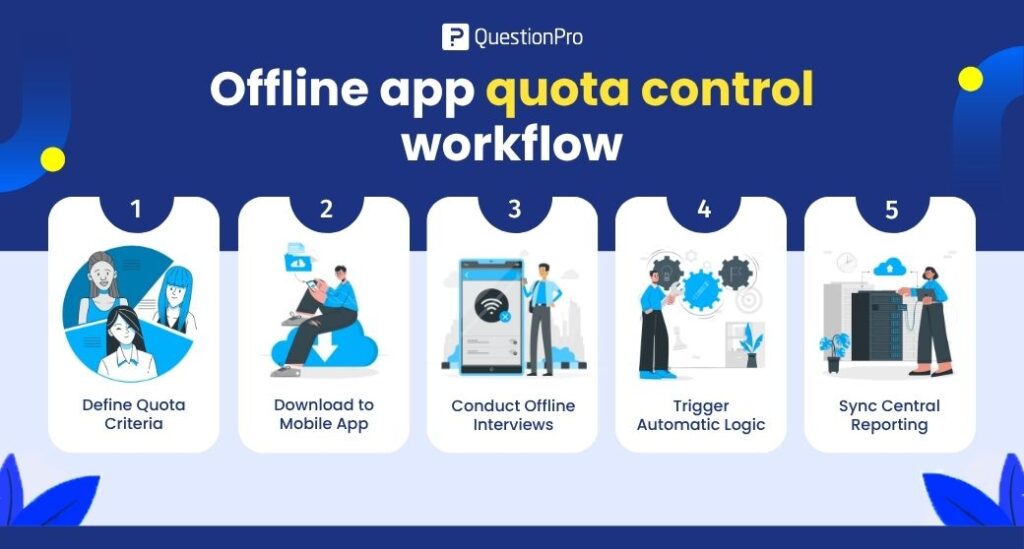
offline-app-quota-control-workflow
  1. Define Quota Criteria.
    Configure the supported quota types and actions in QuestionPro’s Quota Management
  1. Download to the Mobile App.
    Synchronize the survey and quota configuration to the Offline App before starting fieldwork.
  1. Conduct Offline Interviews.
    Collect responses without an active internet connection. The app tracks quota progress using the latest quota information available on the device.
  1. Trigger Automatic Logic.
    When a question-level quota reaches its limit on the device, the configured action is applied, such as hiding the answer option, terminating the interview, or redirecting the respondent.
  1. Sync Central Reporting.
    Reconnect the device to synchronize collected responses. Quota counts and status are updated based on the synchronized response data.

Multi-Device Offline Fieldwork

When multiple devices are collecting responses offline, each device operates using its latest synchronized quota information. Devices do not have a shared real-time quota counter while disconnected.

For example, one device may synchronize and reach a quota while another device remains offline and continues collecting based on its local quota state. When that device synchronizes, its responses are retained and the latest quota status is updated.

For multi-device studies, plan regular synchronization windows when connectivity is available so field teams have more current quota information.

Best Practices

  • Synchronize all devices with the latest survey and quota configuration before fieldwork.
  • Use the Quota Overview to monitor sample progress.
  • Establish regular synchronization windows for multi-device fieldwork.
  • Set expectations that disconnected devices do not share real-time quota counts.
  • Use Question-Based Quotas when field agents need automatic actions for individual answer options.

Get Started Today

Bring structured sample management to your off-grid field operations.

To start using Quota Control on your devices, contact your account manager or create your own offline survey

Create memorable experiences based on real-time data, insights and advanced analysis. Request Demo

SHARE THIS ARTICLE:

About the author
Amulya Mishra
Product Manager, InsightsHub & Livepolls
View all posts by Amulya Mishra

Primary Sidebar

Research what's on your mind. Find out what's on theirs!

A suite of tools to leverage research and transform insights.

Discover our insight platform

RELATED ARTICLES

Predictive NPS and CSAT: How to Forecast Customer Loyalty Before It Slips

May 28,2026

HubSpot - QuestionPro Integration

Teacher Feedback Surveys: Improving Professional Development

Sep 11,2026

HubSpot - QuestionPro Integration

Enhancing Student Engagement: A Dive into the QuestionPro Survey Software Experience

Dec 27,2023

BROWSE BY CATEGORY

Footer

MORE LIKE THIS

offline-quota-control

Managing Target Sample Ratios in Offline Field Research: On-Device Quota Control

Oct 8, 2026

respondent-overlap-across-research-projects

QuestionPro Audience gives every tracker, benchmark, and campaign study a clean slate with respondent exclusions

Oct 6, 2026

Interview-Chat

Get the why behind every answer: introducing Interview (Chat)

Oct 6, 2026

questionpro-communities-whatsapp-integration

QuestionPro Communities adds WhatsApp integration to win back quiet panelists

Oct 5, 2026

Other categories

questionpro-logo-nw
Help center Live Chat SIGN UP FREE
  • Sample questions
  • Sample reports
  • Survey logic
  • Branding
  • Integrations
  • Professional services
  • Security
  • Survey Software
  • Customer Experience
  • Workforce
  • Communities
  • Audience
  • Polls Explore the QuestionPro Poll Software - The World's leading Online Poll Maker & Creator. Create online polls, distribute them using email and multiple other options and start analyzing poll results.
  • Research Edition
  • LivePolls
  • InsightsHub
  • Blog
  • Articles
  • eBooks
  • Survey Templates
  • Case Studies
  • Training
  • Webinars
  • All Plans
  • Nonprofit
  • Academic
  • Qualtrics Alternative Explore the list of features that QuestionPro has compared to Qualtrics and learn how you can get more, for less.
  • SurveyMonkey Alternative
  • VisionCritical Alternative
  • Medallia Alternative
  • Likert Scale Complete Likert Scale Questions, Examples and Surveys for 5, 7 and 9 point scales. Learn everything about Likert Scale with corresponding example for each question and survey demonstrations.
  • Conjoint Analysis
  • Net Promoter Score (NPS) Learn everything about Net Promoter Score (NPS) and the Net Promoter Question. Get a clear view on the universal Net Promoter Score Formula, how to undertake Net Promoter Score Calculation followed by a simple Net Promoter Score Example.
  • Offline Surveys
  • Customer Satisfaction Surveys
  • Employee Survey Software Employee survey software & tool to create, send and analyze employee surveys. Get real-time analysis for employee satisfaction, engagement, work culture and map your employee experience from onboarding to exit!
  • Market Research Survey Software Real-time, automated and advanced market research survey software & tool to create surveys, collect data and analyze results for actionable market insights.
  • GDPR & EU Compliance
  • Employee Experience
  • Customer Journey
  • Synthetic Data
  • About us
  • Executive Team
  • In the news
  • Testimonials
  • Advisory Board
  • Careers
  • Brand
  • Media Kit
  • Contact Us

QuestionPro in your language

  • English
  • Español (Spanish)
  • Português (Portuguese (Brazil))
  • Nederlands (Dutch)
  • العربية (Arabic)
  • Français (French)
  • Italiano (Italian)
  • 日本語 (Japanese)
  • Türkçe (Turkish)
  • Svenska (Swedish)
  • Hebrew IL (Hebrew)
  • ไทย (Thai)
  • Deutsch (German)
  • Portuguese de Portugal (Portuguese (Portugal))
  • Español / España (Spanish / Spain)

Awards & certificates

  • survey-leader-asia-leader-2023
  • survey-leader-asiapacific-leader-2023
  • survey-leader-enterprise-leader-2023
  • survey-leader-europe-leader-2023
  • survey-leader-latinamerica-leader-2023
  • survey-leader-leader-2023
  • survey-leader-middleeast-leader-2023
  • survey-leader-mid-market-leader-2023
  • survey-leader-small-business-leader-2023
  • survey-leader-unitedkingdom-leader-2023
  • survey-momentumleader-leader-2023
  • bbb-acredited
The Experience Journal

Find innovative ideas about Experience Management from the experts

  • © 2022 QuestionPro Survey Software | +1 (800) 531 0228
  • Sitemap
  • Privacy Statement
  • Terms of Use