
Age gating is a checkpoint that asks visitors to state their age before a site, app, or survey lets them in. A pop-up requests a date of birth, and the answer decides what happens next. It is the most common age check online, and the easiest one to fool.
The stakes keep rising. US courts have upheld age checks for adult sites, UK regulators call tick-box gates ineffective, and the Federal Trade Commission (FTC) still expects any age question to be asked fairly.
In this blog, we’ll cover how age gating works, where it fails, which rules apply, and how researchers use it in surveys.
What is age gating?
Age gating is the practice of asking a visitor to declare their age or birth date before granting access to restricted content, products, or services. The site takes the answer at face value and does not check it against a record. That self-reported step separates age gating from stronger checks.
Organizations use an age gate wherever a minimum age applies. Common examples include:
- Alcohol
- Tobacco, vaping, and e-cigarettes
- Cannabis
- Gambling
- Firearms
- Adult content
- Mature-rated video games
Research teams use age gates too. They keep minors out of studies meant for adults.
How does age gating work?
Age gating works as a short decision step that runs before restricted content loads. The flow is nearly identical across industries.
- The visitor lands on a page or opens a survey link.
- A prompt asks for a birth date, an age, or a yes or no confirmation.
- The system compares the answer with the minimum age.
- Visitors who meet the minimum continue.
- Visitors who fall short see a neutral exit message or land on a different page.
Many gates also set a cookie, which is a small file the browser stores. The cookie stops a blocked visitor from retrying with a different date. FTC staff recommend a cookie or a similar technical step for this reason.
What are the main types of age gates?
Age gates fall into four common types, and each trades ease of use against reliability. The right choice depends on how much risk the content carries.
Click-through confirmation
The visitor clicks “I am over 18” or ticks a box. This adds almost no friction and almost no protection.
- Best for: low-risk mature themes
- Weakness: anyone can click yes
Date-of-birth entry
The visitor types a birth date, and the system calculates age. This gives precise answers near cut-off birthdays. It still depends on honesty, because any valid date works.
- Best for: alcohol brand sites, mature games, and surveys
- Weakness: minors can type an older year
Hard gates and soft gates
A hard gate blocks the whole site until the check passes. A soft gate lets visitors browse general pages and blocks only the restricted areas.
- Best for hard gates: regulated products
- Best for soft gates: retailers with one age-restricted category
Location-based gates
The minimum age changes by country. The system infers location from the visitor’s IP address, which is the numeric address a device uses online. A brand can apply 21 in one market and 18 in another.
- Best for: global audiences
- Weakness: a virtual private network (VPN) can mask location
What is the difference between age gating, age verification, and age estimation?
Age gating relies on what a visitor says. Age verification checks that claim against evidence, and age estimation infers age from signals such as a selfie. The table shows how the methods compare.
| Method | How it works | Evidence needed | Reliability | Typical use |
|---|---|---|---|---|
| Age gating | Visitor states age or birth date | None | Low | Surveys, brand sites, low-risk mature content |
| Age verification | Matches the claim to an ID, bank, or database record | Document or trusted record | High | Gambling, adult sites in states with verification laws |
| Age estimation | Software estimates age from a face scan or other signals | Image or behavioral data | Varies by tool | Platforms that want low-friction checks |
| Age assurance | Umbrella term covering verification, estimation, or both | Varies | Varies | Regulatory language, especially in the UK |
Ofcom, the UK communications regulator, lists open banking, photo ID matching, facial age estimation, mobile network operator checks, credit card checks, digital identity services, and email-based age estimation as methods capable of high effectiveness. It also confirmed that self-declaration is not highly effective.
Why do businesses and researchers use age gating?
Age gating gives organizations a fast, low-cost way to show they tried to keep minors out. Five benefits explain its popularity.
- Reasonable effort on record: Under guidance for the Children’s Online Privacy Protection Act (COPPA), an operator that screens age in a neutral way may rely on the age users enter, even when the entry is wrong.
- Low friction: Typing a birth date takes seconds, so visitors stay in the flow. Document uploads ask far more of them.
- Better audience targeting: Brands keep age-restricted offers in front of eligible adults.
- Research integrity: Studies built for adults need a clean way to exclude minors. That supports ethics in research standards.
- Visible responsibility: A clear gate tells visitors and partners that the organization takes age limits seriously.
Where does age gating fall short?
Age gating falls short mainly because it trusts the visitor. A minor can type an older birth year in seconds, and the system cannot tell. Four weaknesses follow from that design.
- Easy to bypass: In March 2026, Ofcom and the Information Commissioner’s Office (ICO), the UK data protection regulator, restated that self-declaration alone is not sufficient to prevent underage access.
- Added friction: Every extra screen gives some visitors a reason to leave before they buy or sign up.
- Privacy exposure: Collecting birth dates you do not need can erode customer trust if you store them carelessly.
- Location gaps: Gates that read IP addresses can misjudge visitors who use a VPN.
What do US laws say about age gating?
No single US law requires every website to age-gate, but several rules shape how you build one. Child privacy law governs the data you collect. State laws govern access to adult content. This section is general information, not legal advice, so confirm the details with counsel.
COPPA and age screening
COPPA is a federal law that limits how operators collect personal information from children under 13. It protects data, not content. The FTC states that COPPA will not keep children away from inappropriate material such as pornography.
COPPA does not require general-audience sites to ask for age. If you do ask, the FTC expects a neutral age screen. That means:
- Let users enter their month and year of birth freely.
- Do not default the field to age 13 or older.
- Do not hint that under-13 users will lose access.
- Block back-button retries with a cookie.
The FTC amended the COPPA Rule on April 22, 2025. Courts can impose civil penalties of up to $53,088 per violation.
State laws for adult content
On June 27, 2025, the US Supreme Court decided Free Speech Coalition v. Paxton. The Congressional Research Service (CRS) summarizes the ruling this way:
- Decision date: June 27, 2025.
- Holding: The Court upheld a Texas law requiring certain websites with sexually explicit content to verify users’ ages.
- Reach: More than 20 states have passed laws requiring age verification for such content.
These laws target sites with substantial sexual content, so most brands and research teams fall outside them. They still show the direction of travel. Lawmakers expect real verification where harm to minors is the concern, which goes beyond asking visitors to state their age.
How does age gating work in QuestionPro surveys?
QuestionPro’s age verification setting is an age gate built into the survey itself. Respondents enter a date of birth, the platform calculates their age, and the survey starts only if they clear your threshold. The age verification help guide notes that the date of birth is not stored, which keeps the check light on data.
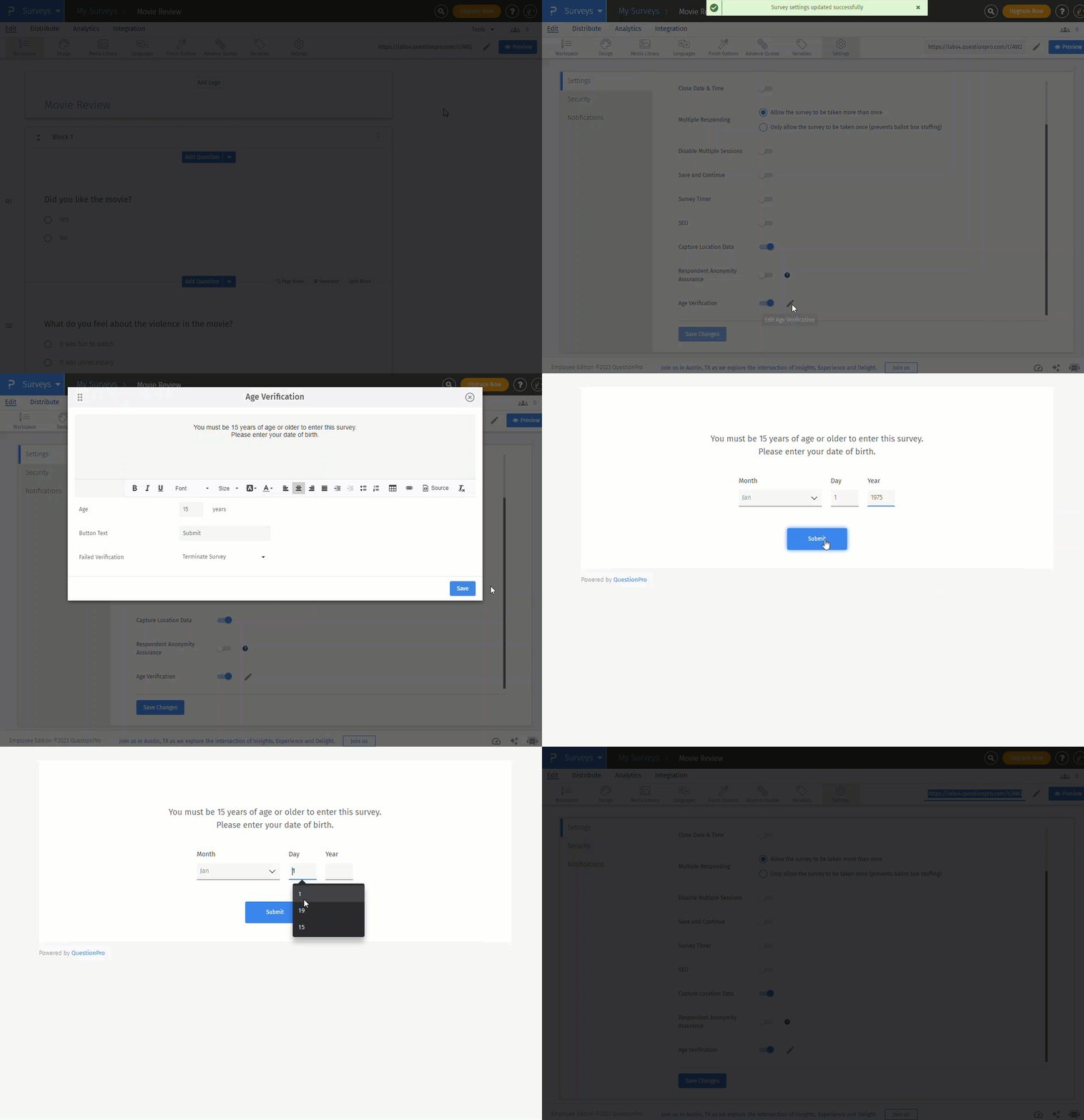
Set the minimum age and the failure action
Turn the feature on under Survey, Edit, Settings, then enable the Age Verification toggle. Click the pencil icon to adjust the details:
- Minimum age: The default is 18. You can set any value from 3 to 30.
- Button text: You can rename the button respondents click.
- Failed verification: The survey terminates by default. You can redirect respondents to a web page instead.
- Defaults: You can enable the setting for all new surveys under My Account, then Survey Setting. You can also enable it for the whole organization under Organization, then Settings. Existing surveys need the toggle switched on by hand.
- Languages: Respondents choose a language first, then enter their date of birth.
Pair the age screen with a screening question block when you need other eligibility rules, such as product usage.
Use geolocation logic for country-specific thresholds
Geolocation logic lets one survey apply different minimum ages by country. You can add up to five logic statements, and each statement can cover several countries. QuestionPro reads location from the respondent’s IP address. Respondents from locations you did not list face a minimum of 18, according to the help guide.
The guide’s example sets a 21-year minimum for Spain, Portugal, and France and a 25-year minimum for India. This setup suits multi-market age-gated surveys where legal ages differ.
What QuestionPro age gating does not do
The setting works as an age gate, not an ID check. Plan around three limits:
- It does not confirm identity or check documents.
- IP-based location can shift when a respondent uses a VPN.
- A gate alone does not satisfy COPPA.
QuestionPro positions age verification as a COPPA aid. Compliance still depends on your privacy notice, parental consent for under-13 data, and data handling. The COPPA-compliant survey tools add parental consent controls and limits on personal data collection. The age verification feature ships with the Research Edition license, part of QuestionPro’s market research software.
How do you design an age gate that holds up?
A sound age gate asks fairly, collects little, and fails safely. Follow these six steps.
- Place the age prompt before any request for personal information.
- Keep the prompt neutral. Let users enter any age, and do not default the field to an eligible year.
- Avoid hints. Do not name the age that triggers a block, because that invites false entries.
- Block retries. Set a cookie so back-button attempts fail.
- Use a plain eligibility message. Say the visitor is not eligible rather than naming the cutoff.
- Delete what you do not need. If a visitor fails, do not keep their birth date or contact details.
The wording matters. A neutral prompt reads, “Enter your month and year of birth.” A leading prompt reads, “You must be 18 or older to enter.” The second version teaches children what to type.
What failure looks like
Enforcement cases show what goes wrong when a gate asks but does not act. The FTC fined Iconix Brand Group $250,000 after its apparel sites collected personal information from about 1,000 users who said they were under 13. Separately, the FTC concluded Yelp had actual knowledge of child users because its app asked for a birth date but did not block under-13 sign-ups.
The lesson is the same in both cases. Asking for age creates a duty to act on the answer.
How do you choose between age gating and stronger checks?
Choose the lightest check that fits the risk of your content, the law that applies, and the data you can protect. Start with the legal trigger, then match the method to the scenario.
| Scenario | Recommended approach | Why |
|---|---|---|
| Adult-content site in a state with a verification law | Age verification or age estimation | The law requires verification, not self-declaration |
| Alcohol brand marketing site | Date-of-birth gate | Low transaction risk and high reach |
| Checkout for age-restricted goods | Age gate plus verification at purchase or delivery | A stated age does not prove eligibility at the point of sale |
| General-audience app with a minimum age of 13 | Neutral month-and-year screen plus a parental consent path | COPPA expects neutral screening and consent for under-13 data |
| Survey on an age-restricted product | Survey-level age gate plus a screener | Excludes minors cheaply and keeps data clean |
If a regulator names a verification standard, follow it. If none applies, document why a gate is enough.
How do you measure whether an age gate works?
An age gate works when it blocks ineligible visitors without driving away eligible ones. Track four numbers, and set a review trigger for each before launch.
- Gate completion rate: Visitors who finish the prompt divided by visitors who see it. Review the gate if the rate drops more than 5 percentage points below your baseline.
- Fail rate: Visitors who miss the minimum divided by visitors who finish the prompt. A sudden jump or fall signals a design or traffic change.
- Retry success rate: Blocked visitors who later pass in the same session. Aim for zero, and fix your cookie logic if it rises.
- Age consistency (surveys): Check that no respondent who passed the gate reports a lower age in a later demographic data question. Treat a mismatch above 2 percent as a signal to review.
These triggers are practical starting points, not regulatory standards. Adjust them to your own baseline.
Treat age gating as a first checkpoint, not a guarantee
Age gating earns its place as a quick, low-friction first checkpoint. It does not prove anyone’s age, and regulators on both sides of the Atlantic now say so. The strongest programs match the check to the risk and then act on every answer they collect.
Three habits keep an age gate credible:
- Ask neutrally and collect only what you need.
- Move to verification where law or harm demands it.
- Measure the gate and review it as rules change.
Frequently Asked Questions (FAQs)
The FTC’s example of a neutral screen uses month and year of birth. For a hard cutoff such as 18 or 21, the day adds precision near birthdays. Choose based on your legal threshold, and avoid storing the answer.
A VPN does not change a self-declared birth date, but it can change the location a gate detects. Country-specific thresholds may then misfire. Set a conservative default minimum so visitors from unlisted locations face the stricter rule.
COPPA covers children under 13 only, so it does not require parental consent for teens. Other rules may still apply, including state laws, institutional review board requirements for academic studies, and regional privacy laws. Check with counsel or your review board.
If you screened age neutrally, you may rely on the age entered, even when it is wrong. Once you learn a user is under 13, COPPA duties apply. You must give notice and get parental consent, or delete the child’s information.
COPPA covers commercial websites and online services, so many nonprofits fall outside it. The FTC still encourages nonprofits to give child visitors COPPA-style protections. Universities also answer to review boards, which often set their own rules for studies involving minors.