Customer feedback rarely stays inside one system.
A customer raises an issue. A Ticket is created. The support team works on it. But the workflow often needs to continue somewhere else.
An external system may need the Ticket information. Another application may need to be updated. A downstream workflow may need to start.
And this is where many closed-loop workflows become complicated.
The problem isn’t the Ticket.
It’s what happens after the Ticket event occurs.
Without a reusable integration layer, connecting CLF to external systems can require engineering support for every new workflow. Different customers may need different Ticket events, different conditions, and different API payloads.
That’s why we’re introducing CLF Webhooks.
What Are CLF Webhooks?
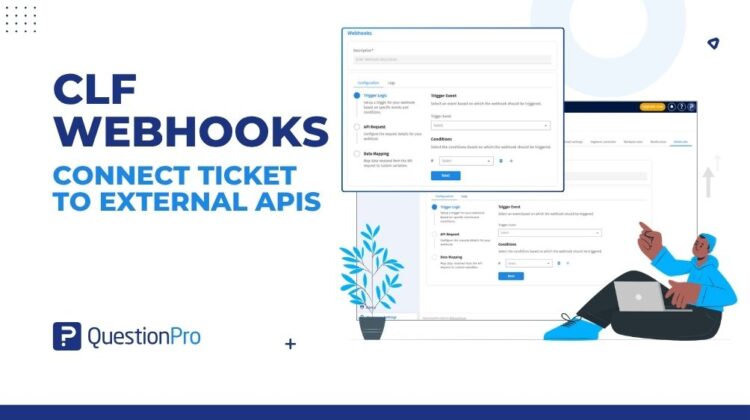
CLF Webhooks provide a configurable way to send CLF Ticket events to external APIs.
Workspace Admins can decide:
- Which Ticket event should trigger the webhook
- Which conditions need to be met
- Which API should receive the request
- How the request should be authenticated
- Which headers should be included
- What Ticket information should be included in the JSON body
Instead of building a separate integration for every workflow, administrators can configure the event-to-API connection directly.
The idea is simple:
Ticket event → Conditions → API request → External system
And because the webhook infrastructure is configurable, the same approach can support different workflows across different customers and teams.
Why Configurable Ticket Integrations Matter
CLF workflows don’t look the same everywhere.
One organization may need an external API to respond to a particular Ticket event.
Another may only want the API triggered for Tickets belonging to a specific Current Segment.
A third may need to use Survey or Custom Variable information to determine whether the workflow should run.
A generic webhook that sends everything isn’t enough.
Teams need control over what gets sent and when.
Send Only the Ticket Events That Matter
CLF Webhooks allows administrators to define conditions using:
- Current Segment
- Survey
- Custom Variables
This means teams can control which Ticket events invoke an external API instead of sending every event to every connected system.
The result is a more targeted integration workflow.
Configure the API Around Your Workflow
External APIs don’t all work the same way.
Some require GET requests. Others use POST or PUT.
Some require API keys. Others use Bearer Tokens or Basic Authentication.
CLF Webhooks supports:
- GET
- POST
- PUT
- No Auth
- API Key
- Bearer Token
- Basic Auth
- Request headers
This gives administrators the flexibility to configure the outbound request around the requirements of the external system.
Put CLF Ticket Data Into the Request
Sending an event is only part of an integration.
The external system often needs to know what happened and which Ticket it relates to.
With CLF Webhooks, administrators can construct the JSON request body using CLF Ticket Objects and Ticket Fields.
That means the webhook can carry relevant Ticket information into the external workflow instead of simply notifying another system that an event occurred.
The Ticket becomes the data that moves the workflow forward.
Test Before You Activate
One of the challenges with API integrations is finding configuration problems after an integration is already live.
An incorrect URL.
An authentication issue.
A missing header.
An incorrectly structured request body.
CLF Webhooks allows administrators to run the API before activating the webhook.
They can validate the configuration and inspect the API response before relying on live Ticket events.
This turns integration setup into something that can be tested before it becomes part of a production workflow.
Know What Happened After the Webhook Ran
Configuration is only one side of integration management.
Teams also need visibility after the webhook executes.
Every webhook execution is recorded in execution logs, while the API response is captured in the standard webhook response field.
This gives administrators a way to understand whether the external API was invoked and inspect the response returned by the external system.
Instead of wondering whether an integration ran, teams have an execution record to work from.
Built for Changing Support Operations
Support workflows change.
New systems are introduced. Teams reorganize their processes. Different business units require different workflows. Ticket attributes become more important over time.
That makes hard-coded integrations difficult to maintain.
CLF Webhooks provides a reusable configuration layer where Workspace Admins can create, edit, enable, disable, and delete webhooks as workflows evolve.
The integration doesn’t have to be rebuilt every time the workflow changes.
From Ticket Activity to Connected Workflows
Closed-loop feedback is ultimately about taking action.
A Ticket is one part of that process, but the action may need to happen across multiple systems.
CLF Webhooks provides the connection between the Ticket event and the external workflow.
It helps organizations move from:
Ticket activity → External action
Manual integration requests → Configurable workflows
All events → Relevant events
Untested APIs → Validated configurations
Unknown outcomes → Execution visibility
The future of closed-loop feedback isn’t just about managing Tickets.
It’s about making sure the right Ticket activity can trigger the right action in the systems that support the customer journey.
CLF Webhooks provides the infrastructure to make that connection configurable, testable, and visible.