• Skip to main content
  • Skip to primary sidebar
  • Skip to footer
QuestionPro

QuestionPro

questionpro logo
  • Products
    survey software iconSurvey softwareEasy to use and accessible for everyone. Design, send and analyze online surveys.research edition iconResearch SuiteA suite of enterprise-grade research tools for market research professionals.CX iconCustomer ExperienceExperiences change the world. Deliver the best with our CX management software.WF iconEmployee ExperienceCreate the best employee experience and act on real-time data from end to end.
  • Solutions
    IndustriesGamingAutomotiveSports and eventsEducationGovernment
    Travel & HospitalityFinancial ServicesHealthcareCannabisTechnology
    Use CaseAskWhyCommunitiesAudienceContactless surveysMobile
    LivePollsMember ExperienceGDPRPositive People Science360 Feedback Surveys
  • Resources
    BlogeBooksSurvey TemplatesCase StudiesTrainingHelp center
  • Features
  • Pricing
Language
  • English
  • Español (Spanish)
  • Português (Portuguese (Brazil))
  • Nederlands (Dutch)
  • العربية (Arabic)
  • Français (French)
  • Italiano (Italian)
  • 日本語 (Japanese)
  • Türkçe (Turkish)
  • Svenska (Swedish)
  • Hebrew IL (Hebrew)
  • ไทย (Thai)
  • Deutsch (German)
  • Portuguese de Portugal (Portuguese (Portugal))
  • Español / España (Spanish / Spain)
Call Us
+1 800 531 0228 +1 (647) 956-1242 +55 9448 6154 +49 030 9173 9255 +44 01344 921310 +81-3-6869-1954 +61 (02) 6190 6592 +971 529 852 540
Log In Log In
SIGN UP FREE

Home Workforce

How Dashboard Allowed Filters Eliminate Data Noise in Employee Experience Analytics

dashboard-allowed-filters

When sharing survey analytics across an enterprise, more data choices don’t always lead to better decisions. HR analytics leads and EX teams spend significant effort building purpose-specific reporting views—only for line managers or executive stakeholders to apply irrelevant filter cuts that distort the intended story.

When every single demographic variable or custom field is exposed on every report, clutter increases and viewers can easily slice data in ways the report was never designed to support.

To solve this challenge, QuestionPro Employee Experience offers Dashboard Allowed Filters. This capability gives dashboard owners complete control over which filter dimensions appear on any given dashboard, keeping data focused, clean, and on-message for every stakeholder.

Whether you are configuring high-level executive overviews or localized pulse reports, combining this control with our robust Employee Experience Software ensures your leaders focus purely on the insights that drive action.

What is the Dashboard Allowed Filters capability?

It is a dashboard-level setting that allows dashboard owners to curate the exact filter dimensions available to viewers.

Instead of cluttering every report menu with every available custom field by default, dashboard owners can explicitly choose which filter dimensions to expose. Once set, the filter menu presents the exact same allowed dimensions to every user who opens that report.

Key capabilities include:

  • Owner-Controlled Menus: Select only the filter dimensions relevant to that specific dashboard’s purpose.
  • Unified Dashboard & Tab Filtering: A single allowed filter configuration governs both dashboard-level and tab-level filter controls.
  • Dynamic Self-Cleaning: If an allowed filter dimension is removed by an owner, any active saved filter on that dimension is automatically dropped upon reload.
  • Flexible Retrospective Editing: Update allowed filters at any time via the edit dashboard menu without having to rebuild the dashboard from scratch.

Why is controlling filter dimensions critical for EX reporting?

When enterprise leaders analyze engagement drivers, providing an overload of filter choices often distracts from the core narrative. Restricting filter menus to purpose-built dimensions delivers clear organizational benefits:

1. Eliminates Misleading Data Cuts

Exposing irrelevant filters allows stakeholders to pull reports off-message or interpret small-sample cuts incorrectly. Restricting available dimensions ensures viewers analyze data within the exact parameters intended by HR analytics teams.

2. Reduces Cognitive Overload

Busy people managers don’t want to wade through dozens of irrelevant demographic categories. Streamlined, purpose-built filter menus help leaders pinpoint actionable department trends immediately.

3. Preserves Consistency Across Teams

Because the allowed filter configuration is a property of the dashboard itself—rather than a per-viewer setting—every stakeholder views the exact same control set, establishing a single source of truth.

How do you configure allowed filters in QuestionPro Employee Experience?

Setting up customized filter controls requires just a few simple clicks when creating or editing a report view:

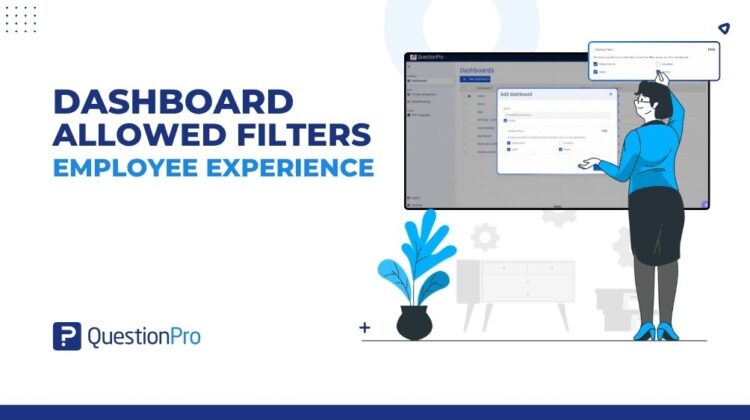
  1. Open the EX Portal: Navigate to your dashboards page and click New dashboard or open the Edit dashboard modal on an existing report.
  1. Access Allowed Filters: Inside the modal, click to expand the Allowed filters section (which defaults to all available custom fields).
  1. Select Relevant Dimensions: Check the specific filter dimensions you want to expose (such as Department, Location, Level, or Tenure) and uncheck the ones you want to hide. Note: At least one filter dimension must remain enabled per dashboard.
  1. Save and Deploy: Click Create or Save. The filter dropdown across both dashboard and tab views will instantly restrict options to your custom selection.

Will this setting affect existing dashboards or workflows?

No. This control is designed with zero disruption to existing analytics workflows:

  • Safe Defaults: For new dashboards, the Allowed filters setting defaults to all available custom fields. Your standard dashboard creation flow remains uninterrupted.
  • Backward Compatibility: All existing dashboards created prior to this update maintain access to all filter dimensions by default, requiring no manual migration.
  • No Impact on Underlying Logic: Restricting visible filters changes only the top-level selection menu. It has zero impact on individual widget-level filters or underlying anonymity threshold settings.

Ready to streamline your employee sentiment analytics?

Curating clear, targeted reports is essential for turning employee feedback into meaningful culture improvements. By utilizing dashboard allowed filters, EX leads can guide leadership attention toward the metrics that matter most without noisy distractions.

Beyond Employee Experience analytics, deploying flexible survey software across all feedback touchpoints empowers organizations to capture high-quality data and deliver clear, actionable insights at scale.
Transform your organization with our Employee Experience Survey and Analytics Platform. Request Demo

SHARE THIS ARTICLE:

About the author
Utkarsh Awasthi

View all posts by Utkarsh Awasthi

Primary Sidebar

Take your people experience to the next level!

Try our Employee Experience Survey and Analytics platform

Learn more

RELATED ARTICLES

HubSpot - QuestionPro Integration

Cultural Insights: What it is, Importance + How to Collect?

Sep 10,2024

HubSpot - QuestionPro Integration

Am I missing something? - Tuesday CX Thoughts

Mar 16,2026

HubSpot - QuestionPro Integration

Top 13 Anonymous Employee Feedback Tools for 2026

Mar 25,2024

BROWSE BY CATEGORY

Footer

MORE LIKE THIS

dashboard-allowed-filters

How Dashboard Allowed Filters Eliminate Data Noise in Employee Experience Analytics

Oct 1, 2026

bi-lite

BI Lite: QuestionPro BI for Every License

Sep 30, 2026

research-agent

Keep the thinking, hand off the build: how Research Agent turns your brief into a working survey

Sep 28, 2026

audience-self-service

Your research study, your call: How Audience self-service puts you in charge from brief to final credit

Sep 24, 2026

Other categories

questionpro-logo-nw
Help center Live Chat SIGN UP FREE
  • Sample questions
  • Sample reports
  • Survey logic
  • Branding
  • Integrations
  • Professional services
  • Security
  • Survey Software
  • Customer Experience
  • Workforce
  • Communities
  • Audience
  • Polls Explore the QuestionPro Poll Software - The World's leading Online Poll Maker & Creator. Create online polls, distribute them using email and multiple other options and start analyzing poll results.
  • Research Edition
  • LivePolls
  • InsightsHub
  • Blog
  • Articles
  • eBooks
  • Survey Templates
  • Case Studies
  • Training
  • Webinars
  • All Plans
  • Nonprofit
  • Academic
  • Qualtrics Alternative Explore the list of features that QuestionPro has compared to Qualtrics and learn how you can get more, for less.
  • SurveyMonkey Alternative
  • VisionCritical Alternative
  • Medallia Alternative
  • Likert Scale Complete Likert Scale Questions, Examples and Surveys for 5, 7 and 9 point scales. Learn everything about Likert Scale with corresponding example for each question and survey demonstrations.
  • Conjoint Analysis
  • Net Promoter Score (NPS) Learn everything about Net Promoter Score (NPS) and the Net Promoter Question. Get a clear view on the universal Net Promoter Score Formula, how to undertake Net Promoter Score Calculation followed by a simple Net Promoter Score Example.
  • Offline Surveys
  • Customer Satisfaction Surveys
  • Employee Survey Software Employee survey software & tool to create, send and analyze employee surveys. Get real-time analysis for employee satisfaction, engagement, work culture and map your employee experience from onboarding to exit!
  • Market Research Survey Software Real-time, automated and advanced market research survey software & tool to create surveys, collect data and analyze results for actionable market insights.
  • GDPR & EU Compliance
  • Employee Experience
  • Customer Journey
  • Synthetic Data
  • About us
  • Executive Team
  • In the news
  • Testimonials
  • Advisory Board
  • Careers
  • Brand
  • Media Kit
  • Contact Us

QuestionPro in your language

  • English
  • Español (Spanish)
  • Português (Portuguese (Brazil))
  • Nederlands (Dutch)
  • العربية (Arabic)
  • Français (French)
  • Italiano (Italian)
  • 日本語 (Japanese)
  • Türkçe (Turkish)
  • Svenska (Swedish)
  • Hebrew IL (Hebrew)
  • ไทย (Thai)
  • Deutsch (German)
  • Portuguese de Portugal (Portuguese (Portugal))
  • Español / España (Spanish / Spain)

Awards & certificates

  • survey-leader-asia-leader-2023
  • survey-leader-asiapacific-leader-2023
  • survey-leader-enterprise-leader-2023
  • survey-leader-europe-leader-2023
  • survey-leader-latinamerica-leader-2023
  • survey-leader-leader-2023
  • survey-leader-middleeast-leader-2023
  • survey-leader-mid-market-leader-2023
  • survey-leader-small-business-leader-2023
  • survey-leader-unitedkingdom-leader-2023
  • survey-momentumleader-leader-2023
  • bbb-acredited
The Experience Journal

Find innovative ideas about Experience Management from the experts

  • © 2022 QuestionPro Survey Software | +1 (800) 531 0228
  • Sitemap
  • Privacy Statement
  • Terms of Use