Live sentiment analysis turns the open-text comments an audience types during a session into an instant read on how people feel. Instead of waiting until after a webinar, town hall, or class to sort through comments by hand, an AI model scores each response and groups it into themes while the session is still running.
The appeal is speed. A presenter who notices rising frustration about a specific topic, or a wave of support for a proposal, can respond to it before the room moves on. That immediacy is the entire value of doing this analysis live instead of the next morning.
In this guide, we’ll explore how live sentiment analysis works, where it fits next to traditional survey analysis, and how QuestionPro LivePolls puts it directly into the presenter’s hands.
What is live sentiment analysis?
Live sentiment analysis, sometimes called real-time audience sentiment analysis, is the automatic classification of open-text audience responses into sentiment categories, positive, neutral, or negative, while a live session is still in progress. It relies on natural language processing, a branch of AI that interprets written language, to score comments as they arrive rather than after the event ends.
This differs from the sentiment analysis most survey teams already use. Traditional, post-event sentiment analysis processes responses after a survey closes, often over hours or days, feeding into a report that lands well after people have moved on. QuestionPro’s traditional sentiment analysis tools work this way for open-ended survey questions, which suits research that needs time to reach a large sample.
Live sentiment analysis trades that scale for speed. It exists for the narrower job of reading a room, a webinar audience, or a training cohort while there is still time to act on what they are saying.
How does live sentiment analysis work?
Sentiment analysis for live polls follows roughly the same pipeline across platforms, though the speed and polish vary widely.
- A participant submits an open-text response to a live question.
- The AI model reads the response and scores its overall tone.
- Responses are grouped into recurring themes based on shared language.
- The system pulls a verbatim quote to represent each theme.
- A plain-language summary is generated from the full set of themes.
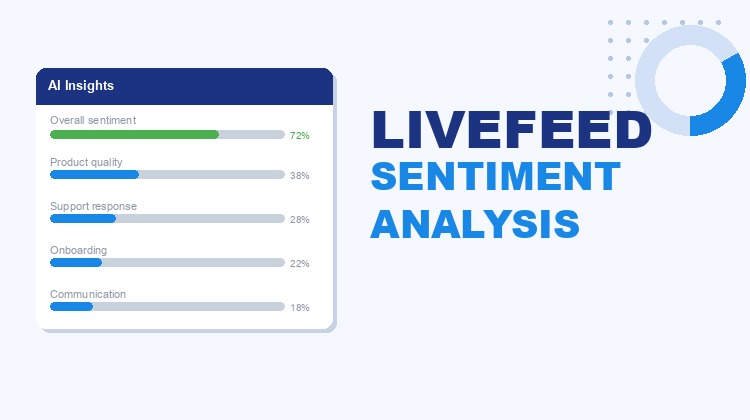
In QuestionPro LivePolls, this sequence runs in seconds inside the presenter view, and results can be refreshed as more responses arrive. The LiveFeed Sentiment Analysis help guide walks through each part of the analysis modal in more detail.
What does a live sentiment analysis report include?
A complete live sentiment analysis output usually has five parts, and each one answers a different question about the room.
- Overall sentiment: The dominant tone, positive, neutral, or negative, shown at a glance.
- Recurring themes: The topics coming up most often, typically with a percentage of responses per theme.
- Representative quotes: Verbatim lines pulled from real responses, not paraphrased summaries.
- Urgent concerns and requests: Time-sensitive issues and explicit feature or action requests, flagged separately so they are not buried.
- Executive summary: A short narrative version of the findings, written to be shared as it is.
The quotes matter more than they might seem. A theme labeled “communication concerns” tells a presenter that something exists. An actual line from a participant tells them what to fix by Monday morning.
Live sentiment analysis vs. traditional survey sentiment analysis
Choosing between the two comes down to timing and sample size, not which method is more accurate.
| Factor | Live sentiment analysis | Traditional survey sentiment analysis |
|---|---|---|
| When it runs | During the live session | After the survey closes |
| Typical volume | Dozens to a few hundred responses | Hundreds to thousands of responses |
| Best used for | Adjusting a session in real time | Measuring patterns across a broader population |
| Output speed | Seconds to minutes | Hours to days |
| Ideal setting | Webinars, town halls, classes, live events | Feedback programs, engagement surveys, market research |
Neither replaces the other. A live poll captures the moment a decision needs to be made, while a traditional survey captures the pattern behind it over a longer window.
Real-world examples of live sentiment analysis in action
Live sentiment analysis shows up most often in settings where a presenter needs to know how the room feels before the session ends.
- Quarterly all-hands meetings.
An HR team running a company-wide update used to spend four to six hours after the session grouping open-text comments in a spreadsheet and writing an executive summary by hand. With live sentiment analysis, that summary is ready before the meeting ends, and the follow-up email goes out the same afternoon instead of the following week. - Conference Q&A sessions.
A session chair reading live sentiment during a conference talk can tell within minutes whether a dense point landed or needs a follow-up slide. - Lecture halls and training cohorts.
An instructor running comprehension checks during a lecture can see confusion building in open-text comments before it shows up in test scores. - Product feedback sessions.
A product team demoing a new feature can separate genuine bug reports from general commentary the moment they arrive, instead of triaging a transcript afterward.
How do you measure and evaluate live sentiment during a session?
The value of live sentiment analysis depends on watching volume as closely as tone, since a handful of comments can skew a theme in either direction.
Treat the first pass of a session as directional rather than final, then re-run the analysis as more responses come in. Speed also compounds in value over time.
Employees who receive meaningful feedback quickly are far more likely to be fully engaged, according to Gallup research on workplace feedback, which is part of why closing the turnaround gap between a comment and a response matters.
| Response count | What it tells you |
|---|---|
| Under 20 | Early signal only, watch for more volume before acting |
| 20 to 100 | Themes are reasonably stable and worth acting on |
| 100 or more | Percentage breakdowns become meaningful for reporting |
Re-triggering the analysis as a session continues keeps the read current instead of locking it to an early, thinner sample.
Common mistakes and limitations to know before you rely on it
Live sentiment analysis is useful, but it has real boundaries worth understanding before a presenter leans on it in the moment.
- It only reads open text. Multiple-choice, rating, word cloud, and swipe questions do not generate sentiment data because there is no free text to analyze.
- Small samples can mislead. A theme built from three comments out of two hundred participants is a weaker signal than one built from thirty.
- It is not a substitute for judgment. AI can group and summarize language, but deciding what to do about a concern still needs a person.
- Participants are typically not notified that analysis is running, since the process reads existing open-text answers rather than collecting new data. Presenters should still be transparent about how audience feedback gets used more broadly.
- Leaning only on the executive summary can flatten nuance. A close read of a few actual quotes catches things a summary tends to smooth over.
QuestionPro LivePolls and live sentiment analysis
QuestionPro LivePolls built this AI sentiment analysis tool directly into its LiveFeed question type, the open-text response format used for gathering free-form audience input.
After an audience submits LiveFeed responses, a presenter clicks Analyze responses inside the presenter view, and the five-part breakdown appears in a modal without leaving the session. The analysis covers up to the 500 most recent non-empty responses and can be re-run at any point as new answers arrive, which keeps long sessions current. It comes included for every QuestionPro LivePolls user at no additional cost, alongside the rest of the Survey Software platform’s response tools.
Insight that arrives while the room is still listening
The value of an audience comment drops the moment a session ends and attention moves elsewhere. Live sentiment analysis exists to close that window, turning a scroll of unread text into something a presenter can act on before people leave the room. Whether that room is a town hall, a classroom, or a conference stage, the same idea holds: feedback is worth the most exactly when it still has somewhere to go.
Frequently Asked Questions (FAQs)
No. Participants see the standard open-text response screen and are not alerted when a presenter runs the analysis. The process reads responses that have already been submitted rather than collecting anything new from them.
The session continues without interruption, and no response data is lost. A message appears in the analysis modal, and the presenter can retry once the service recovers, usually within the same session.
No. It is limited to open-text question types like LiveFeed, since sentiment scoring depends on free-form language. Multiple-choice, word cloud, swipe, and rating questions produce structured data that does not need this kind of analysis.
No. In QuestionPro LivePolls, live sentiment analysis is included for every user regardless of plan tier, with no separate purchase, add-on, or upgrade needed to turn it on inside the presenter view.
Each run processes up to the 500 most recent non-empty responses. For larger audiences, the most recent submissions are prioritized, and the analysis can be re-triggered anytime to include newer responses.