Interactive sessions have become essential in modern meetings, classrooms, webinars, and events. Yet most engagement tools force presenters to make a decision before they even begin: Is this a poll or a quiz?
That simple choice often limits how sessions are designed. If you want to gather audience opinions and test knowledge, you typically need to run separate sessions—or even use multiple tools.
With the latest update to LivePolls, that limitation disappears.
We’re introducing the LivePolls Unified Editor, a new way to build interactive sessions where polls, quizzes, and feedback questions can all exist in the same experience.
This means presenters can design sessions that are more dynamic, engaging, and flexible—without switching tools or workflows.
Meet the LivePolls Unified Editor
The Unified Editor allows hosts to create interactive sessions without deciding upfront whether the session is a poll or a quiz.
Instead, you can simply build your session question by question and mix different formats as needed.
Within a single LivePoll session, you can now:
- Run opinion polls to capture audience sentiment
- Ask quiz questions to test knowledge
- Display live response charts
- Show leaderboards and rankings for competitive questions
The system automatically handles the experience depending on the question type. Poll questions display live charts and distributions, while quiz questions activate scoring and leaderboard tracking.
This makes it possible to move seamlessly between audience feedback and knowledge checks during the same session.
Build Interactive Sessions Faster
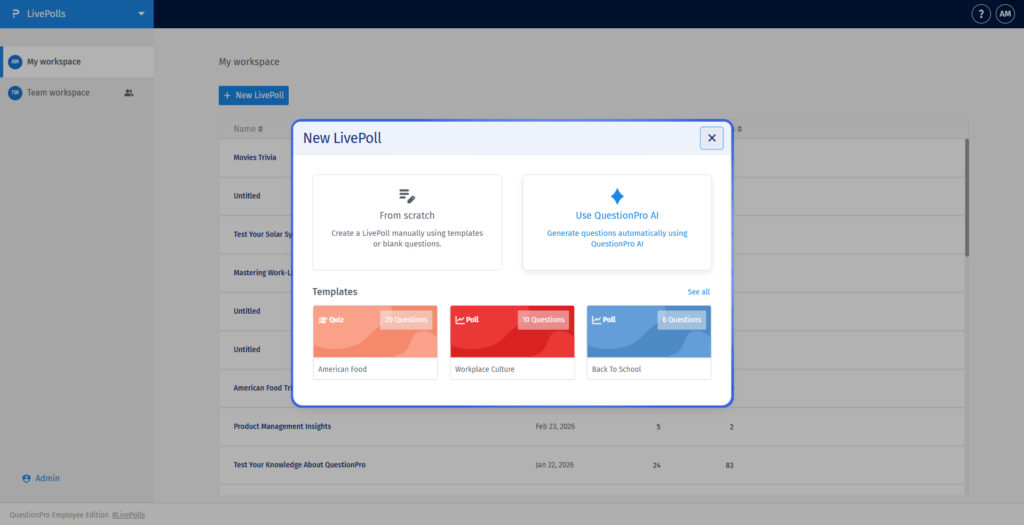
Preparing interactive questions before a presentation or training session can take time. The Unified Editor simplifies that process by providing multiple ways to create your session content.
You can start by:
Building from scratch
Use the editor to manually create questions and customize your session.
Using templates
Select from ready-made LivePoll templates designed for common use cases such as training sessions, events, or classroom activities.
Generating questions with AI
Provide notes, documents, or study material, and LivePolls can automatically generate high-quality questions for your session.
These options allow presenters to build engaging sessions much faster—without starting from a blank page.
Combine Feedback and Gamification in One Session
The most powerful benefit of the Unified Editor is the ability to combine feedback collection and gamified participation in the same experience.
For example, a session could be structured like this:
- Start with a multiple-choice poll to understand audience opinions.
- Follow with a true-or-false quiz question to test knowledge.
- Ask participants to contribute ideas using a word cloud question.
- Reveal the leaderboard and highlight the top performers.
Quiz questions automatically enable scoring and leaderboards, allowing participants to earn points for correct answers. Rankings update in real time, encouraging friendly competition and increasing engagement.
This mix of insight gathering and gamification helps presenters maintain energy and participation throughout the session.
Where LivePolls Works Best
The Unified Editor supports a wide range of interactive scenarios.
Corporate training
Run knowledge checks during training while collecting participant feedback in the same session.
Conferences and webinars
Keep audiences engaged with opinion polls, trivia questions, and real-time participation.
Education and classrooms
Teachers can test understanding while gathering student feedback during lessons.
Internal meetings and workshops
Teams can run quick polls, ask questions, and add light gamification to make discussions more interactive.
By combining different engagement formats in one session, LivePolls adapts to the natural flow of real conversations and presentations.
Create More Engaging Sessions with LivePolls
The LivePolls Unified Editor makes it easier than ever to design interactive experiences that combine polls, quizzes, and feedback in one session.
Whether you’re running a training workshop, hosting a conference session, or teaching a classroom, the ability to mix engagement formats helps create presentations that feel dynamic and participatory.
Because the most memorable sessions don’t just deliver information.
They invite the audience to be part of the experience.