One parent project, one cost estimate, and a launch button that doesn’t wait for your slowest market. That is the exact operational shift powering the multi-country launch audience feature.
Nine countries, one deadline, one market running late
Nine countries. One survey. One deadline.
Eight markets are ready to go. The ninth is still finishing an internal approval, three days behind schedule.
In the old workflow, that means building nine separate Audience projects. You launch each one by hand. Then you hold your breath while the ninth catches up before anyone can report a single result.
That is the operational reality that multi-country launch removes.
Learn More: See how multi-country launch fits inside QuestionPro Audience.
What is a multi-country launch?
Multi-Country Launch is a capability inside QuestionPro Audience, available across a wide range of countries. It lets you run a single specialized sample project across two or more markets simultaneously. Instead of creating a separate Audience project for each market, you configure a single parent project. QuestionPro Audience then creates a separate child project for each country you select.
The parent project gives you a single place to view the entire study. Each child project still runs on its own timeline, with its own credits and status.
How multi-country launch works in QuestionPro Audience
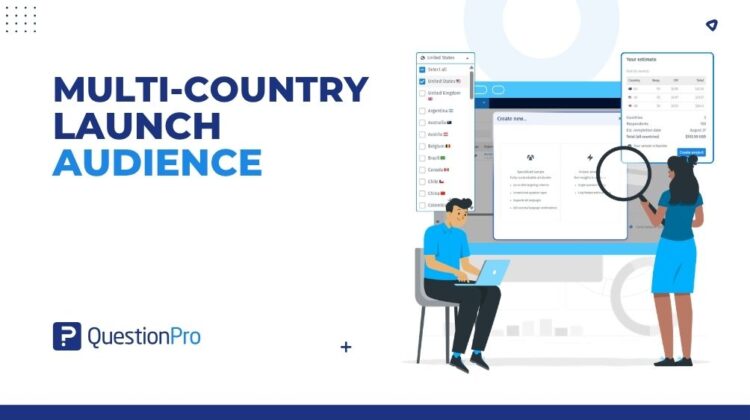
Setup happens in a single workflow. Open Audience, start a Specialized Sample project, and pick two or more countries from the Country selector. From there, enter the response target for each country individually. Then fill in incidence rate, completion date, and survey length once for the whole study.
Click into each country tab under Select your audience and set that market’s targeting on its own. Audience saves each country’s settings as you move between tabs.
Before you commit anything, review your estimate panel. It shows CPI and total cost per country side by side, along with the overall respondent count and completion date, all calculated in real time as you adjust criteria. If a country cannot hit its target with the current settings, Audience flags it as not feasible right there. That happens before a dollar of budget moves. Adjust the targeting or drop that market, and the rest of the setup carries on.
When you are ready, click Launch once from the parent project. Credits are checked independently by country, so a market that can start does start. If one or two countries cannot begin yet, you get a clear message. A Launch remaining countries button appears instead of a stalled project.
Multi-Country Launch in action
Picture a global consumer electronics brand running a concept test across North America, Europe, and Southeast Asia. Nine markets, one survey, one deadline for the executive readout. Two Southeast Asian markets are flagged again as not feasible at the original response target. The research lead trims the target in those two countries. The cost estimate updates automatically before the project is created. Seven countries launch immediately. The two adjusted markets follow an hour later, once credits clear, without holding up the other seven.
A European research agency that runs quarterly CX studies for several retail clients uses the same project structure in different ways. One client’s German fieldwork wraps up two days early. The account lead closes that country from the parent project view. They check the remaining five markets on the same screen. Final numbers go to the client, with no second dashboard in sight.
The advantages of multi-country launch
A short list covers most of what makes this feature worth using on your next international study.
- One setup, many markets.
Configure the survey, response targets, and fieldwork dates once, rather than repeating the same steps for each country.
- Country-level targeting that sticks.
Each market keeps its own audience settings, saved independently as you move between country tabs.
- Cost and feasibility, before you commit.
The cost-by-country estimate shows CPI and total spend per market, with built-in feasibility flags.
- Independent controls, one view.
Pause, resume, or close a single country without touching the others, from the same parent project screen.
- A study that launches on its own schedule.
Per-country credit checks and a Launch remaining countries option mean one slow market does not hold the rest hostage.
When to use it, and when not to
Multi-country launch fits studies that run the same survey across two or more countries on the same core timeline. Brand trackers, concept tests, and multi-market CX programs are the clearest fit.
It is not the right tool for a single-country study. It is also not right when each market needs a different survey instrument. The same goes for an Instant Answers project, which uses its own setup flow. Once any country in the study starts collecting, the list of countries locks. Add or remove markets before launch, not after.
How to turn on multi-country launch in QuestionPro Audience
It lives directly inside specialized sample project setup, with no separate activation step. The QuestionPro help center article on multi-country launch covers the full click-by-click detail. That includes the country tab layout and the estimate panel.
Get started
Research globally. Launch instantly. That’s the idea behind multi-country launch, and it holds up once you’re actually inside the workflow.
If you already run research through QuestionPro’s Market Research Software, a multi-country launch is available within your existing Audience workspace. If you are setting up your first Specialized Sample project, create a QuestionPro account. Select two or more countries the next time you build one.
For more on managing fieldwork once a multi-country study is live, see our related post on multi-country survey research.
Frequently asked questions
Multi-country launch is a feature that lets you run a single Specialized Sample project across two or more countries simultaneously. It creates a parent project for the overall study and a separate child project for each country, so you configure the study once while still managing each market on its own.
You can select two or more. A Select all option is available in the Country selector if you want to include every market QuestionPro Audience supports. Feasibility and cost will still vary by how niche your target audience is in each market.
Yes. Click into each country’s tab under Select your audience and configure that market’s criteria on its own. Settings are saved independently per country as you move between tabs, so adjusting one market’s targeting does not affect any other country in the study.
Only while every country is still in Bid status, before any of them has started collecting responses. Once one country begins fieldwork, the country list is locked for the entire project. Add or drop markets during setup rather than waiting until after launch.
QuestionPro Audience marks any country that cannot hit its response target with the current settings as not feasible, right inside the cost estimate panel. Adjust that market’s targeting or remove it before you create the project. The rest of the study is unaffected either way.
No. Credits are checked independently by country, so markets that are ready can start immediately, even if one or two are not. A Launch remaining countries button appears for any country still waiting, and you can bring it into the study once it clears.
Yes. The Pause, Resume, and Close controls are available per country in the parent project’s monitoring view. Changing one market’s status has no effect on the others, so a country that finishes early or needs to stop can be handled separately.
License and packaging details for multi-country launch are best confirmed with your account admin or QuestionPro support, since availability can vary by account. They can also walk through which Audience plan fits a multi-market study of your size, and how CPI is likely to run across the countries you have in mind.