

• Skip to main content
  • Skip to primary sidebar
  • Skip to footer
QuestionPro

QuestionPro

questionpro logo
  • Products
    survey software iconSurvey softwareEasy to use and accessible for everyone. Design, send and analyze online surveys.research edition iconResearch SuiteA suite of enterprise-grade research tools for market research professionals.CX iconCustomer ExperienceExperiences change the world. Deliver the best with our CX management software.WF iconEmployee ExperienceCreate the best employee experience and act on real-time data from end to end.
  • Solutions
    IndustriesGamingAutomotiveSports and eventsEducationGovernment
    Travel & HospitalityFinancial ServicesHealthcareCannabisTechnology
    Use CaseAskWhyCommunitiesAudienceContactless surveysMobile
    LivePollsMember ExperienceGDPRPositive People Science360 Feedback Surveys
  • Resources
    BlogeBooksSurvey TemplatesCase StudiesTrainingHelp center
  • Features
  • Pricing
Language
  • English
  • Español (Spanish)
  • Português (Portuguese (Brazil))
  • Nederlands (Dutch)
  • العربية (Arabic)
  • Français (French)
  • Italiano (Italian)
  • 日本語 (Japanese)
  • Türkçe (Turkish)
  • Svenska (Swedish)
  • Hebrew IL (Hebrew)
  • ไทย (Thai)
  • Deutsch (German)
  • Portuguese de Portugal (Portuguese (Portugal))
  • Español / España (Spanish / Spain)
Call Us
+1 800 531 0228 +1 (647) 956-1242 +55 9448 6154 +49 030 9173 9255 +44 01344 921310 +81-3-6869-1954 +61 (02) 6190 6592 +971 529 852 540
Log In Log In
SIGN UP FREE

Home LivePolls

How to Add Live Polls to Google Slides

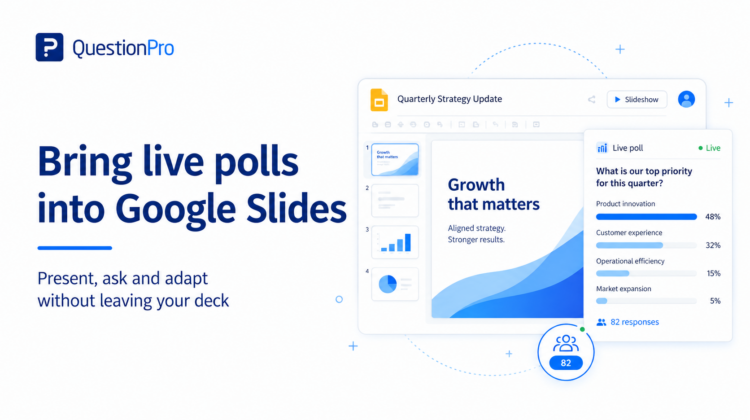
If Google Slides is already the center of your presentation workflow, opening a separate polling tool can create unnecessary friction. The presenter has to switch tabs, reshare a screen, or ask the audience to wait while the interaction loads.

QuestionPro LivePolls provides a Chrome extension designed to let hosts create, add, edit and run live polls in Google Slides.

What you need

  • A QuestionPro / LivePolls account.
  • Google Chrome.
  • A Google Slides presentation.
  • The LivePolls Chrome extension for Google Slides.

How to add the LivePolls extension to Google Slides

According to the current QuestionPro help documentation:

  1. Open the Chrome Web Store.
  2. Search for LivePolls.
  3. Select Add to Chrome.
  4. Open Google Slides. The LivePolls option should appear in the Google Slides menu bar.

View the official Google Slides extension instructions.

How to create a new LivePoll from Google Slides

  1. Open the LivePolls menu item in Google Slides.
  2. Log in to your LivePolls account if prompted.
  3. Open the LivePolls home screen.
  4. Select Create new.
  5. Create the poll or quiz in the LivePolls editor.
  6. The newly created LivePoll is added to the Google Slides presentation.

How to add an existing LivePoll

If you already created the interaction in LivePolls:

  1. Open the LivePolls menu item in Google Slides.
  2. Open the LivePolls home screen.
  3. Choose Add to Presentation for the LivePoll you want.
  4. If the presentation does not already contain a LivePoll slide, the extension creates one. If it does, the selected LivePoll can update the existing LivePoll slide.

Keep your deck moving and bring audience responses into Google Slides.

Add LivePolls to your presentation

How to host the poll during the presentation

The current QuestionPro workflow is designed so the LivePoll session starts in the background when you present the deck.

  1. Make sure the LivePoll has been added to the presentation.
  2. Start the Google Slides presentation.
  3. When the LivePoll slide appears, the waiting room becomes visible.
  4. Ask participants to join.
  5. Start the question once participants are ready.
  6. Finish the question to reveal or review the collected responses.
  7. Continue through the remaining questions and results.

How participants join

QuestionPro’s current help article gives two joining options for Google Slides sessions:

  • Scan the QR code displayed in the waiting room.
  • Go to QuestionPro’s participant join page and enter the PIN shown in the waiting room.

What should you poll inside Google Slides?

At the beginning

Use one low-friction question to understand the audience:

Which of these topics is most relevant to you today?

After a key concept

Use a confidence check:

If someone asked you to explain this right now, how confident would you feel?

Before changing direction

Use a prioritization question:

We’ve got 10 minutes left. What deserves more time?

At the end

Use an open question:

What’s the question you’re thinking but haven’t asked yet?

Why integration matters

The advantage is not simply that “Google Slides has a poll.” It is that the interaction can happen without breaking the presenter’s flow. When polling is easy to launch, presenters are more likely to use it at the moment it is actually useful.

Live poll vs. quiz inside Google Slides

Use an unscored poll for opinion, confidence, prioritization or feedback. Use a scored quiz question for knowledge testing. QuestionPro LivePolls can combine both in one session through its unified editor.

Tips for a smoother live session

  • Test the extension and login before the audience arrives.
  • Keep poll questions short enough to read on a presentation slide.
  • Tell participants how they will join before the first interaction.
  • Do not overload the deck with interactions; use them at decision points.
  • Plan what you will do if the result is different from what you expected.

Frequently asked questions

Can I create a new LivePoll from Google Slides?

Yes. The current LivePolls Chrome extension supports creating a new LivePoll from the Google Slides workflow.

Can I add an existing LivePoll?

Yes. Existing LivePolls can be added to a presentation through the extension.

Do participants need the Chrome extension?

No. The extension is for the presenter. Participants join the live session using the provided joining method, such as the QR code or PIN workflow.

Make the slide deck responsive to the audience

A presentation becomes more useful when the audience can influence what happens next. The Google Slides integration reduces the distance between asking a question, seeing the result and adapting the presentation around what the audience actually needs.


SHARE THIS ARTICLE:

About the author
Vaidehi Palsokar

View all posts by Vaidehi Palsokar

Primary Sidebar

Gain insights with 80+ features for free

Create, Send and Analyze Your Online Survey in under 5 mins!

Create a Free Account

RELATED ARTICLES

HubSpot - QuestionPro Integration

AI-Enabled Quality Assurance for Gulf Universities: Building Accreditation Evidence at Scale

Sep 02,2026

HubSpot - QuestionPro Integration

15 Best Customer Analytics Software of 2026

Mar 21,2024

HubSpot - QuestionPro Integration

What is a CAPI survey? The Complete Guide for Market Research Agencies Running Field Research in India

Apr 16,2026

BROWSE BY CATEGORY

Footer

MORE LIKE THIS

Live Quizzes vs Live Polls: Which Should You Use?

Sep 3, 2026

Anonymous Polling: How to Get More Honest Audience Feedback

Sep 3, 2026

Mentimeter Alternatives: 10 Live Polling Tools to Consider

Sep 3, 2026

10 Best Live Polling Tools for Audience Engagement in 2026

Sep 3, 2026

Other categories

questionpro-logo-nw
Help center Live Chat SIGN UP FREE
  • Sample questions
  • Sample reports
  • Survey logic
  • Branding
  • Integrations
  • Professional services
  • Security
  • Survey Software
  • Customer Experience
  • Workforce
  • Communities
  • Audience
  • Polls Explore the QuestionPro Poll Software - The World's leading Online Poll Maker & Creator. Create online polls, distribute them using email and multiple other options and start analyzing poll results.
  • Research Edition
  • LivePolls
  • InsightsHub
  • Blog
  • Articles
  • eBooks
  • Survey Templates
  • Case Studies
  • Training
  • Webinars
  • All Plans
  • Nonprofit
  • Academic
  • Qualtrics Alternative Explore the list of features that QuestionPro has compared to Qualtrics and learn how you can get more, for less.
  • SurveyMonkey Alternative
  • VisionCritical Alternative
  • Medallia Alternative
  • Likert Scale Complete Likert Scale Questions, Examples and Surveys for 5, 7 and 9 point scales. Learn everything about Likert Scale with corresponding example for each question and survey demonstrations.
  • Conjoint Analysis
  • Net Promoter Score (NPS) Learn everything about Net Promoter Score (NPS) and the Net Promoter Question. Get a clear view on the universal Net Promoter Score Formula, how to undertake Net Promoter Score Calculation followed by a simple Net Promoter Score Example.
  • Offline Surveys
  • Customer Satisfaction Surveys
  • Employee Survey Software Employee survey software & tool to create, send and analyze employee surveys. Get real-time analysis for employee satisfaction, engagement, work culture and map your employee experience from onboarding to exit!
  • Market Research Survey Software Real-time, automated and advanced market research survey software & tool to create surveys, collect data and analyze results for actionable market insights.
  • GDPR & EU Compliance
  • Employee Experience
  • Customer Journey
  • Synthetic Data
  • About us
  • Executive Team
  • In the news
  • Testimonials
  • Advisory Board
  • Careers
  • Brand
  • Media Kit
  • Contact Us

QuestionPro in your language

  • English
  • Español (Spanish)
  • Português (Portuguese (Brazil))
  • Nederlands (Dutch)
  • العربية (Arabic)
  • Français (French)
  • Italiano (Italian)
  • 日本語 (Japanese)
  • Türkçe (Turkish)
  • Svenska (Swedish)
  • Hebrew IL (Hebrew)
  • ไทย (Thai)
  • Deutsch (German)
  • Portuguese de Portugal (Portuguese (Portugal))
  • Español / España (Spanish / Spain)

Awards & certificates

  • survey-leader-asia-leader-2023
  • survey-leader-asiapacific-leader-2023
  • survey-leader-enterprise-leader-2023
  • survey-leader-europe-leader-2023
  • survey-leader-latinamerica-leader-2023
  • survey-leader-leader-2023
  • survey-leader-middleeast-leader-2023
  • survey-leader-mid-market-leader-2023
  • survey-leader-small-business-leader-2023
  • survey-leader-unitedkingdom-leader-2023
  • survey-momentumleader-leader-2023
  • bbb-acredited
The Experience Journal

Find innovative ideas about Experience Management from the experts

  • © 2022 QuestionPro Survey Software | +1 (800) 531 0228
  • Sitemap
  • Privacy Statement
  • Terms of Use

