How to exclude completed respondents in QuestionPro Audience
What happens when the same people complete every tracking wave?
Respondent exclusions help you keep unique respondents across related Audience projects. A research operations manager is setting up the next wave of a tracking study. The survey is ready. The country and response target are set. Then one question remains: will people who already completed the last wave be invited again?
If they are, the new project is no longer a fresh sample. The earlier project stays the same. The new project is the one that loses uniqueness.
That is the moment Respondent exclusions is built for. Not after launch. During Specialized Sample setup, before the current project goes live.
Why unique respondents matter in brand health studies
Brand health studies, campaign measurement, and other tracking work depend on each new project using fresh respondents.
When the same people complete related projects, two problems follow:
- The new sample is no longer independent of the earlier wave.
- The team has to explain overlap after fieldwork instead of preventing it during setup.
Respondent exclusions is for research that needs that control before launch. It is available on Specialized Sample projects.
Why QuestionPro Audience added respondent exclusions
Research teams already knew they needed unique respondents. The missing piece was a place in project setup to select earlier Audience projects whose completed respondents should not be invited again.
The product decision was to add Respondent exclusions to Project specifications, keep the list editable only while the current project is a draft, and apply the exclusion when the current project launches.
The platform can exclude people who completed a selected project. The researcher still chooses which earlier projects to include.
What are respondent exclusions?
Respondent exclusions is a QuestionPro Audience feature that keeps respondents unique across related Specialized Sample projects.
You select earlier projects whose completed respondents should not be invited to the current project. The exclusion works in one direction. If Project A is selected while creating Project B, people who completed Project A are excluded from Project B. Project A is not changed.
It does not change a live source project. It does not apply to a project type other than Specialized Sample. It does not stay editable after the current project is launched.
How to exclude completed respondents from a new project
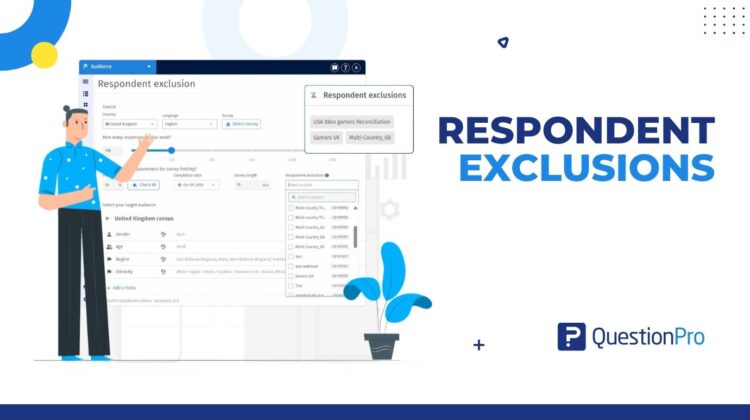
Respondent exclusions sits in Project specifications on a Specialized Sample create or edit form.
- Create a new Specialized Sample project, or edit a project that has not been launched.
- Go to Project specifications.
- Open Respondent exclusions.
- Use Search projects to find an earlier project by name.
- Select each project whose completed respondents you want to exclude. The list shows the project name and project ID so projects with similar names are easy to identify.
- Finish the project setup and launch the project.
Which projects appear in the exclusion list?
You can select up to 50 projects. Only projects that have already been launched and are Live, Paused, or Closed appear in the list.
What happens after the current project launches?
When the current project is launched, respondents who completed any selected project during the previous 90 days are excluded from the current project.
Can you change respondent exclusions after launch?
You can change the selection while the project is still a draft. After the project is launched, the selection cannot be changed.
Open the Project details page to review the list. Under Launch criteria & audience configuration, the Respondent exclusions card shows the selected projects.
How do respondent exclusions work with multi-country projects?
A multi-country parent project does not appear in the selection list because it does not collect responses itself. Select the launched country project whose completed respondents you want to exclude.
When you add exclusions to a new multi-country project, the exclusions are applied to its launched country projects where the sample provider matches.
How respondent exclusions work in a campaign measurement study
A research team is preparing a post-campaign Specialized Sample project. A pre-campaign project is already launched and is Live, Paused, or Closed.
Without Respondent exclusions, people who completed the pre-campaign project could be invited to the post-campaign project. With Search projects, the team selects the pre-campaign project, reviews it on the Project details page, and launches the new project.
After launch, people who completed the selected project in the previous 90 days are excluded from the new project. The pre-campaign project is unchanged. This is a planning scenario, not a promised field result.
What comes next after you set respondent exclusions?
Respondent exclusions is the setup control for unique respondents in QuestionPro Audience Specialized Sample projects.
Use it when the next project should not invite people who already completed a related study. If you need to change the list, do that before launch. If the source project is a multi-country parent, select the launched country project instead.
Roadmap details beyond the current Specialized Sample workflow are to be confirmed.
Respondent exclusions: common questions
Respondent exclusions help you keep unique respondents across related Audience projects by selecting earlier projects whose completed respondents should not be invited to the current project.
No. The setting is optional. Use it for tracking studies, brand health studies, campaign measurement, or any research that needs fresh respondents.
Yes. You can select up to 50 launched projects that are Live, Paused, or Closed.
No. The exclusion works in one direction. The selected source project is not changed.