



There are six main types of journey maps: current state, future state, day-in-the-life, service blueprint, persona-based, and customer lifecycle. Each one answers a different question about how customers or users experience your business.
US customers move across many channels in a single relationship with a brand, from a website to a mobile app to a phone call with support. A journey map makes that scattered experience visible in one place.
In this guide, we’ll break down each type of journey map, when to use it, and how to pick the right one for your next customer experience project.
What is a journey map?
A journey map is a visual tool that shows the steps a customer or user takes while interacting with a product, service, or brand. It captures what people do, think, and feel at each stage of that experience.
The Nielsen Norman Group describes a journey map as a visualization of the process a person goes through to reach a goal tied to a business or product, used to understand and address customer needs and friction points. That framing matters because a good map centers the customer’s goal, not the company’s internal workflow.
Most journey maps include the same core elements, even when the format changes:
| Element | What it means |
|---|---|
| Stages | The main phases of the journey, such as awareness, purchase, onboarding, or support |
| Touchpoints | The places where the customer interacts with the brand |
| Actions | What the customer does at each stage |
| Emotions | How the customer feels during the experience |
| Pain points | Problems, delays, or frustrations the customer faces |
| Opportunities | Ways the business can improve the experience |
A map is only useful if a team can act on it. Loading every channel, emotion, and backend process into one diagram usually makes it harder to read, not easier.
What should a journey map include at a minimum?
At minimum, a journey map should include the customer’s goal, a defined persona, the journey stages, touchpoints, actions, emotions, pain points, and improvement opportunities.
These eight parts connect what customers do with how they feel and where the experience breaks down:
- Persona: the audience segment the map represents
- Scenario or goal: the task or experience being mapped
- Journey stages: the main phases of the experience
- Touchpoints: interactions across web, mobile, email, support, or store visits
- Customer actions: what the customer does at each step
- Thoughts and emotions: what the customer is likely thinking or feeling
- Pain points: where the experience creates friction
- Opportunities: what the business can change to improve it
Start with one clear question your team needs answered, then build the map around it. A map trying to cover every audience and every channel at once tends to collapse into noise.
Pair the pain points on your map with real feedback data rather than internal guesses. Structured metrics like Net Promoter Score or a customer satisfaction score confirm whether a friction point is actually hurting the relationship or just an assumption made in a workshop.
Journey map vs experience map: What is the difference?
A journey map focuses on one specific customer goal, persona, or scenario, while an experience map gives a broader, cross-channel view of the overall relationship.
Both tools support customer experience work, but they operate at different altitudes.
| Feature | Journey map | Experience map |
|---|---|---|
| Focus | A specific persona, goal, or scenario | A broader view of the overall experience |
| Scope | Detailed and journey-specific | High-level and cross-channel |
| Timeline | Usually chronological | Can be non-linear |
| Best for | Improving a specific process | Understanding the broader experience landscape |
| Example | Mapping a customer support journey | Mapping the full brand experience across channels |
Use a journey map to fix something specific, such as onboarding, checkout, support, or renewal. Use an experience map when leadership needs a wide-angle view of how customers relate to the brand overall. For a broader walkthrough of the process, see QuestionPro’s guide to creating a customer journey map.
What are the main types of journey maps?
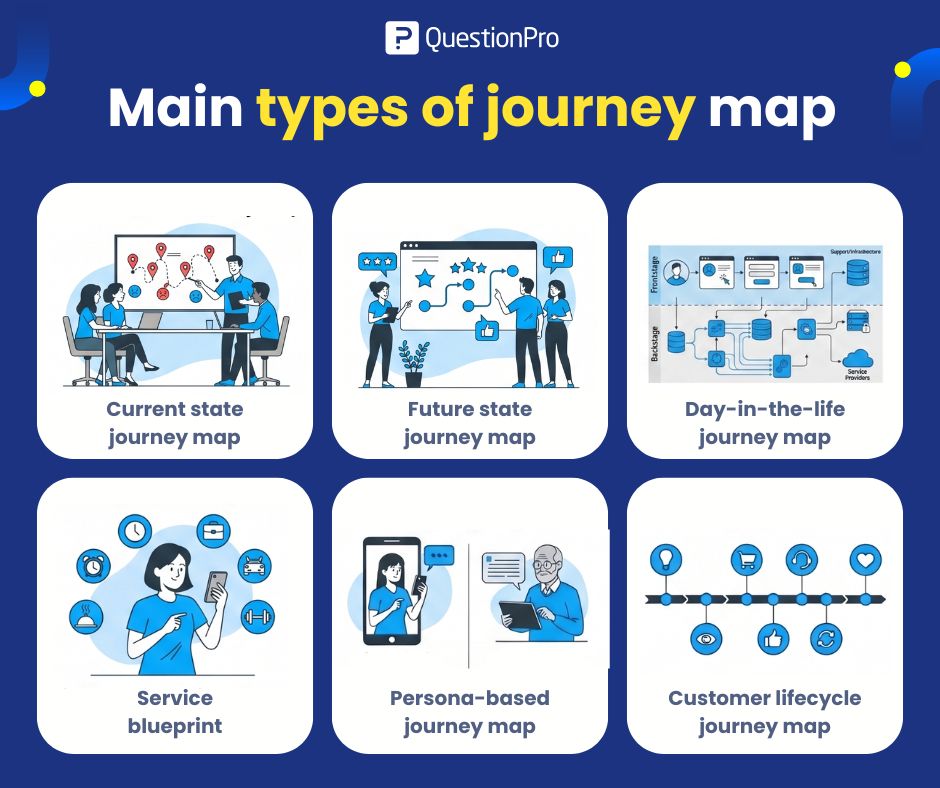
The six main types of journey maps are current state, future state, day-in-the-life, service blueprint, persona-based, and customer lifecycle maps. Each one is built to answer a different question about the customer relationship, and QuestionPro’s customer journey mapping guide walks through the process of building any of them.
Current state journey map
A current state journey map shows how customers experience a product, service, or process today, including existing touchpoints, actions, emotions, and friction points.
Use it when you need to understand the existing experience before making any changes.
Example: A retailer maps its current online checkout flow and finds that customers abandon their carts most often at the shipping cost step, not at payment.
Future state journey map
A future state journey map shows the ideal experience a business wants customers to have once improvements are in place.
Use it when planning a redesign, a new service, or an updated experience strategy.
Example: A travel company designs a future booking journey with fewer form fields, upfront pricing, and a faster mobile checkout.
Day-in-the-life journey map
A day-in-the-life journey map shows how a product or brand fits into a customer’s daily routine, rather than into a single transaction.
Use it to understand habits, priorities, and real-world constraints that shape when and how customers engage.
Example: A fitness app team maps how a working parent fits workouts, meal planning, and commuting around the app throughout a typical weekday.
Service blueprint
A service blueprint maps both the customer-facing experience and the internal processes, systems, and people behind it, including frontstage and backstage actions.
Use it when the experience depends on multiple teams, tools, or handoffs, and a standard journey map cannot explain why something breaks.
Example: A support team blueprints a help ticket from submission through agent response, internal escalation, and system updates to final resolution.
Persona-based journey map
A persona-based journey map shows how one specific customer segment experiences the same journey, which is useful when different groups need different treatment.
Use it whenever your audience includes segments with meaningfully different needs or comfort levels.
Example: A bank compares the mobile banking journey of a tech-comfortable young professional against that of an older customer who needs clearer, slower instructions.
Customer lifecycle journey map
A customer lifecycle journey map shows the full relationship over time, from awareness through purchase, onboarding, retention, support, renewal, and loyalty.
Use it to understand and improve the long-term relationship rather than a single moment in it.
Example: A SaaS company maps the lifecycle from a first website visit through trial signup, onboarding, feature adoption, renewal, and account expansion.
How do you choose the right type of journey map?
Choose the journey map type based on the specific question your team needs answered, not on which map looks the most detailed.
| Goal | Best journey map type |
|---|---|
| Understand today’s experience | Current state journey map |
| Design a better future experience | Future state journey map |
| Understand a customer’s daily context | Day-in-the-life journey map |
| Connect customer-facing and internal processes | Service blueprint |
| Compare different customer segments | Persona-based journey map |
| Track the long-term customer relationship | Customer lifecycle journey map |
| Understand the broader experience landscape | Experience map |
A common mistake is reaching for the most detailed map when a simple one would answer the question faster. If customers are frustrated with slow support resolutions, a service blueprint usually explains more than a general current state map, because it exposes the internal handoffs a customer never sees.
What mistakes should you avoid when building a journey map?
The most common mistake is building one oversized map that tries to cover every persona, channel, and process at once instead of answering one clear question.
Other frequent mistakes include:
- Mapping assumptions instead of real customer data or feedback
- Skipping the persona step, so the map represents no one in particular
- Treating the map as a one-time project instead of updating it as the experience changes
- Leaving out emotions and pain points and mapping only actions
- Building the map without input from the frontline teams closest to the customer
A journey map built on guesses can point a team in the wrong direction just as easily as no map at all.
How do you measure whether a journey map is working?
A journey map is working if the pain points it identifies show measurable improvement in customer feedback after changes are made.
Pair each map with feedback collected at the touchpoints it covers, such as post-purchase surveys, support satisfaction scores, or onboarding check-ins. QuestionPro’s journey mapping software, built on top of its survey platform, lets teams attach real customer feedback to each stage of a map, so a service blueprint or current state map is not built on internal opinion alone. Comparing scores before and after a journey redesign is one of the clearest ways to confirm the map led to a real improvement.
A better map answers one clear question
No single map answers every customer experience question, and that is by design. A current state map shows what is happening now, while a future state map shows what the experience should become. Service blueprints reveal what happens behind the scenes, and a persona-based map shows how different customers experience the same journey in different ways.
Pick the map that matches the question in front of your team. If it clarifies the customer’s goal, their pain points, and the next-best improvement, it has done its job.
Frequently Asked Questions (FAQs)
The current state journey map is the most widely used because most projects start by understanding today’s experience before proposing changes. It gives teams a factual baseline built from real customer behavior rather than assumptions about how the journey should work.
Yes. Many CX teams pair a current state map with a service blueprint to see both the customer view and the internal process behind it. Combining maps gives a fuller picture than relying on a single format for every project.
A customer journey is the actual lived experience a person has with a brand. A journey map is the visual tool a team builds to document and analyze that experience so it can be discussed, shared, and improved across departments.
B2B journeys often involve multiple decision-makers and longer sales cycles, so B2B teams frequently rely more on persona-based and lifecycle maps. B2C journeys are often shorter, so current-state and future-state maps tend to see more everyday use.
Update a journey map whenever a business changes a product, adds a channel, or sees a shift in customer behavior data. Many teams review maps at least once a year, but a major product launch or support process change is reason enough to revisit one sooner.



