- Moderation
- Usability test: UX Diagnostics
- Sprint View: Usability tests
- Accessible Usability Scale - AUS
- System Usability Scale - SUS
- SUPR-Q
- PSSUQ
- UX Crowd: Usability tests
- AI Insights for Usability Tests
- Self-Reported Success (SRS)
- AI Executive Summaries
- Participant Diaries and Study Analysis
- Image analysis
- Voting task analysis
- Video tasks: Analysis

Studies in QuestionPro UX
A Study is the highest level of organization in QuestionPro UX. It serves as a container for your research agenda, allowing you to group multiple Quests together. Each Quest, in turn, consists of specific tasks or questions designed to capture user insights.
This hierarchy ensures that complex research projects remain structured and easy to manage for both the researcher and the participant.
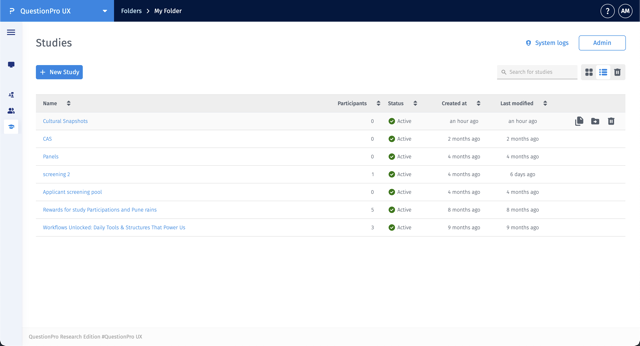
To access your research projects, navigate to the Qualitative Research section in the left sidebar and select Studies. You can organize these into specific Folders to maintain a clean workspace.
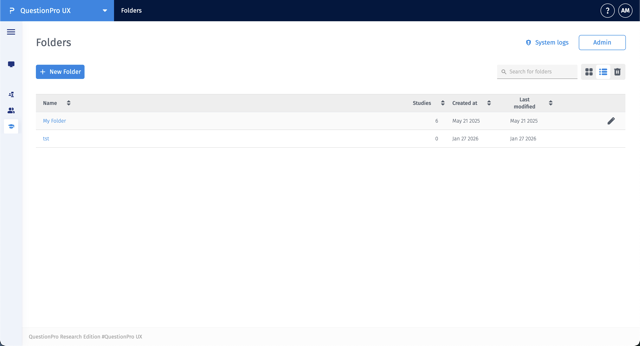
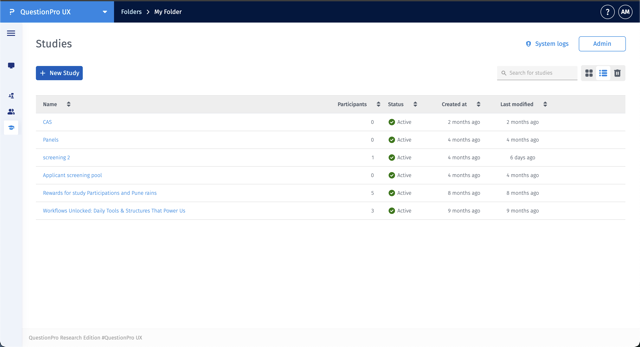
Once inside a folder, you will see a list of all existing studies, their participant count, status, and modification history.
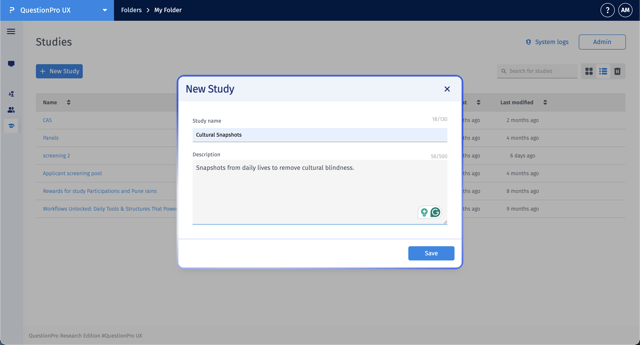
To create a new study, click the + New Study button within your selected folder. A modal will appear where you can enter the following:
- Study name: Give your study a clear, identifiable title.
- Description: Provide context or internal notes about the research objectives.
Click Save to initialize the study and begin adding content.
Management actions for studies are performed directly from the Studies list view. When you hover over a specific study row, three action icons will appear on the far right:
- Copy Study: Click the Copy icon to create a duplicate of the study.
- Move Study: Click the Folder icon to transfer the study to a different folder.
- Delete Study: Click the Trash icon to permanently remove the study and its associated data.
Note: These actions are exclusively available via these hover icons and are not found within the study configuration settings.