Remote usability testing is a UX research method where participants complete tasks on a website, app, prototype, or digital product from their own location. Researchers observe behavior, collect feedback, and identify usability issues without bringing users into a lab.
This method is useful for US product, design, and research teams that need feedback from users across different cities, time zones, devices, and customer segments. It can also reduce scheduling friction compared with in-person testing.
The goal is simple: watch real users try to complete real tasks, then use what you learn to improve the product experience.
What is remote usability testing?
Remote usability testing is a research method used to evaluate how easily people can use a digital product from a remote location.
As a form of remote user research, remote usability testing focuses on whether people can complete real tasks on a website, app, prototype, or digital product.
In a remote test, participants may share their screen, record their session, answer questions, or complete tasks through a testing platform. Researchers then review where users succeed, where they struggle, and what causes confusion.
Usability means how easily a person can complete a goal with a product, service, or system. For example, if a customer cannot find the checkout button or does not understand a form field, that is a usability problem.
Remote usability testing works well for:
- Websites.
- Mobile apps.
- SaaS products.
- Ecommerce flows.
- Prototypes.
- Landing pages.
- Onboarding flows.
- Self-service portals.
- Content-heavy pages.
For a broader foundation, this method sits inside UX research, which includes the methods businesses use to understand users, needs, behaviors, and product experiences.
Start with usability testing to understand the basics, why it matters, and how it helps teams find product friction.
How does remote usability testing work?
Remote usability testing works by asking participants to complete specific tasks while researchers observe their behavior or collect recorded feedback.
A typical test includes:
- A research goal.
- A target participant profile.
- A product, prototype, or flow to test.
- A set of tasks.
- A test script.
- A way to record behavior or responses.
- A process for analyzing findings.
For example, an e-commerce team may ask users to find a product, compare options, add an item to the cart, and reach checkout. If several users get stuck on shipping options, the team has a clear issue to fix.
Remote testing is valuable because participants use their own devices and environments. That can reveal real-world problems that may not appear in a controlled lab.
What are the types of remote usability testing?
The two main types of remote usability testing are moderated usability testing and unmoderated usability testing. The right choice depends on the research goal, timeline, budget, and how much interaction you need with participants.
| Type | How it works | Best for | Main limitation |
| Moderated remote testing | A researcher guides the participant live through a video call or testing platform | Deep feedback, follow-up questions, complex tasks | Takes more time to schedule and run |
| Unmoderated remote testing | Participants complete tasks on their own using written instructions | Faster feedback, larger samples, simple flows | Less context because there is no live moderator |
Nielsen Norman Group explains that remote usability testing can be moderated or unmoderated, and that remote sessions happen when the researcher and participant are not in the same physical location.
1. Moderated remote usability testing
Moderated remote usability testing is a live session where a researcher guides the participant through tasks and asks follow-up questions.
This method is best when you need to understand why someone behaved a certain way. It is useful for new concepts, confusing workflows, complex products, or early-stage prototypes.
Moderated testing can help you capture:
- Facial reactions.
- Verbal feedback.
- Confusion in the moment.
- Decision-making behavior.
- Follow-up explanations.
- Emotional friction.
- Questions users ask while completing tasks.
The main tradeoff is time. You need to recruit participants, schedule sessions, moderate each test, and review recordings or notes.
2. Unmoderated remote usability testing
Unmoderated remote usability testing lets participants complete tasks independently, usually through a testing platform.
This method is useful when the task is clear, and the research team does not need live follow-up questions. It works well for testing simple flows, collecting quick feedback, comparing design options, or getting input from a larger sample.
Unmoderated testing can help you collect:
- Task completion rates.
- Click paths.
- Completion time.
- Written feedback.
- Screen recordings.
- Survey responses.
- Satisfaction scores.
The main tradeoff is context. If a participant gets confused, you may see what happened, but you may not fully understand why unless your follow-up questions are strong.
When should you conduct remote usability testing?
Remote usability testing should be conducted whenever a team needs to understand how real users complete key tasks without meeting them in person.
It is especially useful at these points:
- Early concept validation: Test rough ideas, wireframes, or prototypes before investing heavily in design or development.
- Design iteration: Check whether users understand navigation, labels, layouts, buttons, and task flows.
- Pre-launch review: Find blockers before a website, app, or product feature goes live.
- Post-launch evaluation: See how real users interact with the product after release and identify what needs improvement.
- Onboarding review: Test whether new users can set up an account, understand the product, and complete first actions.
- Feature optimization: Compare different versions of a feature and see which one users understand faster.
Remote testing is also helpful when your audience is spread across the USA. A product team in Austin can test with users in New York, Chicago, Seattle, or rural markets without asking anyone to travel.
How do you conduct remote usability testing step by step?
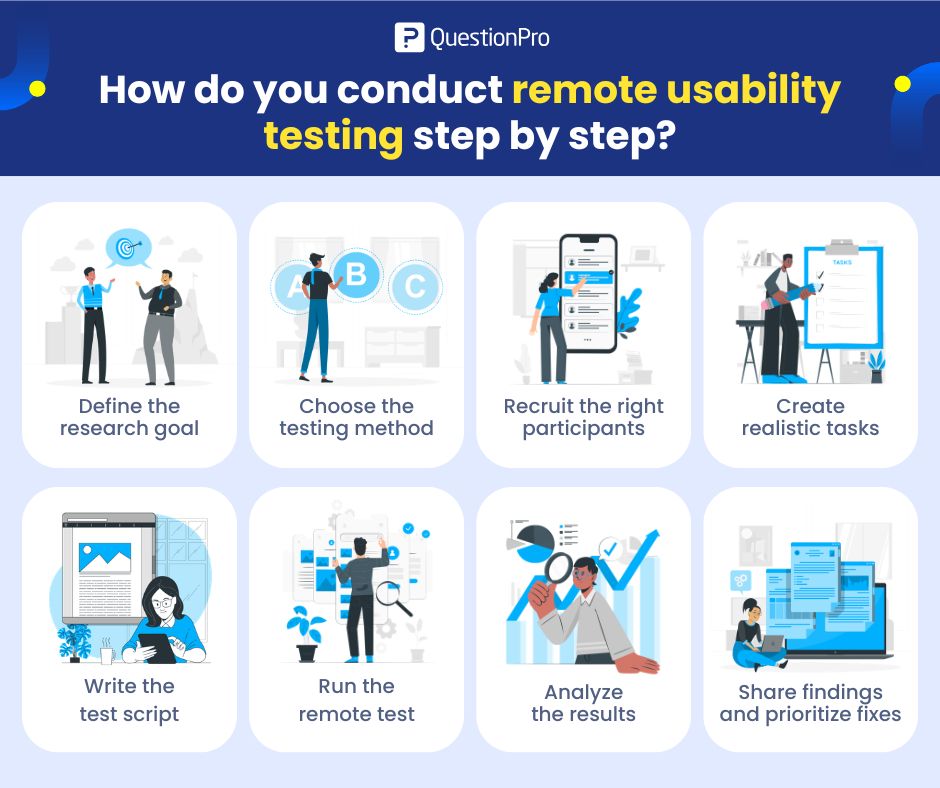
To conduct remote usability testing, start with one clear research goal, choose the right testing method, recruit the right participants, create realistic tasks, run the test, and prioritize fixes based on user behavior.
1. Define the research goal
Start with one focused question. A vague goal creates vague findings.
Good research goals sound like:
- Can users complete checkout without help?
- Do new users understand the onboarding flow?
- Can customers find pricing information?
- Do users understand the difference between two plan options?
- Where do people get stuck while booking a demo?
A clear goal keeps the test short and helps the team decide what to measure.
2. Choose the testing method
Choose moderated testing when you need live conversation, probing questions, and deeper explanation. Run unmoderated testing when the task is simple, the audience is larger, or speed matters more.
A practical rule:
- Use moderated testing for “why” questions.
- Use unmoderated testing for “can users complete this task?” questions.
Both methods are useful. The wrong choice usually happens when teams pick the faster option even though they need deeper insight.
3. Recruit the right participants
Recruit participants who match the audience for the product or feature you are testing.
Participant criteria may include:
- Role.
- Age range.
- Location.
- Device type.
- Product experience.
- Buying behavior.
- Industry.
- Technical skill level.
- Current customer status.
For most usability tests, a small group can reveal repeated issues. Larger samples are useful when you need stronger quantitative signals, such as task success rate or preference comparison.
Use a screener survey to confirm that participants match the target user profile before inviting them to the test.
4. Create realistic tasks
Usability tasks should reflect what users actually need to do.
Weak task:
“Explore the website and tell us what you think.”
Better task:
“You are comparing pricing options for a small team. Find the plan that fits a team of 10 and explain what you would do next.”
Good tasks are specific but not overly guided. You should tell participants what goal to complete, not exactly where to click.
Here are a few task examples:
| Product type | Scenario | Task example |
|---|---|---|
| Ecommerce site | Buying luggage | Find a medium suitcase under $150 and reach checkout |
| Fitness app | Tracking activity | Log a walk and review your daily progress |
| Food delivery app | Ordering dinner | Find a restaurant, customize an order, and reach payment |
| SaaS website | Comparing plans | Find the best plan for a small team and explain why |
| Support portal | Solving an issue | Find instructions for resetting your password |
5. Write the test script
A test script keeps the session consistent across participants. It should include the introduction, consent language, warm-up questions, tasks, follow-up questions, and closing questions.
A simple script structure includes:
- Welcome and purpose.
- Recording notice, if applicable.
- Context questions.
- Task instructions.
- Follow-up questions.
- Final feedback.
- Thank-you message.
Keep the language simple. Avoid product jargon unless the participant would naturally know it.
If you need help with structure, a usability test script can help you keep remote sessions consistent and easier to analyze.
6. Run the remote test
During the test, give clear instructions and avoid helping too quickly. The goal is to observe where the product works and where it breaks down.
For moderated testing:
- Ask participants to think out loud.
- Watch where they pause.
- Note confusion and hesitation.
- Ask neutral follow-up questions.
- Avoid explaining the interface during the task.
- Save time at the end for final impressions.
For unmoderated testing:
- Make task instructions short.
- Add clear start and end points.
- Include written follow-up questions.
- Test the flow before sending it to participants.
- Check that screen recording, links, and surveys work.
A pilot test with one participant can catch unclear instructions before the full study begins.
7. Analyze the results
After the test, organize findings by task, issue, severity, and user impact.
Look for patterns such as:
- Multiple users failing the same task.
- Users taking longer than expected.
- Repeated confusion around labels.
- High drop-off at one step.
- Misunderstood buttons or icons.
- Positive moments worth keeping.
- Quotes that explain the issue clearly.
Do not treat every comment as equal. A comment from one user may be interesting, but a repeated behavior across participants is usually more important.
Turn findings into a short report that product, design, marketing, and leadership can understand.
A useful usability report should include:
- Research goal.
- Participant profile.
- Testing method.
- Key tasks.
- Top usability issues.
- Evidence from recordings or quotes.
- Severity level.
- Recommended fixes.
- Next steps.
Prioritize fixes based on user impact and effort. A small copy change that helps users complete a task may be worth doing quickly. A larger design issue may need deeper planning.
For a more detailed process, read this guide on how to conduct usability testing.
What questions should you ask in remote usability testing?
Remote usability testing questions should help explain what users did, why they did it, and how the experience felt.
Good questions include:
- What did you expect to happen here?
- What made you choose that option?
- Was anything confusing?
- What information was missing?
- How easy or difficult was this task?
- What would you do next?
- What part of the experience felt slow or unclear?
- If you could change one thing, what would it be?
Avoid leading questions like:
- “Was this page easy to use?”
- “Did you like our new design?”
- “How helpful was this feature?”
Better wording:
- “How would you describe this page?”
- “What stood out to you about this design?”
- “When would you use this feature?”
What metrics should you track in remote usability testing?
Remote usability testing metrics help teams compare user behavior across tasks and sessions.
Common metrics include:
| Metric | What it measures | Why it matters |
|---|---|---|
| Task success rate | Whether users completed the task | Shows if the flow works |
| Time on task | How long users took | Reveals friction or confusion |
| Error rate | Number of mistakes or wrong turns | Shows where users struggle |
| Drop-off point | Where users quit or fail | Identifies blockers |
| Satisfaction score | How users rate the task experience | Adds user perception to behavior |
| Completion path | How users moved through the product | Shows whether navigation matches expectations |
Metrics are useful, but they should not replace observation. A user may complete a task and still feel frustrated. That is why the best remote usability tests combine behavior, feedback, and task data.
If you are still deciding whether testing is worth the time, the benefits of usability testing explain how testing can improve user satisfaction and reduce product friction.
What mistakes should you avoid in remote usability testing?
The most common remote usability testing mistakes happen before the test starts. Weak goals, unclear tasks, and poor participant screening can make the results hard to trust.
Avoid these mistakes:
- Testing too much at once: A long test creates fatigue and messy findings.
- Recruiting the wrong users: Feedback from the wrong audience can lead to poor design decisions.
- Writing leading tasks: Do not guide users toward the answer you want.
- Helping too quickly: If you rescue users every time they pause, you will miss real usability problems.
- Ignoring technical setup: Broken links, poor audio, and failed recordings can ruin a session.
- Reporting every issue equally: Prioritize issues by frequency, severity, and business impact.
Remote testing should feel structured but not scripted to the point where users cannot behave naturally.
How can research platforms support remote usability testing?
Research platforms can support remote usability testing by helping teams recruit participants, collect structured feedback, run surveys after tasks, and analyze results in one place.
This section matters when teams need more than a video call. Video shows behavior, but surveys and structured feedback help quantify what users experienced.
QuestionPro can support this workflow through QuestionPro Research Suite, which includes research tools for surveys, feedback collection, audience access, and analysis. Teams can use it to collect post-task feedback, screen participants, analyze responses, and connect usability findings with broader product research.
For teams that need a broader research setup, online survey software can also support follow-up surveys, participant screeners, and feedback forms before or after usability sessions.
The platform should support the research plan. It should not replace clear goals, strong tasks, and careful analysis.
Final thoughts
Remote usability testing helps teams understand how real users experience a product outside a lab. It works because people complete tasks from their own environment, often on their own devices, with fewer location barriers.
The strongest tests are focused. They start with one clear goal, recruit the right participants, use realistic tasks, and turn findings into prioritized product fixes.
For US teams working with distributed users, remote testing is often a practical way to improve websites, apps, prototypes, onboarding flows, and digital services without slowing down product work.
Frequently Asked Questions (FAQs)
Yes, remote usability testing can be reliable when the research goal, participant criteria, tasks, and analysis process are clear. It works best when teams test realistic tasks with users who match the intended audience.
For qualitative usability testing, small groups can reveal repeated issues. Larger samples are useful for unmoderated tests when teams want task success rates, completion times, or stronger quantitative comparisons across user groups.
Remote user testing is a broader term for testing with users remotely. Remote usability testing focuses specifically on whether users can complete tasks easily, understand the interface, and use the product without unnecessary friction.
Yes, remote usability testing works well for prototypes. Teams can test early concepts, navigation, labels, copy, and flows before development. This helps identify confusing parts before time is spent building the final product.
A remote usability test usually works best when it stays focused and short. Many sessions take 20 to 45 minutes, depending on the number of tasks, the product complexity, and whether the test is moderated.
Remote usability testing usually needs a testing platform, video or screen recording, participant recruitment, a test script, and a way to collect feedback. Surveys can also help capture post-task ratings and open-ended comments.