Your broad audiences forgive a rough guess. Your niche ones send you back for a requote. That is exactly why you need an AI incidence rate estimate to do the heavy lifting.
The number you guess decides the whole quote
You are setting up a feasibility check. Respondents, country, completion date. Then one small field asks for your incidence rate, and you pause.
You type 40. Or 60. If you are honest, you are guessing.
That guess is not harmless. It sets your cost per complete, your timeline, and the quote you hand your client. Guess too high, and the study underdelivers, the field runs long, and you are back asking for a requote. For a broad consumer audience, a rough number is usually close enough. For a niche one, it rarely is.
That is the gap an AI incidence rate estimate closes. Instead of asking you to know the number, it reads your survey and your targeting, then hands you a data-driven starting point.
Learn More: Access respondents and run feasibility with QuestionPro Audience
What is an AI incidence rate estimate?
It is a feature inside QuestionPro Audience that predicts your survey incidence rate before you launch. It reads your screener questions and qualifying answers, the panel filters you have applied, and historical panel profiling data where it exists. Then it returns a suggested IR with a confidence level.
It sits right next to the incidence rate field in your feasibility setup, behind a “Check with AI” button. One click, and you get a number instead of a shrug.
Three things it is not. It is not a live field metric that updates while your survey runs. It is not a quota simulator. And it does not redesign your survey for you. It gives you a better number to start from, and leaves the decisions with you.
How it works, from screener to feasibility
The payoff is a realistic IR without the manual math. Here is the flow behind it.
You select or upload your survey, then tag which questions are screeners. You mark the answers that qualify a respondent. You apply the panel filters that are actually available for your target. Then you click “Estimate IR.”
The system sends that package to the AI, which compares two things: what your survey requires versus what the panel can genuinely target and profile. Within seconds, you see a suggested IR, a confidence level, and a niche warning if your target looks hard to reach. You can apply the number to your feasibility with one click, or type your own if you would rather.
What it looks like in practice
A broad consumer study
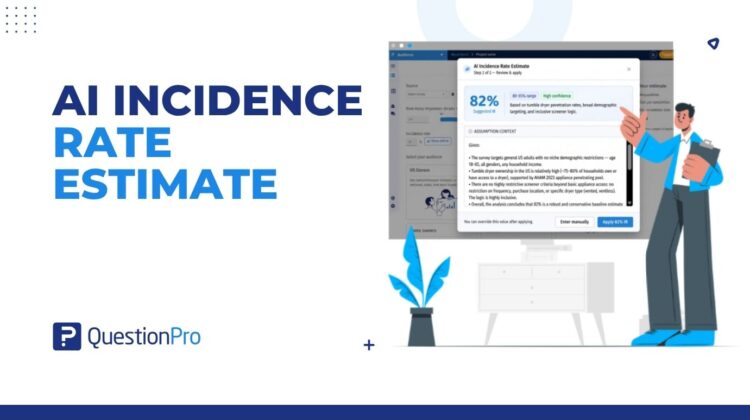
Say you are fielding a tumble dryer usage study to US adults, 18 to 65, all genders, any household income, with a single screener: owns or has access to a tumble dryer. The AI reads that setup and suggests an IR around 82 percent, inside an 80 to 85 percent range, with high confidence. The logic is right there to read: dryer ownership is high, the demographics are broad, and the screener is inclusive. You apply it and move on.
A niche, brand-specific target
Now say you want owners of one specific electric vehicle brand. The panel may only be able to target “car owners,” not that exact model. The estimate comes back lower, the confidence drops, and a warning tells you the audience is very niche. That is the moment to reset expectations with your client, or to talk to the Audience team, rather than discovering the problem three days into field.
The advantages of an AI incidence rate estimate
- A data-driven starting number replaces a gut-feel guess, so your feasibility begins from something real.
- A confidence indicator tells you how much weight to put on the estimate before you commit.
- Early niche warnings surface hard-to-reach targets while you can still adjust, not mid-field.
- Fewer requotes and delays follow when the quote you send is built on a realistic IR.
- Full control stays with you, because you can override the suggestion or enter your own value at any point.
When to trust it, and when to dig deeper
For broad consumer targets with a clear screener, a high-confidence estimate is a solid number to run with.
For very niche or brand-specific targets, read the warning and treat the estimate as a starting point for discussion rather than a promise. This is a planning estimate, not a guarantee, and real field IR can still shift once your survey is live. Watching that in the field is a different job, handled by Incidence Rate management, which monitors on-field IR after launch. Use the AI estimate to plan well. Use IR management to protect the project once it is running.
If you want the wider context on why IR matters for panel projects, our guides to online panels and panel research companies are good background.
Get started
Better feasibility starts with a better number. If you are running niche audience work, an estimate you can trust saves you the requote and the awkward client call.
Create a free QuestionPro account and set up your next feasibility check.
Frequently asked questions
It is a prediction of your survey incidence rate, generated before you launch, based on your screeners, qualifying answers, and applied panel targeting. Instead of typing a number you guessed, you get a suggested IR with a confidence level and a warning if the audience looks niche. You can apply it to your feasibility or override it with your own value.
Incidence rate is the share of screened people who qualify for your study. You divide the number of qualified respondents by the total number screened, qualified and unqualified together. A study of dryer owners, for example, has an IR equal to the percentage of screened people who actually own or use a dryer. Lower IR means more screening and higher cost per complete.
No. The estimate is a starting point, not a lock. You can apply the suggested number to your feasibility, or choose to enter your incidence rate manually if you know something the model does not. The goal is to give you a realistic anchor and the reasoning behind it, then leave the final call to you.
The system flags it. When the panel cannot target your exact criteria, or the qualifying pool looks small, you get a lower estimate, a reduced confidence level, and a niche audience warning. That early signal lets you reset client expectations or refine the target before field, rather than finding out through slow completes and a requote.
No. The AI estimate is a planning tool used before launch, during feasibility. Monitoring your actual IR while the survey is live in the field is a separate feature, IR management, which tracks on-field metrics and flags cost changes after launch. One helps you plan the project, the other protects it once it is running.
Seconds. You mark your screeners and qualifying answers, apply your panel filters, and click to estimate. The suggested IR, its confidence range, and any niche warning appear right in the feasibility flow, so checking the number is a quick step in setup rather than a separate task.
A more accurate IR gives you a more accurate quote, which is the real benefit here. Incidence rate is one of several inputs into what a panel project costs, alongside sample size and survey length. For a full quote on your specific study, your account admin or the QuestionPro Audience team can walk you through the numbers.