• Skip to main content
  • Skip to primary sidebar
  • Skip to footer
QuestionPro

QuestionPro

questionpro logo
  • Products
    survey software iconSurvey softwareEasy to use and accessible for everyone. Design, send and analyze online surveys.research edition iconResearch SuiteA suite of enterprise-grade research tools for market research professionals.CX iconCustomer ExperienceExperiences change the world. Deliver the best with our CX management software.WF iconEmployee ExperienceCreate the best employee experience and act on real-time data from end to end.
  • Solutions
    IndustriesGamingAutomotiveSports and eventsEducationGovernment
    Travel & HospitalityFinancial ServicesHealthcareCannabisTechnology
    Use CaseAskWhyCommunitiesAudienceContactless surveysMobile
    LivePollsMember ExperienceGDPRPositive People Science360 Feedback Surveys
  • Resources
    BlogeBooksSurvey TemplatesCase StudiesTrainingHelp center
  • Features
  • Pricing
Language
  • English
  • Español (Spanish)
  • Português (Portuguese (Brazil))
  • Nederlands (Dutch)
  • العربية (Arabic)
  • Français (French)
  • Italiano (Italian)
  • 日本語 (Japanese)
  • Türkçe (Turkish)
  • Svenska (Swedish)
  • Hebrew IL (Hebrew)
  • ไทย (Thai)
  • Deutsch (German)
  • Portuguese de Portugal (Portuguese (Portugal))
  • Español / España (Spanish / Spain)
Call Us
+1 800 531 0228 +1 (647) 956-1242 +55 9448 6154 +49 030 9173 9255 +44 01344 921310 +81-3-6869-1954 +61 (02) 6190 6592 +971 529 852 540
Log In Log In
SIGN UP FREE

Home CX

Manager Roles: Bringing Role-Based Access to Closed Loop Feedback

manager-roles

As CX teams grow, not every manager needs the same level of access to customer tickets.

A manager responsible for day-to-day ticket handling may need to create, edit, comment, and respond to tickets. A team lead may also need to assign or escalate tickets. Another manager may be responsible for RCA and other higher-level actions.

When all managers have the same access, it becomes difficult to align permissions with these different responsibilities.

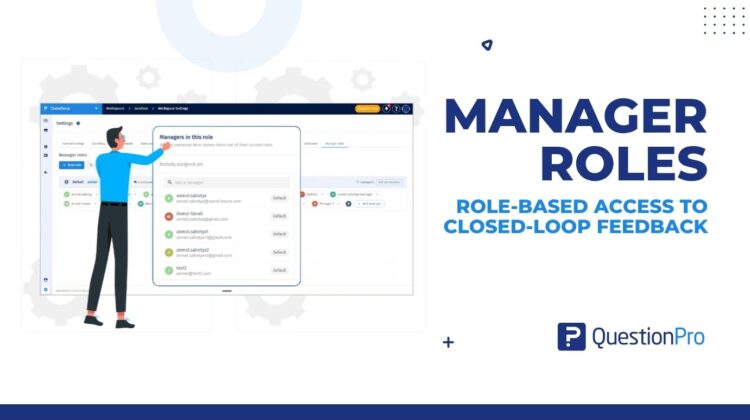
This is the problem Manager Roles addresses in Closed Loop Feedback.

Moving from broad access to role-based permissions

Previously, manager access to ticket actions was largely all-or-nothing. Delete access was also handled separately through a dedicated global setting.

This created two problems.

First, administrators couldn’t easily define different permission levels for different managers.

Second, sensitive actions such as deleting tickets couldn’t be restricted to specific groups of managers without changing a broader setting.

Manager Roles introduces a workspace-level role-based permission model.

Workspace admins can now create roles, configure their permissions, and assign managers to those roles.

A manager’s role determines which ticket actions they can see and perform.

Define permissions around responsibilities

Roles are configured around five permission groups:

  • Work on tickets
  • Collaborate on a ticket
  • Route & escalate
  • Resolve & analyse
  • Destructive

Within these groups, admins can control individual actions such as:

  • Create and edit tickets
  • Comment and respond
  • Manage watchers
  • Assign or reassign tickets
  • Escalate tickets
  • Set root cause / RCA
  • Delete tickets

This allows an organization to create permission sets that reflect how its CX team actually operates.

For example, an organization could have a Team Lead role with assignment and escalation permissions, while reserving RCA or delete permissions for a more senior role.

The roles themselves are configurable, so organizations don’t have to fit their team structure into predefined permission levels.

A Default role for everyone else

Not every manager needs a custom role.

Manager Roles includes a system Default role that administrators can configure.

Existing and new CX managers are assigned to the Default role when Manager Roles launches. Administrators can then move individual managers to a custom role when their responsibilities require a different permission set.

This provides a baseline access model without requiring administrators to configure every manager individually.

Managing changes as responsibilities evolve

Permissions often need to change when people move between responsibilities.

With Manager Roles, administrators can move a manager between the Default role and custom roles, or between different custom roles.

Each manager belongs to only one role at a time.

This means an administrator doesn’t need to rebuild an individual’s permissions whenever their responsibilities change. They can simply move the manager to the appropriate role.

Custom roles can also be duplicated when an administrator needs to create a similar permission set.

Delete access is now part of the role

One of the important changes in Manager Roles is how delete access is handled.

Previously, delete ticket access was controlled through a separate global setting.

With Manager Roles, Delete is a permission within the role.

This means an administrator can create a role that has access to delete tickets while keeping that permission disabled for other roles.

The existing Settings → Delete ticket access entry now directs administrators to Manager Roles, where this permission is managed.

Permissions are enforced where managers work

Manager Roles doesn’t only define what permissions look like in Workspace Settings.

The assigned role controls the actions available to managers throughout the CX experience.

Unauthorized actions can be hidden or disabled across areas including:

  • Dashboard
  • Ticket details
  • Ticket tabs
  • Watchers
  • Ticket action menus
  • Assignment
  • Escalation
  • RCA
  • Responding
  • Resolving
  • Deleting tickets

Permissions are also enforced at the backend level, so restricting an action isn’t dependent only on whether the corresponding UI control is visible.

Built for growing CX teams

The underlying problem with broad permissions becomes more noticeable as CX teams become more structured.

When every manager has the same access, the permission model doesn’t necessarily reflect the organization’s operating model.

Manager Roles provides a way to define that operating model explicitly:

Create roles → define permissions → assign managers → manage access as responsibilities change.

For workspace administrators, this provides a centralized way to manage manager access.

For CX managers, it means the ticket actions available to them can reflect the responsibilities associated with their role.

Manager Roles is available under Workspace Settings → Manager Roles in Closed Loop Feedback.
Experiences change the world. Deliver the best with our CX management software and delight your customers at every touchpoint. Request Demo

SHARE THIS ARTICLE:

About the author
Anmol Sahetya
Product Manager
View all posts by Anmol Sahetya

Primary Sidebar

Take full control of your customer journey

Make immediate business actions with our CX management platform

Learn more

RELATED ARTICLES

HubSpot - QuestionPro Integration

Top 15 Customer Testimonial Software to Enhance Branding

Mar 20,2024

HubSpot - QuestionPro Integration

KFC Customer Journey Map: A Real-World 5-Stage Example

Oct 06,2023

HubSpot - QuestionPro Integration

Experience - Engineers versus Designers | Tuesday CX Thoughts

Jul 15,2025

BROWSE BY CATEGORY

Footer

MORE LIKE THIS

manager-roles

Manager Roles: Bringing Role-Based Access to Closed Loop Feedback

Oct 2, 2026

survey-score

Introducing Survey Score: know your survey is ready before you publish

Oct 1, 2026

ai-powered-ex-analytics

Turn EX Survey Data into Instant Action: Introducing AI-Powered Summary and Action Recommendations with Organizational Context

Oct 1, 2026

dashboard-allowed-filters

How Dashboard Allowed Filters Eliminate Data Noise in Employee Experience Analytics

Oct 1, 2026

Other categories

questionpro-logo-nw
Help center Live Chat SIGN UP FREE
  • Sample questions
  • Sample reports
  • Survey logic
  • Branding
  • Integrations
  • Professional services
  • Security
  • Survey Software
  • Customer Experience
  • Workforce
  • Communities
  • Audience
  • Polls Explore the QuestionPro Poll Software - The World's leading Online Poll Maker & Creator. Create online polls, distribute them using email and multiple other options and start analyzing poll results.
  • Research Edition
  • LivePolls
  • InsightsHub
  • Blog
  • Articles
  • eBooks
  • Survey Templates
  • Case Studies
  • Training
  • Webinars
  • All Plans
  • Nonprofit
  • Academic
  • Qualtrics Alternative Explore the list of features that QuestionPro has compared to Qualtrics and learn how you can get more, for less.
  • SurveyMonkey Alternative
  • VisionCritical Alternative
  • Medallia Alternative
  • Likert Scale Complete Likert Scale Questions, Examples and Surveys for 5, 7 and 9 point scales. Learn everything about Likert Scale with corresponding example for each question and survey demonstrations.
  • Conjoint Analysis
  • Net Promoter Score (NPS) Learn everything about Net Promoter Score (NPS) and the Net Promoter Question. Get a clear view on the universal Net Promoter Score Formula, how to undertake Net Promoter Score Calculation followed by a simple Net Promoter Score Example.
  • Offline Surveys
  • Customer Satisfaction Surveys
  • Employee Survey Software Employee survey software & tool to create, send and analyze employee surveys. Get real-time analysis for employee satisfaction, engagement, work culture and map your employee experience from onboarding to exit!
  • Market Research Survey Software Real-time, automated and advanced market research survey software & tool to create surveys, collect data and analyze results for actionable market insights.
  • GDPR & EU Compliance
  • Employee Experience
  • Customer Journey
  • Synthetic Data
  • About us
  • Executive Team
  • In the news
  • Testimonials
  • Advisory Board
  • Careers
  • Brand
  • Media Kit
  • Contact Us

QuestionPro in your language

  • English
  • Español (Spanish)
  • Português (Portuguese (Brazil))
  • Nederlands (Dutch)
  • العربية (Arabic)
  • Français (French)
  • Italiano (Italian)
  • 日本語 (Japanese)
  • Türkçe (Turkish)
  • Svenska (Swedish)
  • Hebrew IL (Hebrew)
  • ไทย (Thai)
  • Deutsch (German)
  • Portuguese de Portugal (Portuguese (Portugal))
  • Español / España (Spanish / Spain)

Awards & certificates

  • survey-leader-asia-leader-2023
  • survey-leader-asiapacific-leader-2023
  • survey-leader-enterprise-leader-2023
  • survey-leader-europe-leader-2023
  • survey-leader-latinamerica-leader-2023
  • survey-leader-leader-2023
  • survey-leader-middleeast-leader-2023
  • survey-leader-mid-market-leader-2023
  • survey-leader-small-business-leader-2023
  • survey-leader-unitedkingdom-leader-2023
  • survey-momentumleader-leader-2023
  • bbb-acredited
The Experience Journal

Find innovative ideas about Experience Management from the experts

  • © 2022 QuestionPro Survey Software | +1 (800) 531 0228
  • Sitemap
  • Privacy Statement
  • Terms of Use