Your last research plan is not an archive. It is a head start. Now, you can create an interview study from a document you already have on file.
The file nobody wants to retype
Somewhere in your shared drive there is a file called q3_satisfaction_guide_final_v7_actually_final.docx. Nobody remembers who made v4. Everybody remembers it was good.
That file holds real thinking: what the team wanted to learn, who it wanted to hear from, and which questions finally got honest answers. Then a new study comes along, and someone opens a blank page and retypes it all.
If you run research for a living, you know the feeling. If you run it on the side, you feel it even more. Maybe you are a product manager with a launch coming, or a CX lead with a sinking score. It takes longer than it should, and it eats the hours you meant to spend listening to people.
QuestionPro ListenAI now starts from the file instead. ListenAI is QuestionPro’s product for AI-moderated interviews, powered by QuestionPro AI. Instead of a fixed list of questions, participants have a conversation. QuestionPro AI asks, listens, and follows up on interesting answers, much like a skilled human moderator would. With survey guide upload, you attach a document and ListenAI drafts that study for you.
Learn more: Explore QuestionPro ListenAI
What survey guide upload does
A survey guide is the document that records what you want to learn and how you plan to ask. A research brief, an earlier survey, or a stakeholder’s notes can do the same job. Between them, they usually hold your goals, your audience, and the background a new study needs.
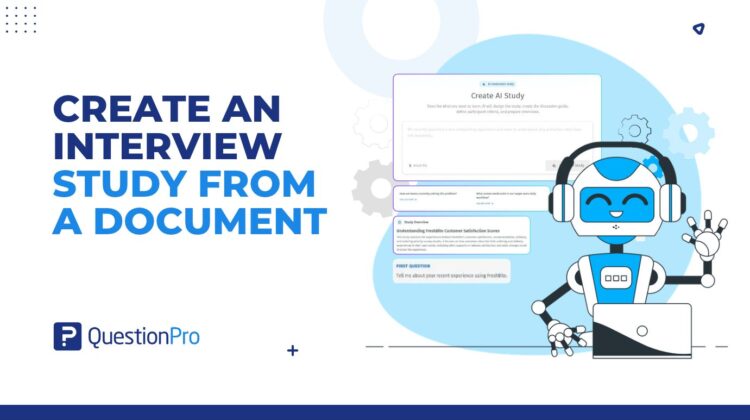
Survey guide upload lets you hand one of those documents to ListenAI. QuestionPro AI reads it and builds a draft study, with a study overview and an interview preview that shows what participants will see. Four details are worth knowing:
- It reads the files you already have.
PDF, TXT, or DOCX, up to 5 MB, one file at a time.
- Notes are optional.
Add the audience or the focus if the document skips it. Leave the box empty if it does not.
- It works in the background.
You keep working while a progress card counts up in the corner.
- It is a draft.
You review it and edit it before anything launches.
No document at all? Describe your idea and start from scratch, exactly as before. The upload is a shortcut, not a gate.
How it works, start to finish
- Open the create AI study screen. This is where you would otherwise type a brief.
- Click attach file and pick your document. A chip shows its name and size. Picked the wrong one? Click the X and swap it.
- Add a note if you like: the audience, the focus, a constraint. Anything the document does not say.
- Click generate study, then go answer your email. A card in the bottom-right corner shows the current step and the percent complete.
- When the card reads study ready, click open study. The draft opens with a draft badge on it.
- Read the study overview, check the interview preview, and click continue to review. This is where your judgment takes over.
Prefer the screen-by-screen version? The ListenAI survey guide help article covers each step.
Who uses it, and for what
Anyone with a folder like that one. Here is how it plays out for a few of them.
The CX lead with a slipping score
A regional grocery chain sees satisfaction dip after a store redesign. The team already has last quarter’s satisfaction survey guide. They attach it and add a line about which shoppers they want to hear from. Then they review a draft study built to explore the reasons behind the scores, not just the scores themselves.
The product manager with a brief and a deadline
A software team has a one-page brief for a feature that has not shipped. They upload it with a note on who the users are. Then they review a draft study on how people react to the idea before anyone builds it.
The agency juggling client projects
A research agency turns a client’s brief into a draft study, then refines it with the client. Editing a draft makes for a friendlier meeting than staring at a blank page together.
The HR team with last year’s engagement survey
The survey already points to the topics that matter most. Attach it, and move on to deeper conversations about them instead of another round of ratings.
And the brand team handed a stakeholder brief on Thursday? Same move. The objectives carry straight into the study. Follow-up studies get one more benefit: because they start from the earlier guide, they stay aligned with the research that came before.
These are illustrations. What ListenAI generates depends on what is in your document and any notes you add.
What it will not do
Honest limits make a feature easier to trust, so here they are.
It will not launch anything for you. The output is a draft, and the review step is the point.
It will not grade your source document. If the document is thin on objectives or audience, the draft will be too. The best input clearly states your objectives, your audience, and your questions, with a short note for whatever it leaves out.
It will not accept a stack of files or other formats. One PDF, TXT, or DOCX at a time, up to 5 MB.
The split of labor is simple. QuestionPro AI does the typing. You decide what is worth asking.
Get started
Dig out the folder. Pick the guide you trust most, attach it, and see what ListenAI makes of it. If you want the product team’s short read on the same feature, it is here.
Ready to start your next study from a document? Try QuestionPro ListenAI
Frequently asked questions
One that clearly states your study objectives, your audience, and the questions you want answered. A previous survey, an existing survey guide, a research brief, or supporting notes all qualify. If the document leaves something out, such as who you want to hear from, add it in the optional note before you generate the study.
QuestionPro AI. ListenAI is powered by QuestionPro AI, which reads your document and any notes you add, then builds the draft study from them. You review and edit that draft before anything launches.
ListenAI accepts PDF, TXT, and DOCX files up to 5 MB, one at a time. If your file is something else, save or export it in one of those formats first. If it is too large, or you have several documents, pull the pages that carry your objectives and audience into one file. Attach that.
Yes. Describe your study idea in the text box and generate from that. Starting from scratch is still fully supported. Document upload simply saves you from retyping when you already have material. You can also combine the two: attach a file and add notes for anything it does not cover.
No. Treat it as a first draft. QuestionPro AI builds the study from your document and any notes. Review the study overview and interview preview, and edit anything that does not match your goals before you launch. QuestionPro AI does the setup. The research decisions stay with you.
No. It builds from what the document contains and does not validate or improve it. A document with unclear objectives or no audience gives the draft less to work with. Spending a few minutes tightening the source, or adding a clarifying note, helps.
Teams that already have material and run repeat or follow-up research. That includes market researchers, CX managers, UX researchers, product managers, insights and brand teams, and agencies handling client projects. If you have only an idea and no document, you are covered too: typed notes still start a study.