• Skip to main content
  • Skip to primary sidebar
  • Skip to footer
QuestionPro

QuestionPro

questionpro logo
  • Products
    survey software iconSurvey softwareEasy to use and accessible for everyone. Design, send and analyze online surveys.research edition iconResearch SuiteA suite of enterprise-grade research tools for market research professionals.CX iconCustomer ExperienceExperiences change the world. Deliver the best with our CX management software.WF iconEmployee ExperienceCreate the best employee experience and act on real-time data from end to end.
  • Solutions
    IndustriesGamingAutomotiveSports and eventsEducationGovernment
    Travel & HospitalityFinancial ServicesHealthcareCannabisTechnology
    Use CaseAskWhyCommunitiesAudienceContactless surveysMobile
    LivePollsMember ExperienceGDPRPositive People Science360 Feedback Surveys
  • Resources
    BlogeBooksSurvey TemplatesCase StudiesTrainingHelp center
  • Features
  • Pricing
Language
  • English
  • Español (Spanish)
  • Português (Portuguese (Brazil))
  • Nederlands (Dutch)
  • العربية (Arabic)
  • Français (French)
  • Italiano (Italian)
  • 日本語 (Japanese)
  • Türkçe (Turkish)
  • Svenska (Swedish)
  • Hebrew IL (Hebrew)
  • ไทย (Thai)
  • Deutsch (German)
  • Portuguese de Portugal (Portuguese (Portugal))
  • Español / España (Spanish / Spain)
Call Us
+1 800 531 0228 +1 (647) 956-1242 +55 9448 6154 +49 030 9173 9255 +44 01344 921310 +81-3-6869-1954 +61 (02) 6190 6592 +971 529 852 540
Log In Log In
SIGN UP FREE

Home Market Research

Go beyond percentages: Unlock deeper insights with Advanced Cross-Tabulation

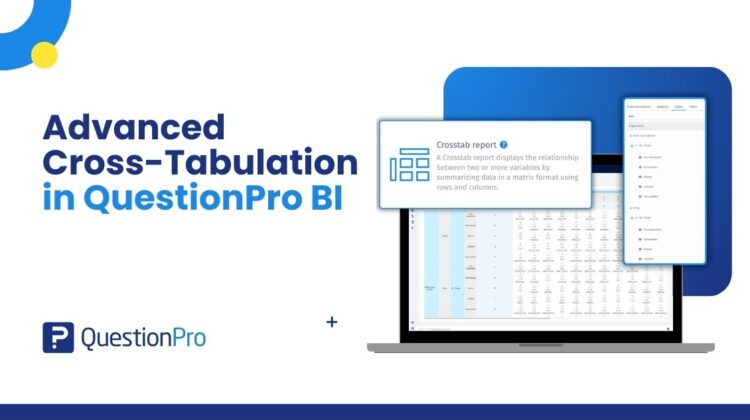
Advanced Cross-Tabulation in QuestionPro BI

How often have you looked at survey results and thought,

“This is interesting… but what’s really driving this?”

You see overall percentages. You see averages. You see trends.

But what if you want to know:

  • Are younger customers more satisfied than older ones?
  • Do promoters differ significantly by region?
  • Is this difference statistically meaningful or just random noise?
  • How do two variables truly relate to each other?

That’s where Advanced Cross-Tabulation in QuestionPro BI comes in.

What is Advanced Cross-Tabulation?

Advanced Cross-Tabulation lets you compare multiple variables side by side to uncover relationships in your data.

Instead of just looking at one question in isolation, you can:

  • Break responses down by demographics
  • Compare answers across segments
  • Add custom BI variables
  • Run statistical tests directly within the report

And you can do all this within a few clicks.

It transforms your survey data from simple descriptive reporting into real analytical exploration.

Why Cross-Tabs Matter?

Imagine you’re looking at a single overall result from your survey.

The number looks clear and straightforward. But does it tell the whole story?

Now consider:

  • How does this result differ between new and returning respondents?
  • Do patterns change across regions?
  • Are there noticeable differences between age groups or roles?
  • Which segments are driving the highest or lowest responses?

Suddenly, you’re no longer looking at one summary figure — you’re uncovering patterns within different groups.

Cross-tabulation helps you move beyond surface-level reporting and explore how responses vary across segments, giving you clearer context and more meaningful insights.

What Makes It “Advanced”?

1. Flexible Row & Column Configuration

Drag and drop questions into:

  • Rows (stubs)
  • Columns (banners)

You can:

  • Add multiple variables
  • Drill down into sub-questions
  • Include BI variables
  • Compare segments dynamically

You’re not limited to fixed demographic splits.

2. Built-in Statistical Testing

One of the biggest challenges with cross-tabs is interpretation. Just because numbers differ doesn’t mean they’re meaningful. With Advanced Cross-Tabulation, you can apply:

  • Chi-Square test to check for statistically significant differences
  • Fisher’s Exact Test for small sample sizes
  • Confidence intervals for proportion testing

This removes guesswork and adds analytical rigor.

3. Multiple Analytical Views

You can switch between:

  • Count
  • Row percentage
  • Column percentage
  • Row & column totals
  • Row/Column means
  • Heatmaps for pattern detection

Whether you want a quick snapshot or a deep dive, the view adapts to your goal.

4. Seamless BI Integration

Once configured, your cross-tab report can be:

  • Downloaded
  • Added as a tab in your BI dashboard
  • Shared with stakeholders

No need to recreate the analysis elsewhere as it becomes part of your reporting workflow.

When Should You Use Advanced Cross-Tabulation?

Use it when:

  • You need to compare responses across segments
  • You’re preparing client-ready analysis
  • You need statistical validation
  • You’re exploring hypotheses
  • You want to understand relationships between variables

Avoid it when:

  • You only need a single headline metric
  • You want a quick visual summary without deeper analysis

For that, other widgets might be more appropriate.

Who Is This For?

  • Insights teams
  • Market researchers
  • CX analysts
  • Product teams
  • Data-driven decision makers

Anyone who needs more than just surface-level reporting.

Final Thoughts

Survey data is rarely one-dimensional—the real value comes from understanding how different variables interact and influence one another. Advanced Cross-Tabulation in QuestionPro BI is built to help you uncover these deeper relationships and turn complex datasets into clear, actionable insights. With the right analytical tools in place, you can Explore, Compare, Validate, and Present, all within one structured reporting environment. If you’ve been exporting data to Excel just to run statistical comparisons, you won’t need to anymore.

Create memorable experiences based on real-time data, insights and advanced analysis. Request Demo

SHARE THIS ARTICLE:

About the author
Prabal Gupta

View all posts by Prabal Gupta

Primary Sidebar

Research what's on your mind. Find out what's on theirs!

A suite of tools to leverage research and transform insights.

Discover our insight platform

RELATED ARTICLES

HubSpot - QuestionPro Integration

How to Know Whether Your Employee Initiatives are Working

Jun 17,2024

HubSpot - QuestionPro Integration

The Starbucks Customer Experience: Brewing Success

Oct 11,2023

HubSpot - QuestionPro Integration

Feedback Loop: What It Is, Types & How It Works?

Jun 21,2024

BROWSE BY CATEGORY

Footer

MORE LIKE THIS

customer-journey-analytics-tools

Customer Journey Analytics Tools: How They Work and What to Look For

Mar 2, 2026

surveys-with-questionpro-ai

Build Professional Surveys in 60 Seconds with QuestionPro AI

Feb 26, 2026

nps-survey-question

What is an NPS Survey Question? Examples, Types, and Scoring Guide

Feb 26, 2026

best-ai-tool-for-analyzing-video-survey-responses

Best AI Tool for Analyzing Video Survey Responses in 2026: QuestionPro VideoAI

Feb 26, 2026

Other categories

questionpro-logo-nw
Help center Live Chat SIGN UP FREE
  • Sample questions
  • Sample reports
  • Survey logic
  • Branding
  • Integrations
  • Professional services
  • Security
  • Survey Software
  • Customer Experience
  • Workforce
  • Communities
  • Audience
  • Polls Explore the QuestionPro Poll Software - The World's leading Online Poll Maker & Creator. Create online polls, distribute them using email and multiple other options and start analyzing poll results.
  • Research Edition
  • LivePolls
  • InsightsHub
  • Blog
  • Articles
  • eBooks
  • Survey Templates
  • Case Studies
  • Training
  • Webinars
  • All Plans
  • Nonprofit
  • Academic
  • Qualtrics Alternative Explore the list of features that QuestionPro has compared to Qualtrics and learn how you can get more, for less.
  • SurveyMonkey Alternative
  • VisionCritical Alternative
  • Medallia Alternative
  • Likert Scale Complete Likert Scale Questions, Examples and Surveys for 5, 7 and 9 point scales. Learn everything about Likert Scale with corresponding example for each question and survey demonstrations.
  • Conjoint Analysis
  • Net Promoter Score (NPS) Learn everything about Net Promoter Score (NPS) and the Net Promoter Question. Get a clear view on the universal Net Promoter Score Formula, how to undertake Net Promoter Score Calculation followed by a simple Net Promoter Score Example.
  • Offline Surveys
  • Customer Satisfaction Surveys
  • Employee Survey Software Employee survey software & tool to create, send and analyze employee surveys. Get real-time analysis for employee satisfaction, engagement, work culture and map your employee experience from onboarding to exit!
  • Market Research Survey Software Real-time, automated and advanced market research survey software & tool to create surveys, collect data and analyze results for actionable market insights.
  • GDPR & EU Compliance
  • Employee Experience
  • Customer Journey
  • Synthetic Data
  • About us
  • Executive Team
  • In the news
  • Testimonials
  • Advisory Board
  • Careers
  • Brand
  • Media Kit
  • Contact Us

QuestionPro in your language

  • English
  • Español (Spanish)
  • Português (Portuguese (Brazil))
  • Nederlands (Dutch)
  • العربية (Arabic)
  • Français (French)
  • Italiano (Italian)
  • 日本語 (Japanese)
  • Türkçe (Turkish)
  • Svenska (Swedish)
  • Hebrew IL (Hebrew)
  • ไทย (Thai)
  • Deutsch (German)
  • Portuguese de Portugal (Portuguese (Portugal))
  • Español / España (Spanish / Spain)

Awards & certificates

  • survey-leader-asia-leader-2023
  • survey-leader-asiapacific-leader-2023
  • survey-leader-enterprise-leader-2023
  • survey-leader-europe-leader-2023
  • survey-leader-latinamerica-leader-2023
  • survey-leader-leader-2023
  • survey-leader-middleeast-leader-2023
  • survey-leader-mid-market-leader-2023
  • survey-leader-small-business-leader-2023
  • survey-leader-unitedkingdom-leader-2023
  • survey-momentumleader-leader-2023
  • bbb-acredited
The Experience Journal

Find innovative ideas about Experience Management from the experts

  • © 2022 QuestionPro Survey Software | +1 (800) 531 0228
  • Sitemap
  • Privacy Statement
  • Terms of Use