A data strategy is the plan that connects your business goals to how you collect, manage, and use data to reach them.
Most companies collect more data than they use well. The problem is rarely a lack of data. It is a lack of a clear plan for what to do with it.
This guide covers what a data strategy is, why it matters, a practical seven-step framework, and a real example showing how it works in practice.
What is a data strategy?
A data strategy is a long-term plan that defines how an organization collects, manages, protects, and uses data to support its business goals.
It is not a technology purchase or a one-time project. It covers three connected elements:
- People: who owns data decisions and how employees use data day to day
- Processes: how data moves through the organization and how quality is maintained
- Technology: the tools used to store, share, and analyze data
A data strategy answers a simple question. Given our business goals, what data do we need, and how do we make sure the right people can use it as part of a working business intelligence practice?
Why a data strategy matters
Without a strategy, data accumulates faster than it gets used. Different departments build their own systems, and the organization ends up with fragmented, duplicated, or conflicting information.
According to McKinsey research on data-driven organizations, companies that treat data as a core business asset consistently outperform peers on both efficiency and revenue growth.
The cost of not having a strategy shows up in wasted effort. Teams spend time reconciling numbers instead of acting on them. Decisions get made on gut feeling because nobody trusts the data enough to rely on it.
How to build a data strategy step by step
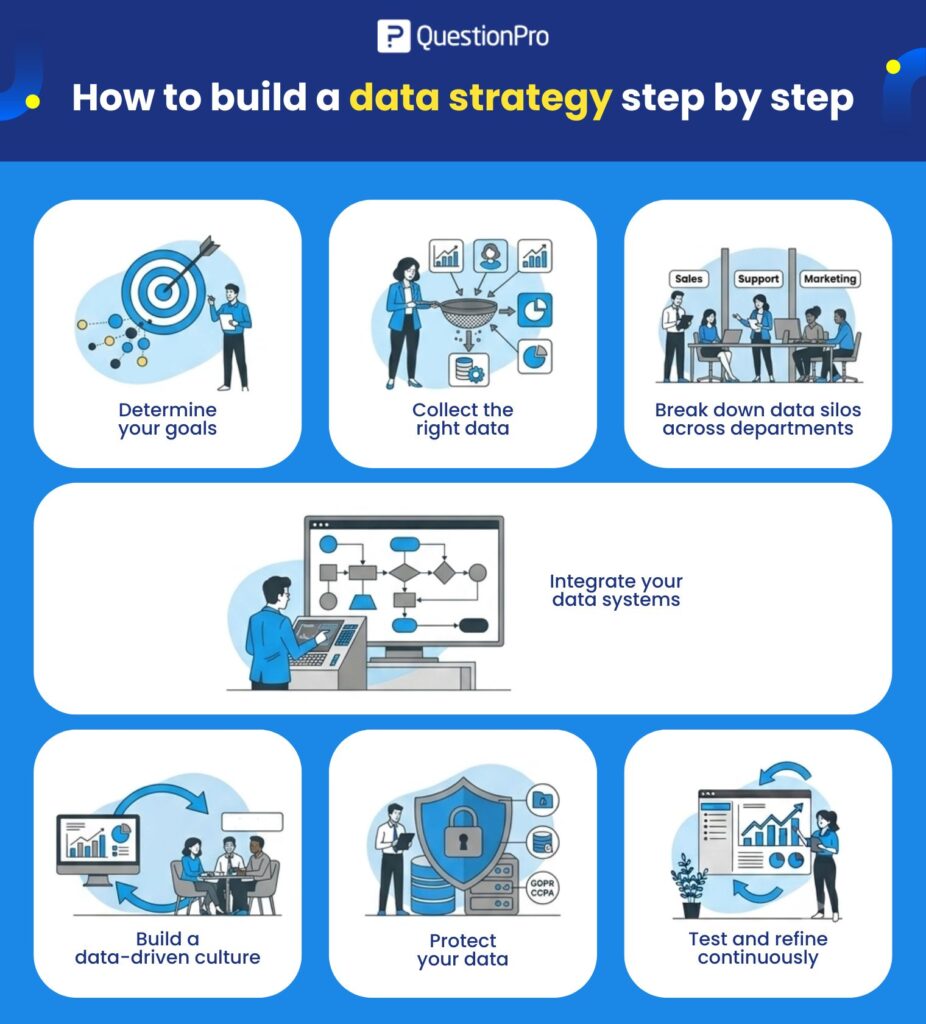
These seven steps take a data strategy from concept to something your organization can actually run on.
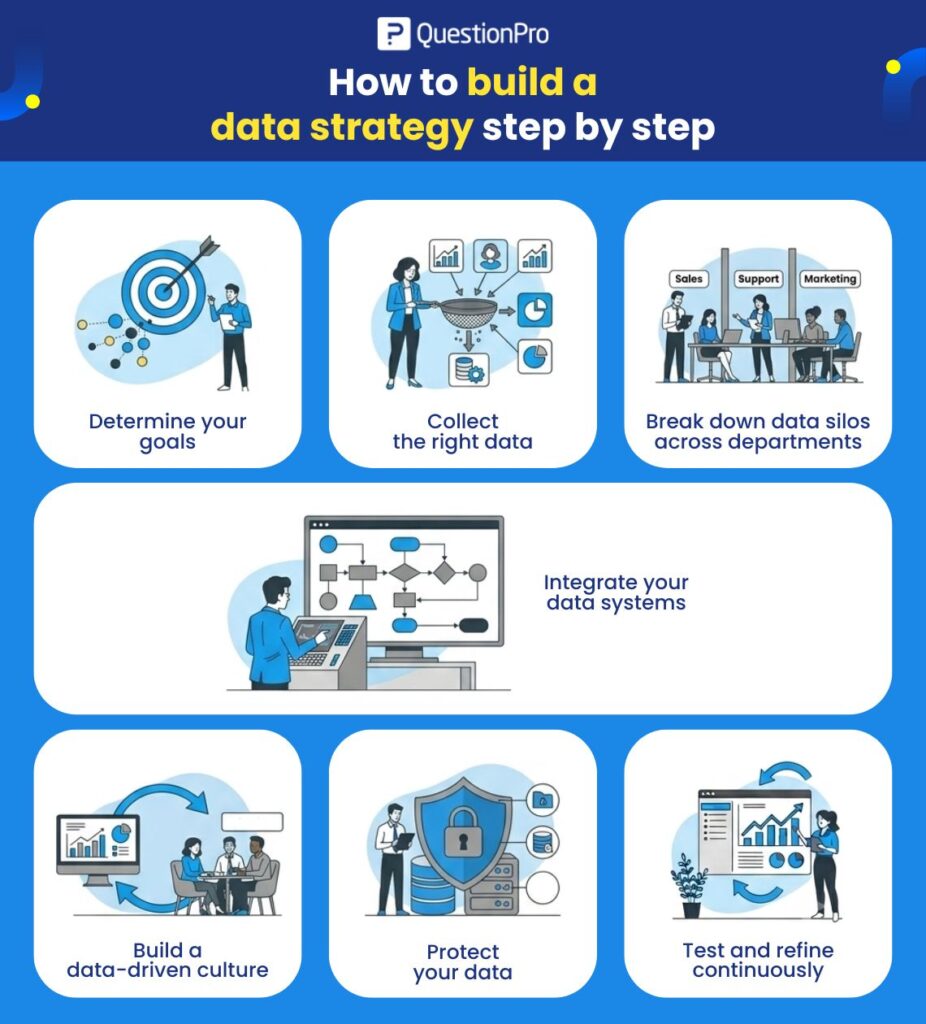
Step 1: Determine your goals
Start with the business outcome, not the data.
Vague goals produce vague data collection. “Understand our customers better” is not specific enough to guide a plan. “Reduce customer churn in the enterprise segment by 15% this year” tells you exactly what data you need.
Once the goal is clear, work backward to identify the smallest useful dataset. More data is not automatically better. A tightly scoped dataset tied to a specific goal beats a large, unfocused one.
Step 2: Collect the right data
Good data collection starts with matching sources to your goal, not collecting everything available.
Useful sources typically include:
- Internal systems: CRM, support tickets, product usage logs
- Customer feedback: surveys, reviews, direct interviews
- External data: market reports, competitor data, social listening
Prioritize quality over volume. A smaller dataset with reliable, well-documented sources is more useful than a large one full of gaps and inconsistencies.
Step 3: Break down data silos across departments
A data silo forms when one department’s data is inaccessible to others. Sales data lives in the CRM. Support data lives in a helpdesk tool. Marketing data lives somewhere else entirely.
Silos create blind spots. A sales team without support ticket visibility misses churn risk signals. A marketing team without sales data cannot measure which campaigns actually close deals.
Fixing this requires deliberate effort:
- Set a shared data ownership model across departments
- Standardize naming conventions so the same customer looks the same everywhere
- Give teams visibility into each other’s relevant data, not just their own
Step 4: Integrate your data systems
Integration connects your tools so data flows automatically instead of being manually copied between systems.
Manual data transfer is slow and error-prone. Integration reduces both problems and enables automation, such as triggering a support alert when a high-value customer’s usage drops.
Start with the highest-impact integrations first. Connecting your CRM and support platform usually delivers more value early than connecting every tool in your stack at once.
Step 5: Build a data-driven culture
A strategy fails if people do not trust or use the data. Culture is what makes the technical parts of a data strategy actually stick.
Three things build that trust over time:
- Skill building: Give employees training on the tools and basic data literacy so they feel confident, not intimidated, by data.
- Visible leadership behavior: When leaders visibly use data to make decisions, teams follow that example.
- Consistent access: Employees who can find and trust the data they need are far more likely to use it correctly.
Culture change takes longer than any technical rollout. Expect this step to take months, not weeks.
Step 6: Protect your data
Data protection is not optional. It reduces the risk of breaches and keeps the organization compliant with data regulations.
For US companies, this means accounting for both federal and state-level requirements, including the California Consumer Privacy Act (CCPA), alongside international regulations like GDPR if you handle data from customers in the EU.
Practical protection steps include:
- Role-based access controls so employees only see data relevant to their job
- Regular audits of who has access to sensitive data
- A clear policy for how long data is retained and when it gets deleted
Regulations change. Build review cycles into your strategy so your protection measures do not go stale.
Step 7: Test and refine continuously
A data strategy is not something you finish. It needs regular testing to confirm it is still delivering value.
Review your strategy against three questions on a regular cycle:
- Is the data still tied to a current business goal?
- Are teams actually using it to make decisions?
- Has anything changed, new tools, new regulations, new goals, that requires an update?
Treat this step as ongoing maintenance, not a final checkbox.
Data strategy example: how it works in practice
Here is how these steps play out for a real business problem.
- The scenario: A sales team has fragmented customer data spread across a CRM, a support tool, and spreadsheets. Reps cannot see a customer’s full history before a call, which slows down deals and hurts customer trust.
- The strategy applied: The company sets a specific goal, give every rep a single view of each customer before every call. They identify the data needed (CRM records, support history, product usage), break down the silo between sales and support, and integrate the two systems into one dashboard.
- The result: Reps walk into calls already knowing a customer’s support history and product usage patterns. They can address problems proactively instead of being surprised by them. Deal cycles shorten because reps stop asking questions the data already answers.
- The broader value: Beyond the sales team, this integration also gives customer success and marketing visibility into the same unified customer view, reducing duplicated effort across departments.
Common mistakes when building a data strategy
- Collecting data without a clear goal.
Data collected without a specific purpose usually goes unused. Every data source
should trace back to a business objective. - Treating it as an IT project.
A data strategy touches every department. Leaving it entirely to IT produces a technically sound system nobody outside IT actually uses. - Skipping the culture work.
Buying tools without building trust and skill among employees leads to low adoption regardless of how good the technology is. - Ignoring US-specific compliance.
Companies focused only on GDPR sometimes overlook CCPA and other state-level US privacy laws that apply directly to their data practices. - Never revisiting the strategy.
Business goals change. A data strategy built two years ago and never updated is likely misaligned with what the company needs today.
How QuestionPro supports data strategy execution
Customer and employee feedback is a core data source for most data strategies, but it is often the piece most disconnected from other systems. QuestionPro provides survey and feedback tools that integrate with CRM and analytics platforms, helping teams fold structured feedback data into the same unified view as their operational data rather than treating it as a separate silo.
A data strategy is only as good as the decisions it improves
The seven steps in this guide build a working system, not a document that sits unread. The real test of a data strategy is whether it changes how decisions get made day to day.
Organizations that treat their data strategy as a living plan, reviewed regularly and adjusted as goals shift, get more value from their data than those that build it once and move on. The technology matters less than the discipline of keeping the strategy tied to real business outcomes.
Frequently Asked Questions (FAQs)
A data strategy is the broader plan connecting data to business goals, covering people, processes, and technology. Data governance is one part of that plan, focused specifically on data quality, ownership, and compliance rules that keep data trustworthy and secure.
Building the initial framework typically takes four to eight weeks for a mid-size organization. Full adoption, including the culture and integration work, usually takes six months to a year before the strategy is fully embedded in how teams operate.
Ownership works best as a shared responsibility between a data or analytics leader and business unit leaders. A data strategy owned entirely by IT often lacks business context, while one owned entirely by business teams often lacks the technical structure to scale.
A data silo is a dataset that one department controls and other departments cannot access. Silos create blind spots, duplicate work, and prevent a full view of customers or operations, which is why breaking them down is a core step in most data strategies.
GDPR applies to any organization handling data from individuals in the European Union, regardless of where the company is based. US companies with no EU customers are not subject to GDPR but should still comply with relevant state laws such as CCPA.