• Skip to main content
  • Skip to primary sidebar
  • Skip to footer
QuestionPro

QuestionPro

questionpro logo
  • Products
    survey software iconSurvey softwareEasy to use and accessible for everyone. Design, send and analyze online surveys.research edition iconResearch SuiteA suite of enterprise-grade research tools for market research professionals.CX iconCustomer ExperienceExperiences change the world. Deliver the best with our CX management software.WF iconEmployee ExperienceCreate the best employee experience and act on real-time data from end to end.
  • Solutions
    IndustriesGamingAutomotiveSports and eventsEducationGovernment
    Travel & HospitalityFinancial ServicesHealthcareCannabisTechnology
    Use CaseAskWhyCommunitiesAudienceContactless surveysMobile
    LivePollsMember ExperienceGDPRPositive People Science360 Feedback Surveys
  • Resources
    BlogeBooksSurvey TemplatesCase StudiesTrainingHelp center
  • Features
  • Pricing
Language
  • English
  • Español (Spanish)
  • Português (Portuguese (Brazil))
  • Nederlands (Dutch)
  • العربية (Arabic)
  • Français (French)
  • Italiano (Italian)
  • 日本語 (Japanese)
  • Türkçe (Turkish)
  • Svenska (Swedish)
  • Hebrew IL (Hebrew)
  • ไทย (Thai)
  • Deutsch (German)
  • Portuguese de Portugal (Portuguese (Portugal))
  • Español / España (Spanish / Spain)
Call Us
+1 800 531 0228 +1 (647) 956-1242 +55 9448 6154 +49 030 9173 9255 +44 01344 921310 +81-3-6869-1954 +61 (02) 6190 6592 +971 529 852 540
Log In Log In
SIGN UP FREE

Home Market Research

Keep open-ended feedback focused with Censored sub-themes in TextAI

censored-sub-themes

The morning after a concert, the event team needs to know what to fix before the next show. Attendees mention vocals that were hard to hear, long entry lines, and an accessible viewing area that filled up early. Mixed in with those details are a few ads and replies about something else entirely.

When the same dashboard supports both analysis and the stakeholder debrief, it helps to have a deliberate way to handle those replies. The research team needs access to the original comments. The event team needs to see where changes would improve the next show.

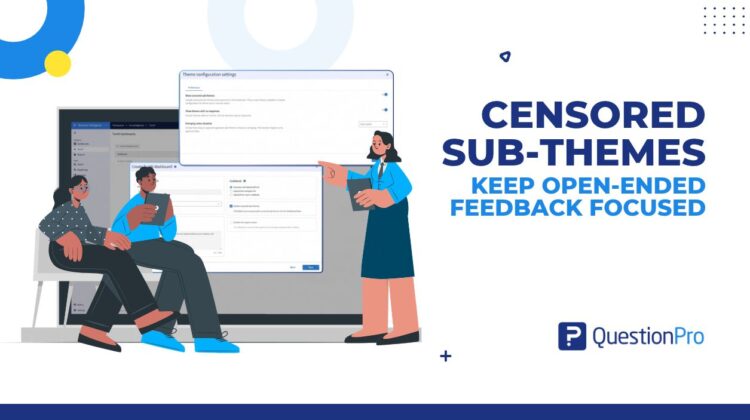
Censored sub-themes in QuestionPro TextAI give both teams a way to work with the same feedback. Researchers can review flagged replies in Theme configuration and decide whether to include them in the dashboard.

Give flagged replies a place to go

When TextAI flags a response as spam, off-topic, abusive, or malicious, it groups the reply under Outlier Parent Topic → Censored and assigns it Neutral sentiment. The original response stays available in Theme configuration, where an analyst can read it in context.

That review matters because one comment can contain several ideas. If a flagged reply includes useful feedback, remove its Censored tag and assign a sub-theme that reflects the relevant part of the response. This fits into the advanced text analysis workflow in TextAI, alongside the codebook your team uses to organize feedback.

Set it up in your next TextAI dashboard

  • Leave Enable censored sub-themes selected under Codebook when you create the dashboard. It’s on by default. If you clear it during setup, you cannot enable it later for that dashboard.
  • Open Theme configuration and select Censored under Outlier Parent Topic to review the original replies.
  • To re-categorize a response, remove its Censored tag, select the response, and use Add sub-theme to apply the relevant category.
  • Use Show censored sub-themes in Theme configuration settings to control what appears in the dashboard. The switch is on by default.

What this looks like in a concert debrief

In the walkthrough, one flagged reply promotes an unrelated car dealership. The analyst reviews it in Theme configuration, removes its Censored tag, and assigns the custom Unrelated promotions sub-theme. For a different example, imagine a flagged reply that mentions the bass drowning out the vocals near the sound desk. The analyst can move that reply to Sound balance and clarity so it can inform the next sound check.

For the debrief, the event lead can hide Censored responses from the dashboard and focus the discussion on practical questions. Where should the sound team check the mix? Do entrance signs need to change? Is there enough space on the accessible viewing platform? The research team can still return to the flagged replies in Theme configuration.

If several responses point to an issue outside the current codebook, Emerging Themes in TextAI gives analysts another way to explore what may deserve a closer look.

Give stakeholders a clearer view of the feedback

Keep the original comments available for review and build a dashboard that helps your team decide what to do next. See how to set up and review Censored sub-themes in TextAI.
Create memorable experiences based on real-time data, insights and advanced analysis. Request Demo

SHARE THIS ARTICLE:

About the author
Prabal Gupta

View all posts by Prabal Gupta

Primary Sidebar

Research what's on your mind. Find out what's on theirs!

A suite of tools to leverage research and transform insights.

Discover our insight platform

RELATED ARTICLES

HubSpot - QuestionPro Integration

Pre-Launch Surveys for Marketing Campaigns: A Practical Guide

Feb 12,2026

HubSpot - QuestionPro Integration

Data Cleansing in Survey Research: A Practical Guide With Steps and Checks

Oct 15,2025

HubSpot - QuestionPro Integration

Top 20 Patient Experience Software for Modern Healthcare

Mar 14,2024

BROWSE BY CATEGORY

Footer

MORE LIKE THIS

censored-sub-themes

Keep open-ended feedback focused with Censored sub-themes in TextAI

Nov 26, 2026

cx-agent-closeloop

From Ticket Management to Ticket Execution: How AI Is Changing Customer Support Operations

Nov 26, 2026

Customer Experience Workflows

Customer Experience Survey Deployment: Automate and Simplify Survey Distribution with QuestionPro CX

Nov 25, 2026

questionpro-certifications

QuestionPro certifications: A complete guide to mastering the platform, course by course

Nov 23, 2026

Other categories

questionpro-logo-nw
Help center Live Chat SIGN UP FREE
  • Sample questions
  • Sample reports
  • Survey logic
  • Branding
  • Integrations
  • Professional services
  • Security
  • Survey Software
  • Customer Experience
  • Workforce
  • Communities
  • Audience
  • Polls Explore the QuestionPro Poll Software - The World's leading Online Poll Maker & Creator. Create online polls, distribute them using email and multiple other options and start analyzing poll results.
  • Research Edition
  • LivePolls
  • InsightsHub
  • Blog
  • Articles
  • eBooks
  • Survey Templates
  • Case Studies
  • Training
  • Webinars
  • All Plans
  • Nonprofit
  • Academic
  • Qualtrics Alternative Explore the list of features that QuestionPro has compared to Qualtrics and learn how you can get more, for less.
  • SurveyMonkey Alternative
  • VisionCritical Alternative
  • Medallia Alternative
  • Likert Scale Complete Likert Scale Questions, Examples and Surveys for 5, 7 and 9 point scales. Learn everything about Likert Scale with corresponding example for each question and survey demonstrations.
  • Conjoint Analysis
  • Net Promoter Score (NPS) Learn everything about Net Promoter Score (NPS) and the Net Promoter Question. Get a clear view on the universal Net Promoter Score Formula, how to undertake Net Promoter Score Calculation followed by a simple Net Promoter Score Example.
  • Offline Surveys
  • Customer Satisfaction Surveys
  • Employee Survey Software Employee survey software & tool to create, send and analyze employee surveys. Get real-time analysis for employee satisfaction, engagement, work culture and map your employee experience from onboarding to exit!
  • Market Research Survey Software Real-time, automated and advanced market research survey software & tool to create surveys, collect data and analyze results for actionable market insights.
  • GDPR & EU Compliance
  • Employee Experience
  • Customer Journey
  • Synthetic Data
  • About us
  • Executive Team
  • In the news
  • Testimonials
  • Advisory Board
  • Careers
  • Brand
  • Media Kit
  • Contact Us

QuestionPro in your language

  • English
  • Español (Spanish)
  • Português (Portuguese (Brazil))
  • Nederlands (Dutch)
  • العربية (Arabic)
  • Français (French)
  • Italiano (Italian)
  • 日本語 (Japanese)
  • Türkçe (Turkish)
  • Svenska (Swedish)
  • Hebrew IL (Hebrew)
  • ไทย (Thai)
  • Deutsch (German)
  • Portuguese de Portugal (Portuguese (Portugal))
  • Español / España (Spanish / Spain)

Awards & certificates

  • survey-leader-asia-leader-2023
  • survey-leader-asiapacific-leader-2023
  • survey-leader-enterprise-leader-2023
  • survey-leader-europe-leader-2023
  • survey-leader-latinamerica-leader-2023
  • survey-leader-leader-2023
  • survey-leader-middleeast-leader-2023
  • survey-leader-mid-market-leader-2023
  • survey-leader-small-business-leader-2023
  • survey-leader-unitedkingdom-leader-2023
  • survey-momentumleader-leader-2023
  • bbb-acredited
The Experience Journal

Find innovative ideas about Experience Management from the experts

  • © 2022 QuestionPro Survey Software | +1 (800) 531 0228
  • Sitemap
  • Privacy Statement
  • Terms of Use