Introduction
Think about the first few weeks in a new job. There’s a lot to take in: new names, new systems, a new manager’s way of working. Most of us form an impression of an organisation surprisingly quickly. And yet many organisations don’t ask new starters how it’s going until the annual survey comes round, sometimes ten months later.
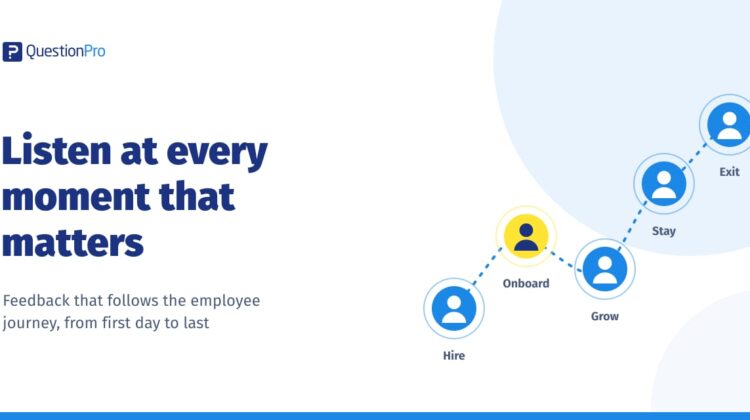
By then, the moment has passed. That’s the gap employee lifecycle surveys are designed to close. Instead of one big survey a year, they ask short, timely questions at the moments that shape how people feel about their work: joining, settling in, growing, staying and leaving.
Key takeaways
- Employee lifecycle surveys are short surveys triggered at key moments: candidate, onboarding (30, 60 and 90 days), development, stay and exit.
- They show where the employee experience breaks down, which a once-a-year average hides.
- Connecting them to your HR system lets start, move and leaving dates trigger each survey automatically.
- Most organisations start with onboarding and exit surveys, then add stay surveys.
What are employee lifecycle surveys?
Employee lifecycle surveys are short surveys sent at set moments in an employee’s journey, such as onboarding, a work anniversary, an internal move or an exit. Because each one is tied to a specific experience, the feedback is timely and easier to act on than a once-a-year average.
An annual engagement survey tells you how people feel overall. Lifecycle surveys tell you where in the journey that feeling is formed. Both are useful. But if you’ve ever looked at a disappointing engagement score and wondered where things went wrong, lifecycle data is often where the answer sits. (Our overview of the stages of the employee lifecycle covers each stage in more detail.)
What should you ask at each stage of the employee lifecycle?
There isn’t one model that suits every organisation, but these six moments are a good starting point. Keep each survey short: three to eight questions is usually enough.
| Channel | Reach | Cost | Anonymity | Best for | Watch out for |
|---|---|---|---|---|---|
| SMS | Very high: works on any mobile phone | Per-message cost | Good, with anonymous links | Shift workers, older devices, short pulses | Character limits; needs up-to-date mobile numbers |
| High where WhatsApp is widely used | Usually per-conversation | Good, with anonymous links | India, the Middle East, South Africa and other WhatsApp-first markets | Opt-in requirements; personal vs work phone boundaries | |
| QR code | Anyone on site with a smartphone | Very low | Very strong: no personal link at all | Break rooms, canteens, site notice boards | Can’t target or remind specific people |
| Microsoft Teams | Staff with Teams access | Included where Teams is in use | Good, depending on setup | Frontline teams already using Teams on shared or personal devices | Only reaches people who actually open Teams |
| Email or kiosk | Desk-based staff; kiosks for shared sites | Low | Good | Mixed workforces, as one channel among several | Low response from frontline staff if used alone |
Onboarding: 30, 60 and 90 days
Onboarding surveys are often where lifecycle listening starts, and for good reason. Early feedback tells you whether new starters have the tools, information and relationships they need. Asking at 30, 60 and 90 days shows how that experience changes as people settle in. A question that works well at day 30 (“Do you know who to go to for help?”) may matter less by day 90, when the focus shifts to growth and fit.
Stay surveys: listening before people leave
Exit surveys are useful, but by the time someone resigns, the decision is made. A stay survey asks similar questions earlier. What keeps you here? What would make you think about leaving? It gives you a chance to respond while there’s still time to make a difference.
Stay surveys also send a quiet but important signal: we’d like to understand what’s working for you, not just what went wrong after you’ve gone.
Exit surveys: the honest view from the door
People who are leaving can be more candid than anyone else. An exit survey, ideally kept separate from the exit interview, gives them space to share what they might not say face to face. The key is to read the results as patterns over time, not as individual verdicts.
Why should you automate employee lifecycle surveys?
Automating employee lifecycle surveys means connecting your survey platform to your HR system, so events already recorded there, such as a start date, a role change or a leaving date, trigger the right survey at the right time. It removes manual list-building and keeps timing consistent across every team and country.
That’s why the most sustainable lifecycle programmes are automated. When your survey platform connects to your HR system, the events that already exist there, such as a start date, a role change or a leaving date, can trigger the right survey automatically.
What to bring across from your HR system
The useful fields are usually the ones you’d want to filter by later: department, location, job level, tenure and manager. Some organisations also include details such as gender or pay band for equity analysis. These attributes let you compare experiences across groups without asking employees to repeat information you already hold.
Filtering without losing anonymity
Rich data comes with a responsibility. If a team has only three people, filtering results by that team could make individuals identifiable. Set a minimum group size before results are shown, and tell employees how their answers are protected. People share more honestly when they trust the process.
How do you connect lifecycle survey data in one view?
Lifecycle data becomes most useful when you can see it side by side. Are new starters in one region struggling more at day 60? Do people who leave in their first year mention the same issues as those flagged during onboarding?
A shared dashboard that draws on several surveys at once makes those connections visible. Instead of separate reports for onboarding, engagement and exit, you see one journey, and where it needs attention.
This is also where lifecycle data starts to tell a story leaders can act on. A single exit survey might say “not enough support from my manager”. On its own, that’s one person’s view. But if onboarding results from the same team showed lower scores on “I know who to ask for help”, and stay surveys flagged workload concerns a year earlier, the pattern becomes much harder to ignore. Seeing the journey as a whole helps you respond earlier, and more precisely, than any single survey could.
What are the most common lifecycle survey mistakes?
- Too many touch points. If employees receive a lifecycle survey, a pulse and an annual survey in the same month, coordinate the schedule. Our guide to pulse survey best practices covers how to find a sustainable rhythm.
- No owner for each stage. Onboarding feedback should reach whoever owns onboarding. Without a clear owner, results tend to sit unread.
- Collecting exit data nobody reviews. Exit insights are only useful if someone looks for patterns each quarter and shares them with leaders.
- Long surveys at sensitive moments. A new starter in week four or someone in their notice period has limited time and patience. Keep it brief.
How QuestionPro supports lifecycle listening
QuestionPro’s employee experience platform connects with HR management systems to bring in employee details such as department, location and contact information. Lifecycle surveys can then be triggered automatically from workflow dates like a start date, and sent by email, SMS, WhatsApp or Microsoft Teams. Results can be filtered anonymously and analysed in dashboards that combine one survey or several.
A practical place to start
You don’t need all six stages on day one. Many organisations start with onboarding and exit, because those moments are easy to define and the insights are immediately useful. Once those are running smoothly, add a stay survey, then map the full employee journey.
The question worth asking your team is simple: at which moment in the employee journey do we know the least about how people feel? That’s usually the best place to begin.
See how lifecycle surveys can run automatically from your HR system, or request a demo to talk it through with our team.
Frequently asked questions
When should you send an onboarding survey?
Most organisations send onboarding surveys at 30, 60 and 90 days after the start date. The first checks basics like tools, information and who to ask for help. Later surveys focus on role clarity, relationships and fit. Automating them from the HR system’s start date keeps the timing consistent.
What is the difference between an exit survey and an exit interview?
An exit survey is a short, often anonymous questionnaire that employees complete before leaving. An exit interview is a conversation, usually with HR. Surveys collect comparable data over time, while interviews add depth. Many organisations use both, keeping the survey separate so people can answer more candidly.
Who should see lifecycle survey results?
The person who owns each stage should see its results: talent acquisition for candidate surveys, onboarding leads and managers for onboarding, HR and leadership for exit trends. Share results at group level, with a minimum group size, so individual employees can’t be identified.
How many lifecycle surveys is too many?
There’s no fixed limit, but employees notice when surveys overlap. Keep each lifecycle survey short, coordinate it with pulse and annual surveys, and make sure each one has a clear purpose and owner. If a survey isn’t leading to action, it’s worth pausing.