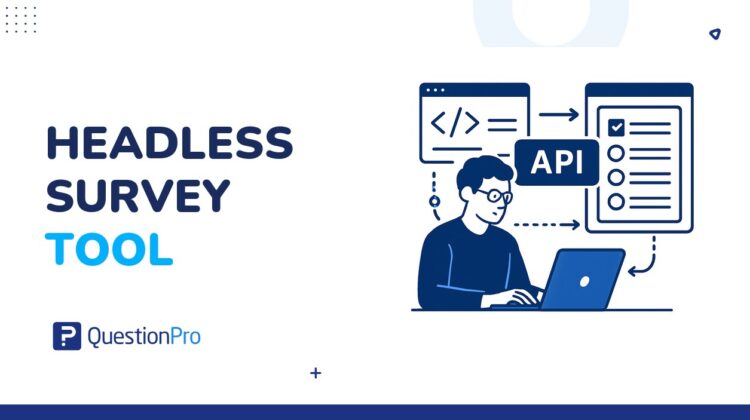
If you’ve ever tried to embed a survey into a mobile app and the widget looked like it was built in 2009, you already understand the problem. Headless survey tools solve exactly that: they separate the data collection engine from the front-end display layer, so your team can render surveys anywhere, in any format, without fighting with someone else’s UI.
The concept comes straight from headless CMS architecture, now applied to feedback and research. Instead of a rigid interface dictating how questions look, you get a pure API that delivers survey logic and captures responses — while your developers build the experience on top of it. A headless survey tool is a platform that exposes its survey engine (question types, branching logic, quota controls, and response storage) through an API, with no prescribed visual layer attached. The result is surveys that feel native to your product, your brand, and your audience.
What is a headless survey tool?
A headless survey tool is a survey platform that exposes its core functionality through an API, without bundling a fixed front-end interface. The word “headless” refers to the absence of a prescribed “head,” meaning there is no locked-in visual layer dictating how your surveys look or where they appear. The platform handles question logic, branching rules, response capture, quota management, and data storage. Everything else is yours to build.
A traditional survey tool gives you a complete package (a builder, a theme engine, an embed widget, and a results dashboard, all tightly coupled), instead a headless tool gives you the engine, what you do with it, how you present it, and where you deploy it is entirely up to your team. You call the API to fetch questions, render them using your own components, and submit responses back through the same API.
This architecture mirrors what happened in the content management world.
Headless CMS platforms proved that separating content from presentation unlocked entirely new deployment possibilities. The same principle now applies to surveys: the data collection logic lives in one place, and every front-end surface can consume it on its own terms.
A SaaS company can embed a post-onboarding survey that looks exactly like their product UI. A retailer can trigger a satisfaction check on a point-of-sale kiosk. A healthcare app can serve questions inside a voice interface. All of these come from the same survey definition: stored once, deployed everywhere.
How a headless survey tool works
The mechanics are straightforward once you strip away the jargon. A headless survey platform maintains a back-end repository of survey definitions: questions, answer options, branching logic, display conditions, and validation rules and these definitions are exposed via a REST or GraphQL API. Your development team queries that API, receives structured JSON, and uses it to build the UI that respondents actually see.
When a respondent answers a question and moves forward, your front-end posts the answer back to the API. The platform applies its logic server-side (skip patterns, quotas, randomization) and returns the next question, then, when the survey is complete, the response is stored in the platform’s database and available for analysis in the dashboard, or exportable to whatever data warehouse your team uses.
How a headless survey works: step by step
Define the survey in the platform
A researcher or product manager builds the survey in the back-end: questions, logic, branching, quotas. No front-end work is needed at this stage.
02 — Query the API
The client application sends an API request to retrieve the survey definition. The platform returns structured JSON with all questions, answer options, and branching conditions.
Render with your own UI components
Your front-end team builds the question display using your design system: typography, colors, animations, accessibility standards — all under your control.
04 — Submit responses via API
As the respondent answers, each response is posted to the platform API. Skip logic and quotas are applied server-side and the next question is returned in real time.
Analyze in the platform dashboard
All responses are stored in the platform and available for reporting, segmentation, and export — regardless of which channel collected them.
One detail that surprises most teams: the branching logic still runs server-side. This matters because your skip patterns, quota controls, and validation are not exposed in client code, they can’t be manipulated or bypassed by a respondent inspecting network traffic. The front-end only sees what the API decides to surface next.
Some platforms also support a webhook-based model, where responses trigger real-time notifications to your CRM, data warehouse, or ticketing system the moment a respondent submits. This is what makes headless survey data genuinely operationalizable: it doesn’t sit in a reporting silo waiting for someone to log in and export a CSV. It flows directly into the systems where your team acts on it.
Key benefits of using a headless survey tool
The headline benefit is design freedom, but that description undersells what’s actually happening. It’s not just that your surveys can match your brand colors. It means your surveys can be indistinguishable from the rest of your product experience, which has a measurable effect on completion rates. When a survey looks foreign to the interface it appears in, users hesitate or abandon it. When it looks native, the friction disappears.
That gap reflects something straightforward: context matters. A survey that interrupts a user with a redirect to an external page competes with everything else vying for their attention. A survey rendered natively within your app feels like part of the experience, not an interruption of it. Beyond completion rates, the contextual accuracy of answers improves too — respondents are answering while the experience is still fresh, not from memory hours later.
The benefits compound across several other dimensions worth naming specifically:
- Multi-channel deployment from a single source: Define the survey once, deploy it to your web app, iOS app, Android app, and a physical kiosk — all pulling from the same API without copy-pasting question logic across platforms.
- Offline capability: some headless implementations cache the survey definition locally, allowing respondents in low-connectivity environments (field research, remote locations) to complete questions and sync responses when a connection is restored.
- Full accessibility control: since your team controls the rendering, you implement WCAG compliance to the exact standard your organization requires, rather than hoping the survey vendor’s widget meets it.
- Deeper integrations: API-first architecture makes it straightforward to pass context variables (plan tier, product usage data, session attributes) into the survey, enabling personalization that out-of-the-box tools simply can’t match.
The integration point is worth dwelling on. When you pass context variables into the survey, you can pre-fill answers your system already knows, reducing friction. You can segment results by user attributes without post-hoc data matching. And you can trigger follow-up actions the moment a specific answer is submitted — routing a detractor’s response to the customer success team in under a second, for example. This is the difference between collecting feedback and actually acting on it in real time.
Headless vs. traditional survey tools: what’s the difference?
Traditional survey platforms are self-contained: you use their builder, their themes, their embed code, and their reporting interface. They’re designed for speed and require zero engineering. That’s a genuine advantage when a researcher needs a survey live tomorrow morning. The trade-off is that you’re constrained by the platform’s design decisions at every layer of the stack.
Headless tools flip the model. The platform handles everything requiring survey expertise: question type libraries, branching logic, statistical calculation, data storage, compliance. Everything requiring product expertise is delegated to your team. The dependency shifts from the survey vendor to your engineering capacity.
Here’s what that difference looks like across the dimensions that matter most:
| Dimension | Traditional survey tool | Headless survey tool |
|---|---|---|
| Front-end control | Platform-defined templates and themes | Fully custom — built by your team |
| Deployment channels | Email, web link, iframe embed | Any surface your app touches: web, mobile, IoT, kiosk, voice |
| Engineering requirement | None — no-code deployment | Front-end development required |
| Branding fidelity | Limited to vendor theme options | Pixel-perfect — matches your design system exactly |
| Time to first survey | Minutes — no setup needed | Weeks — initial API integration required |
| Survey logic | Managed inside the platform UI | Enforced server-side by the API |
Neither model is objectively better. The question is whether your team’s constraints align better with one or the other. Many organizations use both: a traditional tool for ad-hoc research and researcher-led projects, and a headless setup for product-embedded feedback loops that need to scale without ongoing manual effort.
Common use cases for headless survey tools
The pattern that appears most often is in-product feedback for SaaS companies. A product team wants to understand why users are abandoning a specific workflow step. With a traditional survey tool, the best they can do is send a follow-up email the next day. With a headless tool, they can trigger a two-question survey at the exact moment the user exits that step, rendered natively inside the product UI. The response rate difference is not marginal — it’s the difference between 4% and 40%.
But the use cases extend well beyond product-led research. Here are the contexts where headless architecture genuinely changes what’s possible:
- Multi-language digital products: Teams with a single front-end codebase serving users in multiple locales can dynamically fetch survey content in the correct language from the API, rather than maintaining separate survey instances per language and keeping them in sync manually.
- Kiosk and point-of-sale feedback: Retailers and hospitality businesses render satisfaction surveys on touchscreen devices. Since the device interface is custom-built anyway, adding a headless survey API costs almost nothing architecturally — the renderer is already there.
- IoT and embedded systems: Connected devices (medical equipment, smart appliances, industrial sensors) can trigger feedback prompts through a companion app, with survey logic managed centrally and updated without redeploying device firmware.
- Research panels and online communities: Organizations that manage their own research communities can embed headless survey experiences directly in their platform, keeping respondents in the same environment throughout rather than redirecting them to an external survey link.
- Voice and conversational interfaces: Chatbots and voice assistants consume survey APIs and present questions conversationally. The platform stores structured responses; the channel handles the dialogue format. This is particularly effective in customer support contexts, where the bot is already in the conversation.
What ties all of these together is channel ownership. If you own the channel your users are already in, a headless survey lets you collect feedback there instead of pulling people out of it. That friction reduction is the core value proposition, applied to whatever surface makes sense for your specific deployment context.
How to implement a headless survey tool
Implementation follows a predictable path once you understand the architecture. The complexity isn’t in the API itself — most platforms publish clear documentation and return well-structured JSON. The real challenge is coordinating three different stakeholder groups: researchers who design surveys, developers who build the rendering layer, and analysts who need the data downstream. Misalignment between these groups is the most common reason headless survey projects stall after a promising start.
Implementation phases for a headless survey setup
API evaluation
Assess the platform’s API docs, authentication model, rate limits, and webhook support. Confirm it returns structured JSON and enforces branching server-side.
Component library build
Developers create reusable UI components for each question type: single choice, multiple choice, matrix, open text, NPS scale. Components read from the API response schema.
Integration and testing
Connect the renderer to your app. Test across devices and OS versions, validate branching behavior, and confirm responses land correctly in the platform database.
One decision point teams consistently underestimate is caching strategy. If your app serves many concurrent users, fetching the survey definition from the API on every load creates latency. Most teams solve this by caching the definition locally and refreshing it on a schedule, while always posting responses directly to the API in real time. The survey definition changes rarely — responses need to be captured immediately. These two things need different strategies.
Authentication requires deliberate planning too. Headless survey implementations typically use API keys or OAuth tokens. If you’re collecting authenticated user data (where you can link a response to a specific user account), you need a consistent identity layer: a stable user ID passed as a contact property on every API request. This is what makes it possible to merge survey data with product analytics or CRM records later without painful post-hoc matching exercises.
Limitations and challenges to consider
The limitations of headless survey tools are real, and this is where many vendor comparisons get evasive. The architecture solves a specific set of problems exceptionally well. It introduces a different set of problems that shouldn’t be minimized in a planning conversation.
The most significant is the engineering dependency. Every survey change that affects the UI requires developer involvement. Adding a new question type your component library doesn’t currently support means a sprint, not an afternoon. For research teams that need to iterate quickly — testing different question formats, adding new survey instruments mid-study — this is a genuine operational constraint. The researcher-developer handoff process needs to be explicitly designed before the first survey goes live, not discovered as a bottleneck after.
“The biggest mistake teams make with headless survey architecture is treating it as a one-time integration. It’s actually a product you’re maintaining: question type coverage, API version compatibility, and component library upkeep are ongoing costs that need a named owner.”
— QuestionPro Research Engineering Team, 2024
That ongoing maintenance cost accumulates in ways that aren’t visible at project kickoff. API versioning is particularly problematic: when the survey platform releases a new API version, your rendering layer needs to be updated to stay compatible. If you’re running on an older version and the platform deprecates it, you’re facing a refactor that touches every question type component your team built — potentially across multiple apps and channels simultaneously.
Three other limitations worth naming explicitly:
- Higher initial time-to-value: A traditional tool can have your first survey live in 30 minutes. A headless implementation typically requires 4 to 8 weeks of development before the first survey deploys. That upfront investment needs to be justified by the volume, longevity, and design requirements of the surveys you plan to run. One-off research projects rarely justify it.
- Accessibility gaps: Counterintuitively, headless implementations sometimes end up less accessible than vendor defaults. When a platform has invested in ARIA labels, keyboard navigation, and screen reader support across its default components, rolling your own requires the same investment — which often doesn’t happen under sprint pressure.
- Analytics fragmentation: If your survey platform provides a results dashboard but your rendering layer doesn’t pass all the metadata the platform expects, you can end up with incomplete reporting — missing device data, missing respondent attributes, or broken segmentation filters. Validating the full data model is a step teams frequently skip when racing to launch.
None of these make headless the wrong choice. They make it the wrong choice for specific contexts: small research teams without dedicated engineering support, organizations that need to change survey instruments frequently without developer involvement, or projects where time-to-launch matters more than brand consistency. The honest question is whether your situation maps to one of those, or to the use cases where headless genuinely shines.
Conclusion
A headless survey tool is the right architecture for teams that own a channel and want feedback to feel native to that channel. It eliminates the visual friction of embedded widgets, enables deployment across every surface your product touches, and gives engineering teams the integration depth that traditional platforms can’t match. The trade-off is real: you’re taking on a software project, not just subscribing to a tool. That investment makes sense when your survey volume is high, your design requirements are non-negotiable, and your team has the engineering capacity to treat the rendering layer as a maintained product.
QuestionPro’s API-first architecture supports headless deployment alongside a full-featured platform for teams that need both. Whether you’re embedding feedback natively in a SaaS product, collecting data across a fleet of kiosks, or building a custom research community, the platform provides the survey engine while your team controls the experience. Want to see how it fits your specific deployment context? Talk to our team today and get a technical walkthrough tailored to your stack.
A headless survey tool is a survey platform that separates its core functionality (question logic, branching, response capture, and data storage) from any fixed front-end interface. It exposes everything through an API so development teams can fetch survey definitions, render questions in their own UI, and submit responses back programmatically. The term “headless” refers to the absence of a prescribed visual layer: the platform has no opinion about how surveys look or where they appear.
Traditional survey tools are self-contained: they provide a visual builder, embed code, and hosted delivery with no engineering required. Headless tools provide only the back-end logic through an API and leave front-end rendering entirely to your development team. Traditional tools are faster to deploy and require no technical resources; headless tools offer full design freedom and multi-channel deployment but require an initial engineering investment — typically 4 to 8 weeks before the first survey goes live.
The main benefits are: pixel-perfect brand control over how surveys look, deployment across any channel your product touches (web, mobile, kiosk, IoT, voice), a single survey definition that works everywhere without duplicating question logic, and deeper integrations that allow you to pass user context into surveys and trigger downstream actions based on responses. Logic runs server-side, which also prevents respondents from manipulating branching rules through client-side inspection.
The primary limitation is engineering dependency: every survey change affecting the UI requires developer involvement, which slows iteration for research teams accustomed to no-code tools. There is also a significant upfront implementation cost, ongoing maintenance of API version compatibility and UI components, potential accessibility gaps if your team doesn’t prioritize them, and a risk of analytics fragmentation if the response metadata schema isn’t fully implemented during the initial build.
Yes. QuestionPro provides an API-first architecture that supports headless deployment, allowing development teams to fetch survey definitions, manage response submissions, and access results programmatically. The platform also includes a full-featured interface for researchers who need to design surveys and analyze data without writing code — meaning organizations can run headless deployments for product-embedded feedback while still supporting traditional survey workflows for ad-hoc research projects alongside them.