A customer feedback tool is software that collects, organizes, and analyzes customer opinions so a business can make informed decisions about its products and services, instead of relying on internal guesswork.
Through surveys, ratings, reviews, and in-app prompts, a feedback tool builds a clear, ongoing picture of what is working and what is not. Businesses across the US use these platforms to stay close to customers, catch problems early, and reduce churn before it shows up in revenue numbers.
If customer experience is a real priority, a reliable feedback collection tool is not optional. It is the foundation everything else gets built on. In this article, we’ll explore how a customer feedback tool works, its types, and how to collect customer feedback effectively.
How does a customer feedback tool work?
A customer feedback tool follows a repeatable five-step cycle: collect, organize, analyze, act, and close the loop.
- Collect. Customers respond to surveys or leave ratings through email, SMS, the website, or in-app prompts.
- Organize. Responses land in one dashboard regardless of which channel they came from.
- Analyze. Built-in analytics calculate scores, surface trends, and flag responses that need attention.
- Act. The team uses the insights to fix issues, improve the product, or follow up with unhappy customers.
- Close the loop. Automated alerts or follow-up messages make sure feedback never gets ignored, which is the same principle behind a closed-loop feedback process.
The goal is replacing guesswork with a consistent system that reflects what customers actually experience, not what a business assumes they experience.
What types of customer feedback tools exist?
Different feedback tools serve different channels, and most businesses end up combining two or three rather than relying on a single type.
| Tool type | How it works | Best for |
|---|---|---|
| Survey-based tools | Send structured questionnaires via email, SMS, or links | NPS, CSAT, CES tracking |
| In-app and website tools | Embed pop-ups or feedback buttons in the product | Real-time reaction capture |
| Review and rating platforms | Collect public feedback on Google, Trustpilot, and similar sites | Brand reputation monitoring |
| Live chat feedback tools | Capture ratings right after a support interaction | Customer service quality |
| Social listening tools | Monitor brand mentions across social platforms and forums | Sentiment trend spotting |
Most businesses combine a survey tool for structured feedback, an in-app prompt for real-time reactions, and a review monitoring tool for public sentiment. That combination gives a fuller picture than any single channel provides on its own.
Why do businesses need a customer feedback tool?
Most unhappy customers do not complain. They simply leave, and a customer feedback tool gives a business a way to hear from the ones who would otherwise say nothing.
A low NPS score or a negative open-ended comment is an early warning sign. With automated alerts, a team can reach out before that customer becomes a lost account. Tracking satisfaction over months, rather than relying on a single survey, also reveals whether product changes are actually working. If CSAT drops right after a release, that pattern is worth investigating immediately.
Feedback becomes far more useful once it connects to a specific business goal. If the goal is reducing support tickets, feedback collected right after support interactions can show exactly which product areas cause the most confusion. Manual feedback collection does not scale past a certain point, so automated triggers that fire after a purchase, a support ticket, or a signup milestone are what keep a program consistent as volume grows.
What metrics should a customer feedback tool track?
The most useful customer feedback tools calculate specific metrics from responses rather than just storing raw answers, and three metrics dominate US business use.
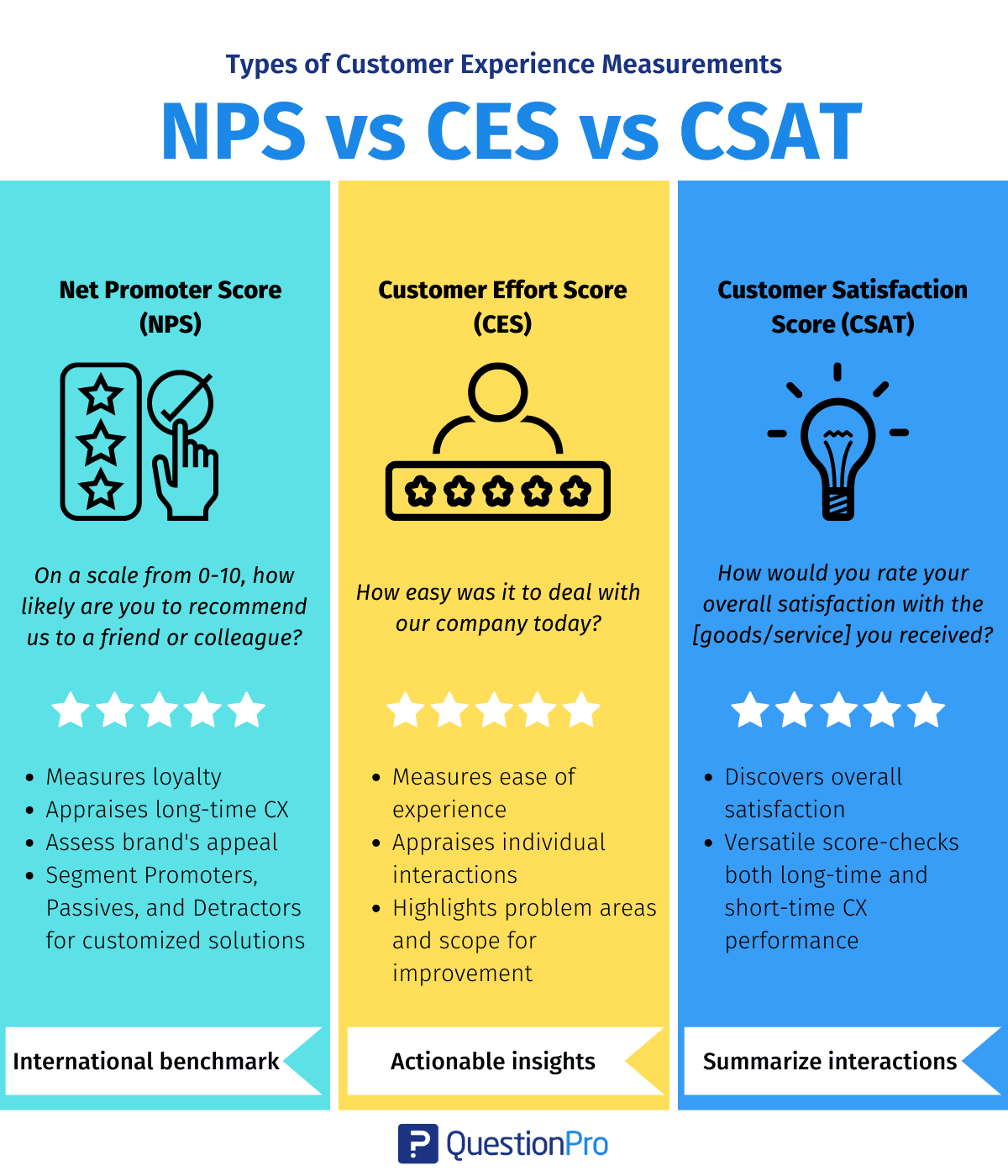
- Net Promoter Score (NPS) asks how likely a customer is to recommend the business to a friend or colleague. Responses on a 0 to 10 scale are grouped into promoters, passives, and detractors, and NPS is the percentage of promoters minus the percentage of detractors.
- Customer Satisfaction Score (CSAT) measures satisfaction with one specific interaction, typically collected right after a purchase or support ticket using a 1 to 5 rating scale.
- Customer Effort Score (CES) measures how easy it was for a customer to get what they needed. Research from CEB, now part of Gartner, found that reducing customer effort is a strong predictor of retention in service environments, which is why a rising CES often signals a process problem worth fixing before it shows up as churn.
For a closer comparison of how these three metrics work together, see the breakdown in NPS vs CSAT vs CES.
What features should you look for in a customer feedback tool?
The right customer feedback tool should combine multi-channel distribution with strong analytics, not just an easy way to build a survey.
- Multi-channel distribution: Sends surveys via email, SMS, in-app, QR code, and website embeds
- Customizable design: Applies brand colors, logo, and fonts to every survey
- Real-time analytics dashboard: Updates as responses come in, with segment and date filtering
- CRM integration: Connects feedback data to existing customer records
- Automated triggers: Sends surveys based on specific customer actions or milestones
- Mobile-friendly surveys: Renders correctly across phones and tablets
- Data export: Supports CSV, Excel, or PDF for stakeholder reporting
If a platform is missing more than two of these, it will likely limit what a feedback program can do as it scales. Multi-channel distribution matters because customers are not all in the same place. Email works well for post-purchase feedback, in-app prompts capture reactions in the moment, and SMS reaches customers who rarely open email at all.
CRM integration deserves particular attention, since connecting feedback to existing customer records lets a team match a low score to a specific account, trigger an automated follow-up, and track whether the underlying issue was actually resolved.
How do you collect customer feedback effectively? A step-by-step process
The approach matters more than the specific tool. These five steps apply regardless of which platform a team uses.
- Define what you want to learn.
Start with one clear question, such as “are customers satisfied with onboarding?” and build questions that answer it directly. Vague goals produce vague data.
- Choose the right channel for the moment.
Email works well for post-purchase feedback, while in-app prompts are better suited to capturing a reaction to a specific feature.
- Keep it short.
Three to five questions are enough for most use cases, since response rates drop sharply as surveys get longer.
- Time it right.
Send the survey while the experience is still fresh. A survey sent thirty minutes after a support interaction gets more honest responses than one sent two weeks later.
- Act on what you hear.
Assign negative responses to the right team member and follow up with unhappy customers. This closed-loop step is what separates businesses that improve from those that just collect data.
How much does a customer feedback tool cost?
Pricing varies widely depending on features, user count, and monthly response volume, so it is worth mapping cost against actual survey volume before committing to a plan.
| Plan type | Typical monthly cost | Best for |
|---|---|---|
| Free/ freemium | $0 | Small teams testing basic surveys |
| Starter | $25 to $99 | Growing businesses with moderate volume |
| Professional | $100 to $499 | Mid-size teams needing advanced analytics |
| Enterprise | Custom pricing | Large organizations with compliance needs |
Watch for response volume caps that trigger extra charges, integrations locked behind higher tiers, and per-user pricing that scales quickly for larger teams. Most vendors offer a free trial, which is the best way to test the dashboard and mobile experience before signing an annual contract.
How do you choose the right customer feedback tool?
Choosing the right tool comes down to five practical questions rather than a long feature checklist.
What is the primary feedback goal? A lightweight tool may be enough for basic NPS tracking, while automated follow-ups and CRM connections call for a more capable platform. Does it integrate with the existing tech stack? A feedback tool that cannot connect to a CRM or helpdesk creates a data silo. How strong is the analytics layer? Most tools make survey creation easy, but the real differentiator is what happens after responses come in. What are the response volume limits? High-volume programs can get expensive quickly if caps are not factored into total cost. Does it work well on mobile? Opening a demo survey on a phone is the fastest way to find out.
How does QuestionPro help collect and analyze customer feedback?
QuestionPro is a customer feedback platform that covers the full feedback cycle, from survey creation and multi-channel distribution through real-time analytics and automated follow-up.
It supports distribution through email, SMS, QR codes, and website embeds. The analytics dashboard lets teams filter responses by segment, track NPS, CSAT, and CES side by side, and export data for stakeholder reporting. QuestionPro also integrates with common CRM systems, which makes it easier to connect feedback to individual customer records and automate survey triggers based on customer behavior.
For teams that want to consolidate multiple feedback channels into one platform, this is worth evaluating alongside broader survey software already in use for research or CX work.
Feedback is only as valuable as what a business does with it
Most businesses say they listen to customers. Fewer build systems that consistently capture, analyze, and act on what those customers actually say. That gap is where problems quietly grow until they surface as churn, support ticket spikes, or falling repeat purchases.
A customer feedback tool gives a consistent early signal, one that shows where things stand before a small issue turns into a lost account. For US businesses competing in crowded markets, that early signal can be the difference between keeping a customer and losing them to a competitor who was paying closer attention.
Frequently Asked Questions (FAQs)
A customer feedback tool is the software used to collect and analyze responses. Voice of the customer is the broader strategy that combines feedback tools with other signals, like support tickets and behavioral data, to build a complete picture of customer sentiment across the entire relationship.
Yes. Many platforms offer free or low-cost tiers suited to small teams, and a basic setup, one short survey triggered after purchase plus a shared inbox for flagged responses, can run effectively without a dedicated CX hire.
Most programs limit transactional surveys to once per meaningful interaction and relationship surveys, like NPS, to once per quarter. Sending surveys too frequently causes fatigue and lowers response rates across the board, which hurts data quality over time.
Yes, though the approach shifts. B2B feedback programs often prioritize account-level tracking and stakeholder engagement over high-volume transactional surveys, since a single large account may involve feedback from several different contacts across departments.
The most common mistake is prioritizing survey design features while ignoring the analytics and follow-up layer. A tool that makes it easy to build a survey but hard to act on the results will not meaningfully reduce churn, no matter how polished the survey looks to respondents.