



A feedback form looks simple, but a badly built one quietly costs you responses and trust. People abandon forms that feel long, vague, or pointless.
In this blog, we’ll break down everything you need to build a feedback form that gets answered.
- What a feedback form is, and how it differs from a survey
- The 10 types of feedback forms with example questions
- A 7-step creation process and the mistakes that ruin response rates
- How to measure whether your form works
What is a feedback form?
A feedback form is a structured questionnaire that collects opinions, ratings, and suggestions about a product, service, event, or experience. It can be digital or printed. Most combine closed questions for measurable data with open questions for context.
Organizations use feedback forms to spot problems early, confirm what’s working, and decide with evidence instead of guesswork. Businesses, schools, healthcare providers, and event organizers all rely on them to turn scattered opinions into comparable data.
Feedback form vs. Survey: What’s the difference?
A feedback form reacts to a specific experience, while a survey usually investigates a broader research question. Every feedback form is technically a short feedback survey, but the intent and scope differ.
| Aspect | Feedback Form | Survey |
|---|---|---|
| Purpose | Evaluate one specific experience | Explore a broader research question |
| Trigger | An event: a purchase, a support ticket, a session | A schedule or research plan |
| Length | Short, often 3–10 questions | Can run 20+ questions |
| Audience | People who just had the experience | A sampled or targeted population |
| Output | Quick, actionable fixes | Trends, segments, deeper analysis |
If you want to know how yesterday’s webinar went, build a feedback form. If you need to understand why churn rose this year, design a survey.
Why are feedback forms important?
Feedback forms matter because they replace assumptions with evidence at a scale conversations can’t match. One support call tells you about one customer; five hundred completed forms tell you what to fix first.
Here’s what a well-run feedback program gives you.
- A ranked list of problems: Recurring complaints show where to invest before churn does.
- Proof of what’s working: Positive patterns tell you which strengths to protect.
- Faster decisions: Structured responses can be quantified, so debates end with data.
- Higher loyalty: People who see their input lead to change respond again, and stay longer.
- A trend line: Repeating the same core questions turns opinions into a performance metric.
What are the main types of feedback forms?
There are 10 common types of feedback forms, and each fits a different moment. Eight are defined by who or what you’re asking about. The last two, open-ended and multiple-choice, are defined by question format instead.
| Type | Best Moment to Send It | Sample Question |
|---|---|---|
| Customer feedback form | After a purchase or support interaction | How satisfied are you with your recent experience? |
| Employee feedback form | Check-ins, reviews, after big changes | Do you feel supported in your role? |
| Event feedback form | Within 24 hours of an event | How would you rate the event overall? |
| Website or app feedback form | During or after a session | Was it easy to find what you needed? |
| Product feedback form | After launch or a feature release | What almost stopped you from using this product? |
| Training feedback form | Right after a course or session | Can you apply what you learned this week? |
| NPS form | Quarterly or after key milestones | How likely are you to recommend us? (0–10) |
| Anonymous feedback form | Sensitive topics, culture issues | What is one thing we should change? |
| Open-ended feedback form | When you need context, not counts | What was the best part of your experience? |
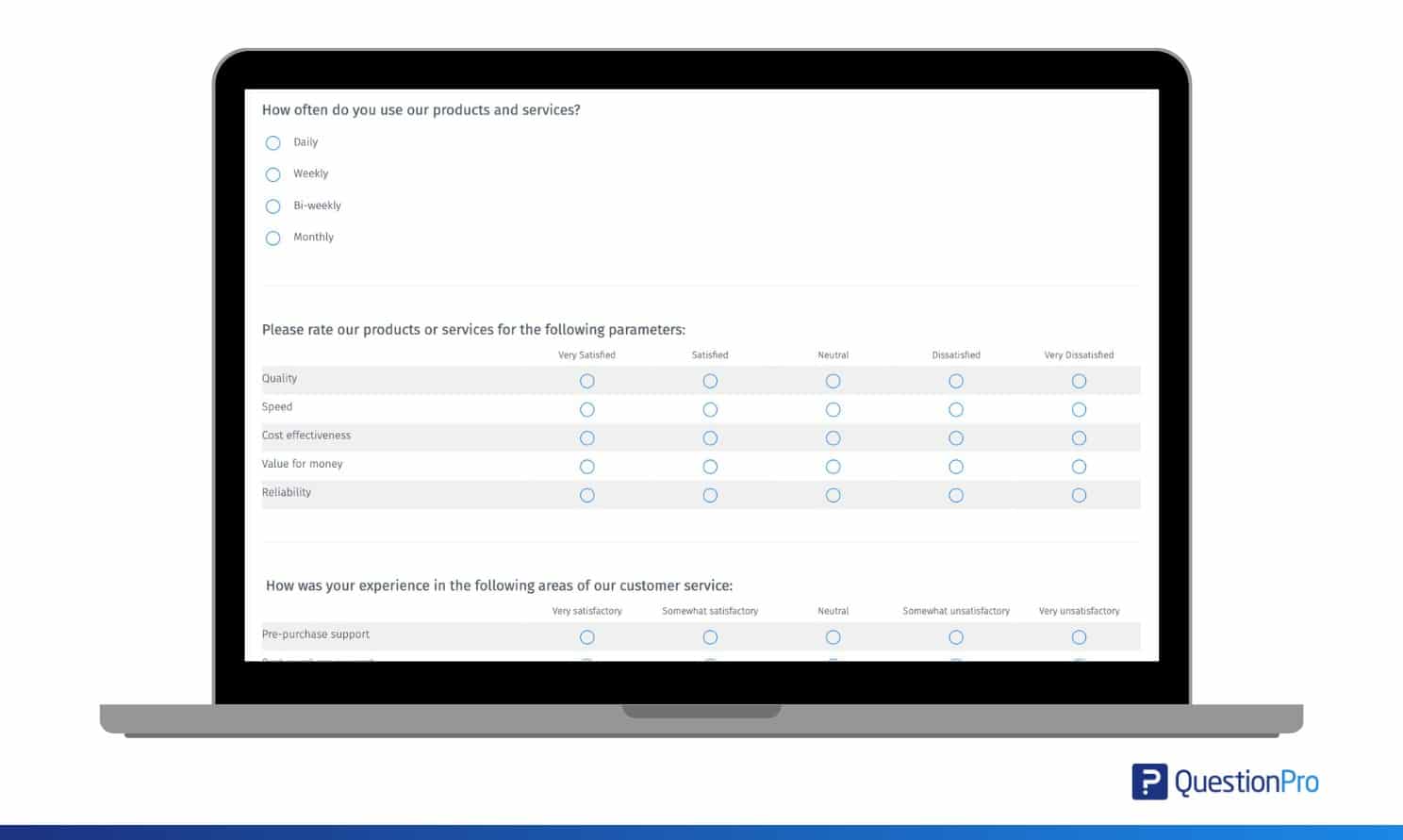
| Multiple-choice feedback form | When you need fast, comparable data | How often do you use our product? |
Customer feedback form
This is the workhorse of the list. A customer feedback form captures how someone felt about a purchase, delivery, or support interaction. Send it within a day, while the memory is fresh.
Try these proven customer feedback questions first.
- How satisfied are you with our product or service?
- Was your issue resolved on the first contact?
- What is one thing we could have done better?


Employee feedback form
An employee feedback form gives your team a structured, low-pressure way to flag what’s working and what isn’t. Use it during onboarding, regular check-ins, and after organizational changes, not just at review time.
Start with questions from a proven employee feedback survey template.
- Do you have the tools you need to do your job well?
- What is the biggest obstacle in your daily work?
- Would you recommend this team to a friend?
Event feedback form
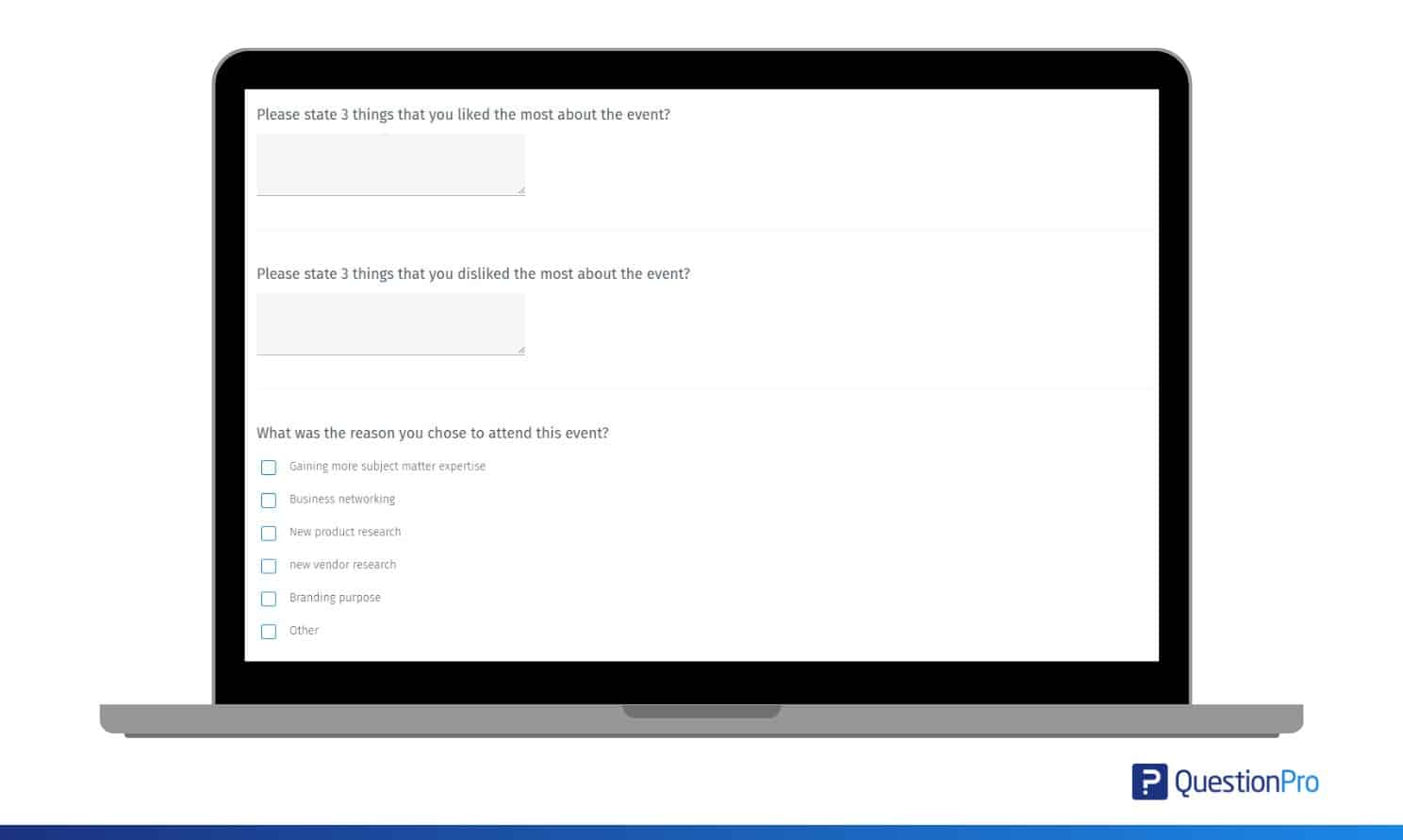
Event feedback forms tell you whether the sessions, speakers, and logistics actually landed. Send them the same day, before recall fades.
These event feedback survey questions are reliable starters.
- How would you rate the event overall?
- Which session was most valuable to you, and why?
- What topic should we cover next time?
Website or app feedback form
This type appears as an embedded widget, a pop-up, or an in-product link. It catches usability problems in the moment, before users forget the friction.
Keep it to two or three questions.
- Did you find what you were looking for today?
- Did anything slow you down or confuse you?
- What feature would make this more useful?
Product feedback form
A product feedback form focuses on the thing itself: what users like, what frustrates them, and what they’d change. Product teams run these after launches, betas, and major feature updates to steer the roadmap.
Ask questions that expose priorities, not just opinions.
- What problem were you hoping this product would solve?
- What almost made you give up while using it?
- If you could change one thing, what would it be?
NPS form
Net Promoter Score (NPS) is a loyalty metric built on one 0-10 question: how likely are you to recommend us? Your score is the percentage of promoters minus the percentage of detractors.
- Promoters (9-10): loyal fans who will refer you
- Passives (7-8): satisfied, but easy to lose
- Detractors (0-6): unhappy and at risk of churning
Pair the NPS survey question with one open follow-up asking the main reason for the score.
Anonymous feedback form
An anonymous feedback form removes names and identifying data so people can be honest without fear of consequences. It’s the right choice for workplace culture questions, sensitive complaints, and topics where power dynamics soften the truth.
The trade-off is follow-up, because you can’t ask an anonymous respondent to clarify. So write prompts that invite specifics, such as asking what one thing leadership should stop doing.
How do you choose the right feedback form?
Start from the decision you need to make, then pick the form that feeds it. Choosing by goal keeps your form short and your data usable.
| Your Goal | Use This Form | Core Question Format |
|---|---|---|
| Fix a specific customer experience | Customer feedback form | Rating scale plus one open question |
| Track loyalty over time | NPS form | 0–10 scale plus reason |
| Improve a product or feature | Product feedback form | Open-ended with targeted prompts |
| Diagnose team morale | Anonymous employee form | Mix of scales and open text |
| Make the next event better | Event feedback form | Ratings per session plus suggestions |
| Remove friction from your site | Website feedback widget | Yes/no plus one open question |
When two forms could work, pick the shorter one.
How to create a feedback form in 7 steps
Creating a feedback form that people complete takes planning, not just a question list. Follow these seven steps in order to avoid the most common failure points.
- Define one goal. Write a single sentence: “This form will tell us ___.” Every question must serve that sentence or get cut.
- Pick 3-8 questions. Aim for a completion time under five minutes. Kantar’s research found that a survey over 25 minutes loses more than three times as many respondents as one under five minutes.
- Mix question types. Use rating scales for trends, multiple choice for fast comparisons, and one or two open-ended questions for the “why.”
- Write specific, neutral wording. Ask “How was the delivery speed?” instead of “How was everything?” Avoid leading phrases like “How much did you love…”
- Design for mobile first. Most forms get opened on a phone, so use large tap targets, one question per screen on longer forms, and a progress bar.
- Test before you send. Complete the form yourself, then have a colleague try it. Fix confusing wording, broken logic, and anything that takes two reads.
- Close the loop. Thank respondents, share what you learned, and announce the changes you made. Visible action is the best predictor of future response rates.
What are common feedback form mistakes?
The most common feedback form mistakes are asking too much, asking it badly, and doing nothing with the answers. Every one of them is avoidable.
- Question overload: Every added question lowers completion. If a question won’t change a decision, delete it.
- Leading or loaded wording: “How great was our new feature?” biases answers upward. Learn how to avoid survey bias before you publish.
- Double-barreled questions: “Was the staff friendly and knowledgeable?” forces one answer to two questions. Split them.
- Only closed questions: Scales tell you what’s happening; without one open question, you’ll never learn why.
- Bad timing: A request three weeks after the experience gets vague memories, not data.
- Silent inboxes: Collecting feedback and never acting on it trains people to stop responding.
How do you measure whether your feedback form works?
Judge a feedback form by three numbers: response rate, completion rate, and the share of open answers with usable detail. Response rate is the share of invited people who answer; completion rate is the share who finish once they start. QuestionPro’s research places typical customer survey response rates at 10-15% and completion rates between 20-50%. Those ranges give you a practical baseline for survey dropout analysis on your own forms.
Set concrete targets before you send anything. A short post-purchase form to engaged customers should beat a 30% completion rate.
If completion falls below your baseline, cut questions or fix the first screen, since most abandonment happens early. If open answers come back as one-word replies, your prompts are too vague to act on. Track the same metrics on every send; a form you never measure is a formality.
How does QuestionPro help you build feedback forms?
QuestionPro’s free plan includes skip logic and branching, a capability most form builders reserve for paid tiers. Branching means the form adapts to each answer. When someone rates support 2 out of 5, the form immediately asks what went wrong. A 5-star respondent skips straight to the finish.
That one feature changes what a short form can learn.
- Unhappy respondents get targeted follow-ups instead of generic ones.
- Happy respondents finish in under a minute, protecting your completion rate.
- Every branch’s data lands in the same report, so analysis stays simple.
With 300+ prebuilt templates and built-in analytics on top, a short form can do the work of a much longer one.
Making every feedback form count
A feedback form is only as valuable as the decision it changes. The teams that get the most from it treat the form as the start of a process: few questions, the right moment, visible action afterward.
Before your next send, check three things.
- The form has one goal you can state in a sentence.
- It takes under five minutes to finish on a phone.
- You know who will review the results, and when.
Get those right, and the rest follows naturally.
Frequently Asked Questions (FAQs)
Aim for three to eight questions and a completion time under five minutes. Shorter forms consistently earn higher completion rates and better answer quality. Cut any question that would not directly change a decision your team plans to make.
Customer survey response rates typically land around 10-15%, with completion rates between 20-50% once someone starts. Engaged audiences, like recent buyers or event attendees, should beat those ranges. Cold pop-ups usually sit near the bottom of them.
Make forms anonymous when honesty matters more than follow-up, such as workplace culture or sensitive complaints. Keep them identified when you need to resolve individual issues, like a support complaint that requires contacting the customer directly.
Send it while the experience is fresh, ideally within 24 hours of the purchase, event, or interaction. Memory fades quickly, and delayed requests produce vaguer answers and noticeably fewer responses than same-day or next-day asks.
Yes. Several platforms offer free plans, and QuestionPro’s free tier includes unlimited surveys with skip logic and branching. Free plans cover most small teams’ needs; paid tiers mainly add advanced analytics, integrations, and larger distribution options.



