Usability testing methods help teams see how real users interact with a website, app, product, or prototype. These methods reveal where users get stuck, what causes confusion, and which design changes can improve the user experience.
For product, UX, and research teams in the USA, usability testing is especially useful before a launch, redesign, or major feature update. It gives teams direct evidence from users instead of relying only on opinions, assumptions, or internal reviews.
In this article, we’ll explain what usability testing is, why it matters, the main types of usability testing, and how to choose the right method for your research goal.
What is usability testing?
Usability testing is a UX research method used to evaluate how easy it is for people to use a website, app, product, or prototype. During a usability test, participants complete realistic tasks while researchers observe their behavior, listen to feedback, and record issues.
The goal is to understand how users interact with the experience in real situations. This can reveal problems with navigation, page layout, forms, content, mobile flows, product features, or task completion.
For example, a team may ask users to:
- Find a product on a website.
- Complete a checkout process.
- Sign up for a free trial.
- Use a new app feature.
- Submit a support request.
- Compare two prototype designs.
Nielsen Norman Group describes usability testing as a UX research method where a facilitator asks participants to complete tasks while observing behavior and listening for feedback.
Why are usability testing methods important?
Usability testing methods are important because they help teams find UX problems before users experience them at scale. They show where people struggle, what they misunderstand, and which design changes are worth making.
The main benefits include:
| Benefit | What it means |
|---|---|
| Find usability issues | See where users get stuck, confused, or frustrated |
| Validate design choices | Test whether a layout, flow, or feature works as expected |
| Improve user satisfaction | Remove friction from key tasks |
| Save time and cost | Fix issues before development or launch becomes expensive |
| Support user-centered design | Low and flat at any volume |
This matters for US businesses because users have many alternatives. If a form is too long, a checkout process fails, or an app flow feels confusing, users can quickly move to another product.
What is the usability testing process?
The usability testing process is the set of steps teams use to plan, run, analyze, and report a usability test. A simple process keeps the test focused and makes the findings easier to act on.
A practical usability testing process includes:
- Define the goal: Decide what you want to learn, such as whether users can complete checkout or understand a new feature.
- Choose the method: Select the right testing approach based on the goal, timeline, budget, and product stage.
- Recruit representative users: Test with people who match your target audience.
- Create realistic tasks: Ask participants to complete tasks they would actually do.
- Run the test: Observe user behavior, collect feedback, and note where users struggle.
- Analyze findings: Look for patterns in errors, confusion, task time, and comments.
- Report recommendations: Share the key issues, evidence, and suggested fixes.
- Retest after changes: Test again to see whether the improvements worked.
A usability test should not only produce a report. It should help the team make better design decisions.For a deeper process breakdown, see QuestionPro’s guide to usability testing steps.
What are the main types of usability testing?
The main types of usability testing include qualitative, quantitative, moderated, unmoderated, remote, in-person, website, and mobile testing. Each type answers a different research question.
| Type | What it helps you learn |
|---|---|
| Qualitative usability testing | Why users struggle or behave a certain way |
| Quantitative usability testing | How many users succeed, fail, or complete tasks within a time limit |
| Moderated usability testing | What users think and do with real-time follow-up questions |
| Unmoderated usability testing | How users complete tasks independently at scale |
| Remote usability testing | How users interact from their own location |
| In-person usability testing | How users behave in a controlled or natural physical setting |
| Website usability testing | How users navigate pages, forms, content, and conversion paths |
| Mobile usability testing | How users interact with app flows, gestures, and small-screen layouts |
Qualitative testing is best when you need depth. Quantitative testing is best when you need measurable patterns. Moderated testing is best when you need follow-up questions. Unmoderated testing is useful when you need faster feedback from more participants.
What are the best usability testing methods?
The best usability testing methods depend on the product stage, research goal, budget, and type of insight needed. The following methods are commonly used by UX, product, and research teams.
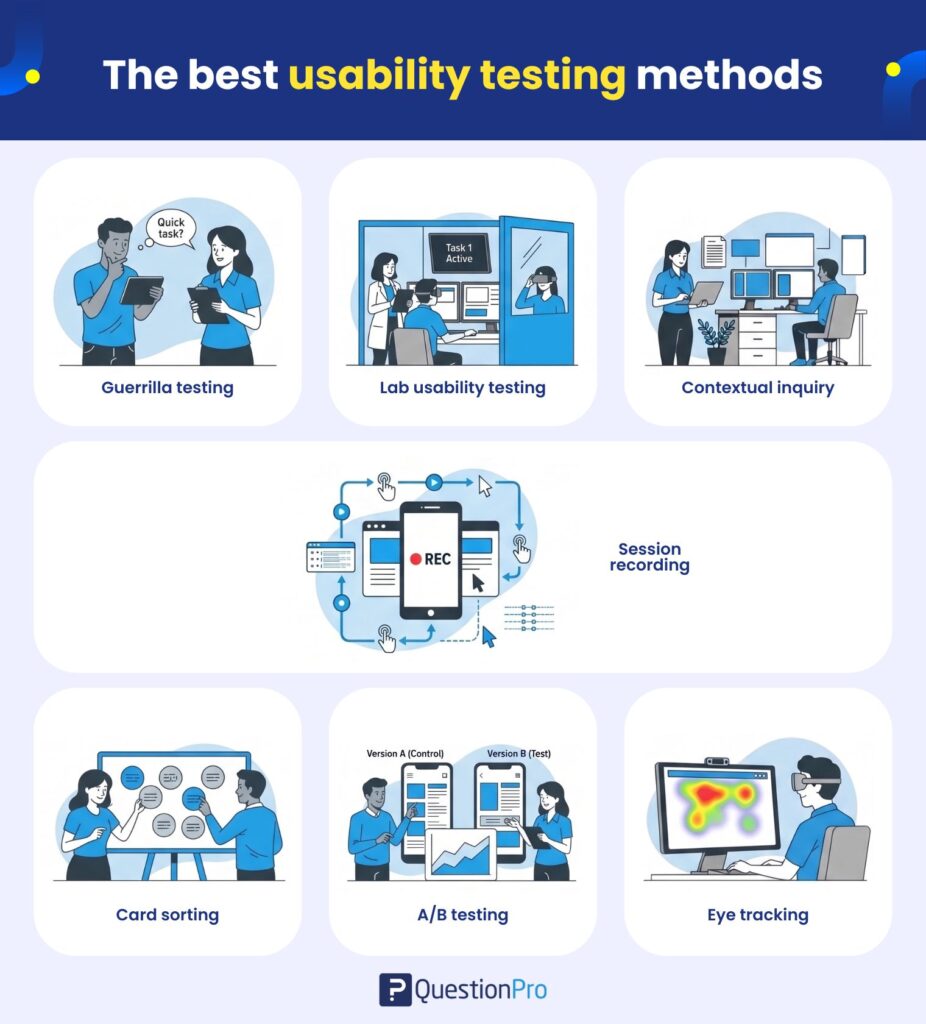
Guerrilla testing
Guerrilla testing is a quick, informal usability testing method where researchers ask people who match the target user profile to complete a short task.
Best for: Early feedback on simple flows, landing pages, or prototypes.
Limitation: The sample is usually small and informal, so findings may not represent the full target audience.
Lab usability testing
Lab usability testing takes place in a controlled environment where researchers observe participants as they complete tasks. The setup may include screen recording, cameras, note-taking tools, or eye-tracking equipment.
Best for: Detailed observation, controlled testing, and high-stakes product flows.
Limitation: It can be more expensive and may not fully reflect how users behave in their natural environment.
Contextual inquiry
Contextual inquiry is a research method where researchers observe users in their real environment while they complete tasks. It combines observation with questions about the user’s behavior, needs, and challenges.
Best for: Understanding real-world workflows and the context behind user behavior.
Limitation: It takes more planning and can be harder to scale than remote or unmoderated testing.
Session recording
Session recording captures how users interact with a website, app, or product interface. Researchers can review clicks, scrolling, navigation paths, and points where users hesitate or leave.
Best for: Finding digital behavior patterns, navigation issues, and friction in live experiences.
Limitation: Recordings show what users did, but they may not explain why users behaved that way.
Card sorting
Card sorting is a method where participants organize topics, pages, or features into groups that make sense to them. It helps teams understand how users expect information to be structured.
Best for: Website navigation, menu structure, content organization, and information architecture.
Limitation: It does not test whether users can complete a full task. It mainly helps with structure and labeling.
A/B testing
A/B testing compares two versions of a page, design, or feature to see which one performs better against a defined goal, such as clicks, signups, or conversions.
Best for: Comparing design options with measurable outcomes.
Limitation: A/B testing shows which version performs better, but it does not always explain why users prefer one version.
Eye tracking
Eye tracking measures where users look, how long they focus on certain areas, and the order in which they view elements on a screen.
Best for: Testing visual attention on pages, ads, layouts, dashboards, and interfaces.
Limitation: It often requires specialized tools and should be combined with other research to understand user intent.
How do you choose the right usability testing method?
Choose the right usability testing method based on the research goal, product stage, budget, timeline, and type of insight you need. The best method is the one that answers your question with enough evidence to guide the next decision.
| Research goal | Best method |
|---|---|
| Find early usability issues | Guerrilla testing or moderated testing |
| Understand user behavior in context | Contextual inquiry |
| Test website navigation | Card sorting or website usability testing |
| Compare two design options | A/B testing |
| Observe real digital behavior | Session recording |
| Study visual attention | Eye tracking |
| Collect feedback from many users quickly | Unmoderated usability testing |
| Explore why users struggle | Moderated usability testing |
A good rule is simple: use moderated testing when you need to ask why, and use unmoderated or quantitative testing when you need faster patterns across more users.
How can QuestionPro help with usability testing?
QuestionPro can support usability testing by helping teams collect structured user feedback before, during, or after a test. This is useful when teams need to measure satisfaction, compare design reactions, or understand whether users completed tasks smoothly.
Teams can use QuestionPro for:
- Post-test feedback surveys
- Prototype feedback surveys
- Website experience surveys
- Mobile app experience surveys
- User satisfaction ratings
- Recruitment screeners
- Research panels
- Follow-up feedback after design changes
For example, after a moderated usability test, a team can send a short survey asking participants how easy the task felt, where they got confused, and what they expected to happen. That feedback can be reviewed alongside observation notes and task completion data.
The value is not only collecting responses. It is connecting user feedback with the usability issues found during the test.
Final thoughts on usability testing methods
Usability testing methods help teams build products, websites, and apps that people can actually use without confusion. They turn user experience problems into clear evidence that product, design, and research teams can act on.
For an IMPROVE article, the key is to keep the topic practical. Teams need to know what usability testing means, which methods are available, how the process works, and how to choose the right method.
The best method is not always the most advanced one. A short moderated test, a quick card sort, or a simple post-test survey can reveal problems that internal teams may miss. What matters most is testing with real users before those problems affect more people.
Frequently Asked Questions
Guerrilla testing is often the easiest method to start with because it is quick, low-cost, and works well for early feedback. It is useful for testing simple flows, prototypes, or page concepts before investing in a larger study.
The number depends on the research goal. Small qualitative tests often use fewer participants to find major issues, while quantitative tests need larger samples for reliable measurement. For business-critical decisions, test with enough users to represent your target audience.
Moderated testing includes a facilitator who guides the session and asks follow-up questions. Unmoderated testing lets users complete tasks on their own. Moderated testing gives deeper context, while unmoderated testing is faster and easier to scale.
Yes. Remote usability testing lets participants complete tasks from their own location using online tools. It is useful for reaching users across the USA, reducing scheduling barriers, and testing digital products in a more natural environment.
Common usability test measures include task completion, time on task, error rate, user satisfaction, user comments, and points of confusion. The right measures depend on whether your goal is to understand behavior, compare designs, or validate a specific flow.