Mobile usability testing shows how real people use a mobile app, mobile site, or prototype, not just how it looks in a design file. Teams ask participants to complete real tasks, then use what goes wrong to fix navigation, forms, and flow before those issues reach the app store.
Phones add constraints that desktop testing does not have. Small screens, one-handed use, patchy networks, and constant interruptions change how people behave, so a flow that feels simple on a laptop can still fail on a phone.
In this article, we’ll cover what mobile usability testing covers, when to run it, which methods fit different timelines, and how to measure whether a test actually worked.
What is mobile usability testing?
Mobile usability testing is a research method that has real users attempt tasks on a mobile app, mobile website, or prototype while researchers watch, listen, and record where they struggle.
It sits inside the wider practice of usability testing, applied specifically to the constraints of phones and tablets. A session usually asks a participant to do something realistic, such as create an account, find a product, finish checkout, or upload a photo, while a researcher or a recording tool captures behavior instead of opinions alone.
A single test typically evaluates:
- Navigation and menu structure
- Touch target size and spacing
- Form design on small screens
- Content clarity and readability
- Load speed and responsiveness
- Task completion and error rates
The session can be moderated, with a researcher guiding the participant live, or unmoderated, with participants working through tasks on their own. Both formats get more detail later in this guide.
Mobile usability testing vs. mobile QA testing
Mobile usability testing and mobile QA testing get confused often because both happen before a release, but they answer different questions.
Usability testing asks whether real people can complete tasks without confusion. QA testing, short for quality assurance testing, asks whether the app functions correctly and is free of crashes, bugs, or broken code.
| Aspect | Usability testing | QA / functional testing |
|---|---|---|
| Core question | Can users complete the task easily? | Does the feature work as built? |
| Who runs it | UX researchers, product teams | QA engineers, developers |
| What it finds | Confusing navigation, unclear labels, friction | Crashes, broken links, performance bugs |
| Typical timing | Prototype through post-launch | Every build before release |
The two practices work best together, not as substitutes. A related distinction worth knowing is usability vs. user testing, which covers a similar mix-up between evaluating ease of use and gathering broader user feedback.
Why usability testing for mobile apps matters for US product teams
Usability testing for mobile apps matters because it surfaces friction before it turns into lost sales, low app store ratings, or support tickets.
Poor mobile experiences carry a real cost. Baymard’s research on user experience found that 90% of users have stopped using an app due to poor performance, a gap between an app that works and one that works well that usability testing catches early. See the full UX statistics report for more context.
For app and product teams in the USA, this matters even more because customers expect quick, reliable mobile experiences across shopping, banking, healthcare, education, travel, and software. A mobile usability test typically answers:
- Can users complete key tasks without help?
- Do users understand the navigation?
- Are buttons and touch targets easy to tap?
- Do forms work well on small screens?
- Does the app respond quickly enough?
- Where do users hesitate or give up?
Teams that skip this step tend to rely only on internal opinions, which rarely match how real customers behave on their own devices.
How mobile usability testing differs from desktop testing
Mobile usability testing differs from desktop testing because mobile users interact through touch, smaller screens, and constantly changing environments instead of a mouse, a large monitor, and a stable connection.
| Factor | Desktop testing | Mobile testing |
|---|---|---|
| Input | Mouse and keyboard, precise clicks | Touch and gestures, less precise |
| Screen space | Large, more content visible at once | Small, content gets prioritized or hidden |
| Environment | Usually seated, stable setup | Walking, commuting, one-handed use |
| Network | Typically stable | Often patchy or slow |
| Interruptions | Rare during a session | Calls, notifications, app switching |
Touch precision alone changes design decisions. Nielsen Norman Group’s research on touch target sizing recommends a minimum touch target of 1cm by 1cm so users can select it quickly and accurately. That constraint simply does not exist in desktop design. Mobile usability is not a smaller version of desktop usability. It is its own discipline with its own failure points.
When to run a mobile usability test
A mobile usability test should run before launch, after launch, and whenever a key mobile flow changes.
- Prototype stage.
Test early designs before development starts, to catch navigation and labeling problems while they are still cheap to fix.
- MVP stage.
An MVP, or minimum viable product, is the simplest testable version of the product. Check whether users can complete core tasks like signup, search, or purchase.
- Pre-launch stage.
Run a fuller test that checks task completion, device compatibility, accessibility, and anything that could block a key action.
- Post-launch stage.
Keep testing after release. Mobile products change often, so usability testing should stay an ongoing habit rather than a one-time project.
What to test in a mobile app usability testing study
Good mobile app usability testing can evaluate a native app, a mobile website, a web app, a prototype, or one specific flow inside a larger product.
Common areas include signup and login, onboarding, search and filters, checkout and payment, account settings, push notification journeys, error messages, and offline or low-network behavior. The best area to test is usually the flow tied to a real business problem.
A few examples make this concrete. Picture a retail team noticing high cart abandonment: they might test the mobile checkout flow, watching whether users can find shipping options and apply a promo code without backing out.
A healthcare app might test whether a patient can book the next available appointment in under two minutes, since that single task often decides whether the app gets used again. Meanwhile, a bank might test whether a first-time user can log in, verify their identity, and check a balance without contacting support.
Each example ties the test to a specific outcome instead of testing everything at once.
How to run a mobile usability test: 7 Steps
Running a mobile usability test follows a consistent process, from setting a goal to prioritizing fixes.
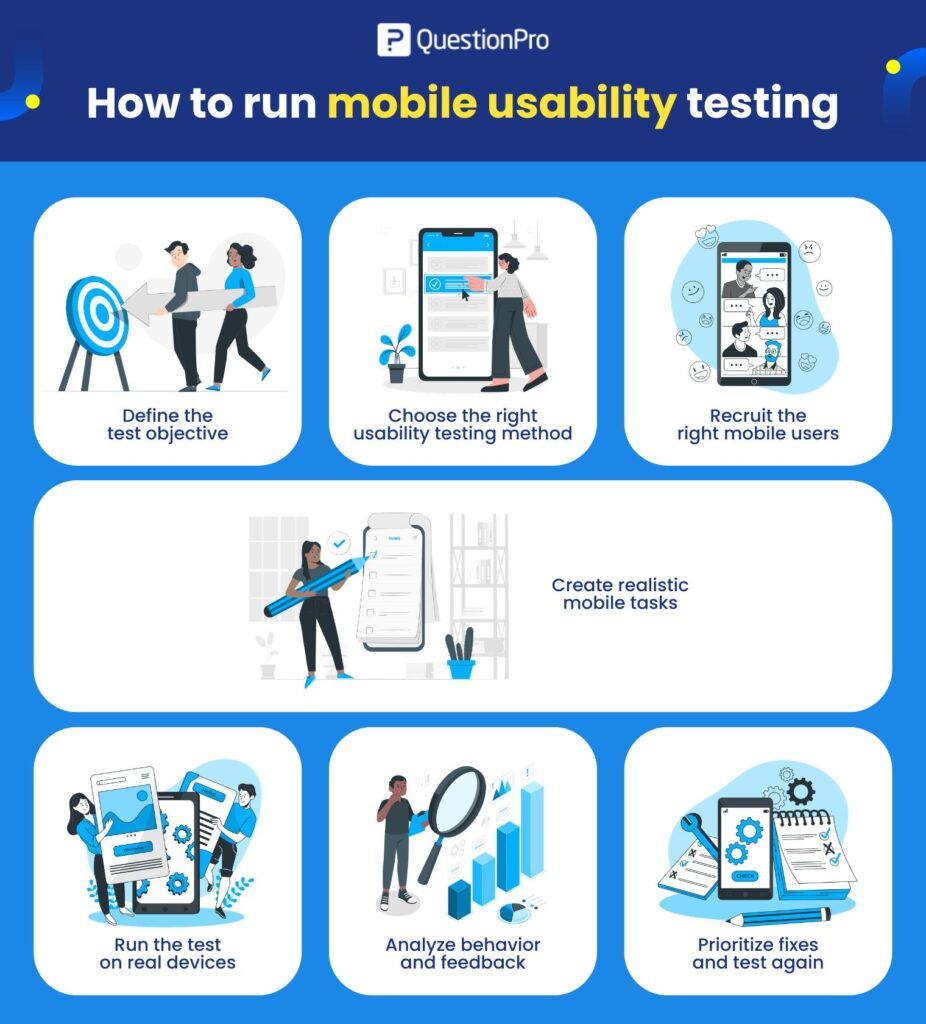
- Define the test objective. Start with one clear goal, such as finding friction in checkout or testing whether new users understand onboarding. A usability test plan keeps the study focused before recruiting begins.
- Choose the right method. Pick moderated testing for follow-up questions, unmoderated testing for faster feedback from more people, or remote testing when participants are spread across locations.
- Recruit the right mobile users. Match participants to the target audience and the platforms that matter, and include the devices your real customers use.
- Create realistic tasks. Write tasks around real goals, like “find a blue jacket in size medium and add it to your cart,” without telling users exactly where to tap.
- Test on real devices. Simulators miss real touch behavior, screen glare, and loading delays. Ask participants to think aloud so their reasoning is visible, not just their actions.
- Analyze behavior and feedback. Review task success, time on task, mis-taps, drop-off points, and participant comments together. What someone says and what they actually do often disagree.
- Prioritize fixes and retest. Group issues by severity, fix the ones that block task completion first, and run the test again to confirm the fix worked.
How QuestionPro supports mobile usability testing feedback
QuestionPro does not replace watching real users interact with a product, but it supports the research built around those sessions.
Teams can use QuestionPro UX to build post-test surveys, screen participants, and collect structured feedback after a task, asking questions like how easy the task felt or where a participant got stuck. Paired with QuestionPro Survey Software, teams can share results with product and design stakeholders in a format that connects feedback directly to decisions, rather than leaving it scattered across notes and recordings.
Mobile usability testing methods: Which one fits your project
Choosing a mobile usability testing method depends on timeline, budget, and the kind of question being asked. A full breakdown of usability testing methods covers the wider research landscape beyond mobile.
- Moderated testing.
A researcher guides the session live. Choose this when follow-up questions matter or a flow is complex enough to need real-time probing.
- Unmoderated testing.
Participants complete tasks alone. Choose this for faster results, larger sample sizes, or simple task validation where follow-up questions are not critical.
- Remote testing.
Participants join from their own location. Choose this when the audience is spread across the USA or when real-life context, like using the app at home or at work, matters to the results.
- Prototype testing.
Evaluates early designs before development. Choose this to validate navigation and content hierarchy before engineering work begins.
- In-app feedback testing.
Collects responses inside the live product. Choose this after launch to understand friction in real flows or satisfaction after a key task.
How to measure mobile usability testing results
Mobile usability testing metrics should show whether users can complete tasks easily and where they struggle.
| Metric | What it measures | Why it matters |
|---|---|---|
| Task success rate | Whether users complete the task | Shows if the flow works at all |
| Time on task | How long a task takes | Reveals friction or confusion |
| Error rate | Mistakes made during the task | Shows where users go wrong |
| Mis-tap rate | Taps on the wrong area | Highlights touch target issues |
| Drop-off rate | Where users abandon the flow | Shows the exact point of friction |
| Customer Effort Score | How easy the task felt | Adds a self-reported effort signal |
| Qualitative comments | What users say during testing | Explains the reasons behind the numbers |
A strong usability report pairs metrics with observation. Numbers point to where the problem sits. Behavior and comments explain why it happens.
Mobile usability testing best practices and mistakes to avoid
Good mobile usability testing comes down to realistic users, realistic tasks, real devices, and honest analysis. A quick usability testing checklist helps teams running their first study.
Best practices to follow:
- Test on real devices across iOS and Android, not only simulators.
- Recruit users who match the target audience and platform.
- Write realistic, goal-based tasks without leading participants.
- Test key flows before investing in visual polish.
- Check accessibility and network conditions, not just the happy path.
- Prioritize fixes by severity, then retest to confirm they worked.
Mistakes to avoid:
- Testing on only one device or one operating system.
- Recruiting only internal employees instead of real users.
- Giving vague tasks or asking leading questions.
- Focusing only on how the app looks, not how it works.
- Skipping accessibility checks and low-network conditions.
- Writing a report without prioritizing which fixes matter most.
A practical rule holds up across most teams. If a user cannot complete a key task without help, the design still needs work, regardless of how polished the interface looks.
Building mobile usability testing into the product cycle
Mobile usability testing works best as a habit, not a single gate before launch. The goal is not only to find bugs. It is to understand where people struggle, why they struggle, and what needs to change before those problems affect adoption, retention, or revenue.
Teams that treat it as ongoing, tied to real releases and real flows, catch smaller problems before they turn into expensive ones.
Frequently Asked Questions (FAQs)
Most teams see strong results from 5 to 8 participants per user segment for moderated testing. Unmoderated or quantitative studies often use larger samples, sometimes 20 or more, to support statistical comparisons across devices or flows.
Yes. The same core process applies to native apps, mobile websites, and web apps, though native apps also need testing for OS-specific gestures, push permissions, and app store guidelines that mobile websites do not face.
Most sessions run 20 to 45 minutes per participant, depending on the number of tasks. Longer sessions risk fatigue, which can distort results, especially in moderated remote studies with US-based participants across multiple time zones.
No. Analytics and A/B testing show what users do at scale. Mobile usability testing shows why by watching individual sessions closely enough to catch confusion that aggregate data cannot explain on its own.
There is no universal number, but many researchers treat a task success rate below 70% as a signal that a flow needs redesign, not just minor copy fixes. Compare results against an earlier test of the same flow rather than a general average.