CX dashboard design is the practice of arranging customer experience metrics, widgets, and visual cues so teams can read customer data quickly and act on it. A well-designed dashboard does more than look polished. It helps a team spot a trend, understand a spike in complaints, and decide where to step in next.
Color is only one piece of that puzzle. Layout, widget choice, contrast, and metric priority all shape whether a dashboard actually gets used or gets ignored after the first week.
In this guide, we’ll cover what makes CX dashboard design effective, which metrics and widgets belong on the screen, how color should be used responsibly, and how QuestionPro Customer Experience supports the process.
What is CX dashboard design?
CX dashboard design is the process of arranging customer experience data, such as feedback, survey scores, and sentiment trends, into a visual layout that helps teams monitor performance at a glance.
A dashboard usually pulls together NPS, CSAT, CES, sentiment trends, response volume, and touchpoint performance into one screen. Design decisions determine which of those numbers get attention first and which fade into the background.
A dashboard is not a folder of charts. It works best as a decision tool. Anyone looking at it should be able to answer three questions in seconds: what changed, where it happened, and what to do next.
Why does CX dashboard design matter?
CX dashboard design matters because teams often use dashboards in fast-moving moments, including executive reviews, weekly stand-ups, and live customer escalations. A cluttered or poorly labeled screen can bury the one number that actually needs attention.
Inconsistent colors create a second problem. When green means “good” on one chart and “average” on another, teams start guessing instead of reading.
Strong dashboard design helps teams:
- Scan customer experience metrics in seconds, not minutes
- Spot sudden changes before they become larger problems
- Compare performance across locations, teams, or channels
- Find exactly where customers are getting frustrated
- Prioritize which issues need follow-up first
- Present findings to leadership without extra explanation
- Cut down the time spent interpreting reports
- Build a clear, evidence-backed customer experience story
Pairing a dashboard with a customer journey map makes this even more useful, since teams can see exactly where friction shows up across the full customer path rather than in an isolated metric. For US companies running multiple locations or channels, that speed matters because CX decisions often need to happen the same day feedback comes in.
What metrics should a customer experience dashboard highlight?
A customer experience dashboard should highlight the metrics that explain loyalty, satisfaction, effort, and touchpoint performance. Which ones matter most depends on the team. Support teams often care about effort and resolution time. Retail teams care about satisfaction by location. SaaS teams watch onboarding feedback and renewal risk closely.
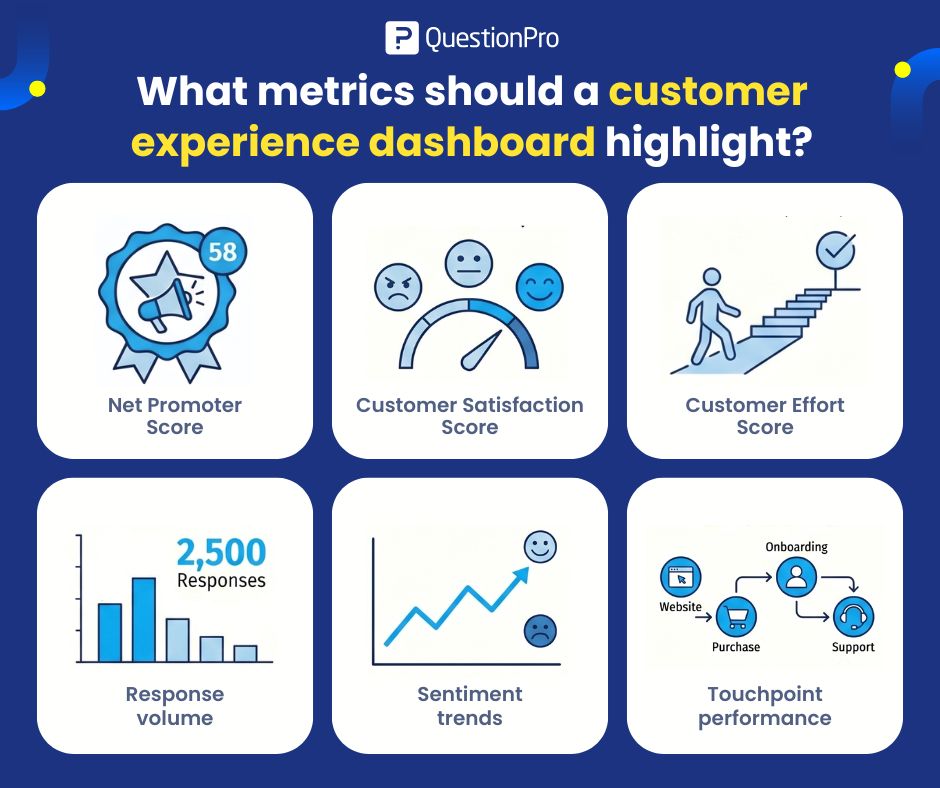
The table below breaks down the core metrics most CX dashboards should track.
| Metric | What it shows | Best used for |
|---|---|---|
| Net Promoter Score (NPS) | How likely customers are to recommend the brand | Tracking loyalty over time |
| Customer Satisfaction (CSAT) | How satisfied a customer was with one interaction | Post-purchase, post-support, post-delivery checks |
| Customer Effort Score (CES) | How easy or hard a task was to complete | Support, checkout, onboarding, claims |
| Response volume | How many customers actually responded | Confirming a trend is statistically meaningful |
| Sentiment trends | Whether open-text comments are turning more positive or negative | Spotting early warning signs |
| Touchpoint performance | How individual journey moments are performing | Website, onboarding, renewal, delivery, support |
Response volume deserves special attention here. A trend built on five responses should never carry the same visual weight as one built on five thousand, yet many dashboards display both with identical confidence.
How do CX dashboard widgets help teams read data faster?
A widget is a single dashboard element, such as a score card, chart, table, or comment feed, that shows one type of information at a time. Widgets help teams read data faster because they turn raw feedback into focused visual blocks instead of one dense spreadsheet.
Widgets that consistently earn their place on a CX dashboard include:
- Score widgets for NPS, CSAT, and CES
- Trend charts that show change over time
- Bar charts for side-by-side comparisons
- Heatmaps for segment or location performance
- Comment feeds for open-ended feedback
- Filter widgets for time period, channel, region, or team
- Alert widgets that flag sudden negative shifts
- Sample-size widgets that show response volume alongside every score
The best widgets answer exactly one question. A widget that tries to show NPS, CSAT, and regional breakdowns all in one chart usually ends up harder to read than three separate ones.
How does color improve CX dashboard design?
Color improves CX dashboard design by helping people identify status, direction, and priority faster than numbers alone. A well-used palette shows whether a metric is improving, declining, or holding steady, and it draws the eye toward the parts of the dashboard that need attention first.
A simple, consistent color logic works across most CX dashboards:
- Green signals improvement or healthy performance
- Red signals decline, risk, or something needing urgent attention
- Yellow or orange signals a warning or mixed result
- Blue supports neutral information or side-by-side comparisons
- Gray reduces visual noise around secondary data
Color should support the data. It should never decorate it. A dashboard covered in bright, unrelated colors becomes harder to scan, not easier.
What are the best practices for CX dashboard color themes?
Dashboard color themes work best when they stay consistent, readable, and tied to one clear meaning throughout the entire tool.
- Keep the same color meaning across every chart and widget
- Reserve bold colors for changes that actually matter
- Use neutral tones for background or secondary data
- Never let positive, negative, and warning colors shift meaning between screens
- Limit the palette instead of adding a new color for every category
- Pair color with labels, numbers, or icons rather than color alone
- Confirm the contrast holds up on different screen sizes
- Design with both analysts and non-technical viewers in mind
A theme succeeds when it helps someone understand the customer experience story faster than reading the raw numbers would.
How should businesses use color responsibly in CX dashboards?
Businesses should use color responsibly by making sure no critical information depends on color alone. Some viewers have color vision differences or low vision. Others print reports in grayscale or glance at a dashboard quickly during a meeting.
The W3C’s accessibility guidance on the use of color notes that color should never be the only visual means of conveying information, since that excludes people who cannot distinguish between certain colors.
Good practices for accessible CX dashboards include:
- Add labels or numbers next to every color-coded value
- Pair red or green warnings with icons or text, not color alone
- Avoid relying only on red and green together
- Confirm enough contrast between text and background
- Test the dashboard with people who will actually act on it
- Keep chart legends close to the chart they explain
- Make filters and date ranges easy to spot at a glance
Color is a helpful shortcut. Clarity remains the actual goal.
A real-world example of CX dashboard design in action
Picture a US retail chain running twenty locations. Its CX dashboard combines a single NPS scorecard at the top, a heatmap showing CSAT by location beneath it, and a comment feed pulling in real-time feedback from checkout surveys.
When one location’s CSAT drops below a set threshold, an alert widget flags it in red with the exact number of responses attached. A regional manager can see the drop, open the comment feed for that store, and identify a recurring complaint about wait times within minutes instead of waiting for a monthly report.
That is the difference a well-designed dashboard makes. It turns a lagging report into a same-day response.
What mistakes should businesses avoid when designing CX dashboards?
The most common CX dashboard mistakes make data harder to read rather than easier, which defeats the entire purpose of building one.
- Showing too many metrics on a single screen
- Using colors without any consistent meaning behind them
- Hiding or omitting response volume
- Mixing unrelated metrics inside one widget
- Forcing executives and analysts to use the identical view
- Choosing charts too complex for the intended audience
- Ignoring accessibility and color contrast
- Failing to label whether a trend is improving or declining
- Treating every metric as equally important
- Leaving out what action should happen next
The biggest mistake is building a dashboard that looks impressive in a demo but never actually changes what a team does the next morning.
How should teams measure whether a CX dashboard is working?
A CX dashboard is working if it consistently shortens the time between a customer problem appearing and a team responding to it. That is the clearest measure of design success, more useful than any aesthetic opinion.
Teams can check this by tracking how quickly alerts get acted on, whether stakeholders can explain a trend without extra help, and whether the number of ad hoc reporting requests drops after the dashboard launches. If people still export the data into spreadsheets to make sense of it, the dashboard design needs another pass.
How can QuestionPro Customer Experience support CX dashboard design?
QuestionPro Customer Experience helps teams organize feedback, track metrics, and customize dashboards with widgets built for monitoring change across touchpoints. Businesses can add charts, scorecards, and filters, then adjust color themes to make positive and negative shifts easier to spot at a glance.
The real value comes from pairing that flexible design with reliable feedback data underneath it, so a dashboard reflects what customers are actually saying rather than a partial picture.
A dashboard should shorten the distance between data and action
CX dashboard design is not about making a report look colorful. It is about helping a team understand what is happening with customers faster and with more confidence in what they are seeing.
Layout, widget choice, and color all play a role, but none of them matter without a clear point of view on what the dashboard needs to answer. When those pieces work together, a team can see exactly where customers are satisfied, where friction is growing, and where someone needs to step in today.
Frequently Asked Questions (FAQs)
A CX dashboard updates continuously and highlights priority signals visually, while a standard report is usually a static snapshot built for a single meeting. Dashboards are built for ongoing monitoring, not a one-time review of past performance.
Most well-designed CX dashboards limit the main view to four or five priority metrics, with drill-down options for deeper detail. Showing more than that on the primary screen usually slows down the quick reads a dashboard is meant to support.
Yes. Modern survey and CX platforms include prebuilt dashboard templates with score widgets and filters already configured, so a small team can launch one without custom development work or dedicated analysts on staff.
Yes, in most cases. Executives typically need a high-level trend view, while frontline teams need location or ticket-level detail tied to specific actions. Building both from the same widget library keeps the metrics consistent while the depth changes.
Reviewing the color theme once or twice a year is usually enough, unless a rebrand or accessibility audit calls for changes sooner. Frequent color changes can confuse regular users who have already learned what each color means.