
Lean UX is a product design approach that helps teams test ideas quickly, collect user feedback early, and improve the experience through short learning cycles. Instead of spending months creating polished deliverables before validation, it focuses on testing assumptions with real users as soon as possible.
This approach is useful for product teams, UX researchers, startups, SaaS companies, and agile teams that need to move fast without losing sight of user needs.
The goal is simple: reduce guesswork, learn from users, and build products that solve real problems.
What is Lean UX?
Lean UX is the application of lean and agile principles to user experience design. It focuses on outcomes, assumptions, fast experiments, user feedback, and continuous improvement.
Traditional UX often produces detailed research reports, wireframes, and design documentation before development begins. Lean UX shifts the focus from deliverables to learning. The team asks, “What do we need to learn?” and “What is the smallest thing we can test?”
Lean UX was popularized by Jeff Gothelf and Josh Seiden through the book Lean UX: Designing Great Products with Agile Teams. Their approach encourages teams to work collaboratively, test assumptions, and learn from real users throughout the product development process.
A simple way to define it:
Lean UX is a fast, collaborative UX methodology that helps teams validate product ideas before investing too much time in full design and development.
Why does Lean UX matter for product teams?
Lean UX matters because product teams often build based on assumptions. Some assumptions are right. Many are not.
A team may believe users need a specific feature, workflow, dashboard, or onboarding flow. But until users interact with the idea, the team does not know whether it solves the right problem.
It helps teams:
- Test ideas before full development.
- Reduce wasted design and engineering work.
- Get user feedback earlier.
- Work better across design, product, research, and development.
- Improve products through short cycles.
- Focus on user outcomes instead of internal opinions.
- Make faster product decisions with evidence.
This is especially helpful for US product teams working in fast-moving software, SaaS, ecommerce, fintech, healthtech, and digital service environments. In those markets, long product cycles can make teams slow to respond to customer needs.
What are the main Lean UX principles?
Lean UX principles help teams reduce waste, collaborate better, and make product decisions based on learning.
Focus on outcomes, not deliverables
Lean UX focuses on the user or business outcome the team wants to create.
A deliverable might be a wireframe, report, prototype, or journey map. Those can be useful, but they are not the final goal. The real goal is a better user experience.
For example, instead of saying, “We need to redesign the checkout page,” a Lean UX team might say, “We need to reduce checkout confusion for first-time buyers.”
Reduce waste in the design process
Waste means work that does not help the team learn, build, or improve the user experience.
Waste can include unnecessary meetings, unused documentation, features no one needs, long approval cycles, or design work created before the team understands the problem.
Lean UX does not mean cutting corners. It means spending effort on the work that helps the team learn faster.
Test assumptions early
An assumption is something the team believes is true but has not confirmed yet.
Examples include:
- Users understand the new feature.
- Users want this workflow.
- Users will pay for this upgrade.
- The new screen will reduce support tickets.
- The prototype solves the main pain point.
Lean UX turns assumptions into hypotheses that can be tested.
Work in cross-functional teams
Lean UX works best when designers, researchers, product managers, developers, marketers, and stakeholders work together.
This matters because product decisions affect more than design. Engineering feasibility, customer expectations, sales messaging, support issues, and product strategy all shape the final experience.
Cross-functional work reduces handoff delays and helps teams make better decisions earlier.
Use feedback to guide decisions
Lean UX depends on user feedback.
Feedback can come from interviews, surveys, usability tests, product analytics, customer support conversations, prototype tests, or product feedback surveys. The point is to learn what users actually need, not only what the team thinks they need.
How does the Lean UX cycle work?
The Lean UX cycle usually follows a simple loop: create a hypothesis, build the smallest testable version, collect feedback, learn from the results, and repeat.
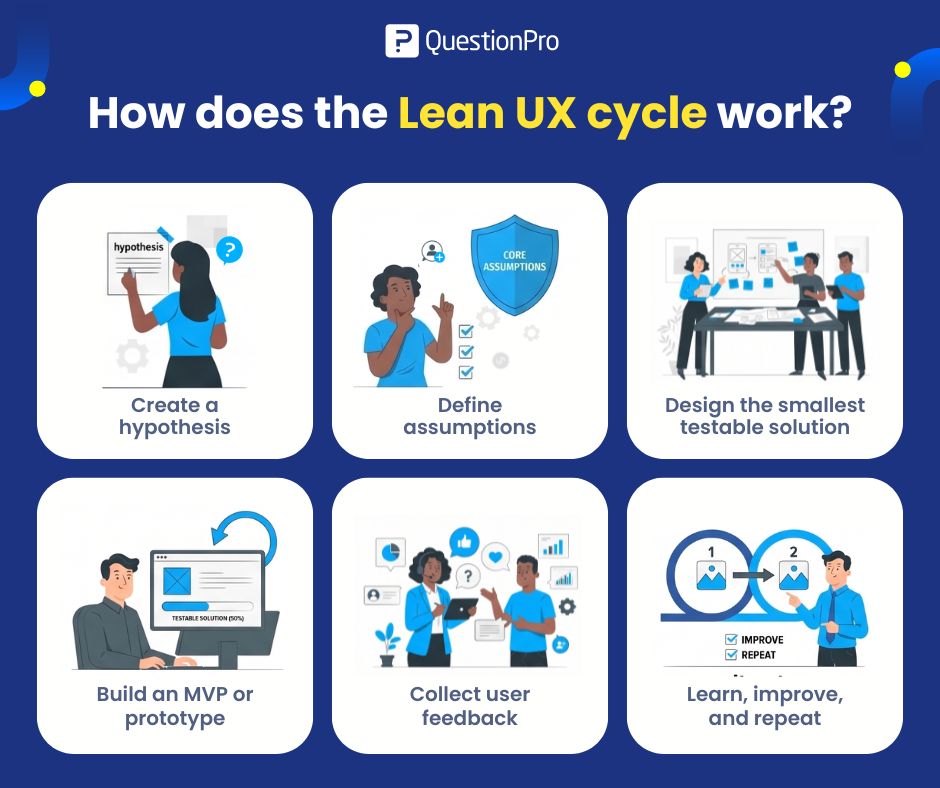
1. Create a hypothesis
A hypothesis is a clear statement about what the team believes will happen.
Example:
We believe that simplifying the onboarding flow will help new users complete setup faster and reduce support requests.
A strong hypothesis includes:
- The user group.
- The problem.
- The proposed change.
- The expected outcome.
- A way to measure success.
2. Define assumptions
Before designing, list the assumptions behind the idea.
Ask:
- Who is the user?
- What problem are we solving?
- Why does this matter to users?
- What behavior do we expect to change?
- What risk do we need to test first?
- What evidence would prove or disprove this idea?
This helps the team avoid building too much before learning whether the idea is useful.
3. Design the smallest testable solution
Lean UX does not require a fully polished design at the start.
The team should create the smallest version that can test the main assumption. This might be a sketch, clickable prototype, landing page, mockup, survey, or single feature flow.
The key question is:
What is the smallest thing we can show users to learn whether this idea is worth building?
4. Build an MVP or prototype
An MVP, or minimum viable product, is the smallest usable version of a product or feature that can test whether the idea creates value.
In Lean UX, the MVP does not always need to be production-ready software. It can also be a prototype, test page, demo, or manual process that helps the team learn.
The goal is not to launch something incomplete. The goal is to test the highest-risk assumption with the least unnecessary work.
5. Collect user feedback
After users interact with the MVP or prototype, collect feedback.
Useful feedback methods include:
- User interviews.
- Usability testing.
- Product feedback surveys.
- Short in-product surveys.
- Customer support feedback.
- Concept testing.
- Prototype testing.
- Behavioral analytics.
The best feedback combines what users say with what users do.
6. Learn, improve, and repeat
The team reviews the feedback and decides what to do next.
Possible decisions include:
- Continue with the idea.
- Change the design.
- Test a different solution.
- Narrow the audience.
- Stop the idea.
- Collect more feedback.
Lean UX is not a one-time workshop. It is a cycle of learning and improving.
Lean UX vs traditional UX: What is the difference?
Lean UX and traditional UX both care about user experience, but they work differently.
Traditional UX often uses a more structured and document-heavy process. Research, strategy, information architecture, wireframes, and final designs may be completed before development starts.
Lean UX uses shorter cycles. It creates just enough design and research to test the next assumption.
| Area | Lean UX | Traditional UX |
| Main focus | Learning quickly from users | Planning and documenting the full experience |
| Workflow | Iterative and collaborative | More sequential |
| Deliverables | Lightweight and test-focused | More detailed and formal |
| Research timing | Early and continuous | Often planned in larger stages |
| Best fit | Agile teams, startups, fast product cycles | Complex projects, regulated environments, large UX programs |
| Risk | May move too fast without enough research | May move too slowly before testing |
Neither approach is automatically better. Lean UX is strongest when speed and learning matter. Traditional UX can be useful when complexity, compliance, or detailed documentation is required.
Lean UX vs Agile UX: How are they different?
Lean UX and Agile UX are related, but they are not the same.
Agile UX is the practice of fitting UX work into agile development cycles. Lean UX is a broader mindset focused on testing assumptions, reducing waste, and learning from users.
A team can use Agile UX without fully practicing Lean UX. For example, designers may work one sprint ahead of developers but still rely on internal assumptions.
Lean UX asks the team to test whether the work is solving the right user problem.
The simple difference:
- Agile UX focuses on how UX fits into agile delivery.
- Lean UX focuses on how teams learn faster and reduce product risk.
What research methods support Lean UX?
Lean UX research methods help teams test assumptions quickly without slowing the product cycle.
User surveys
User surveys help teams measure patterns across a larger group.
They are useful for testing pain points, feature priorities, satisfaction, product needs, and user preferences. Surveys work best when the team already understands the topic well enough to ask clear questions.
Customer interviews
Customer interviews help teams understand user motivations, frustrations, and behavior in detail.
They are useful early in the Lean UX process because they reveal how users describe the problem in their own words.
Usability testing
Usability testing shows whether users can complete tasks with a product, prototype, or design.
This method is useful when teams need to see where users get stuck, confused, or slowed down.
Concept testing
Concept testing helps teams evaluate an idea before building it.
A team can test whether users understand the concept, value it, trust it, and would consider using or buying it.
Prototype testing
Prototype testing helps teams test a design before development.
It can reveal unclear labels, missing steps, confusing flows, or unnecessary features.
Product feedback surveys
Product feedback surveys help teams collect structured input from users after they interact with a product or feature.
They are useful after release, during beta testing, or after a prototype session.
What are the advantages of Lean UX?
Lean UX helps teams learn faster, reduce waste, and build products closer to user needs.
Key advantages include:
- Faster learning: Teams test ideas earlier instead of waiting until launch.
- Less waste: Teams avoid building features users do not need.
- Better collaboration: Designers, developers, researchers, and product managers work together.
- More user focus: Decisions are connected to user needs and behavior.
- Early risk reduction: Teams test risky assumptions before heavy investment.
- Easier iteration: Teams can improve designs based on user feedback.
- Clearer priorities: Teams focus on the most important user problems first.
Lean UX is especially helpful when teams need to improve quickly and cannot afford long delays between idea, test, and change.
What are the limitations of Lean UX?
Lean UX has limits. It can create problems if teams treat speed as more important than research quality.
Common limitations include:
- Small tests may not represent the full audience.
- Teams may skip deeper research too often.
- Fast cycles can create unclear documentation.
- Stakeholders may expect polished deliverables too early.
- Some teams may confuse MVP with unfinished work.
- Complex products may require more planning.
- Regulated industries may need more formal validation.
Lean UX works best when teams balance speed with responsible research. Moving fast should not mean ignoring evidence.
What mistakes should teams avoid with Lean UX?
Teams should avoid using Lean UX as an excuse to rush design, skip research, or ship poor experiences.
Common mistakes include:
- Starting with a solution instead of a problem.
- Writing vague hypotheses.
- Testing with the wrong users.
- Asking leading survey or interview questions.
- Building too much before validating the core assumption.
- Treating one test as final proof.
- Ignoring negative feedback.
- Failing to include developers or stakeholders early.
- Measuring activity instead of outcomes.
- Confusing internal agreement with user validation.
The biggest mistake is thinking Lean UX means “less UX.” It does not. It means more focused UX, done in smaller learning cycles.
How can QuestionPro support Lean UX research?
QuestionPro can support Lean UX research by helping product teams collect user feedback, run surveys, test concepts, and understand product experiences throughout the design cycle.
For example, teams can use UX research methods to understand user behavior before designing. They can run usability testing to see where users struggle with prototypes or live products. They can also use a product satisfaction survey template to collect structured feedback after users try a feature.
QuestionPro works best in Lean UX when it supports fast learning. Teams can use it to test assumptions, compare feedback across user segments, and track whether product changes improve the user experience over time.
The goal is not to collect feedback for the sake of it. The goal is to turn user evidence into better product decisions.
Final thoughts
Lean UX is useful because it keeps product teams close to users while still moving quickly.
It helps teams stop guessing, test assumptions early, and improve designs through repeated feedback. The process is not about creating fewer UX practices. It is about focusing UX work on what helps the team learn and build better products.
A strong Lean UX process starts with a clear hypothesis, tests the smallest useful version, collects honest user feedback, and improves from there.
Frequently Asked Questions (FAQs)
No. Lean UX works for startups, SaaS teams, enterprise product teams, and agile organizations. It is most useful when teams need to test ideas quickly, reduce product risk, and improve the user experience through shorter feedback cycles.
Research helps Lean UX teams test assumptions with real users. Interviews, surveys, usability tests, and prototype tests show whether a product idea solves the right problem and whether users understand the proposed solution.
Lean UX often uses MVP testing to validate risky assumptions before full development. The MVP can be a prototype, test feature, landing page, or simple workflow that helps the team learn with less wasted effort.
No. Lean UX does not replace traditional UX research. It changes the timing and format. Research happens in smaller, faster cycles, but larger studies may still be needed for complex products, high-risk decisions, or regulated industries.
Lean UX should include designers, researchers, product managers, developers, and relevant stakeholders. Sales, support, marketing, and customer success teams can also add useful context because they hear user needs and objections often.
The biggest benefit of Lean UX is faster learning. Teams can test assumptions before building too much, collect feedback from users, and improve the product based on evidence instead of internal opinion.