



Survey email examples are easy to find online. Most collections just show you the wording and skip the reasoning behind it. In this blog, we break down eight survey email examples you can adapt today. Alongside each one, we cover the subject lines, structure, and follow-up timing that raise response rates without relying on discounts or gimmicks.
What is a survey email?
A survey email is a message that invites someone, a customer, an employee, or a subscriber, to answer a set of questions. The respondent either clicks through to a full survey or answers a question embedded directly in the email itself.
Businesses send survey emails to collect feedback that shapes real decisions. That includes which product feature to fix next, whether a support interaction went well, or how engaged employees feel about their workplace. The email itself is not the research. It is the doorway to the research, and how that doorway looks determines how many people walk through it.
Three related terms get used interchangeably, but they mean different things:
| Term | What It Means | Where the Respondent Answers |
|---|---|---|
| Survey invitation email | An email that links out to a full, hosted survey | On the survey landing page |
| Embedded email survey | The first question and its answer options appear inside the email itself | Inside the email for question one, then the survey page for the rest |
| Survey reminder email | A follow-up sent only to people who have not yet responded, using the same survey link | Same survey page as the original invitation |
Most of the examples below are survey invitation emails, since that is the format most businesses use day to day. A few show how embedding the first question changes the experience.
What makes a survey email get opened and answered?
A survey email earns a response in two separate steps: getting opened, then getting clicked. Each step depends on different things.
To get opened, a survey email needs:
- A subject line that states the purpose plainly, rather than teasing it.
- A sender name the recipient already recognizes, since brand recognition drives most open decisions before the subject line does.
- A realistic time estimate, stated once, not buried at the bottom.
To get clicked and completed, the email body needs:
- One clear reason the response will be used, not a generic “we value your feedback” line.
- A single, obvious call-to-action button or link. Extra links compete for attention and lower clicks on the one that matters.
- Optionally, the first question embedded directly in the email. Reducing the number of steps between opening the email and answering the first question measurably increases completion, since embedding a single-select, NPS (Net Promoter Score), or smiley-rating question directly in the invite removes a click before the respondent has committed to anything.
8 Survey email examples you can use today
Each example below includes a subject line, a short version of the body, and the reason it tends to outperform a generic invite. Swap in your own product, event, or team name, and keep the rest of the structure intact.
1. Customer satisfaction survey email
This is the classic CSAT (customer satisfaction) email: a short, single-purpose ask tied to one recent interaction.
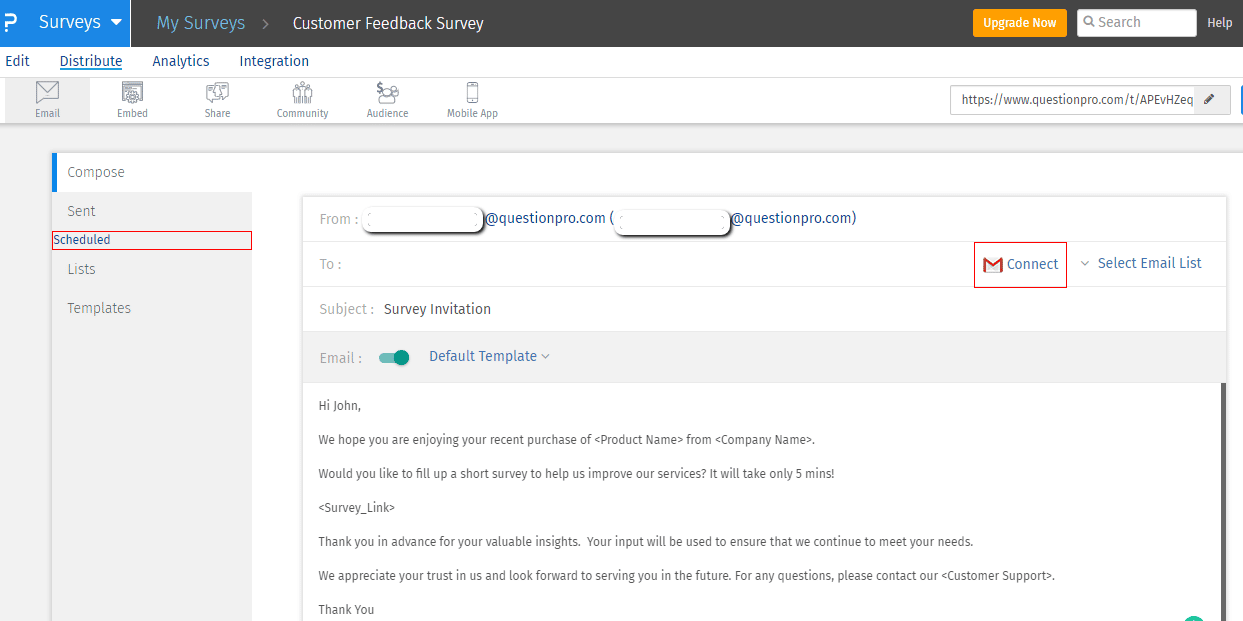
Subject: How did we do with your recent order?
Body: Thank the customer by name for a specific, recent purchase. State the time commitment (2 minutes). Include one link to the survey. Close with a one-line reason the feedback matters, such as improving the exact product or service they just used.
Why it works:
- Ties the request to something the customer just experienced, not a generic check-in.
- States the time cost up front, which lowers the perceived effort.
- Uses one link and one ask, so there is nothing else competing for the click.
A short list of customer satisfaction survey questions works well behind this kind of invite. The email promises something quick, so the survey needs to deliver on that promise.
2. Post-purchase feedback survey email
Subject: Quick favor: how was your order?
Body: Reference the specific item or order number. Ask one open question about the unboxing or delivery experience before linking to the fuller survey. Mention that the answer helps future customers, not just internal reporting.
Why it works:
- Framing the ask around helping future customers, not just the company, appeals to reciprocity.
- Referencing the order number signals the request is not a mass blast.
- Placing one question in the email body previews what the survey covers.
3. NPS survey email
Subject: How likely are you to recommend us to a colleague?
Body: Lead with the 0 to 10 recommendation scale as the very first thing the recipient sees. Embed it in the email if the tool allows it, and skip the preamble. Follow with a one-line thank-you and a link for anyone who wants to add context.
Why it works:
- A single-question format matches what Net Promoter Score actually measures, so there is no reason to pad the email.
- Embedding the scale directly in the email removes the click needed to reach question one.
- Detractors and passives who do click through are more likely to add the open-ended reason, since they already committed with the first click.
Businesses running recurring loyalty tracking often standardize this format. A full NPS email guide walks through scoring and follow-up sequencing in more depth.
Subject: Are our emails actually useful to you?
Body: Ask directly whether recent emails have been relevant, then link to a short survey. Offer a one-line preview of what will change based on the answers. That could mean sending fewer emails or different content types.
Why it works:
- Framing the survey as a way to receive fewer, better emails gives subscribers a concrete personal incentive.
- Asking about a behavior the recipient just performed, opening or ignoring recent emails, keeps the question grounded and specific.
- Naming a likely outcome, rather than a vague “your feedback matters,” makes the ask feel consequential.
5. Retail or in-store experience survey email
Subject: Thanks for stopping by. Got 2 minutes?
Body: Reference the store location and approximate visit date if the point-of-sale system captures it. Ask about one thing: staff helpfulness, product availability, or checkout speed. Mention any small thank-you for completing it, if one exists.
Why it works:
- Location and date references make the email feel tied to a real visit, not a mailing list blast.
- Asking about one dimension of the visit, instead of the whole experience, keeps the survey short enough to finish on a phone.
- A modest thank-you, not a hard sell, keeps the tone appreciative rather than transactional.
A retail customer survey template covers store-specific questions like layout, staffing, and checkout. Use it as a starting point beyond the single question in the email.
6. Employee engagement survey email
Subject: Your voice, your workplace: 5 quick questions
Body: Send from a recognizable internal sender, such as HR or a team lead, not a no-reply address. State that responses are confidential and used to shape specific changes, not filed away. Keep the survey link to one click.
Why it works:
- A recognizable internal sender increases trust that the survey is genuine and worth the time.
- Naming confidentiality explicitly addresses the most common reason employees skip these surveys.
- Tying the ask to specific, plausible changes (scheduling, benefits, tools) makes the outcome feel real rather than theoretical.
An employee engagement survey template gives a starting question set if you are building this survey from scratch.
7. Post-event survey email
Subject: Thanks for joining us. One last question.
Body: Send within 24 hours of the event ending, while the experience is still fresh. Reference the specific session or event name. Ask about the single most useful takeaway alongside a rating question. Offer a link to any recordings or slides as a thank-you.
Why it works:
- Speed matters here more than almost any other survey type; memory of specific sessions fades fast.
- Pairing the ask with something useful, like recordings, gives a reason to open the email beyond the survey itself.
- Referencing the specific event name avoids the generic feel of a recycled template.
8. Survey reminder email
Subject: Still have 2 minutes for us?
Body: Send only to people who have not yet responded, using the identical survey link from the original invite. Keep the body shorter than the original, restate the time estimate, and avoid guilt-based language.
Why it works:
- Reusing the same link keeps all responses consolidated under one survey, rather than fragmenting data across duplicate links.
- A shorter body respects that this is a second ask, not a new pitch.
- Sending reminders only to non-responders, rather than the whole list, avoids irritating people who already answered.
Most survey platforms can automate reminder sends to non-responders on a set schedule, which removes the manual tracking work.
How to choose the right survey email for your goal
The right survey email format depends on what decision the answer needs to inform, not on which template looks best.
| Your Goal | Best Format | Example Above |
|---|---|---|
| Track loyalty over time | NPS survey email | Example 3 |
| Fix a specific recent experience | Customer satisfaction or post-purchase email | Examples 1 and 2 |
| Improve your own email marketing | Newsletter evaluation email | Example 4 |
| Understand a physical visit | Retail or in-store email | Example 5 |
| Shape internal policy or culture | Employee engagement email | Example 6 |
| Capture feedback while it’s fresh | Post-event email | Example 7 |
| Recover responses from a first send | Reminder email | Example 8 |
If more than one goal applies, run two shorter, separate surveys instead of combining them into one long email. A single-purpose ask completes at a noticeably higher rate than a multi-topic one.
How to measure survey email performance
Four metrics tell you whether a survey email is working, and each measures a different point in the funnel.
- Open rate: The percentage of recipients who opened the email, calculated as opens divided by delivered emails. This reflects your subject line and sender reputation, not the survey itself.
- Click-through rate (CTR): The percentage of recipients who clicked the survey link, calculated as clicks divided by delivered emails. This reflects whether the email body made the ask worth acting on.
- Response rate: The percentage of recipients who completed the survey, calculated as completed responses divided by emails sent. Email surveys commonly land in the 15% to 30% range, though benchmarks vary by industry and audience.
- Completion rate: The percentage of people who started the survey and actually finished it. A low completion rate against a healthy click-through rate usually points to the survey itself, not the email, being too long.
Subject lines carry more weight on open rate than most senders expect. Research on email personalization has found that subject lines alone drive whether more than half of recipients decide to open a message at all. Personalized subject lines also outperform generic ones by a wide margin in controlled comparisons. If open rate is the weak point in your funnel, the subject line is the first place to test. For a fuller breakdown of what counts as healthy across survey types, see this guide to average survey response rates.
Common survey email mistakes that lower response rates
Most low-performing survey emails fail for one of a handful of avoidable reasons.
- Mismatched subject and content.
A subject line that promises something the email does not deliver (like implying a prize with no real odds of winning) increases opens but also increases unsubscribes and distrust on the next send.
- No time estimate.
Recipients decide whether to click partly based on how long the task will take. Leaving that detail out makes people assume the worst.
- Multiple competing links.
Adding links to a website, social media, and the survey in the same email splits attention and lowers clicks on the one link that matters.
- Sending too many reminders.
More than two or three reminders to the same non-responder tends to raise unsubscribe rates faster than it raises completions.
- Ignoring mobile formatting.
Most survey emails are opened on a phone first. A button that is too small to tap, or a subject line that gets cut off, quietly kills opens and clicks before the content even matters.
- Skipping personalization beyond the first name.
Referencing the actual order, event, or interaction the recipient had performs better than a name merge field alone, since it proves the request is specific and not automated spam.
Getting more out of the survey email examples you already have
The templates above work for three reasons. Each one asks for one thing, states the cost plainly, and ties the request to something the recipient just experienced. Copying the wording is the easy part. The harder, more durable habit is testing subject lines and send times against your own list, rather than assuming what worked for someone else’s audience will work for yours.
A few things worth checking before your next send:
- Does the subject line state the topic and time cost, or does it tease?
- Is there exactly one link, and does it go to the survey, not somewhere else?
- Would this email make sense to someone who has never seen a survey from you before?
Small, single-variable tests compound faster than a full template rewrite every quarter. Try one subject line against another, then one send time against another.
Frequently Asked Questions (FAQs)
Most email surveys land between 15% and 30%. The exact number depends heavily on the relationship between sender and recipient, since a known brand emailing recent customers typically lands higher than a cold list with no prior contact.
One or two reminders, spaced a few days apart, is usually enough. Sending more than three tends to raise unsubscribe rates faster than it raises completions, especially once the response rate plateaus.
Incentives can lift open and click rates, particularly for longer surveys, but they are not required for short, well-targeted asks. A clear time estimate and a specific reason the feedback matters often perform nearly as well, without the added cost.
Midweek mornings tend to outperform Mondays and Fridays for most B2C lists. B2B sends often do better a bit later in the workday. Testing against your own list matters more than following a generic rule, since audience habits vary.
Yes. Most email regulations, including the US CAN-SPAM Act (the federal law governing commercial email), require a working unsubscribe mechanism. Survey invitations sent to a marketing or customer list generally count as commercial email under that rule.



