SurveySparrow alternatives become worth exploring the moment your survey needs outgrow a chat-style form. SurveySparrow built its reputation on conversational, one-question-at-a-time surveys that lift completion rates for short, customer-facing feedback. That same format can feel restrictive once you need branching logic, research-grade reporting, or a platform multiple teams can share.
A small business may only want a simple survey builder. Research teams often need advanced logic, panels, and statistical analysis. A CX or people team may need dashboards, automated workflows, and role-based access for a dozen collaborators.
In this article, we’ll compare seven SurveySparrow competitors across pricing, features, and best-fit use case. Pick based on the job the tool needs to do, not just brand recognition.
What is SurveySparrow?
SurveySparrow is a survey and experience management platform built around chat-like, conversational surveys that present one question at a time. Teams use it for customer satisfaction surveys, NPS tracking, employee feedback, and lightweight case management.
Pricing starts around $19 a month for a Basic plan and $39 for Starter. Business, Professional, and Enterprise tiers require a sales conversation to price.
SurveySparrow fits teams that want a fast, engaging way to collect responses without a steep learning curve. Buyers typically start comparing it with other platforms once pricing, reporting depth, question logic, or integration needs grow past what the conversational format was built for.
Quick facts:
- Category: Conversational survey and experience management software
- Starting price: Around $19/month, with upper tiers quote-based
- Known for: Chat-style, one-question-at-a-time survey format
- Common use cases: NPS, CSAT, employee pulse checks, feedback automation
Survey tool, form builder, or experience management platform?
These three categories get used interchangeably, but they solve different problems. A survey tool (SurveySparrow, SurveyMonkey, QuestionPro) is built around structured questions, logic, and analysis.
A form builder (Jotform, Typeform) is built around collecting entries, registrations, and payments, with surveys as one use case among many. An experience management (XM) platform (Qualtrics) connects survey data across customer, employee, and product programs into shared dashboards.
| Category | Core job | Example tools |
|---|---|---|
| Survey software | Structured questions, logic, statistical reporting | QuestionPro, SurveyMonkey |
| Form builder | Entries, registrations, payments, light surveys | Jotform, Typeform |
| Experience management platform | Cross-program feedback at enterprise scale | Qualtrics |
Why do businesses look for SurveySparrow alternatives?
Businesses look for SurveySparrow alternatives once their survey program outgrows the platform’s conversational format, pricing structure, or reporting depth. The most common triggers include:
- Needing branching logic or question piping beyond simple skip patterns
- Needing dashboards, cross-tabulation, or statistical reporting
- Hitting response caps or per-user costs as the team scales
- Needing more question types for research-grade surveys
- Needing access to sample panels or external respondents
- Needing deeper API access or native CRM integrations
- Needing enterprise security, SSO, or compliance certifications
- Needing multiple collaborators working on the same project with role-based permissions
The right alternative depends on which of these is actually the bottleneck. A team that just wants a cleaner form builder and a team that runs quarterly market research studies are not shopping for the same product.
How we compared the best SurveySparrow alternatives
This comparison weighs practical buying criteria rather than raw feature counts. A longer feature list does not always mean a better fit. Each platform below is evaluated on the following criteria.
- Survey creation and question type variety
- Logic, branching, and customization depth
- Reporting, dashboards, and analytics
- Integrations and API access
- Team collaboration and permissions
- Onboarding and support
- Pricing structure and transparency
- Best-fit use case and realistic limitations
A tool built for quick internal pulse checks and a platform built for academic or market research solve different jobs. “Best” only makes sense once you know which job you’re hiring the tool to do.
SurveySparrow alternatives at a glance
Here’s how the seven alternatives stack up on price and rating before the full breakdown below.
| Tool | Best for | Starting price | G2 rating |
|---|---|---|---|
| QuestionPro | Research, CX, and teams that need flexible surveys | ~$83/month | 4.5/5 |
| SurveyMonkey | General business surveys | ~$30/month | 4.6/5 |
| Typeform | Conversational, design-forward forms | ~$39/month | 4.7/5 |
| Jotform | Forms, registrations, basic surveys | ~$39/month | 4.7/5 |
| Qualtrics | Enterprise experience management | Custom quote | 4.4/5 |
| Alchemer | Custom survey workflows and integrations | Custom quote | 4.4/5 |
| Zoho Survey | Teams already using Zoho apps | Free tier available | 4.4/5 |
Ratings and starting prices reflect publicly listed figures as of mid-2026 and can shift, so confirm current numbers directly with each vendor before budgeting. Figures are drawn from G2’s survey software category pages.
What are the best SurveySparrow alternatives?
The best SurveySparrow alternatives are QuestionPro, SurveyMonkey, Typeform, Jotform, Qualtrics, Alchemer, and Zoho Survey. Each one fits a different buyer. The right pick depends on team size, budget, research depth, and how many people need to collaborate on the same survey program.
1. QuestionPro
Best for: Research teams, CX and employee experience teams, universities, and businesses that need more than basic survey collection.
QuestionPro is a strong SurveySparrow alternative once a team needs advanced logic, multilingual surveys, and research workflows alongside standard survey creation. It includes 80+ question types, branching and skip logic, 300+ survey templates, and built-in AI tools for generating and analyzing surveys. QuestionPro’s survey software page details the full feature set, including distribution through email, web, mobile, QR code, and social channels.

- 80+ question types and skip logic
- 300+ expert-designed templates
- Reporting with cross-tabulation and dashboards
- Multilingual survey support
- Team collaboration and role-based access
Possible limitation: the breadth of features can be a lot upfront. A team that only needs a single one-page form may need a short setup period to find the right starting template.
2. SurveyMonkey
Best for: General business surveys and teams that want a familiar, widely used platform. SurveyMonkey works well for HR teams, marketers, and small businesses that need a straightforward builder with standard templates and reporting. It remains one of the most recognized names in the category, used by hundreds of thousands of organizations worldwide.
Its entry plans start near $25 a month, though deeper analytics, longer response history, and advanced logic typically require the higher-tier Advantage or Premier plans. Possible limitation: costs rise noticeably once a team needs the analytics and collaboration features bundled into upper tiers.
3. Typeform
Best for: Conversational forms, lead capture, and polished, design-forward survey experiences.
Typeform popularized the one-question-at-a-time layout and still leads on completion rates for short, customer-facing surveys. It works well for marketing forms, event feedback, onboarding flows, and lightweight customer feedback where visual presentation matters as much as the data collected.

- Strong visual and interaction design
- Conversational, mobile-friendly format
- Reusable templates and branded themes
- Simple embedding and sharing options
Possible limitation: Typeform is less suited to research projects that need deep branching logic, statistical analysis, or detailed respondent-level reporting.
4. Jotform
Best for: Forms, registrations, order forms, and simple surveys rather than research-grade data collection. Jotform is a drag-and-drop form builder that also supports surveys. It’s a good fit for teams that need signups, payment collection, approvals, or intake forms without a steep learning curve.
It’s especially useful for non-technical users who want something live quickly, with plans starting near $39 a month for a small team. Possible limitation: reporting stays fairly basic, so teams needing research-grade analytics or advanced cross-tabulation usually outgrow it.
5. Qualtrics
Best for: Enterprise experience management, advanced research, and large organizations running programs across customer, employee, and product feedback.
Qualtrics connects survey data into a single experience management (XM) system rather than treating each survey as a standalone project. It fits enterprise research teams, universities, and organizations that need governance, single sign-on, and advanced statistical tools built in.
- Advanced statistical and text analytics
- Cross-program experience management dashboards
- Enterprise governance and access controls
- Custom implementation and support options
Possible limitation: pricing is quote-based, and implementation often needs professional services, which can be more than a small team needs.
6. Alchemer
Best for: Flexible survey workflows and teams that need deep customization or native system integrations. Alchemer (formerly SurveyGizmo) is built for survey data that needs to flow directly into CRMs and business systems.
Native Salesforce and HubSpot sync comes built into the core product. It suits teams with technical or process-specific survey needs rather than simple one-off forms. Possible limitation: the flexibility comes with a steeper setup curve compared with simpler form builders.
7. Zoho Survey
Best for: Teams already working inside the Zoho ecosystem who want survey tools connected to existing workflows.
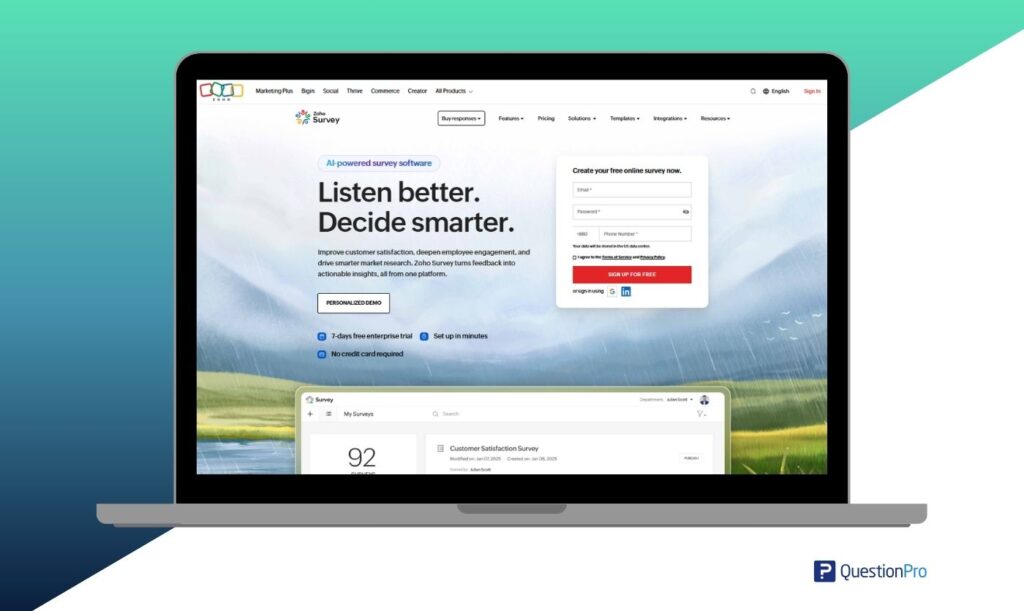
Zoho Survey is a practical, budget-friendly option for small businesses and internal teams. A free tier and paid plans stay accessible as response volume grows. It integrates directly with Zoho CRM and other Zoho apps, so response data flows into tools the team already uses.
- Native integration across Zoho apps
- Multilingual survey support
- Straightforward reporting dashboards
- Accessible pricing for small teams
Possible limitation: it can feel light for teams that need advanced research tools or complex, cross-tabulated analytics.
SurveySparrow vs QuestionPro: Which should you choose?
Choose SurveySparrow if a conversational, chat-style survey experience is the priority and your feedback needs stay simple.
Choose QuestionPro if you need broader survey logic, research workflows, multilingual surveys, and reporting that goes beyond a single survey type. This fits market research use cases especially well, such as academic studies or recurring customer research programs.
A fair way to decide is to test both platforms against the same real survey. Skip the demo and try this instead.
- Build one actual survey you plan to run, using your real logic and question types.
- Send it to a small internal group and review how respondents experience it.
- Pull the reporting and check whether it answers the question you actually asked.
- Have someone else on the team try editing or duplicating the survey.
- Compare the total cost at your expected monthly response volume, not just the listed starting price.
How do you choose the right SurveySparrow alternative?
Start with the survey job you need done, not the tool with the longest feature list. A few concrete thresholds make the decision faster.
- Under 500 responses a month and one editor: a form builder like Jotform or Typeform is usually enough.
- 500 to 5,000 responses a month with a small team: a general survey platform like SurveyMonkey or QuestionPro fits most cases.
- Multiple departments, recurring research, or panel access needed: QuestionPro or Qualtrics justify the added cost.
- Enterprise governance, single sign-on, or cross-program dashboards required: Qualtrics is built for that scale.
- Heavy CRM sync as a daily requirement: Alchemer’s native integrations are worth the setup time.
For US-based teams, also weigh support hours, data residency, and pricing transparency as heavily as the survey builder itself. A cheaper plan that hides response overage fees can cost more at scale than a transparent, slightly pricier one.
Common mistakes when switching survey platforms
Teams switching away from SurveySparrow tend to repeat the same few mistakes.
- Picking a platform from a demo instead of testing a real survey, since demos rarely surface how reporting handles messy, real-world data
- Underestimating migration time, since exporting historical responses, question banks, and branching logic between platforms rarely happens instantly
- Choosing on price alone without checking response caps or per-user fees at actual volume, which often leads to a second switch within a year
- Skipping a trial run with the people who will actually build surveys, not just the buyer, which tends to surface usability problems only after the contract is signed
Making the switch from SurveySparrow
SurveySparrow remains a capable platform for teams that want fast, conversational surveys and don’t need deep research logic. The alternatives above exist because survey needs rarely stay simple as a team or program grows. QuestionPro fits teams that need a flexible survey and research platform.
SurveyMonkey fits teams that want a familiar, general-purpose builder. Typeform fits design-forward, conversational forms. Jotform fits operational forms more than research. Qualtrics fits enterprise experience management. Alchemer fits custom, integration-heavy workflows. Zoho Survey fits teams already inside the Zoho ecosystem.
The right choice comes down to matching the tool to your actual survey goals, reporting needs, team size, and budget. It has nothing to do with the name that shows up first in search results.
Frequently Asked Questions
SurveySparrow works best for small and mid-size teams running customer or employee feedback programs. Enterprise buyers with complex governance, single sign-on, or multi-department research needs typically outgrow it and move toward QuestionPro or Qualtrics instead.
Zoho Survey offers the most accessible entry point with a usable free tier, followed by Jotform and SurveyMonkey’s entry plans. Costs on any platform rise quickly once response volume or team size grows, so check overage pricing before committing.
QuestionPro and Qualtrics are the strongest fits for market research. Both support advanced logic, statistical analysis, and panel access that conversational survey tools like SurveySparrow and Typeform are not built around.
Most competitors support importing questions manually or through CSV, but branching logic and skip patterns rarely transfer automatically. Plan to rebuild complex logic by hand and test the migrated survey before sending it to real respondents.
Zoho Survey and Jotform both offer usable free tiers for small survey volumes. QuestionPro also offers a free plan with core question types and templates, though advanced logic and research features require a paid tier.