Data analysis is the process of inspecting, cleaning, and modeling data to uncover useful information and support a decision. In this blog, we’ll cover what data analysis actually means, the four types you’ll run into, the methods analysts rely on, and a practical process for your next project.
Most teams already collect plenty of data. The gap is usually not volume. It’s turning that data into something a person can act on, and that’s the job data analysis does.
What is data analysis?
Data analysis is the process of examining data to draw conclusions, answer a question, or support a decision. It takes raw numbers or text and turns them into something a person can act on.
The process usually starts with a question. From there, an analyst collects relevant data, cleans it, applies a method suited to the question, and interprets what the results actually mean for the business. A retail team asking “why did June sales drop” and a hospital asking “which patients are at risk of readmission” are both doing data analysis, just with different data and different tools.
Business consultant Daniel Burrus put it simply. A lot of what data analysis does is help people work smarter and faster because there is data available on almost everything that happens. The tools have changed since he said it. The point still holds.
Why does data analysis matter for business decisions?
Data analysis matters because it replaces guesswork with evidence, and evidence-backed decisions tend to perform better. Organizations that build a genuine habit of using data, not just collecting it, consistently outperform those that don’t.
Research from McKinsey found that data-driven organizations are 23 times more likely to acquire new customers, six times as likely to retain them, and 19 times more likely to be profitable than their peers. That gap doesn’t come from having more data. It comes from analyzing what’s already there and acting on it.
A few concrete ways this shows up day to day:
- Faster, evidence-backed decisions. Teams stop debating opinions and start checking what the numbers say.
- Earlier warning on problems. A dip in a metric gets caught in week one instead of showing up in the quarterly review.
- Better resource allocation. Budget and headcount move toward what’s actually working.
- Sharper customer understanding. Preferences and pain points get identified from behavior, not assumptions.
- Fraud and risk detection. Unusual patterns get flagged before they become expensive.
What are the four types of data analysis?
The four types of data analysis are descriptive, diagnostic, predictive, and prescriptive, and each answers a different question about your data. They build on each other: you generally need to know what happened before you can figure out why, and you need to know why before you can forecast what’s next.
| Type | Question it answers | Typical output |
|---|---|---|
| Descriptive | What happened? | Dashboards, summary reports |
| Diagnostic | Why did it happen? | Root-cause findings, correlations |
| Predictive | What’s likely to happen next? | Forecasts, risk scores |
| Prescriptive | What should we do about it? | Recommended actions |
Descriptive analysis
Descriptive analysis answers “what happened?” It summarizes a dataset using measures like averages, totals, and percentages, usually presented as a dashboard or report.
Example: a SaaS company pulls last quarter’s numbers and finds monthly active users grew 12% while churn held steady at 4%. No explanation yet, just a clear picture of what occurred. Read more in our descriptive analysis guide.
Diagnostic analysis
Diagnostic analysis answers “why did it happen?” It looks for correlations and root causes behind a pattern the descriptive stage surfaced.
Example: that same SaaS company notices churn spiked in one region. Drilling into support tickets and onboarding data reveals a broken email in the welcome sequence for that region.
Common diagnostic tools include:
- Correlation analysis, to see which variables move together
- Drill-down reporting, to move from a high-level number into granular detail
- Cohort comparison, to isolate what’s different about one group versus another
See our full diagnostic analysis breakdown for more.
Predictive analysis
Predictive analysis answers “what’s likely to happen next?” It uses historical data, statistics, and machine learning to forecast outcomes.
Example: a retailer uses two years of sales history to forecast holiday demand by SKU, so warehouses stock the right amount instead of guessing. Our predictive analysis article covers the models behind this.
Prescriptive analysis
Prescriptive analysis answers “what should we do about it?” It combines data, business constraints, and optimization to recommend a specific action rather than just a forecast.
Example: an airline’s pricing engine doesn’t just predict demand for a route, it recommends the exact fare to set for each departure date given seat inventory and competitor pricing. What separates prescriptive analysis from the other three:
- It factors in real constraints, like budget limits or inventory caps
- It outputs a specific recommendation, not just a number or a trend
- It’s typically the most resource-intensive of the four types to build well
Data analysis vs. data analytics: what’s the difference?
These two terms get used interchangeably, but they aren’t quite the same thing. Data analysis is the act of examining an existing dataset to find patterns and answer a specific question. Data analytics is the broader discipline, the full pipeline of collecting, storing, analyzing, and acting on data at scale, often with predictive or prescriptive goals built in.
Put simply: analysis is one step; analytics is the whole system that step lives inside. Here’s how a few related terms often get confused:
| Term | What it actually means |
|---|---|
| Data analysis | Examining a specific, already-collected dataset to answer a question |
| Data analytics | The broader practice of collecting, processing, and analyzing data, often at scale and forward-looking |
| Data mining | Searching very large datasets for patterns not tied to one specific question |
| Business intelligence | Turning analyzed data into dashboards and reports for ongoing monitoring |
If you want the fuller picture, our dedicated data analytics vs. data analysis comparison walks through both in more depth.
What methods and techniques does data analysis use?
The right analysis method depends on two things: what kind of data you have, and what question you’re trying to answer. Most projects combine more than one.
Qualitative methods
Qualitative data analysis methods work with non-numeric data like interview transcripts, open-ended survey responses, or focus group notes. Techniques include:
- Thematic analysis, grouping responses into recurring themes
- Content analysis, counting how often specific ideas appear
- Sentiment analysis, gauging positive, negative, or neutral tone in text
Quantitative methods
Quantitative data analysis methods work with numeric data and lean on statistics. Common techniques include:
- Descriptive statistics (mean, median, standard deviation) to summarize a dataset
- Regression analysis to measure how one variable affects another
- Time series analysis to spot trends and seasonality over time
- Cluster analysis to group similar data points, such as customer segments
Specialized techniques
Specialized techniques cover ground that doesn’t fit neatly into either bucket above:
- Text mining and natural language processing (NLP) for large volumes of unstructured text
- Cohort analysis, tracking a specific group’s behavior over time
- A/B testing, comparing two versions of something to see which performs better
Qualitative data explains the “why” behind behavior, while quantitative data tells you “how much” or “how often.” Strong analysis usually uses both.
How do you choose the right data analysis method?
Choosing a method starts with your question, not with the tool you already know how to use. Ask these three things before you pick one:
- What question am I actually answering? “What happened” points to descriptive methods. “Why” points to diagnostic. “What’s next” points to predictive.
- What shape is my data in? Numeric data supports statistical methods; open-ended text or interviews call for qualitative coding.
- How will the result get used? A one-time report can tolerate more manual work; a decision that repeats every week benefits from a method you can automate.
A method that’s technically more advanced isn’t automatically the right call. A team debugging a single sales dip usually needs diagnostic drill-down, not a predictive model, because the model can’t fix a data quality problem it was never built to catch.
How much data is enough to trust the result?
“Enough data” has a rough number attached to it depending on what you’re measuring, and vague guidance like “collect as much as you can” isn’t useful when you’re planning a project.
- Comparing two versions of something (A/B tests): aim for at least 300-400 responses or conversions per group before drawing a conclusion, more if the difference you’re checking for is small.
- Customer satisfaction surveys: 100-200 responses per segment is typically enough to spot a meaningful shift, provided the sample represents the segment fairly.
- Forecasting models: at least 12-24 months of historical data, so the model can see a full seasonal cycle rather than mistaking a seasonal dip for a trend.
- Exploratory qualitative research: 8-12 in-depth interviews per user segment usually surfaces the recurring themes; beyond that, new interviews tend to repeat what’s already been heard.
These are starting points, not hard rules. A highly variable dataset needs a larger sample to say anything with confidence; a stable one needs less.
What does the data analysis process look like, step by step?
A reliable data analysis process has five steps: define the question, decide what and how to measure, collect the data, analyze it, and interpret the results.
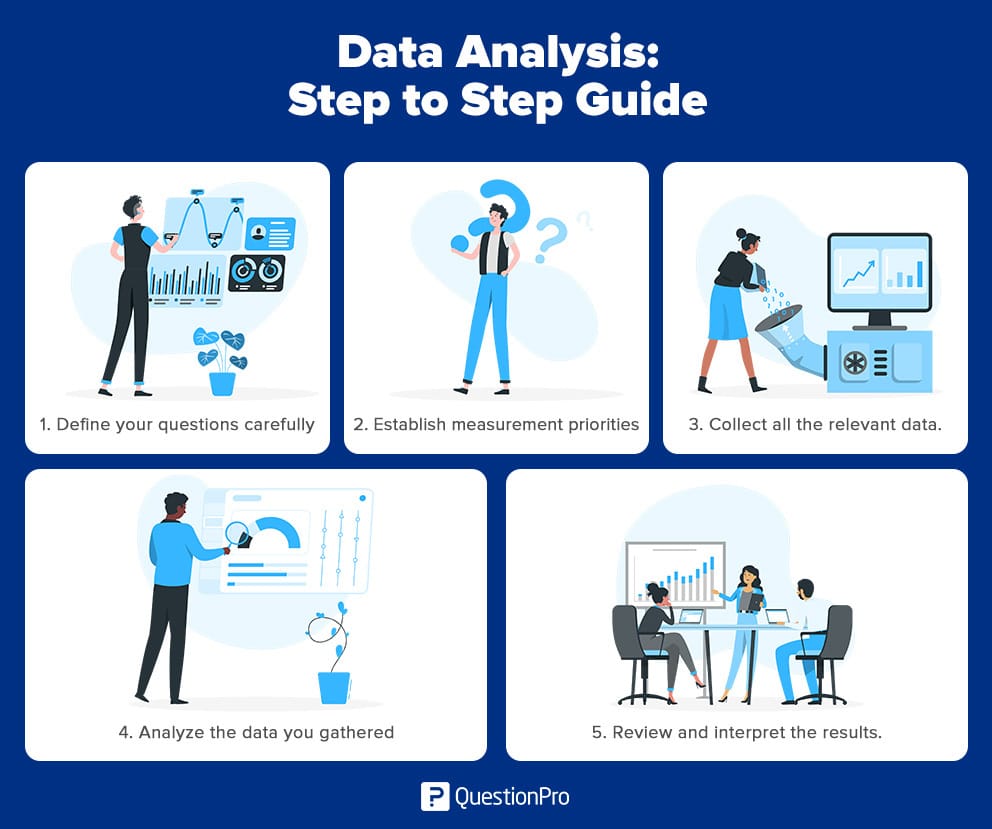
Step 1: Define your question
Start with a question that’s specific and measurable. Compare these two:
- Weak: “How are we doing with signups?”
- Strong: “Why did signups drop 8% in March compared to February?”
A vague question produces a vague analysis, no matter how good the method that follows.
Step 2: Decide what to measure and how
This step splits into two decisions. First, figure out which metrics actually answer your question, since not every available metric is relevant to it. Second, decide how you’ll capture those metrics, whether that’s a survey, an existing system log, or a manual tally. Locking both down before collection starts prevents rework later.
Step 3: Collect the data
Check existing databases before building anything new; the data you need may already exist somewhere in the organization. If it doesn’t, keep collection consistent:
- Use a standard questionnaire or data-capture format across the team
- Log collection dates and source notes as you go
- Agree on a shared file-naming and storage system so nobody duplicates work
Step 4: Analyze the data
Apply the method that matches your question from the sections above. Look for relationships, filter by relevant variables, and let the data narrow toward an answer rather than forcing a predetermined conclusion.
Step 5: Interpret the results
Before acting on any finding, check it against three questions:
- Does it actually answer your original question?
- Does it hold up against likely objections?
- Are there limitations or angles you haven’t considered?
A result that survives all three is ready to inform a decision.
Where is data analysis used in practice?
Data analysis shows up anywhere a decision needs backing, but a few functions rely on it constantly.
- Marketing: Finding which customer segments respond to a campaign and which don’t, then reallocating spend toward what’s working. A retailer might discover that a discount email drives repeat purchases in one age group but gets ignored in another.
- Human resources: Spotting flight risk before an employee resigns, and matching skill sets to open roles instead of relying on gut instinct during hiring.
- Healthcare: Flagging which patients are statistically likely to be readmitted within 30 days, so care teams can schedule a follow-up before it becomes an emergency.
- Academic institutions: Tracking which teaching methods or interventions correlate with better student outcomes, then adjusting curriculum based on what the data actually shows rather than tradition.
- Finance: Monitoring transaction patterns in real time to catch fraud, since a sudden change in spending behavior is often the first visible sign something is wrong.
What are common mistakes in data analysis?
A few mistakes show up often enough to call out directly.
- Skipping the question step. Diving into data without a defined question produces interesting trivia, not a decision-ready answer.
- Confusing correlation with causation. Two metrics moving together doesn’t mean one causes the other; diagnostic analysis exists precisely to test that.
- Ignoring data quality. A flawless model built on incomplete or duplicated data still produces a wrong answer.
- Cherry-picking results. Reporting only the numbers that support a preferred conclusion undermines the entire point of analyzing in the first place.
- Over-relying on one method. Using only descriptive statistics when the real question is predictive leaves the actual decision unanswered.
Data analysis with QuestionPro
Most of the process above depends on having clean, well-organized data to begin with, which is where a lot of teams get stuck before analysis even starts.
QuestionPro’s InsightsHub brings survey responses, open-ended feedback, and operational data into one workspace, so descriptive summaries and deeper cross-tabs are available without exporting to a separate stats tool first. It’s built for the collection-to-interpretation handoff described in Steps 3 and 4 above, rather than replacing the judgment those steps still require.
Getting to decisions you can trust
Data analysis works best as a habit, not a one-off project. The teams that benefit most treat it as a repeatable loop:
- Ask a specific question
- Collect data cleanly
- Apply the method that fits
- Check the interpretation before acting on it
Get that loop right once, and it holds up whether the next question is about churn, hiring, or a product launch.
Frequently Asked Questions (FAQs)
Yes. Demand for analysts spans marketing, healthcare, finance, and operations, and the core skill, turning a question into a data-backed answer, transfers across industries and doesn’t depend on one specific tool staying popular.
Statistics is a set of mathematical tools, like regression or hypothesis testing, used within data analysis. Data analysis is the broader process of applying those tools, along with data cleaning and interpretation, to answer a specific business question.
No. Spreadsheet tools and survey platforms handle plenty of descriptive and diagnostic work without code. Programming becomes more useful for large datasets or predictive modeling, but it isn’t a requirement to start.
There’s no fixed minimum; it depends on the question. A simple comparison of two marketing emails might need a few hundred responses per group, while a predictive model forecasting demand typically needs at least a year of historical data to capture seasonality.