A survey invitation email is the message you send to ask people to take a survey. Its job is to explain who is asking, why the survey matters, how long it takes, and why the respondent’s feedback is worth sharing.
Getting the click is not only about a clever subject line. The invitation has to build trust, set expectations, and make the next step easy. If the email feels vague, too long, or unrelated to the recipient, many people will ignore it.
A strong invitation helps improve survey response rate, but it also improves data quality because the right people understand why their answers matter.
What is a survey invitation email?
A survey invitation email is an email that invites a person to complete a survey. It introduces the survey, explains the purpose, includes the survey link, and gives the respondent enough context to decide whether to participate.
A good survey invitation email should answer four basic questions:
- Who is asking?
- Why am I receiving this?
- How long will it take?
- What will happen with my answers?
Email invitation template help documentation explains that an invitation should set context for the survey and help improve response rate.
Why does a survey invitation email matter?
A survey invitation email matters because it can affect open rate, click-through rate, survey response rate, and respondent trust. The survey itself may be well designed, but people will not answer it if the invitation does not feel relevant or credible.
A weak invitation often creates problems such as:
- Low email opens
- Low survey link clicks
- Low survey completion
- More spam complaints
- Lower trust in the sender
- Lower quality responses
The invitation is the first part of the survey experience. If it feels confusing or impersonal, the respondent may assume the survey will feel the same way.
What should a survey invitation email include?
A survey invitation email should include a recognizable sender, a clear subject line, a short explanation of the survey, an estimated completion time, a clear survey link, and a privacy or confidentiality note.
Use this checklist before sending:
- Recognizable sender name: Use a company name or person the audience knows.
- Clear subject line: Tell people what the email is about without sounding spammy.
- Purpose of the survey: Explain why you are asking for feedback.
- Reason they were invited: Tell respondents why their input is relevant.
- Estimated completion time: Be honest and specific.
- Clear call to action: Use one obvious survey link or button.
- Deadline: Give a clear respond-by date when needed.
- Privacy or confidentiality note: Explain how responses will be handled.
- Contact information: Give respondents a way to ask questions.
- Opt-out or unsubscribe option: Include this when required or appropriate.
The email does not need to be long. It needs to remove doubt.
How do you write a good survey invitation email subject line?
A good survey invitation subject line is short, clear, relevant, and trustworthy. It should tell people why the email matters without using spam-like wording or overpromising an incentive.
A useful target is around 50 characters, but clarity matters more than hitting an exact length. Mobile inboxes cut off long subject lines, so front-load the most important words.
Good subject lines usually include one of these angles:
- A clear feedback request
- A recent customer interaction
- A known company or product name
- A personal or role-based reason to respond
- A specific topic the audience cares about
Examples:
- Tell us about your recent support experience
- How was your onboarding experience?
- Help us improve our customer portal
- Share your feedback on yesterday’s event
- What should we improve next?
- Anna, can you share your product feedback?
Avoid subject lines that sound like spam or clickbait. Words like “free,” “gift card,” “prize,” “winner,” “urgent,” or “guaranteed” can create trust issues, especially when used carelessly.
What should the email body say?
The body of a survey invitation email should be short, specific, and easy to act on. It should explain the survey purpose, set expectations, and give one clear next step.
A simple structure works best:
- Greeting: Use the person’s name if you have it.
- Context: Explain why they are getting the survey.
- Purpose: Tell them what their feedback will help improve.
- Time estimate: Say how long the survey takes.
- Call to action: Add one clear survey button or link.
- Privacy note: Explain confidentiality or how data will be used.
- Contact line: Share who to contact with questions.
Here is a simple body structure:
Hi [First Name],
We are asking for your feedback about [topic or experience]. Your answers will help us understand what is working and what needs to improve.
The survey takes about [X minutes] to complete.
Take the survey: [Survey Link]
Your responses will be reviewed in [confidential/anonymous/aggregated] form. Please complete the survey by [date].
Thank you,
[Name or Team]
Survey invitation email examples
Survey invitation email examples should be short, direct, and matched to the audience. The tone for a customer feedback survey should not feel the same as an employee survey or a market research invitation.
Customer feedback survey invitation
Subject line: How was your recent experience with us?
Hi [First Name],
Thanks for choosing [Company Name]. We would like to hear about your recent experience so we can understand what worked well and what we can improve.
The survey takes about 3 minutes.
Take the survey: [Survey Link]
Your feedback will be reviewed by our team and used to improve future customer experiences.
Thank you,
[Team Name]
Employee survey invitation
Subject line: Share your feedback on our workplace experience
Hi [First Name],
We are running a short employee survey to better understand what is working across the organization and where we need to improve.
The survey takes about 5 minutes. Your responses will be reviewed in aggregate, and individual responses will be kept confidential.
Start the survey: [Survey Link]
Please complete it by [Date].
Thank you,
[HR Team or Leader Name]
Event feedback survey invitation
Subject line: Tell us what you thought of [Event Name]
Hi [First Name],
Thank you for attending [Event Name]. We would love your feedback while the experience is still fresh.
The survey takes about 2 minutes and will help us improve future events.
Share your feedback: [Survey Link]
Thanks again for joining us,
[Event Team]
Market research survey invitation
Subject line: Your opinion on [Topic] matters to our research
Hi [First Name],
We are conducting a short research survey about [Topic]. Your perspective will help us better understand current needs, preferences, and challenges in this area.
The survey takes about [X minutes]. Your responses will be analyzed in aggregate.
Take the survey: [Survey Link]
Thank you for your time,
[Research Team]
Click-through rate vs response rate: what is the difference?
Response rate and click-through rate measure different parts of survey invitation performance. Click-through rate measures how many people clicked the survey link. Response rate measures how many invited people completed the survey.
| Metric | What it measures | What it tells you |
|---|---|---|
| Open rate | People who opened the email | Whether the sender and subject line worked |
| Click-through rate | People who clicked the survey link | Whether the email body and call to action worked |
| Response rate | People who completed the survey | Whether the full invitation and survey experience worked |
| Completion rate | People who started and finished the survey | Whether the survey itself was easy enough to complete |
If people open but do not click, the invitation may be unclear. If people click but do not complete, the survey may be too long, confusing, or difficult on mobile.
How do you keep survey invitation emails out of spam?
To keep survey invitation emails out of spam, use a trustworthy sender, write honest subject lines, avoid spam-heavy wording, keep your list clean, and include required email compliance details.
For US audiences, survey invitation emails may need to follow CAN-SPAM rules depending on the message context. The FTC says the CAN-SPAM Act sets requirements for commercial email, gives recipients the right to stop receiving emails, and includes rules around truthful header information, non-deceptive subject lines, physical postal address, and opt-out handling.
Best practices include:
- Use a recognizable sender name
- Avoid deceptive subject lines
- Avoid all caps and excessive punctuation
- Do not hide the survey purpose
- Keep the email short and clean
- Use one clear call to action
- Keep contact lists updated
- Remove bounced or invalid addresses
- Include opt-out where needed
- Respect unsubscribe requests
- Avoid misleading incentive language
Deliverability is not only a technical issue. Trust, relevance, and list quality matter too.
Should you send survey reminder emails?
Survey reminder emails can improve response rates when they are sent respectfully to nonrespondents. A reminder should be shorter than the original invitation and should restate why the survey matters.
A simple reminder plan:
- Send the original survey invitation
- Wait a few days
- Send one reminder to nonrespondents
- Send a final reminder before the deadline if the survey is important
A reminder email should include:
- Short subject line
- Brief context
- Survey link
- Time estimate
- Deadline
- Thank-you note
- Opt-out when appropriate
Example reminder:
Subject line: Reminder: Share your feedback by Friday
Hi [First Name],
Just a quick reminder to complete our short survey about [Topic]. It takes about [X minutes], and your feedback will help us improve [specific area].
Take the survey: [Survey Link]
Thank you,
[Name or Team]
Do not send too many reminders. Over-emailing can annoy respondents and reduce future participation.
How can QuestionPro help with survey invitation emails?
QuestionPro can help with survey invitation emails by letting teams create, customize, send, schedule, and manage email survey invitations from the survey distribution workflow.
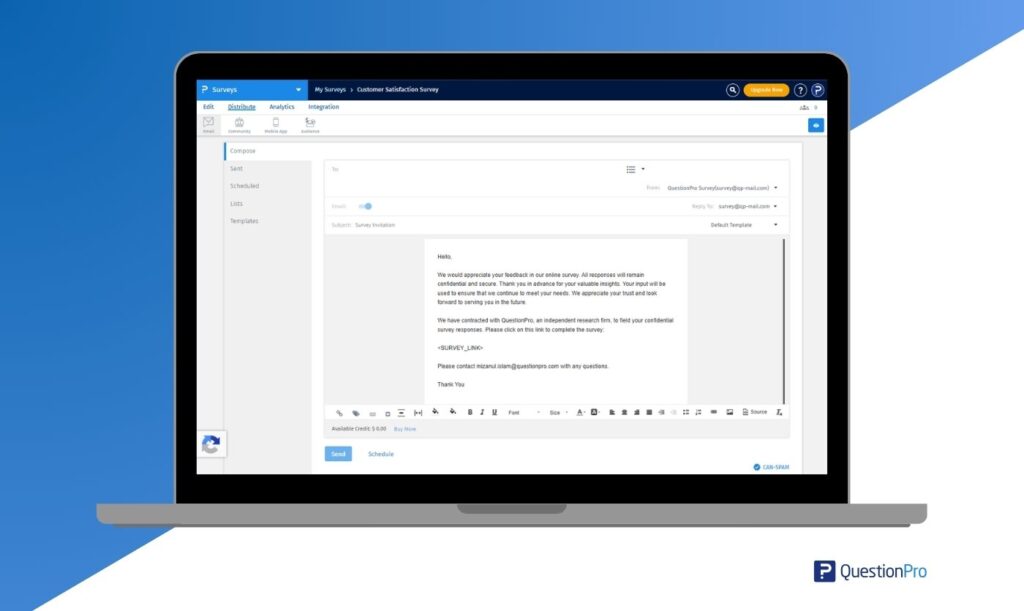
QuestionPro supports:
- Custom email invitation templates
- Survey-specific and global invitation templates
- Custom subject lines
- Custom email body text
- Sender name customization
- Email survey links
- Email list management
- Scheduled survey invitations
- Survey reminders and distribution tracking
This is useful for teams that run recurring customer feedback, employee surveys, market research, event feedback, or post-support surveys.
Final thoughts on survey invitation emails
A survey invitation email should make the survey feel relevant, trustworthy, and easy to complete. The best invitations are clear about who is asking, why the feedback matters, how long it takes, and what happens next.
A strong subject line may get the open, but the email body earns the click. The survey experience earns the completion.
Before sending your next survey invitation, check four things: the sender is recognizable, the subject line is clear, the survey purpose is specific, and the call to action is easy to find.
Frequently Asked Questions
The best subject line is short, specific, and relevant to the audience. Mention the experience, topic, or organization clearly. For example, “How was your recent support experience?” is better than “Take our survey now.”
A survey invitation email should usually be short enough to scan in under a minute. Include the purpose, time estimate, survey link, deadline, privacy note, and contact information. Avoid long explanations that distract from the survey link.
Survey invitation emails can mention incentives if they are real, relevant, and clearly explained. Avoid spam-like wording in the subject line. In the email body, explain eligibility, timing, and any rules in plain language.
One or two reminder emails are enough for most surveys. Send them only to nonrespondents and keep them shorter than the first invitation. Too many reminders can reduce trust and hurt future participation.
Survey click-through rate measures how many people clicked the survey link. Response rate measures how many invited people completed the survey. If clicks are high but responses are low, the survey experience may need improvement.
Many survey invitation emails should include an opt-out or unsubscribe option, especially when sent for business or marketing purposes. For US commercial email, review CAN-SPAM requirements and your organization’s legal guidance.