
User retention measures how many people continue using a product, app, service, or feature over time. It shows whether users find enough value to return after their first interaction.
For SaaS companies, mobile apps, online communities, and digital products in the USA, user retention is a practical sign of product health. Getting new users is important, but keeping them active is what shows whether the product is actually working for them.
In this blog, you’ll learn what user retention means, how to measure it, how it differs from customer retention and churn, and how to improve it using better onboarding, product experience, and feedback.
What is user retention?
User retention is the percentage of users who continue using a product during a specific period. It helps teams understand whether people come back after signing up, downloading an app, joining a platform, or using a feature.
For example, if 1,000 users sign up for a product in January and 300 of them are still active in February, the product retained 300 users from that group.
User retention is commonly tracked by:
- SaaS companies
- Mobile app teams
- Online communities
- Subscription platforms
- Product teams
- Customer experience teams
A retained user does not always mean a paying customer. Some retained users may be using a free plan, a trial, or a freemium version. That is why user retention and customer retention are related, but not identical.
Why is user retention important?
User retention is important because it shows whether users continue finding value after their first experience. If users leave quickly, the business may spend too much money acquiring people who never become active or loyal.
Strong retention helps businesses:
- Reduce wasted acquisition spend
- Improve customer lifetime value
- Build stronger product habits
- Understand product-market fit
- Identify friction in the user experience
- Increase the chance of renewals, upgrades, and referrals
For US businesses where paid ads, sales efforts, and software competition can be expensive, retention matters because growth is not only about attracting new users. It is also about keeping the right users engaged long enough to create value.
The U.S. Small Business Administration notes that market research helps businesses understand customers and strengthen their competitive position. That same idea applies to retention because teams need to understand why users stay, leave, or become inactive. You can read more from the SBA on market research and competitive analysis.
User retention vs customer retention: what is the difference?
User retention tracks whether people continue using a product. Customer retention tracks whether paying customers continue buying, renewing, or subscribing.
The difference matters because not every user is a paying customer.
For example, a mobile app may have many free users who open the app every week. Those users count toward user retention, even if they never pay. A SaaS company may track user retention for product activity and customer retention for account renewals.
| Term | What it measures | Example |
|---|---|---|
| User retention | Continued product usage | A user logs in every week |
| Customer retention | Continued paid relationship | A customer renews a subscription |
| Customer loyalty | Long-term preference | A customer recommends the brand |
User retention is especially useful when a product has free trials, freemium plans, multiple users in one account, or users who may convert later.
User retention vs churn: what is the difference?
User retention measures how many users stay active. Customer churn measures how many users stop using the product during a specific period.
They are opposite signals.
If your retention rate is high, churn is usually low. If churn is high, users are leaving faster than the product can keep them engaged.
A simple way to understand the relationship is:
Churn rate = 100% minus retention rate
For example, if a product has a 70% user retention rate for a month, the churn rate for that same period is 30%.
Churn can happen for many reasons. Users may leave because onboarding was confusing, the product did not solve their problem, the price felt too high, support was slow, or they found another tool that fit better. That is why user retention analysis should include both usage data and user feedback.
What are the main phases of user retention?
The main phases of user retention are onboarding, activation, and habitual use. These phases show whether users understand the product, experience value, and build a reason to return.
Onboarding
Onboarding is the first stage after signup or first use. It helps new users understand what to do, where to start, and how to reach their first useful outcome.
A strong onboarding experience is simple and focused. It should not overwhelm users with every feature at once. It should guide them toward the first action that makes the product useful.
For example, in a survey platform, that first action may be choosing a survey template, creating a question, or collecting the first response.
Activation
Activation happens when users experience the core value of the product for the first time. It is the moment when the product starts to feel useful.
For a project management tool, activation may happen when a user creates a task and invites a teammate. For a feedback platform, activation may happen when a user launches a survey or views the first results.
Activation matters because users rarely keep using a product they do not understand. If users do not reach value early, they are more likely to leave.
Habitual Use
Habitual use happens when the product becomes part of the user’s routine. At this stage, users return because the product helps them complete recurring tasks.
This does not mean every product needs daily usage. Some products are used weekly, monthly, or during specific projects. The goal is to match the natural rhythm of the product and make it easy for users to return when they need it.
How do you measure user retention?
You measure user retention by comparing how many users remain active at the end of a period with how many were active at the start of that period.
User retention formula:
User retention rate = (Active users at the end of a period ÷ Active users at the start of the period) × 100
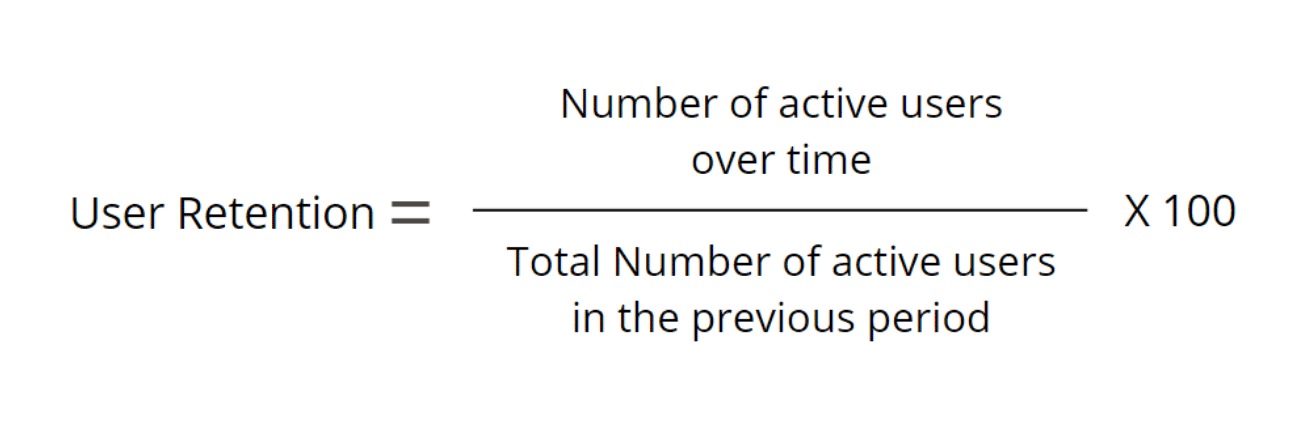
Example:
A mobile app gets 2,000 new users in January. By the end of February, 500 of those users are still active.
500 ÷ 2,000 × 100 = 25% user retention rate
That means the app retained 25% of that January user group.
Teams can measure retention across different time periods, such as:
- Day 1 retention
- Day 7 retention
- Day 30 retention
- Monthly retention
- Quarterly retention
For mobile apps, Day 1, Day 7, and Day 30 retention are often useful because app usage changes quickly. For SaaS products, weekly or monthly retention may be more helpful because users often work in longer cycles.
A simple cohort view can also help. A cohort is a group of users who share the same starting point, such as signup month. Tracking cohorts helps teams see whether users who joined in one month retain better than users who joined in another.
For related measurement ideas, see QuestionPro’s guide to customer retention metrics.
How can you improve user retention?
You can improve user retention by helping users reach value faster, reducing friction, and learning why users stop returning.
Here are practical ways to improve retention:
- Simplify onboarding: Remove unnecessary steps and guide users to one useful action first.
- Improve activation: Identify the action that makes users understand the product’s value.
- Track drop-off points: Find where users stop during signup, setup, or first use.
- Ask inactive users for feedback: Learn whether they left because of confusion, missing features, pricing, or poor timing.
- Segment users: Compare retention by user type, plan, device, location, or product behavior.
- Act on feedback: Use customer retention survey responses and product data together to fix the real cause of user drop-off.
Retention improves when teams stop guessing. Product behavior shows what users did. Feedback explains why they did it.
How can QuestionPro help with user retention?
QuestionPro can help teams understand user retention by collecting feedback across the user journey. This is useful when a business wants to know why users stay active, become inactive, or stop using a product.
For example, teams can use QuestionPro to collect:
- Onboarding feedback
- Product satisfaction feedback
- NPS responses
- CSAT responses
- Feature feedback
- Exit feedback from inactive users
This feedback helps teams connect user behavior with user experience. If users stop returning after onboarding, a short survey can help reveal whether the issue is unclear instructions, missing value, product complexity, or something else.
The best use of feedback is simple: ask users what happened, identify patterns, fix the experience, and follow up when changes are made.
Final thoughts on user retention
User retention shows whether people continue finding value in your product after the first interaction. It is more useful than signups alone because it measures whether users actually come back.
A strong retention strategy starts with a clear definition of active usage. Then teams should track retention rate, churn, activation, and feedback from both active and inactive users.
For most businesses, better retention comes from practical improvements: clearer onboarding, faster activation, fewer friction points, and regular feedback. When users understand the value and can reach it without confusion, they have a stronger reason to return.
Frequently Asked Questions (FAQs)
User retention means users keep coming back to use a product, app, service, or feature after their first interaction. It shows whether people continue finding value instead of leaving after signup, download, or first use.
Calculate user retention by dividing active users at the end of a period by active users at the start of that period, then multiplying by 100. For example, 500 retained users from 2,000 starting users equals 25% retention.
User retention measures how many users stay active. Churn measures how many users stop using the product. If a product has 80% retention during a period, its churn rate for that period is 20%.
Surveys help explain why users stay, leave, or become inactive. Product data shows where users drop off, but survey feedback can reveal the reason, such as confusing onboarding, missing features, pricing concerns, or poor product fit.