


TextAI Filters
Filters in QuestionPro TextAI help you focus dashboard results on the responses that matter most for your analysis. You can narrow results by response status, date range, and custom criteria based on survey questions, operators, and response values.
Saved filters make it easier to reuse common analysis views across sessions. You can name a filter, set it as the default when needed, apply it from the saved filters list, edit it later, or remove it from the dashboard when you want to return to the full response set.
- Step 1: Open the TextAI dashboard you want to analyze so any filter you apply updates the active TextAI results, charts, and response summaries.
- Step 2: Click the filter icon to open the filter panel, where you can combine response status, date range, and custom criteria before applying the filtered view.
- Step 3: Configure the filter criteria that define which responses should remain in the dashboard results. Use these controls together to narrow the dataset by status, date, survey question, operator, response value, and additional logic.
- Open the response status dropdown to choose which respondent completion states should be included, such as completed or partially completed responses.
- Use the search field in the response status list to quickly find the exact status when the list contains multiple options.
- Select the date range so TextAI only includes responses submitted during the period you want to analyze.
- Click Add Criteria when you need a custom rule based on a survey question or response field instead of only status and date filters.
- Open the question dropdown to choose the survey field that TextAI should evaluate for this condition.
- Select the specific question that should drive the filter, which tells TextAI which response data to compare.
- Choose the operator, such as matching or excluding a value, so the condition knows how to evaluate the selected question.
- Select the response value that must satisfy the condition before a response remains in the filtered results.
- Use the plus icon to add an AND condition when a response must satisfy another rule in the same criteria group.
- Click Add OR condition to create another criteria group that can qualify responses as an alternative match.
- Add criteria inside the OR group when the alternate match needs its own question, operator, and response value.
- Use the minus icon to remove a condition that is no longer required, which keeps the filter logic focused and easier to audit.
- Remove an OR group if you no longer need that alternate set of criteria in the filter.
- Keep only the criteria rows required for the filter you want to apply so TextAI uses the intended response subset.

- Step 4: Save the completed filter so the same criteria can be reused later. Click Save filter, add a clear name and description, optionally set it as the default filter, and then save the dialog to make the filter available from the saved filters list.
- Step 5: Remove an applied filter from the filter tag when you want to clear the narrowed view and return the dashboard to a broader response set.
- Step 6: Manage saved filters from the dashboard when you need to reuse or maintain common analysis views. Open Manage filter to view saved filters, click Apply to restore a saved filter, or use the edit icon to update a saved filter before using it again.


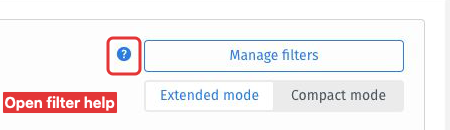
Open your TextAI report and select Filter. Select the question-mark help button next to Manage filters. The TextAI Filters article opens in a new browser tab. Return to your report tab to continue configuring the filter.
This feature is available with the following licenses :
Research Edition Communities Customer Experience Employee Experience University - Research Edition
